receiptsharp
.NET printing library for receipt printers, simple and easy with receipt markdown, printer status support.
- 4
- Apache-2.0
- 4 mo ago
Repo receiptline/receiptsharp, read from GitHub 1 min ago. receiptline has not joined Take My Repo.
In short
receiptline/receiptsharp is a public repo on GitHub by receiptline. .NET printing library for receipt printers, simple and easy with receipt markdown, printer status support. It declares the Apache-2.0 license on GitHub. It is written mainly in C#, has 4 stars and last changed on 2026-07-30. Nobody has reviewed it on Take My Repo yet, which says nothing about its quality. Read from GitHub on 2026-11-25.

ReceiptSharp
.NET printing library for receipt printers, simple and easy with receipt markdown, printer status support.
using ReceiptSharp;

string example = @"^^^RECEIPT

11/30/2025, 12:34:56 PM
Asparagus | 1| 1.00
Broccoli  | 2| 2.00
Carrot    | 3| 3.00
---
^TOTAL | ^6.00";

ReceiptSession session = new ReceiptSession("192.168.192.168");
session.Ready += async (sender, e) => Console.WriteLine(await session.Print(example));
session.Open();
Console.ReadLine();
session.Close();

Console.WriteLine(new Receipt(example).ToSvg());
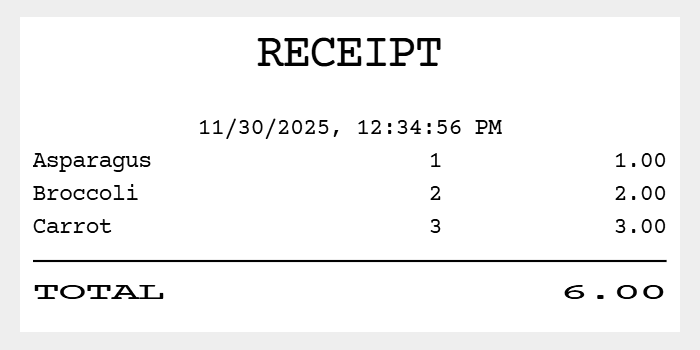
Features
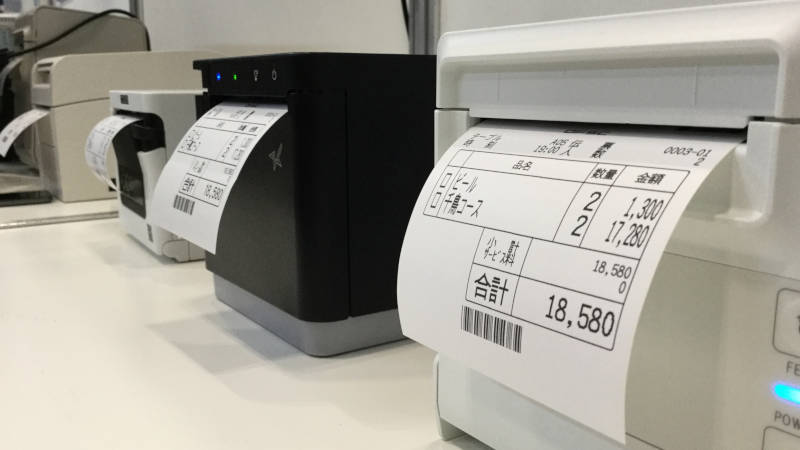
ReceiptSharp is simple printing library for receipt printers that prints with easy markdown data for receipts and returns printer status. Even without a printer, it can output images.
ReceiptSharp auto-detects printer models for seamless printing.
A development tool is provided to edit, preview, and print the receipt markdown.
https://receiptline.github.io/receiptjs-designer/
Receipt printers
- Epson TM series
- Seiko Instruments RP series
- Star MC series
- Citizen CT series
- Fujitsu FP series
Connect with IP address or serial port.
(LAN, Bluetooth, virtual serial port, and real serial port)
Epson TM series (South Asia model) and Star MC series (StarPRNT model) can print with device font of Thai characters.
ReceiptSession Class
Namespace: ReceiptSharp
Print receipt markdown text and notify printer status.
Examples
using ReceiptSharp;

string example = @"^^^RECEIPT

11/30/2025, 12:34:56 PM
Asparagus | 1| 1.00
Broccoli  | 2| 2.00
Carrot    | 3| 3.00
---
^TOTAL | ^6.00";

ReceiptSession session = new ReceiptSession("COM1");
session.StatusChanged += (sender, e) =>
{
    Console.WriteLine(e);
};
session.Ready += async (sender, e) =>
{
    string result = await session.Print(example, "-c 42 -u");
    Console.WriteLine(result);
};
session.Open();
Console.ReadLine();
session.Close();
Constructors
| Name | Description |
|---|---|
| ReceiptSession(String) | Create instance. |
Properties
| Name | Description |
|---|---|
| Status | Printer status. |
| Drawer | Cash drawer status. |
Methods
| Name | Description |
|---|---|
| Open() | Open session. |
| Print(String, String) | Print receipt markdown. |
| InvertDrawerState(Boolean) | Invert cash drawer state. |
| Close() | Close session. |
Events
| Name | Description |
|---|---|
| StatusChanged | Printer status updated. |
| Ready | Ready to print. |
| Online | Printer is online. |
| CoverOpen | Printer cover is open. |
| PaperEmpty | No receipt paper. |
| Error | Printer error (except cover open and paper empty). |
| Offline | Printer is off or offline. |
| Disconnect | Printer is not connected. |
| DrawerChanged | Drawer status updated. |
| DrawerClosed | Drawer is closed. |
| DrawerOpen | Drawer is open. |
ReceiptSession Constructor
public ReceiptSession(string destination)
The ReceiptSession() constructor creates a new ReceiptSession instance.
Parameters
destination- IP address or serial port of target printer
Serial port options:
"COM1:115200N81"<port name>[:<options>]<options><baud rate>,<parity>,<data bits>,<stop bits>[,<flow control>]- Default:
9600,N,8,1,N - Commas can be omitted
<baud rate>2400,4800,9600,19200,38400,57600,115200
<parity>N: None,E: Even,O: Odd
<data bits>8,7
<stop bits>1,2
<flow control>N: None,R: RTS/CTS,X: XON/XOFF
Returns
- A new ReceiptSession instance.
ReceiptSession.Status Property
public string Status { get; }
The Status property is a string representing the printer status.
Property Value
- A string representing the printer status.
Online: Printer is onlinePrint: Printer is printingCoverOpen: Printer cover is openPaperEmpty: No receipt paperError: Printer error (except cover open and paper empty)Offline: Printer is off or offlineDisconnect: Printer is not connected
ReceiptSession.Drawer Property
public string Drawer { get; }
The Drawer property is a string representing the cash drawer status.
Property Value
- A string representing the cash drawer status.
DrawerClosed: Drawer is closedDrawerOpen: Drawer is openOffline: Printer is off or offlineDisconnect: Printer is not connected
ReceiptSession.Open Method
public void Open()
The Open() method starts a session and connects to the target printer.
ReceiptSession.Print Method
public async Task<string> Print(string markdown, string options = "")
The Print() method prints a receipt markdown text.
Parameters
markdown- Receipt markdown text
options-c <chars>: Characters per line- Range:
24-96 - Default:
48
- Range:
-l <language>: Language of receipt markdown texten,fr,de,es,po,it,ru, ...: Multilingual (cp437, 852, 858, 866, 1252 characters)ja: Japanese (shiftjis characters)ko: Korean (ksc5601 characters)zh-hans: Simplified Chinese (gb18030 characters)zh-hant: Traditional Chinese (big5 characters)th: Thai- Default: System locale
-s: Paper saving (reduce line spacing)-m [<left>][,<right>]: Print margin- Range (left):
0-24 - Range (right):
0-24 - Default:
0,0
- Range (left):
-u: Upside down-i: Print as image-n: No paper cut-b <threshold>: Image thresholding- Range:
0-255 - Default: Error diffusion
- Range:
-g <gamma>: Image gamma correction- Range:
0.1-10.0 - Default:
1.0
- Range:
-p <printer>: Printer control languageescpos: ESC/POS (Epson)epson: ESC/POS (Epson)sii: ESC/POS (Seiko Instruments)citizen: ESC/POS (Citizen)fit: ESC/POS (Fujitsu)impact: ESC/POS (TM-U220)impactb: ESC/POS (TM-U220 Font B)generic: ESC/POS (Generic) Experimentalstar: StarPRNTstarline: Star Line Modeemustarline: Command Emulator Star Line Modestargraphic: Star Graphic Modestarimpact: Star Mode on dot impact printers Experimentalstarimpact2: Star Mode on dot impact printers (Font 5x9 2P-1) Experimentalstarimpact3: Star Mode on dot impact printers (Font 5x9 3P-1) Experimental- Default: Auto detection (
epson,sii,citizen,fit,impactb,generic,star)
-v: Landscape orientation- Device font support:
escpos,epson,sii,citizen,star
- Device font support:
-r <dpi>: Print resolution for ESC/POS, landscape, and device font- Values:
180,203 - Default:
203
- Values:
Returns
- A Task that fulfills with a string once the print result is ready to be used.
Success: Printing successPrint: Printer is printingCoverOpen: Printer cover is openPaperEmpty: No receipt paperError: Printer error (except cover open and paper empty)Offline: Printer is off or offlineDisconnect: Printer is not connected
ReceiptSession.InvertDrawerState Method
public void InvertDrawerState(bool invert)
The InvertDrawerState() method inverts cash drawer state.
Parameters
invert- If true, invert drawer state
ReceiptSession.Close Method
public void Close()
The Close() method closes the connection and ends the session.
Receipt Class
Namespace: ReceiptSharp
Convert to image, plain text, or printer commands.
Examples
Questions
What is receiptsharp?
receiptline/receiptsharp is a public repo on GitHub by receiptline. .NET printing library for receipt printers, simple and easy with receipt markdown, printer status support.
Is receiptsharp open source?
It declares the Apache-2.0 license on GitHub.
Does receiptsharp run on macOS, Windows or Linux?
Its maker has not tagged a system, so it is unknown here. Its README says what it needs.
How do I install receiptsharp?
Open "Take it" on its page: Take My Repo writes an install plan for your machine and hands it to your AI agent (Claude Code, Codex or Cursor), which asks you before each step. Take My Repo has not tested it on any machine.