AutoGPT
AutoGPT is the vision of accessible AI for everyone, to use and to build on. Our mission is to provide the tools, so that you can focus on what matters.
- 188k
- Python
- 31 min ago
This repository contains an example of an AI agent that answers questions by retrieving data from Redis, either using the Redis array data type or performing a vector similarity search.
Repo redis-developer/redis-array-context-demo, read from GitHub 3 h ago. redis-developer has not joined Take My Repo.
redis-developer/redis-array-context-demo is a public repo on GitHub by redis-developer. This repository contains an example of an AI agent that answers questions by retrieving data from Redis, either using the Redis array data type or performing a vector similarity search. It declares the MIT license on GitHub. It is written mainly in Python, has 0 stars and last changed on 2026-05-29. Nobody has reviewed it on Take My Repo yet, which says nothing about its quality. Read from GitHub on 2026-11-23.
AutoGPT is the vision of accessible AI for everyone, to use and to build on. Our mission is to provide the tools, so that you can focus on what matters.
This demo showcases the Redis array data type introduced in Redis 8.8 as a context retrieval layer for AI agents. Built with Python, FastAPI, OpenAI, and RedisVL, it demonstrates how arrays give agents a native way to store and retrieve text where line position and exactness matter, complementing rather than replacing semantic vector search.
The demo runs as a web app and a CLI. You load a Markdown document into a Redis array, then ask questions through a chat interface. The agent decides at runtime whether to use exact array operations (ARGREP, ARGET, ARGETRANGE, ARLEN) or vector similarity search (FT.SEARCH). The right panel shows full observability of which path was taken, the exact Redis command executed, and the latency of the Redis round trip.
| Account | Description |
|---|---|
| OpenAI | LLM used to route tool calls and generate agent responses. |
Clone the repository:
git clone <repository-url>
cd redis-array-context-demo
Create your environment file:
cp .env.example .env
Edit .env with your configuration:
| Variable | Required | Description |
|---|---|---|
REDIS_URL |
Yes | Redis connection URL. Use redis://redis-database:6379 for Docker, redis://localhost:6379 for local. |
OPENAI_API_KEY |
Yes | API key used by the agent and embeddings. |
OPENAI_MODEL |
No | OpenAI model for agent responses. Defaults to gpt-4.1-mini. |
DEMO_MARKDOWN_FILE |
Yes | Path to the Markdown file loaded into Redis at startup. |
CLI_REDIS_URL |
No | Redis URL used by the CLI. Defaults to redis://localhost:6379. |
Build and start the app:
docker compose up --build
Open http://localhost:8080.
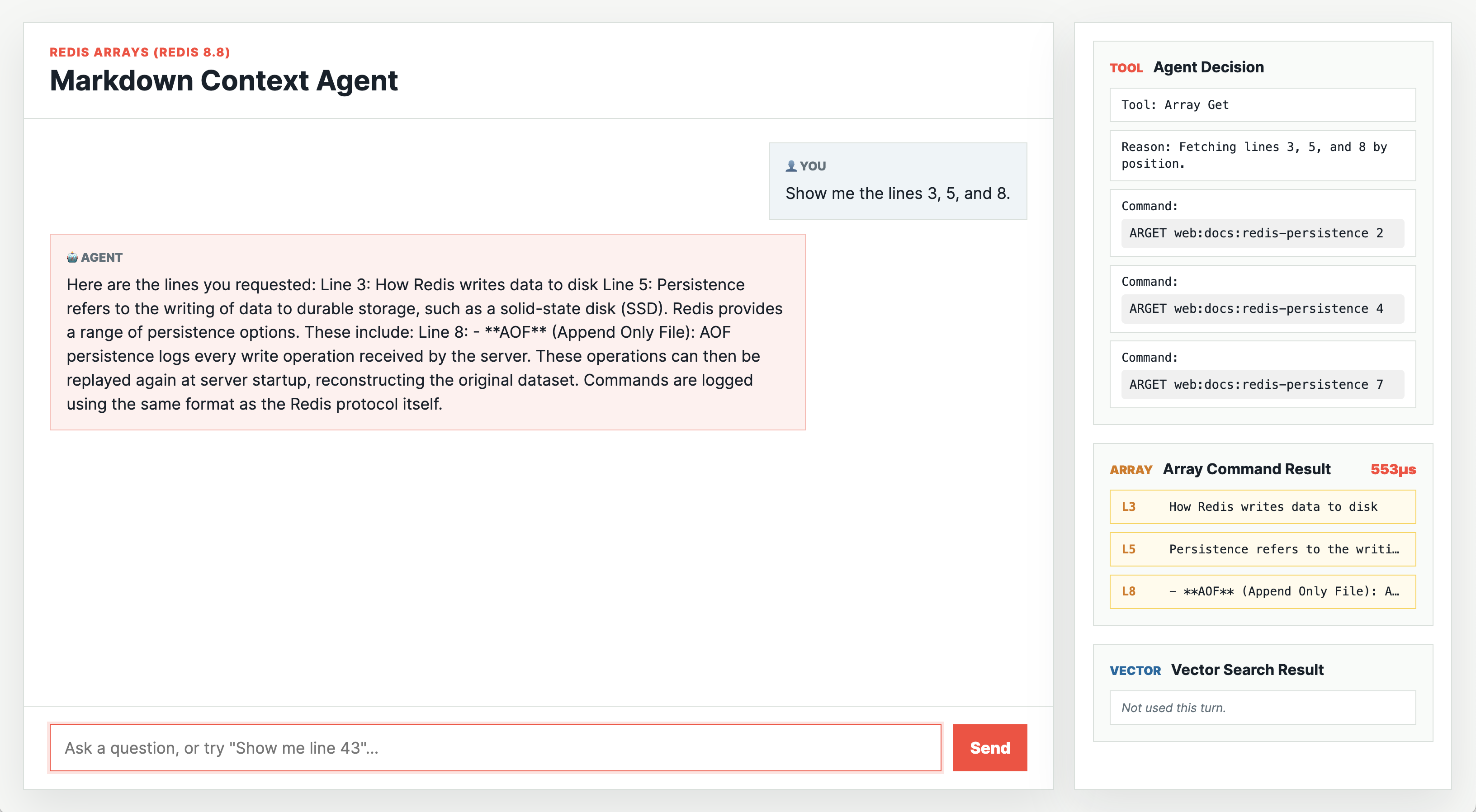
The left pane is the chat interface. The right pane shows three panels updated after every turn: the agent's tool decision and the exact Redis command issued, the Array command result with line numbers and latency, and the vector search result with latency.
The agent receives the user's natural language question and applies a set of rules to select the right tool:
| User asks | Tool used | Redis command |
|---|---|---|
| "How many lines does the document have?" | count_lines |
ARLEN |
| "Show me line 43." | fetch_lines |
ARGET |
| "Show me lines 40 to 50." | fetch_lines |
ARGETRANGE |
| "Find all the headings." | argrep_search |
ARGREP … GLOB ## * |
| "Show lines containing AOF." | argrep_search |
ARGREP … MATCH AOF |
| "How does AOF persistence work?" | vector_search |
FT.SEARCH |
| "Explain the difference between RDB and AOF." | vector_search |
FT.SEARCH |
The argrep_search tool automatically infers the match type from the pattern:
AOF → MATCH AOF## *, save ?^save , RDB|AOF
The right panel refreshes after every turn with three sections:
Latency is shown at sub-millisecond precision (µs for fast commands, ms otherwise). When a tool was not used in a turn, its panel shows a dimmed "Not used this turn." state.
The CLI lets you load documents and run Array and vector operations directly from the terminal. It uses the same backend agent and tools as the web app. The CLI requires a running Redis instance. If you are not running the full web app, start only the database container:
docker compose up -d redis-database
Install dependencies using uv:
uv sync
Or activate the project virtualenv after syncing:
source .venv/bin/activate
By default the CLI connects to redis://localhost:6379. Override it with --redis-url or the CLI_REDIS_URL environment variable.
load — Ingest a Markdown file into Redispython -m cli.main load docs/redis-persistence.md
# With --force to re-ingest an existing key:
python -m cli.main load docs/redis-persistence.md --force
grep — Run an ARGREP query# Plain text (auto-wrapped as glob *AOF*)
python -m cli.main grep "AOF" --file docs/redis-persistence.md
# Glob — all headings
python -m cli.main grep "## *" --file docs/redis-persistence.md
# Regex
python -m cli.main grep "^save " --file docs/redis-persistence.md
search — Run a vector similarity searchpython -m cli.main search "how does snapshotting work?" --file docs/redis-persistence.md
python -m cli.main search "difference between RDB and AOF" --file docs/redis-persistence.md --top-k 3
chat — Start an interactive agent sessionpython -m cli.main chat --file docs/redis-persistence.md
Each response shows the tool used, the Redis command issued, and the latency:
  Tool: Array Grep  ·  array 312µs
  Pattern search for: AOF
  $ ARGREP cli:docs:redis-persistence 0 … MATCH AOF WITHVALUES

Agent: There are 8 lines mentioning AOF...
--redis-url optionThe --redis-url flag must be placed before the subcommand:
python -m cli.main --redis-url redis://myhost:6379 chat --file docs/redis-persistence.md
docker compose up --build.ARLEN and sub-millisecond latency.ARGET with the exact line content.ARGETRANGE with the full range.ARGREP with glob pattern and matched lines.FT.SEARCH and top-k semantic results.| Method | Path | Purpose |
|---|---|---|
GET |
/api/health |
Liveness check. |
GET |
/api/ready |
Readiness check — verifies Redis connection, Array key, and vector index. |
POST |
/api/chat |
Run one agent turn. |
POST /api/chatRequest:
{ "message": "Show me the third line." }
Response:
{
    "user_message": "Show me the third line.",
    "assistant_message": "The third line is: \"How Redis writes data to disk\"",
    "tool_used": "fetch",
    "tool_reasoning": "Fetching line 3 by position.",
    "tool_commands": [
        "ARGET web:docs:redis-persistence 2"
    ],
    "grep_results": [
        {
            "line": 3,
            "content": "How Redis writes data to disk",
            "latency_ms": 0.396
        }
    ],
    "total_latency_ms": 0.396,
    "vector_results": [],
    "vector_latency_ms": null
}
One agent turn runs as follows:
count_lines, fetch_lines, argrep_search, and vector_search.perf_counter_ns(). A pre-warm call using the native Redis client API runs before the timer to ensure the connection pool returns a warm socket.ToolMessage. The LLM generates the final response.TurnResult to the API layer.Both the web app and CLI share one Redis instance but use distinct key prefixes to keep the keyspace readable:
web:docs:{slug}    # Array key — one element per document line (web app)
web:idx:{slug}     # Vector index — non-blank, non-fence lines (web app)

cli:docs:{slug}    # Array key — loaded via CLI load command
cli:idx:{slug}     # Vector index — loaded via CLI load command
{slug} is the Markdown filename, lowercased and slugified — e.g., redis-persistence.md → redis-persistence.
When a Markdown file is loaded (web startup or cli load):
ARINSERT, one element per line, in batches of 500.text-embedding-3-small.Ingestion is idempotent — if the Array key already exists, startup skips re-ingestion.
redis-developer/redis-array-context-demo is a public repo on GitHub by redis-developer. This repository contains an example of an AI agent that answers questions by retrieving data from Redis, either using the Redis array data type or performing a vector similarity search.
It declares the MIT license on GitHub.
Its maker has not tagged a system, so it is unknown here. Its README says what it needs.
The agent that grows with you
The agent harness performance optimization system. Skills, instincts, memory, security, and research-first development for Claude Code, Codex, Opencode, Cursor and beyond.
Reverse engineer anything with agents, from app behavior down to native binaries.
Open "Take it" on its page: Take My Repo writes an install plan for your machine and hands it to your AI agent (Claude Code, Codex or Cursor), which asks you before each step. Take My Repo has not tested it on any machine.
Its last change on GitHub was on 2026-05-29. Take My Repo does not judge from that whether it is maintained.
Nobody has reviewed it on Take My Repo yet, which says nothing about its quality.
Take My Repo cannot say: it does not audit code and has not run redis-array-context-demo. What is known comes from GitHub. It declares the MIT license on GitHub. Its last change was on 2026-05-29. It has 0 stars, which measure popularity, not safety. Nobody has reviewed it on Take My Repo yet, which says nothing about its quality. Read the source before you run it. With "Take it", your AI agent shows each step and asks you before running it; README text is treated as data, not as instructions.