unilm
Large-scale Self-supervised Pre-training Across Tasks, Languages, and Modalities
- 22k
- Python
- MIT
- 2 mo ago
Distributed compute that processes documents.
Repo render-examples/render-workflows-llamaindex, read from GitHub 1 d ago. render-examples has not joined Take My Repo.
render-examples/render-workflows-llamaindex is a public repo on GitHub by render-examples. Distributed compute that processes documents. It declares the MIT license on GitHub. It is written mainly in TypeScript, has 20 stars and last changed on 2026-07-11. Nobody has reviewed it on Take My Repo yet, which says nothing about its quality. Read from GitHub on 2026-11-23.
Large-scale Self-supervised Pre-training Across Tasks, Languages, and Modalities
A production-ready document AI pipeline combining Render Workflows for orchestration and LlamaCloud for intelligent document processing. Upload any document and watch it get classified, parsed, and structured in real-time.

This repo demonstrates how to build document AI applications using:
| Platform | Role |
|---|---|
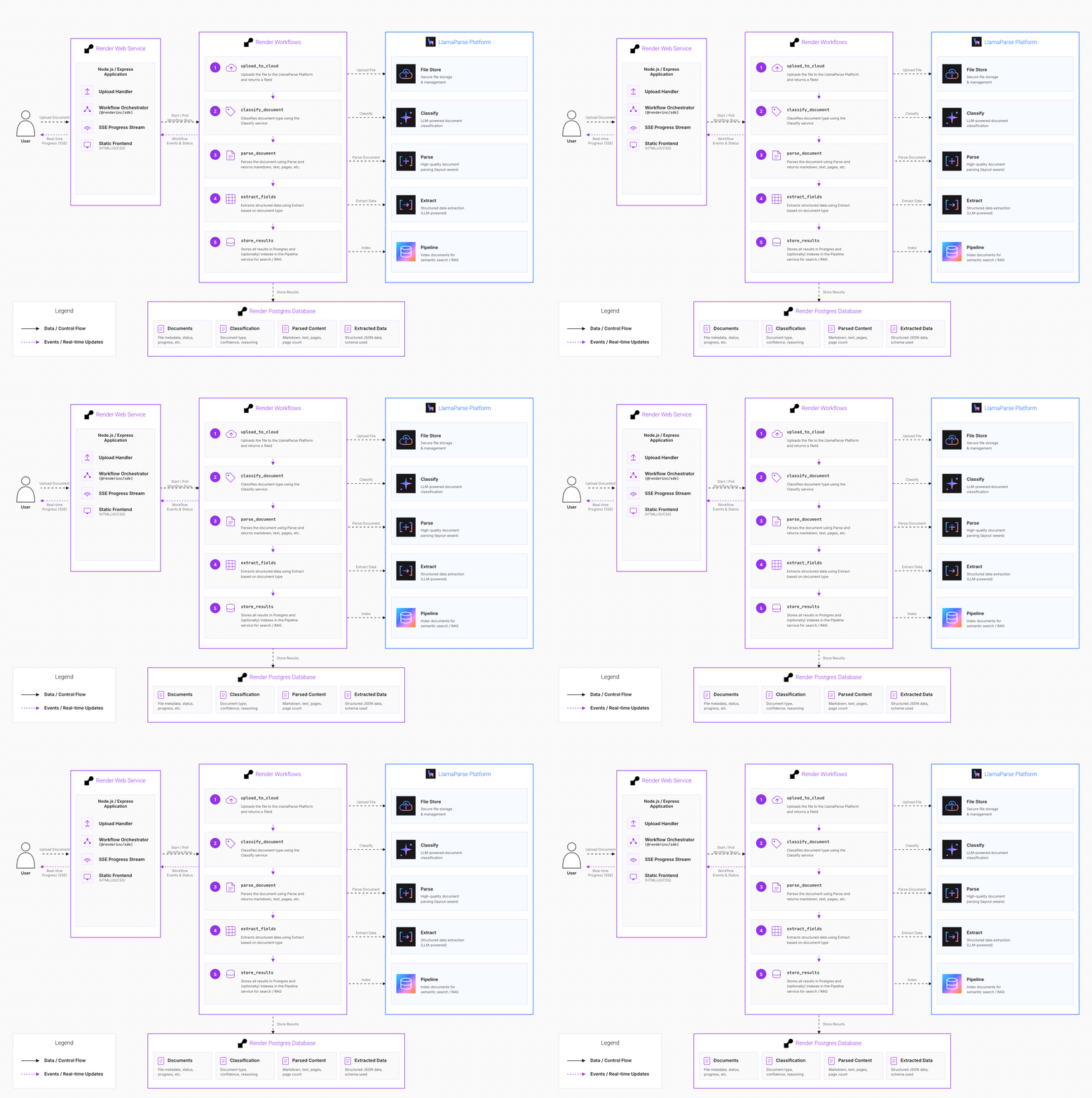
| Render Workflows | Orchestrates long-running document processing tasks with automatic retries, timeouts, and monitoring |
| LlamaCloud | Provides the AI-powered document intelligence: classification, parsing, and structured extraction |
| Render Postgres | Stores processed documents and extracted data |
| Render Web Services | Hosts the Express API and serves the real-time UI |
| Render Workflow Task | LlamaCloud API | What It Does |
|---|---|---|
upload_to_llamacloud |
Files API | Registers the document and returns a file_id |
classify_document |
Classify API | Identifies document type (invoice, contract, form, etc.) |
parse_document |
LlamaParse | Extracts clean markdown and text from 130+ file formats |
extract_fields |
LlamaExtract | Pulls structured fields based on document type |
store_results |
— | Saves everything to Render Postgres |
Click Deploy to Render above
You'll be prompted for:
RENDER_API_KEY — Get one hereLLAMA_CLOUD_API_KEY — Get one hereCreate the Workflow service manually:
npm install && npm run buildnode dist/tasks/index.jsrender-workflows-llamaindex-workflowLLAMA_CLOUD_API_KEY, DATABASE_URL (from your Postgres)Open your web service URL and upload a document!
| Feature | Description |
|---|---|
| Real-time progress | Watch each pipeline stage complete via Server-Sent Events |
| 130+ file formats | LlamaParse handles PDF, DOCX, XLSX, images, HTML, and more |
| Smart classification | LlamaCloud Classify identifies document types automatically |
| Structured extraction | LlamaExtract pulls typed fields based on document type |
| Ephemeral sessions | Each user gets isolated data that auto-deletes (configurable) |
| Optional search | Enable semantic search with a LlamaCloud pipeline |
| Variable | Where | Description |
|---|---|---|
RENDER_API_KEY |
Web service | Render API key for dispatching workflow tasks |
LLAMA_CLOUD_API_KEY |
Both services | LlamaCloud API key for document AI |
DATABASE_URL |
Both services | Render Postgres connection string |
LLAMACLOUD_PIPELINE_ID |
Both (optional) | Enable semantic search |
SESSION_LIFETIME_MINUTES |
Web service | Session duration before cleanup (default: 15) |
MAX_UPLOAD_BYTES |
Web service (optional) | Default 3,145,728 (3 MiB), hard-capped at that value. The first pipeline step (upload_to_llamacloud) passes the file as base64 in startTask arguments. Render Workflows limits per-invocation argument size to 4MB; base64 inflates by ~4/3, so ~3MB raw is the safe maximum. Set lower to tighten the demo. |
The demo sends file bytes to the upload_to_llamacloud task as a base64 string in the workflow task parameters. Per Render’s limits, task arguments are capped at 4MB, so the effective max raw file size is 3 MiB (3,145,728 bytes). The app enforces this in the API, the orchestrator, and the UI. To support larger files in production, store uploads in object storage and pass only a file ID to the task (see Render Workflows).
[!WARNING] For public demos: This app includes a prominent warning against uploading sensitive documents. Session data is deleted from Postgres on expiry, but if
LLAMACLOUD_PIPELINE_IDis set, indexed text persists in LlamaCloud.
To run as a privacy-safe demo:
LLAMACLOUD_PIPELINE_ID empty (disables Search/Ask, but classify/parse/extract still work)main.ts Express API + SSE streaming
pipeline/orchestrator.ts Dispatches Render Workflow tasks
tasks/
upload.ts → LlamaCloud Files API
classify.ts → LlamaCloud Classify API
parse.ts → LlamaParse
extract.ts → LlamaExtract
store.ts → Render Postgres
shared/
db.ts Postgres queries
llama-client.ts LlamaCloud SDK client
render.yaml Render Blueprint
All document routes are session-scoped under /s/{token}/.
| Method | Path | Description |
|---|---|---|
GET |
/ |
Creates session, redirects to /s/{token} |
POST |
/s/{token}/upload |
Upload file, returns SSE progress stream |
POST |
/s/{token}/upload-url |
Fetch from URL, returns SSE progress stream |
GET |
/s/{token}/documents |
List documents in session |
GET |
/s/{token}/documents/:id |
Get single document details |
DELETE |
/s/{token}/documents/:id |
Delete a document |
POST |
/s/{token}/search |
Semantic search (requires LLAMACLOUD_PIPELINE_ID) |
POST |
/s/{token}/ask |
RAG retrieval (requires LLAMACLOUD_PIPELINE_ID) |
| Problem | Solution |
|---|---|
| Workflow tasks fail immediately | Ensure WORKFLOW_SLUG matches your workflow service name exactly |
| Database connection errors | Use the Postgres Internal URL, not External |
| Search returns "not configured" | Set LLAMACLOUD_PIPELINE_ID on both services |
| "Unsupported file type" | Ensure filename has a valid extension (.pdf, .docx, etc.) |
| "File too large" / upload over ~3MB | Workflow argument size — use a smaller file or redesign with external storage + file reference |
| LlamaCloud rate limits | Tasks retry automatically; check your LlamaCloud dashboard |
Render:
LlamaIndex:
render-examples/render-workflows-llamaindex is a public repo on GitHub by render-examples. Distributed compute that processes documents.
It declares the MIT license on GitHub.
Its maker has not tagged a system, so it is unknown here. Its README says what it needs.
Open "Take it" on its page: Take My Repo writes an install plan for your machine and hands it to your AI agent (Claude Code, Codex or Cursor), which asks you before each step. Take My Repo has not tested it on any machine.
Turn any technical book PDF into a Claude Code skill — ready to study, reference, and use while you work.
The Postgres development platform. Supabase gives you a dedicated Postgres database to build your web, mobile, and AI applications.
Stop renting your intelligence. Own it with AnythingLLM. Everything you need for a powerful local-first agent experience
Its last change on GitHub was on 2026-07-11. Take My Repo does not judge from that whether it is maintained.
Nobody has reviewed it on Take My Repo yet, which says nothing about its quality.
Take My Repo cannot say: it does not audit code and has not run render-workflows-llamaindex. What is known comes from GitHub. It declares the MIT license on GitHub. Its last change was on 2026-07-11. It has 20 stars, which measure popularity, not safety. Nobody has reviewed it on Take My Repo yet, which says nothing about its quality. Read the source before you run it. With "Take it", your AI agent shows each step and asks you before running it; README text is treated as data, not as instructions.