rea
Reverse engineer anything with agents, from app behavior down to native binaries.
- 479k
- TypeScript
- MIT
- 3 min ago
JBehave reporters for Report Portal
Repo reportportal/agent-java-jbehave, read from GitHub 23 h ago. reportportal has not joined Take My Repo.
reportportal/agent-java-jbehave is a public repo on GitHub by reportportal. JBehave reporters for Report Portal. It declares the Apache-2.0 license on GitHub. It is written mainly in Java, has 7 stars and last changed on 2026-04-08. Nobody has reviewed it on Take My Repo yet, which says nothing about its quality. Read from GitHub on 2026-11-25.
Reverse engineer anything with agents, from app behavior down to native binaries.
Java examples of Report Portal usage for different frameworks
DISCLAIMER: We use Google Analytics for sending anonymous usage information such as agent's and client's names, and their versions after a successful launch start. This information might help us to improve both ReportPortal backend and client sides. It is used by the ReportPortal team only and is not supposed for sharing with 3rd parties.
The latest version: 5.5.6. Please use Maven Central link above to get the agent. For JBehave version 5.0 and
higher
To start using Report Portal with JBehave framework please do the following steps:
reportportal.properties configuration filelogback.xml fileAdditionally, you may want to configure Step reporter or Scenario reporter. They are regulate how Report Portal count your tests. Step reporter posts statistics per a test step (each test step is counted in 'total' column). Scenario reporter posts statistics per a scenario.
To start using Report Portal you need to create a file named reportportal.properties in your Java project in a source
folder src/main/resources or src/test/resources (depending on where your tests are located):
reportportal.properties
rp.endpoint = http://localhost:8080
rp.api.key = e0e541d8-b1cd-426a-ae18-b771173c545a
rp.launch = JBehave Tests
rp.project = default_personal
Property description
rp.endpoint - the URL for the report portal server (actual link).rp.api.key - an access token for Report Portal which is used for user identification. It can be found on your report
portal user profile page.rp.project - a project ID on which the agent will report test launches. Must be set to one of your assigned
projects.rp.launch - a user-selected identifier of test launches.The full list of supported properties is located here in client-java library documentation (a common library for all Java agents): https://github.com/reportportal/client-java
pom.xml
<project>
    <!-- project declaration omitted -->

    <properties>
        <project.build.sourceEncoding>UTF-8</project.build.sourceEncoding>
        <maven.compiler.target>1.8</maven.compiler.target>
        <maven.compiler.source>1.8</maven.compiler.source>
        <jbehave.core.version>5.1.1</jbehave.core.version> <!-- JBehave binaries version -->
        <embeddables>**/*Stories.java</embeddables> <!-- JBehave story filter -->
        <meta.filter>-skip</meta.filter> <!-- Skip tests tagged with '@skip' tag -->
    </properties>

    <dependencies>
        <dependency>
            <groupId>com.epam.reportportal</groupId>
            <artifactId>agent-java-jbehave</artifactId>
            <version>5.5.6</version>
        </dependency>

        <dependency>
            <groupId>org.jbehave</groupId>
            <artifactId>jbehave-core</artifactId>
            <version>${jbehave.core.version}</version>
        </dependency>
    </dependencies>

    <build>
        <pluginManagement>
            <plugins>
                <plugin>
                    <groupId>org.apache.maven.plugins</groupId>
                    <artifactId>maven-compiler-plugin</artifactId>
                    <version>3.5.1</version>
                </plugin>
            </plugins>
        </pluginManagement>
        <plugins>
            <plugin>
                <groupId>org.jbehave</groupId>
                <artifactId>jbehave-maven-plugin</artifactId>
                <version>${jbehave.core.version}</version>
                <executions>
                    <execution>
                        <id>embeddable-stories</id>
                        <phase>test</phase>
                        <configuration>
                            <includes>
                                <include>${embeddables}</include>
                            </includes>
                            <excludes/>
                            <ignoreFailureInStories>true</ignoreFailureInStories>
                            <ignoreFailureInView>false</ignoreFailureInView>
                            <threads>1</threads>
                            <metaFilters>
                                <metaFilter>${meta.filter}</metaFilter>
                            </metaFilters>
                        </configuration>
                        <goals>
                            <goal>run-stories-as-embeddables</goal>
                        </goals>
                    </execution>
                </executions>
            </plugin>
        </plugins>
    </build>
</project>
build.gradle
plugins {
    id 'java'
}

sourceCompatibility = JavaVersion.VERSION_11
targetCompatibility = JavaVersion.VERSION_11

repositories {
    mavenCentral()
}

def jbehaveVersion = '5.1.1'
dependencies {
    testCompile "org.jbehave:jbehave-core:${jbehaveVersion}"
    testCompile "org.jbehave:jbehave-navigator:${jbehaveVersion}"
    testCompile 'com.epam.reportportal:agent-java-jbehave:5.5.6'
    testCompile 'com.epam.reportportal:logger-java-logback:5.2.2'
}

test {
    outputs.upToDateWhen { return false }
    testLogging.showStandardStreams = true

    // Setup execution filters, ignore scenarios with '@skip' tag
    systemProperty "metaFilters", System.getProperty("filter", "-skip")
    systemProperty "story", System.getProperty("story", "*.story")

    doFirst {
        file('target').mkdirs() // JBehave doesn't work without this folder
    }
    doLast {
        // copy all style and javascript files to get fancy report
        def jbehave = "${classpath.find { it.name.contains('jbehave-core') }}"
        def jbehaveStyle = "${classpath.find { it.name.contains('jbehave-navigator') }}"
        copy {
            from(zipTree(jbehave)) {
                include "style/*"
            }
            into("build/classes/java/jbehave/view")
        }
        copy {
            from(zipTree(jbehaveStyle)) {
                include "js/**/*"
                include "style/**/*"
                include "images/*"
            }
            into("build/classes/java/jbehave/view")
        }

        // the folder will be empty folder, so remove it
        file('target').delete()
    }
}
<?xml version="1.0" encoding="UTF-8"?>
<configuration>
    <!-- Send debug messages to System.out -->
    <appender name="STDOUT" class="ch.qos.logback.core.ConsoleAppender">
        <!-- By default, encoders are assigned the type ch.qos.logback.classic.encoder.PatternLayoutEncoder -->
        <encoder>
            <pattern>%d{HH:mm:ss.SSS} %-5level %logger{5} - %thread - %msg%n</pattern>
        </encoder>
    </appender>

    <appender name="RP" class="com.epam.reportportal.logback.appender.ReportPortalAppender">
        <encoder>
            <!--Best practice: don't put time and logging level to the final message. Appender do this for you-->
            <pattern>%d{HH:mm:ss.SSS} [%t] %-5level - %msg%n</pattern>
            <pattern>[%t] - %msg%n</pattern>
        </encoder>
    </appender>

    <!--'additivity' flag is important! Without it logback will double-log log messages-->
    <logger name="binary_data_logger" level="TRACE" additivity="false">
        <appender-ref ref="RP"/>
    </logger>

    <!-- Mute Report Portal messages -->
    <logger name="com.epam.reportportal.service" level="WARN"/>
    <logger name="com.epam.reportportal.utils" level="WARN"/>

    <!-- By default, the level of the root level is set to DEBUG -->
    <root level="DEBUG">
        <appender-ref ref="RP"/>
        <!-- Uncomment if you want to see console logs -->
        <!-- <appender-ref ref="STDOUT"/> -->
    </root>
</configuration>
To route your logs into Report Portal you should add logger-java-logback dependency into the corresponding section:
build.gradle
// inside 'dependencies' section
testCompile 'com.epam.reportportal:logger-java-logback:5.2.2'
It should be already here if you used gradle configuration listed above.
JBehave requires runtime configuration, to do this place the following class into your src/main/java (for Maven)
or src/test/java
(for Gradle) folders. Notice that you need replace step initialization in stepsFactory method with your own:
MyStories.java
import com.epam.reportportal.example.jbehave.steps.*;
import com.epam.reportportal.jbehave.ReportPortalStepFormat;
import org.jbehave.core.Embeddable;
import org.jbehave.core.configuration.Configuration;
import org.jbehave.core.configuration.MostUsefulConfiguration;
import org.jbehave.core.i18n.LocalizedKeywords;
import org.jbehave.core.io.CodeLocations;
import org.jbehave.core.io.LoadFromClasspath;
import org.jbehave.core.io.StoryFinder;
import org.jbehave.core.junit.JUnitStories;
import org.jbehave.core.model.ExamplesTableFactory;
import org.jbehave.core.model.TableTransformers;
import org.jbehave.core.parsers.RegexStoryParser;
import org.jbehave.core.reporters.StoryReporterBuilder;
import org.jbehave.core.steps.InjectableStepsFactory;
import org.jbehave.core.steps.InstanceStepsFactory;
import org.jbehave.core.steps.ParameterConverters;
import org.jbehave.core.steps.ParameterConverters.DateConverter;
import org.jbehave.core.steps.ParameterConverters.ExamplesTableConverter;

import java.text.SimpleDateFormat;
import java.util.List;
import java.util.stream.Collectors;

import static java.util.Optional.ofNullable;
import static org.jbehave.core.io.CodeLocations.codeLocationFromClass;
import static org.jbehave.core.io.CodeLocations.getPathFromURL;
import static org.jbehave.core.reporters.Format.CONSOLE;
import static org.jbehave.core.reporters.Format.HTML;

/**
 * <p>
 * {@link Embeddable} class to run multiple textual stories via JUnit.
 * </p>
 * <p>
 * Stories are specified in classpath and correspondingly the {@link LoadFromClasspath} story loader is configured.
 * </p>
 */
public class MyStories extends JUnitStories {

	public MyStories() {
		configuredEmbedder().embedderControls()
				.doGenerateViewAfterStories(true)
				.doIgnoreFailureInStories(true)
				.doIgnoreFailureInView(true)
				.useThreads(1)
				.useStoryTimeouts("60");
	}

	@Override
	public Configuration configuration() {
		Class<? extends Embeddable> embeddableClass = this.getClass();
		// Start from default ParameterConverters instance
		ParameterConverters parameterConverters = new ParameterConverters();

		TableTransformers tableTransformers = new TableTransformers();
		// factory to allow parameter conversion and loading from external resources (used by StoryParser too)
		ExamplesTableFactory examplesTableFactory = new ExamplesTableFactory(new LocalizedKeywords(),
				new LoadFromClasspath(embeddableClass),
				tableTransformers
		);
		// add custom converters
		parameterConverters.addConverters(new DateConverter(new SimpleDateFormat("yyyy-MM-dd")),
				new ExamplesTableConverter(examplesTableFactory)
		);
		return new MostUsefulConfiguration().useStoryLoader(new LoadFromClasspath(embeddableClass))
				.useStoryParser(new RegexStoryParser(examplesTableFactory))
				.useStoryReporterBuilder(new StoryReporterBuilder().withCodeLocation(CodeLocations.codeLocationFromClass(
						embeddableClass)).withFormats(CONSOLE, HTML, ReportPortalStepFormat.INSTANCE))
				.useParameterConverters(parameterConverters);
	}

	@Override
	public InjectableStepsFactory stepsFactory() {
		return new InstanceStepsFactory(configuration(),
				// Your steps instantiation go here
				new LogLevelTest(),
				new ReportAttachmentsTest(),
				new ReportsStepWithDefectTest(),
				new ReportsTestWithParameters(),
				new ApiSteps()
		);
	}

	@Override
	public List<String> storyPaths() {
		String storyPatternToRun = ofNullable(System.getProperty("story")).filter(s -> !s.isEmpty())
				.map(s -> "**/" + s)
				.orElse("**/*.story");
		return new StoryFinder().findPaths(getPathFromURL(codeLocationFromClass(this.getClass())),
						storyPatternToRun,
						"**/excluded*.story"
				)
				.stream()
				.distinct()
				.collect(Collectors.toList());
	}
}
We are set. To run set we just need to execute corresponding command in our build system.
mvn test or mvnw test if you are using Maven wrapper
gradle test or gradlew test if you are using Gradle wrapper
Let's take a look on a simple example:
Scenario: Stock trade alert

Given a stock of symbol <symbol> and a threshold <threshold>
When the stock is traded at price <price>
Then the alert status should be status <status>

Examples:
|symbol|threshold|price|status|
|STK1|10.0|5.0|OFF|
|STK1|10.0|11.0|ON|
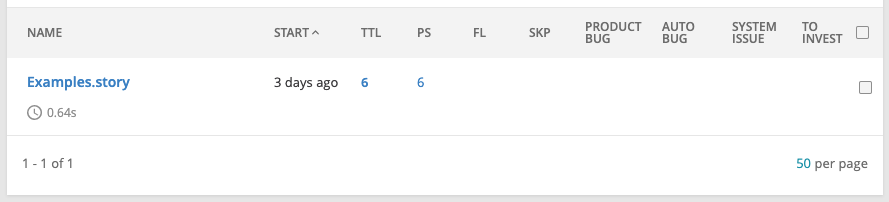
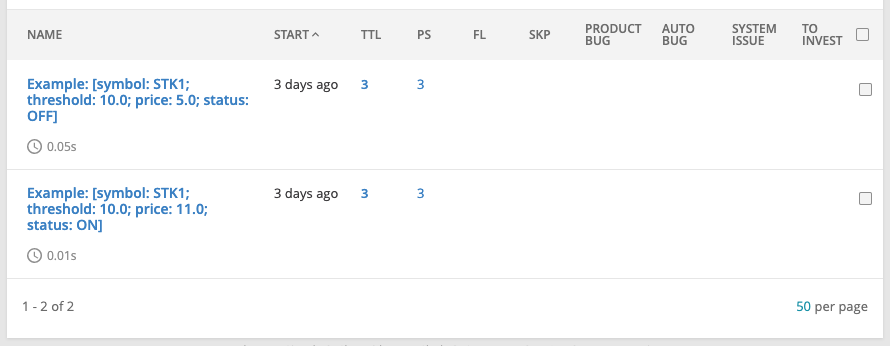
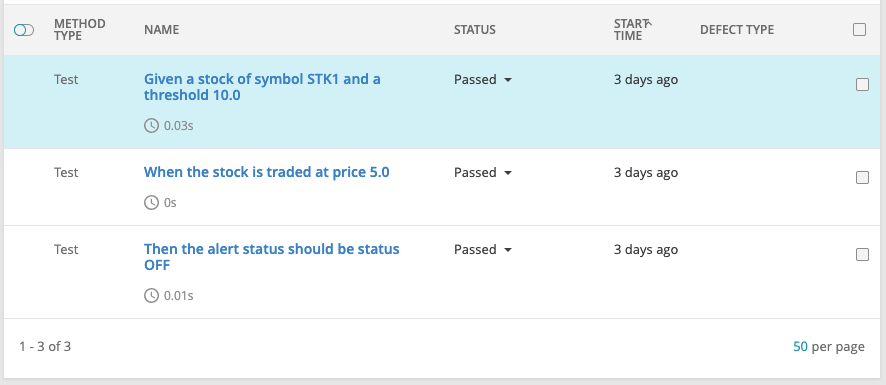
Step reporter posts statistics per test step. On example above Report Portal display 6 test units. Each example row will be a suite, as on screenshots below and each test step will be marked as a test.
To use Step reporter you need to set ReportPortalStepFormat.INSTANCE constant as your story reporter format in
configuration:
reportportal/agent-java-jbehave is a public repo on GitHub by reportportal. JBehave reporters for Report Portal.
It declares the Apache-2.0 license on GitHub.
Its maker has not tagged a system, so it is unknown here. Its README says what it needs.
Open "Take it" on its page: Take My Repo writes an install plan for your machine and hands it to your AI agent (Claude Code, Codex or Cursor), which asks you before each step. Take My Repo has not tested it on any machine.
Its last change on GitHub was on 2026-04-08. Take My Repo does not judge from that whether it is maintained.
Nobody has reviewed it on Take My Repo yet, which says nothing about its quality.
Take My Repo cannot say: it does not audit code and has not run agent-java-jbehave. What is known comes from GitHub. It declares the Apache-2.0 license on GitHub. Its last change was on 2026-04-08. It has 7 stars, which measure popularity, not safety. Nobody has reviewed it on Take My Repo yet, which says nothing about its quality. Read the source before you run it. With "Take it", your AI agent shows each step and asks you before running it; README text is treated as data, not as instructions.