ZenithProxyWebAPI
HTTP API for ZenithProxy
- 9
- MIT
- 3 wk ago
Repo rfresh2/ZenithProxyWebAPI, read from GitHub 10 min ago. rfresh2 has not joined Take My Repo.
In short
rfresh2/ZenithProxyWebAPI is a public repo on GitHub by rfresh2. HTTP API for ZenithProxy. It declares the MIT license on GitHub. It is written mainly in Java, has 9 stars and last changed on 2026-10-29. Nobody has reviewed it on Take My Repo yet, which says nothing about its quality. Read from GitHub on 2026-11-22.
ZenithProxy Web API Plugin
Runs a local web server that lets you interact with the ZenithProxy instance.
Commands
webApi
webApi on/off-> default: onwebApi port <port>-> default: 8080webApi auth <token>webApi webUI on/off-> default: onwebApi logRetentionEntries <entries>-> default: 500webApi commandsAccountOwnerPerms on/off-> default: offwebApi rateLimiter on/off-> default: onwebApi rateLimiter requestsPerMinute <rate>-> default: 30
Web UI
You can open the web UI from a browser: http://<proxy IP>:<port> (example: http://localhost:8080)
The web UI allows you to run commands and view live logs.
Access is authenticated with the same auth token.
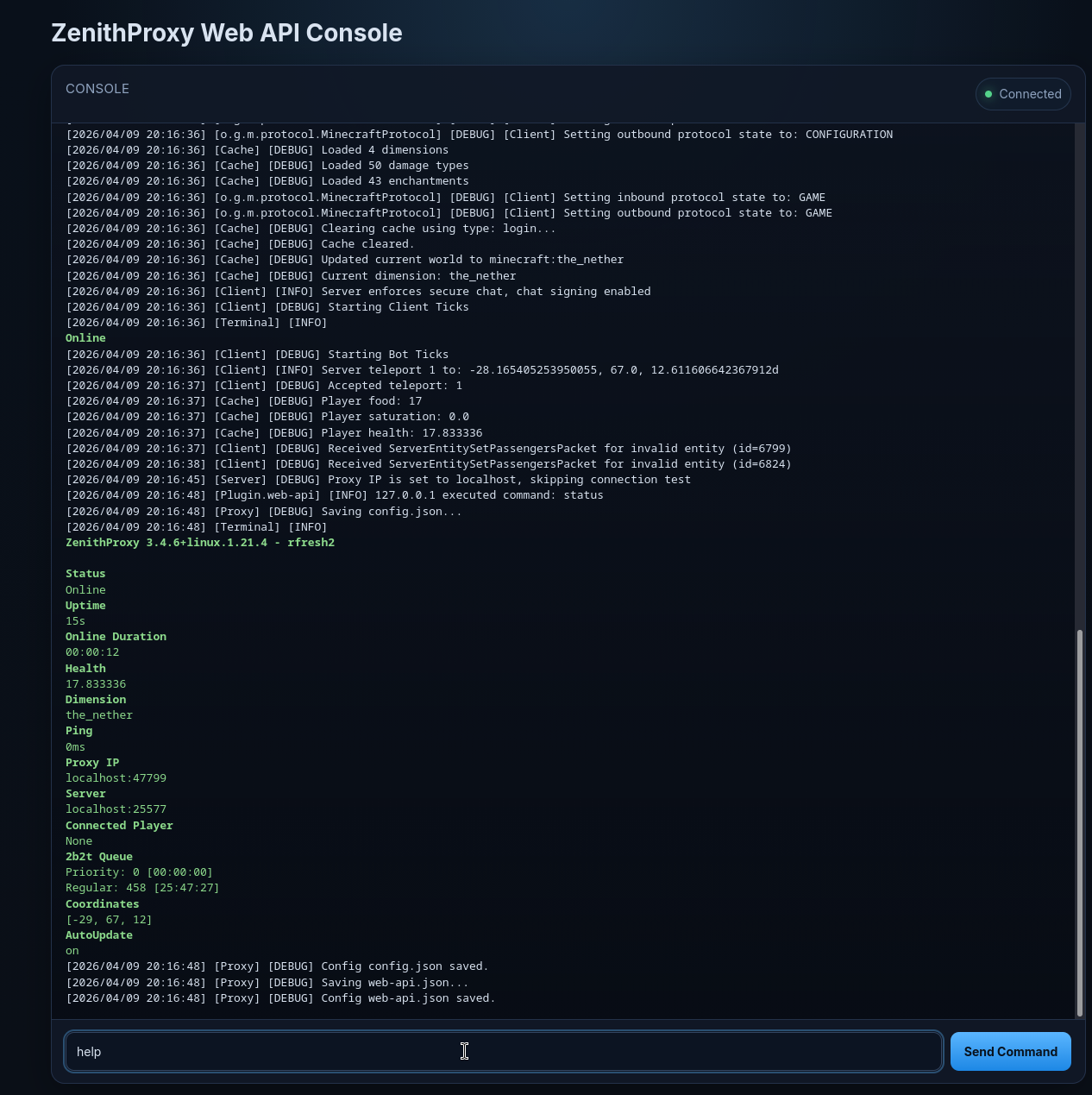
HTTP API
Authorization
All HTTP requests must have an Authorization header.
A default auth token is generated on first launch.
Or it can be set with the webApi auth <token> command.
POST /api/command
Request Body
{
  "command": "status"
}
Response
{
   "embed": "\nZenithProxy 0.0.0 - Unknown\n\nStatus\nDisconnected\nConnected Player\nNone\nOnline For\nNot Online!\nHealth\n20.0\nDimension\nNone\nPing\n0ms\nProxy IP\nlocalhost\nServer\nconnect.2b2t.org:25565\nPriority Queue\nno [unbanned]\nSpectators\non\n2b2t Queue\nPriority: 15 [00:25:49]\nRegular: 688 [07:49:27]\nCoordinates\n||[0, 0, 0]||\nAutoUpdate\non",
   "embedComponent": "{\"color\":\"#E91E63\",\"extra\":[\"\\n\",{\"bold\":true,\"text\":\"ZenithProxy 0.0.0 - Unknown\"},\"\\n\",\"\\n\",{\"bold\":true,\"extra\":[\"\\n\"],\"text\":\"Status\"},{\"extra\":[\"Disconnected\"],\"text\":\"\"},\"\\n\",{\"bold\":true,\"extra\":[\"\\n\"],\"text\":\"Connected Player\"},{\"extra\":[\"None\"],\"text\":\"\"},\"\\n\",{\"bold\":true,\"extra\":[\"\\n\"],\"text\":\"Online For\"},{\"extra\":[\"Not Online!\"],\"text\":\"\"},\"\\n\",{\"bold\":true,\"extra\":[\"\\n\"],\"text\":\"Health\"},{\"extra\":[\"20.0\"],\"text\":\"\"},\"\\n\",{\"bold\":true,\"extra\":[\"\\n\"],\"text\":\"Dimension\"},{\"extra\":[\"None\"],\"text\":\"\"},\"\\n\",{\"bold\":true,\"extra\":[\"\\n\"],\"text\":\"Ping\"},{\"extra\":[\"0ms\"],\"text\":\"\"},\"\\n\",{\"bold\":true,\"extra\":[\"\\n\"],\"text\":\"Proxy IP\"},{\"extra\":[\"localhost\"],\"text\":\"\"},\"\\n\",{\"bold\":true,\"extra\":[\"\\n\"],\"text\":\"Server\"},{\"extra\":[\"connect.2b2t.org:25565\"],\"text\":\"\"},\"\\n\",{\"bold\":true,\"extra\":[\"\\n\"],\"text\":\"Priority Queue\"},{\"extra\":[\"no [unbanned]\"],\"text\":\"\"},\"\\n\",{\"bold\":true,\"extra\":[\"\\n\"],\"text\":\"Spectators\"},{\"extra\":[\"on\"],\"text\":\"\"},\"\\n\",{\"bold\":true,\"extra\":[\"\\n\"],\"text\":\"2b2t Queue\"},{\"extra\":[\"Priority: 15 [00:25:49]\\nRegular: 688 [07:49:27]\"],\"text\":\"\"},\"\\n\",{\"bold\":true,\"extra\":[\"\\n\"],\"text\":\"Coordinates\"},{\"extra\":[\"||[0, 0, 0]||\"],\"text\":\"\"},\"\\n\",{\"bold\":true,\"extra\":[\"\\n\"],\"text\":\"AutoUpdate\"},{\"extra\":[\"on\"],\"text\":\"\"}],\"text\":\"\"}",
   "multiLineOutput": []
}
The embedComponent can be parsed back from json with Kyori Adventure
Component c = GsonComponentSerializer.gson().deserialize(embedComponent);
Or with Minecraft's text components:
// MC 1.21.6+ mojmap
Component component = ComponentSerialization.CODEC
        .parse(JsonOps.INSTANCE, StrictJsonParser.parse(response.embedComponent()))
        .getOrThrow();

// MC 1.21.1-1.21.5 mojmap
MutableComponent component = Component.Serializer.fromJson(
    response.embedComponent(),
    Minecraft.getInstance().player.registryAccess()
);

// MC 1.19.2-1.20.6 mojmap
MutableComponent component = Component.Serializer.fromJson(
    response.embedComponent()
);
Example
curl --location 'http://localhost:8080/api/command' \
--header 'Authorization: c05598ed-d123-4e8f-9aa7-40c11e657f23' \
--header 'Content-Type: application/json' \
--data '{"command":"status"}'
FAQ
How do I call the API from the public internet?
Depends on where and how you are hosting the ZenithProxy instance.
It's the same as accessing the ZenithProxy MC server from the public internet.
So if you had to change firewall settings, port forwarding, or set up tunneling you'd do the same for the web API's port.
I'm running multiple ZenithProxy instance on the same server, can they all have web APIs?
Yes, but each needs to be configured to use a different port: webApi port <port>
Questions
What is ZenithProxyWebAPI?
rfresh2/ZenithProxyWebAPI is a public repo on GitHub by rfresh2. HTTP API for ZenithProxy.
Is ZenithProxyWebAPI open source?
It declares the MIT license on GitHub.
Does ZenithProxyWebAPI run on macOS, Windows or Linux?
Its maker has not tagged a system, so it is unknown here. Its README says what it needs.
How do I install ZenithProxyWebAPI?
Open "Take it" on its page: Take My Repo writes an install plan for your machine and hands it to your AI agent (Claude Code, Codex or Cursor), which asks you before each step. Take My Repo has not tested it on any machine.
Is ZenithProxyWebAPI still maintained?
Its last change on GitHub was on 2026-10-29. Take My Repo does not judge from that whether it is maintained.
What do people who ran ZenithProxyWebAPI say?
Nobody has reviewed it on Take My Repo yet, which says nothing about its quality.
More from rfresh2
XaeroPlus
Xaero WorldMap / Minimap Extra Features