AutoGPT
AutoGPT is the vision of accessible AI for everyone, to use and to build on. Our mission is to provide the tools, so that you can focus on what matters.
- 188k
- Python
- 1 h ago
Voice AI agent with basic capabilities including telephony
Repo rishikksh20/voice-ai-agent-basic, read from GitHub 1 min ago. rishikksh20 has not joined Take My Repo.
rishikksh20/voice-ai-agent-basic is a public repo on GitHub by rishikksh20. Voice AI agent with basic capabilities including telephony. It declares no license on GitHub. Public does not mean open source: without a license, nobody is granted the right to reuse it. It is written mainly in Python, has 8 stars and last changed on 2026-07-10. Nobody has reviewed it on Take My Repo yet, which says nothing about its quality. Read from GitHub on 2026-11-23.
AutoGPT is the vision of accessible AI for everyone, to use and to build on. Our mission is to provide the tools, so that you can focus on what matters.
A FastAPI + Pipecat Voice AI system that supports inbound, outbound Twilio calls, and browser-based text/voice chat from a shared assistant prompt. It is designed primarily for local deployment, with the client and server running in the same environment, but it can also be deployed on a public server by adjusting the deployment strategy and using a public server URL instead of ngrok.
rishikksh20@gmail.comThis repository is a basic showcase of a Voice AI agent built with Pipecat, supporting text chat, live browser voice chat, and inbound/outbound telephony calls. The same foundation can be extended into production Voice AI platforms with custom tools, long-term memory, RAG, workflow automation, analytics, and full control over the voice pipeline.
Production use cases can include sales agents, support agents, telemarketing automation, personal assistants, enterprise workflows, research assistants, and domain-specific voice agents with CRM/database integrations, human handoff, call summaries, lead qualification etc.
Although this demo uses Pipecat, I can also build similar real-time Voice AI systems with LiveKit, depending on product requirements. I can support integrations with Twilio, Telnyx, custom WebSocket serializers, OpenAI Realtime, Gemini Live, and other live voice/TTS/STT pipelines.
I am available for paid, freelance, long-term, or research-based collaborations related to advanced Voice AI products, telephony agents, real-time AI agents, TTS systems, RAG-based assistants, long-term memory, and screen-share-enabled AI agents.
If you are building or planning something in this space, or have ideas you want to explore, feel free to connect with me at rishikksh20@gmail.com.
┌────────────────────┐       ┌────────────────────────┐
│                    │       │                        │
│ Static Web Client  │──────▶│ FastAPI routes         │
│ Calls + Chat + RTC │       │ server/routes.py       │
│                    │       │                        │
└─────────┬──────────┘       └───────────┬────────────┘
          │                              │
          │                              │
          │                     ┌────────▼─────────┐
          │                     │ Shared settings  │
          │                     │ prompts + LLM    │
          │                     └────────┬─────────┘
          │                              │
┌─────────▼──────────┐       ┌───────────▼────────────┐       ┌─────────────────┐
│ Web text chat      │       │ Browser voice chat     │       │ Twilio calls    │
│ /web/chat/stream   │       │ /web/voice/* WebRTC    │       │ /twilio/*       │
│ WebConversationSvc │       │ WebVoiceService        │       │ TwilioService   │
└─────────┬──────────┘       └───────────┬────────────┘       └────────┬────────┘
          │                              │                             │
          │                    ┌─────────▼─────────────────────────────▼─────────┐
          │                    │ Pipecat realtime voice pipeline                 │
          │                    │ transport -> AssemblyAI STT -> OpenAI ->        │
          │                    │ Cartesia TTS -> transport                       │
          │                    └─────────────────────────────────────────────────┘
          │
          └──────────────────▶ OpenAI LLM Pipecat text pipeline
The static client uses one page with separate sections for inbound calls, outbound calls, web text chat, and browser WebRTC voice chat. Telephony and browser voice share the Pipecat realtime voice pipeline in server/bot.py. Web text uses server/conversation_service.py, which runs a lightweight Pipecat LLM pipeline and streams NDJSON events to the browser. Shared prompts are built in server/prompts/ through server/llm_service.py and inject the current date/day using the UTC/GMT offset from APP_TIMEZONE.
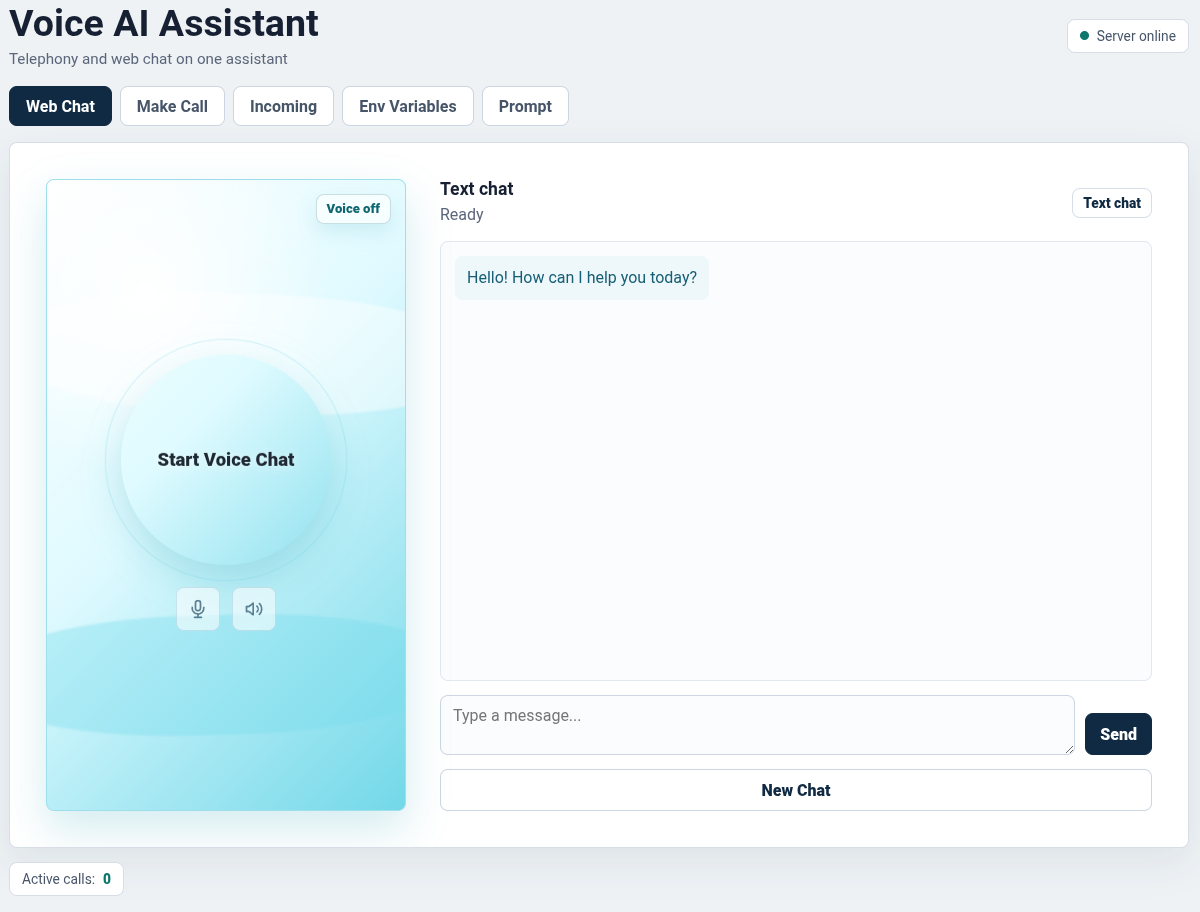
OpenAILLMService streaming.
├── client/
│ └── index.html
├── server/
│ ├── __init__.py
│ ├── bot.py
│ ├── call_store.py
│ ├── config.py
│ ├── conversation_service.py
│ ├── llm_service.py
│ ├── main.py
│ ├── prompts/
│ ├── routes.py
│ └── twilio_service.py
├── scripts/
│ └── check_env.py
├── tests/
├── .dockerignore
├── .env.example
├── .python-version
├── Dockerfile
├── AGENTS.md
├── docker-compose.yml
├── pyproject.toml
└── README.md
Copy the example file and fill in your real values:
cp .env.example .env
The real .env file is intentionally ignored by Git and by Docker builds.
| Variable | Required | Used for | Notes |
|---|---|---|---|
OPENAI_API_KEY |
Yes | LLM responses | OpenAI API key for GPT-4o-mini. |
OPENAI_MODEL |
No | LLM responses | Defaults to gpt-4o-mini. |
OPENAI_TRANSCRIPTION_MODEL |
No | Browser audio transcription | Defaults to whisper-1. |
ASSEMBLYAI_API_KEY |
Yes | Speech-to-text | AssemblyAI key for realtime streaming STT. |
CARTESIA_API_KEY |
Yes | Text-to-speech | Cartesia key for generated voice audio. |
CARTESIA_VOICE_ID |
No | Text-to-speech voice | Defaults to a0e99841-438c-4a64-b679-ae501e7d6091. |
TWILIO_ACCOUNT_SID |
Yes | Twilio REST API | Required for outbound calls and ending calls. |
TWILIO_AUTH_TOKEN |
Yes | Twilio REST API | Required with TWILIO_ACCOUNT_SID. |
TWILIO_PHONE_NUMBER |
Yes | Inbound/outbound calls | Must be an active Twilio number, for example +1234567890. |
SERVER_URL |
Yes for Twilio calls | Webhooks and outbound calls | Public HTTPS URL from ngrok or your deployed server, without trailing slash. You can set or update it from the Env Variables tab after deployment. |
PORT |
No | Local server port | Defaults to 8000. |
APP_TIMEZONE |
No | Prompt date/day context | UTC/GMT offset for prompt injection, for example UTC+05:30; defaults to UTC+05:30. |
PROMPT_INTRO |
No | Prompt customization | Optional assistant intro override. |
PROMPT_BODY |
No | Prompt customization | Optional assistant behavior/body override. |
PROMPT_OUTRO |
No | Prompt customization | Optional default conversation-ending message. |
HOST_PORT |
No | Docker Compose host port | Defaults to 8000; only used by docker-compose.yml. |
For local development on the same PC, the web UI and peer-to-peer WebRTC voice chat can use http://localhost:8000. A public HTTPS URL is required when Twilio must reach the local server, or when the web client is opened from another device.
In terminal, expose the same port through ngrok:
ngrok http 8000
Copy the HTTPS forwarding URL shown by ngrok and set it in .env without a trailing slash, or open the app and save it from the Env Variables tab:
SERVER_URL=https://abc123.ngrok-free.app
Start/restart the FastAPI server after changing .env manually. If you update SERVER_URL from the Env Variables tab, the running process uses the new value immediately.
http://localhost:8000 when using the same PC.SERVER_URL is important because Twilio cannot call localhost. The server uses this public base URL to build outbound-call TwiML and status callback URLs. Configure the inbound Twilio webhook with the same public URL:
https://abc123.ngrok-free.app/twilio/incoming
Use POST as the webhook method.
Browser voice chat uses the origin from which the web page was loaded for /web/voice/* WebRTC signaling requests. It does not read SERVER_URL directly. Localhost is accepted as a secure browser context, but remote microphone access requires HTTPS, which the ngrok URL provides.
ngrok exposes the web application and WebRTC signaling endpoints; it does not relay peer-to-peer WebRTC audio. Connections across different networks or strict NAT/firewall environments may additionally require STUN/TURN configuration. Also remember that a temporary ngrok URL can change when ngrok restarts. Update SERVER_URL from the Env Variables tab or .env, and update the Twilio webhook whenever it changes.
Some hosts, including Vercel-style platforms, only provide the final public URL after deployment. In that case:
SERVER_URL empty if the URL is not known yet.Env Variables, set SERVER_URL to the deployed HTTPS URL, then save.The save reloads env-backed settings in the live FastAPI process immediately. If the deployment filesystem is read-only, the UI will show that the value is active only for the current process. For durable values across cold starts, redeploys, or multiple instances, also set SERVER_URL in the hosting provider's environment variable settings.
Use this for local development. The commands below run from the repo root.
Install dependencies with uv:
uv sync --frozen
Start the server:
uv run python -m server.main
Open the app:
http://localhost:8000
Build and run with Docker Compose:
docker compose up --build
Compose reads values from your shell or local .env file. The container listens on port 8000; set HOST_PORT if you want a different host port:
HOST_PORT=8080 docker compose up --build
You can also run plain Docker:
docker build -t pipecat-voice-ai-agent .
docker run --rm -p 8000:8000 --env-file .env pipecat-voice-ai-agent
Open the app:
http://localhost:8000
For inbound calls, configure your Twilio phone number webhook:
${SERVER_URL}/twilio/incomingPOSTSee Local Deployment with ngrok when running the server on your PC.
Inbound calls:
http://localhost:8000.Outbound calls:
http://localhost:8000.Web chat and browser voice:
http://localhost:8000.Call ending:
end_conversation tool.| Endpoint | Method | Description |
|---|---|---|
/ |
GET | Serve the web UI |
/api/info |
GET | Server info and configured Twilio number |
/health |
GET | Health check |
/twilio/incoming |
POST | Twilio webhook for incoming calls |
/twilio/ws/{call_id} |
WS | Twilio Media Streams WebSocket |
/twilio/outbound-handler/{call_id} |
GET/POST | TwiML handler for outbound calls |
/twilio/status/{call_id} |
POST | Twilio call status callback |
/call/start |
POST | Prepare the UI for an inbound call |
/call/outbound |
POST | Start an outbound call |
/call/end/{call_id} |
POST | End an active call |
/call/status/{call_id} |
GET | Get call status |
/web/chat |
POST | Send a text message to the shared assistant |
/web/chat/stream |
POST | Stream a text-chat assistant response as NDJSON events |
/web/transcribe |
POST | Transcribe uploaded browser audio |
/web/voice/offer |
POST | Start a browser voice WebRTC session from an SDP offer |
/web/voice/ice |
POST | Add ICE candidates for a browser voice session |
/web/voice/message |
POST | Send a text message into a browser voice session |
/web/voice/end/{session_id} |
POST | End a browser voice session |
rishikksh20/voice-ai-agent-basic is a public repo on GitHub by rishikksh20. Voice AI agent with basic capabilities including telephony.
It declares no license on GitHub. Public does not mean open source: without a license, nobody is granted the right to reuse it.
The agent harness performance optimization system. Skills, instincts, memory, security, and research-first development for Claude Code, Codex, Opencode, Cursor and beyond.
Open source voice AI platform. Self-hosted alternative to Vapi and Retell. On Prem, BYOK across Speech to Speech or LLM/STT/TTS, with a visual workflow builder, MCP native and telephony support.
Langflow is a powerful tool for building and deploying AI-powered agents and workflows.
Its maker tagged it for macOS, Windows and Linux, or as Docker or cross-platform. That is declared by the maker; Take My Repo has not tested it.
Open "Take it" on its page: Take My Repo writes an install plan for your machine and hands it to your AI agent (Claude Code, Codex or Cursor), which asks you before each step. Take My Repo has not tested it on any machine.
Its last change on GitHub was on 2026-07-10. GitHub counts 0 open issues and pull requests. Take My Repo does not judge from that whether it is maintained.
Nobody has reviewed it on Take My Repo yet, which says nothing about its quality.
Take My Repo cannot say: it does not audit code and has not run voice-ai-agent-basic. What is known comes from GitHub. It declares no license on GitHub. Public does not mean open source: without a license, nobody is granted the right to reuse it. Its last change was on 2026-07-10. It has 8 stars, which measure popularity, not safety. Nobody has reviewed it on Take My Repo yet, which says nothing about its quality. Read the source before you run it. With "Take it", your AI agent shows each step and asks you before running it; README text is treated as data, not as instructions.