
krr
Prometheus-based Kubernetes Resource Recommendations
- 4.8k
- MIT
- 13 d ago
Repo robusta-dev/krr, read from GitHub 8 h ago. robusta-dev has not joined Take My Repo.
In short
robusta-dev/krr is a public repo on GitHub by robusta-dev. Prometheus-based Kubernetes Resource Recommendations. It declares the MIT license on GitHub. It is written mainly in Python, has 4,797 stars and last changed on 2026-11-11. Nobody has reviewed it on Take My Repo yet, which says nothing about its quality. Read from GitHub on 2026-11-23.


Get Kubernetes Resource Recommendations based on your existing data in Prometheus/Coralogix/Thanos/Mimir and more!
Installation
.
How KRR works
.
KRR UI
Usage
·
Report Bug
·
Request Feature
·
Support
About The Project
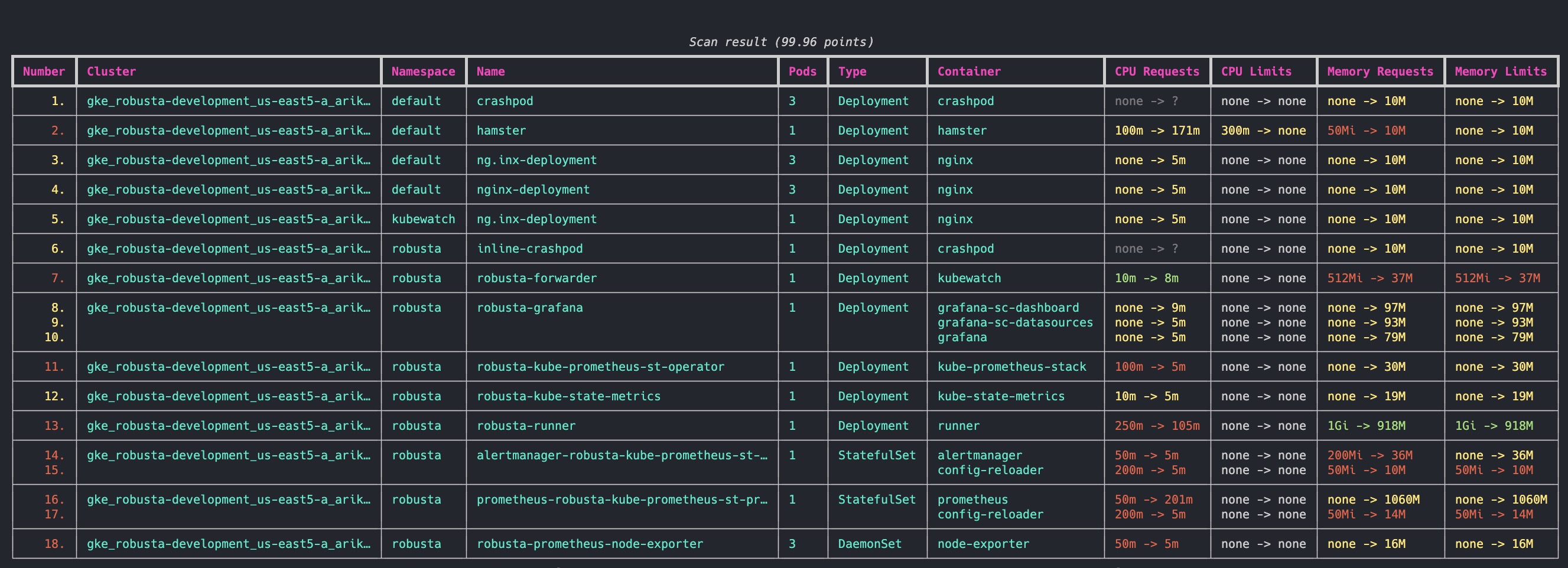
Robusta KRR (Kubernetes Resource Recommender) is a CLI tool for optimizing resource allocation in Kubernetes clusters. It gathers pod usage data from Prometheus and recommends requests and limits for CPU and memory. This reduces costs and improves performance.
Auto-Apply Mode
Put right-sizing on auto-pilot by applying recommendations automatically. See the KRR Enforcer docs.
Data Integrations

View Instructions for: Prometheus, Thanos, Victoria Metrics, Google Managed Prometheus, Amazon Managed Prometheus, Azure Managed Prometheus, Coralogix,Grafana Cloud and Grafana Mimir
Reporting Integrations

View instructions for: Seeing recommendations in a UI, Sending recommendations to Slack, Setting up KRR as a k9s plugin, Azure Blob Storage Export with Teams Notification
Features
- No Agent Required: Run a CLI tool on your local machine for immediate results. (Or run in-cluster for weekly Slack reports.)
- Prometheus Integration: Get recommendations based on the data you already have
- Explainability: Understand how recommendations were calculated with explanation graphs
- Extensible Strategies: Easily create and use your own strategies for calculating resource recommendations.
- SaaS Platform: See why KRR recommends what it does, by using the Robusta SaaS platform.
- Agentic Cost Savings: Go beyond KRR's rule-based recommendations with HolmesGPT — an AI agent that investigates your cluster to find and fix cost-saving opportunities, and generates fixes for KRR's recommendations.
- Future Support: Upcoming versions will support custom resources (e.g. GPUs) and custom metrics.
How Much Can I Expect to Save with KRR?
According to a recent Sysdig study, on average, Kubernetes clusters have:
- 69% unused CPU
- 18% unused memory
By right-sizing your containers with KRR, you can save an average of 69% on cloud costs.
Read more about how KRR works
Difference with Kubernetes VPA
| Feature 🛠️ | Robusta KRR 🚀 | Kubernetes VPA 🌐 |
|---|---|---|
| Resource Recommendations 💡 | ✅ CPU/Memory requests and limits | ✅ CPU/Memory requests and limits |
| Installation Location 🌍 | ✅ Not required to be installed inside the cluster, can be used on your own device, connected to a cluster | ❌ Must be installed inside the cluster |
| Workload Configuration 🔧 | ✅ No need to configure a VPA object for each workload | ❌ Requires VPA object configuration for each workload |
| Immediate Results ⚡ | ✅ Gets results immediately (given Prometheus is running) | ❌ Requires time to gather data and provide recommendations |
| Reporting 📊 | ✅ Json, CSV, Markdown, Web UI, and more! | ❌ Not supported |
| Extensibility 🔧 | ✅ Add your own strategies with few lines of Python | :warning: Limited extensibility |
| Explainability 📖 | ✅ See graphs explaining the recommendations | ❌ Not supported |
| Custom Metrics 📏 | 🔄 Support in future versions | ❌ Not supported |
| Custom Resources 🎛️ | 🔄 Support in future versions (e.g., GPU) | ❌ Not supported |
| Autoscaling 🔀 | 🔄 Support in future versions | ✅ Automatic application of recommendations |
| Default History 🕒 | 14 days | 8 days |
| Supports HPA 🔥 | ✅ Enable using --allow-hpa flag |
❌ Not supported |
Installation
Requirements
KRR requires Prometheus 2.26+, kube-state-metrics & cAdvisor.
Which metrics does KRR need?
No setup is required if you use kube-prometheus-stack or Robusta's Embedded Prometheus.If you have a different setup, make sure the following metrics exist:
container_cpu_usage_seconds_totalcontainer_memory_working_set_byteskube_replicaset_ownerkube_pod_ownerkube_pod_status_phase
Note: If one of last three metrics is absent KRR will still work, but it will only consider currently-running pods when calculating recommendations. Historic pods that no longer exist in the cluster will not be taken into consideration.
Installation Methods
Brew (Mac/Linux)
- Add our tap:
brew tap robusta-dev/homebrew-krr
- Install KRR:
brew install krr
- Check that installation was successful:
krr --help
- Run KRR (first launch might take a little longer):
krr simple
Windows
You can install using brew (see above) on WSL2, or install from source (see below).
Docker image, binaries, and airgapped installation (offline environments)
You can download pre-built binaries from Releases or use the prebuilt Docker container. For example, the container for version 1.8.3 is:
us-central1-docker.pkg.dev/genuine-flight-317411/devel/krr:v1.8.3
We do not recommend installing KRR from source in airgapped environments due to the headache of installing Python dependencies. Use one of the above methods instead and contact us (via Slack, GitHub issues, or email) if you need assistance.
In-Cluster
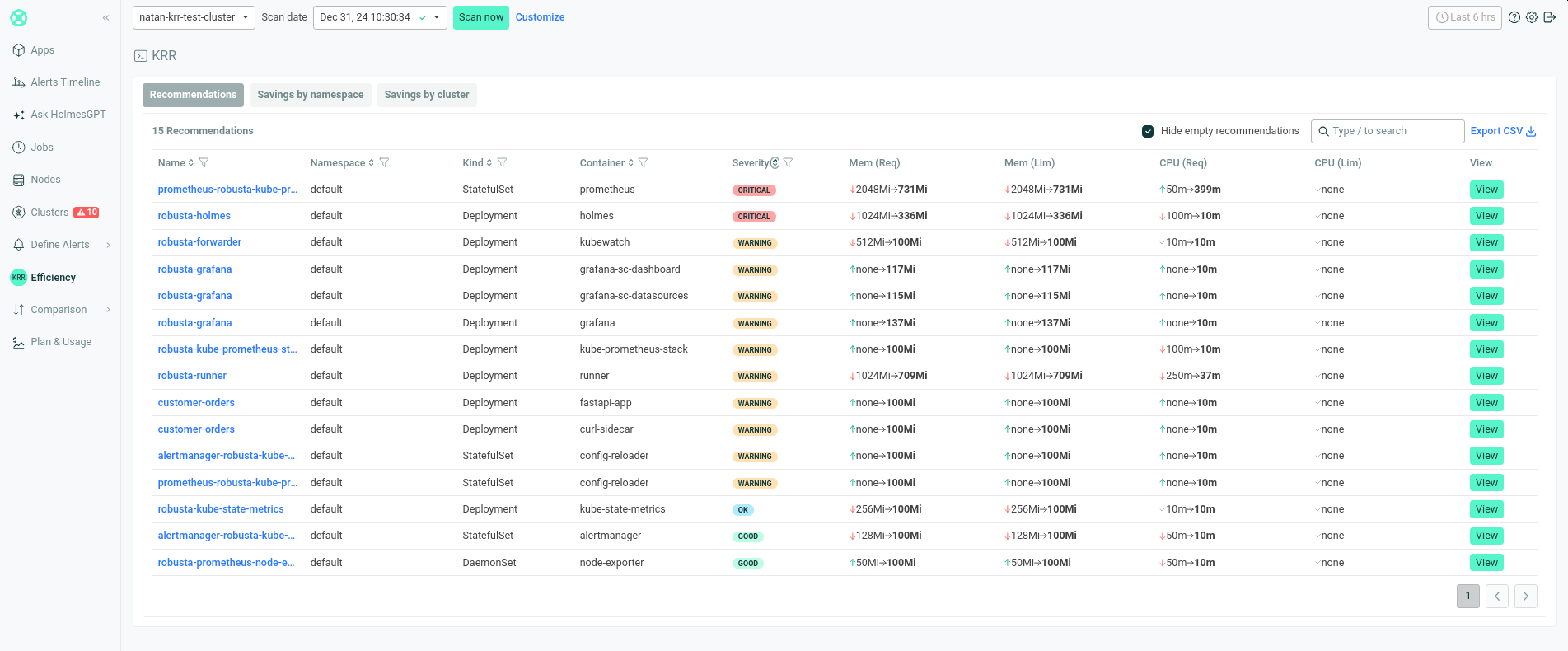
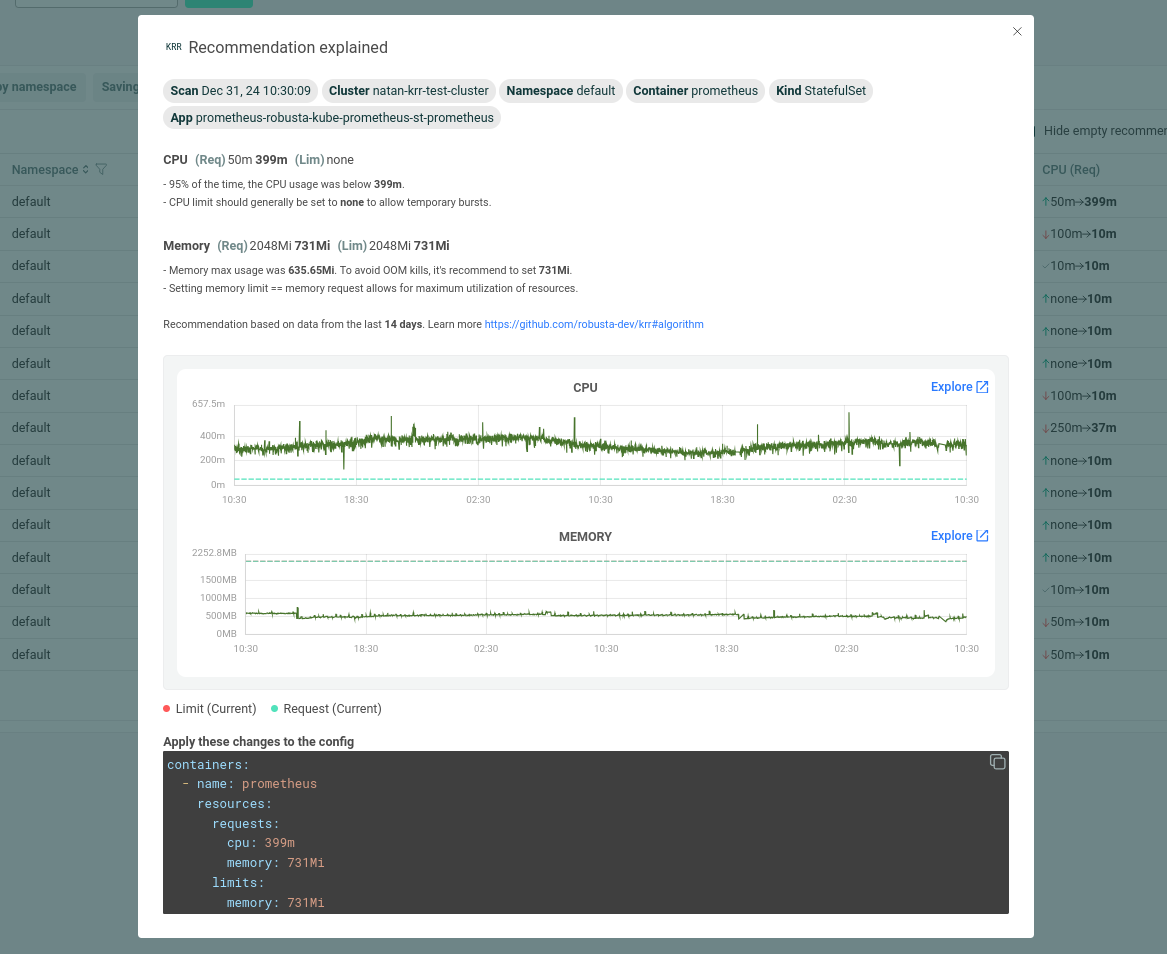
Apart from running KRR as a CLI tool you can also run KRR inside your cluster. We suggest installing KRR via the Robusta Platform . It gives you a UI with some features like the following
- View application usage history graphs on which recommendations are based.
- Get application, namespace and cluster level recommendations.
- YAML configuration to apply the suggested recommendation and more
You can also run KRR in-cluster as a Kubernetes Job, if you don't want to view results easily in a UI.
kubectl apply -f https://raw.githubusercontent.com/robusta-dev/krr/refs/heads/main/docs/krr-in-cluster/krr-in-cluster-job.yaml
From Source
- Make sure you have Python 3.9 (or greater) installed
- Clone the repo:
git clone https://github.com/robusta-dev/krr
- Navigate to the project root directory (
cd ./krr) - Install requirements:
pip install -r requirements.txt
- Run the tool:
python krr.py --help
Notice that using source code requires you to run as a python script, when installing with brew allows to run krr.
All above examples show running command as krr ..., replace it with python krr.py ... if you are using a manual installation.
Additional Options
Environment-Specific Instructions
Setup KRR for...
- Google Cloud Managed Prometheus
- Azure Managed Prometheus
- Amazon Managed Prometheus
- Coralogix Managed Prometheus
- Grafana Cloud Managed Prometheus
- Grafana Mimir
Trusting custom Certificate Authority (CA) certificate:
If your llm provider url uses a certificate from a custom CA, in order to trust it, base-64 encode the certificate, and store it in an environment variable named CERTIFICATE
KRR UI on Robusta SaaS
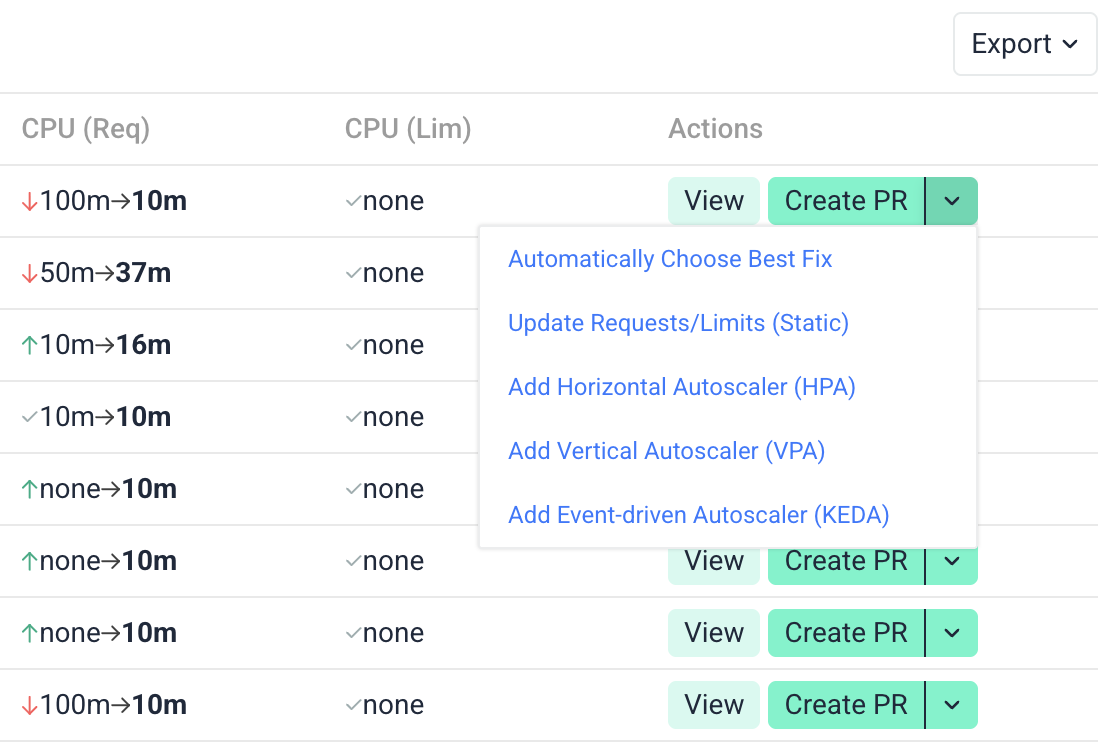
We highly recommend using the Robusta SaaS platform. You can:
- Understand individual app recommendations with app usage history
- Sort and filter recommendations by namespace, priority, and more
- Give devs a YAML snippet to fix the problems KRR finds
- Automatically generate fixes for KRR recommendations using AI and HolmesGPT
KRR right-sizes your workloads using predetermined strategies. To uncover cost-saving opportunities that go beyond fixed rules, the platform pairs KRR with HolmesGPT — an AI agent that investigates your clusters and reasons about where you're overspending, instead of relying on hardcoded rules. Let it find and fix cost-saving opportunities for you.
Usage
Basic usage
krr simple
Tweak the recommendation algorithm (strategy)
Most helpful flags:
--cpu-minSets the minimum recommended cpu value in millicores--mem-minSets the minimum recommended memory value in MB--history_durationThe duration of the Prometheus history data to use (in hours)
More specific information on Strategy Settings can be found using
krr simple --help
Giving an Explicit Prometheus URL
If your Prometheus is not auto-connecting, you can use kubectl port-forward for manually forwarding Prometheus.
For example, if you have a Prometheus Pod called kube-prometheus-st-prometheus-0, then run this command to port-forward it:
kubectl port-forward pod/kube-prometheus-st-prometheus-0 9090
Then, open another terminal and run krr in it, giving an explicit Prometheus url:
krr simple -p http://127.0.0.1:9090
Run on specific namespaces
List as many namespaces as you want with -n
Questions
What is krr?
robusta-dev/krr is a public repo on GitHub by robusta-dev. Prometheus-based Kubernetes Resource Recommendations.
Is krr open source?
It declares the MIT license on GitHub.
Does krr run on macOS, Windows or Linux?
Its maker tagged it for macOS, Windows and Linux, or as Docker or cross-platform. That is declared by the maker; Take My Repo has not tested it.
How do I install krr?
Open "Take it" on its page: Take My Repo writes an install plan for your machine and hands it to your AI agent (Claude Code, Codex or Cursor), which asks you before each step. Take My Repo has not tested it on any machine.


