
code-probe-c64
A machine language monitor for the Commodore 64
- 8
- MIT
- 2 mo ago
Repo rohingosling/code-probe-c64, read from GitHub 1 min ago. rohingosling has not joined Take My Repo.
In short
rohingosling/code-probe-c64 is a public repo on GitHub by rohingosling. A machine language monitor for the Commodore 64. It declares the MIT license on GitHub. It is written mainly in Assembly, has 8 stars and last changed on 2026-09-15. Nobody has reviewed it on Take My Repo yet, which says nothing about its quality. Read from GitHub on 2026-11-26.

Code Probe (Commodore 64)


A machine language monitor for the Commodore 64. Loads at $C000 on a stock C64 — no cartridge or memory expansion required.
- Inspect and modify memory with a hex dump and interactive alter mode.
- View and modify the CPU registers and processor status flags via a shadow-register block; capture the live CPU state when a user routine returns through
BRK. - Fill and copy arbitrary blocks of memory.
- Save and load machine language programs to and from disk, in PRG and SEQ formats; list directories.
- Clear the screen and exit cleanly back to BASIC.
See Commodore VIC-20 version, here.
📑 Contents
- 🔎 Overview
- 🚀 Quick Start
- 📜 Version History
- 💾 Loading and Starting
- 📝 Command Reference
- 🎬 Example Session
- 📂 Project Structure
- 💻 Building From Source
- 💿 Disk Image Listing
- ❓ FAQ
- 🤝 Contributing
- 🙋♂️ Acknowledgements
- 📄 License
🔎 Overview
Code Probe is a software-based machine language monitor that runs at the upper-RAM window $C000-$CFFF on a stock Commodore 64. The address range is permanent RAM, sitting between BASIC ROM (which ends at $BFFF) and the I/O page (which starts at $D000), so the monitor coexists with both ROMs in their default banked-in configuration.
The design of Code Probe was inspired by the DOS DEBUG utility and presents a similar terminal-style user interface and commands. All numeric input is hexadecimal: addresses are 4 digits; byte values, file types, and device numbers are 2 digits each.
Memory Map
┌──────────────┬────────────────────────────────────────────────────┐
│ $E000-$FFFF  │   KERNAL ROM                                       │
│ $D000-$DFFF  │   I/O page (VIC-II, SID, CIA, color RAM)           │
│ $C000-$CFFF  │ ► Code Probe (4 KiB)                               │
│ $A000-$BFFF  │   BASIC ROM                                        │
│ $0800-$9FFF  │   BASIC program + free RAM (PRG load at $0801)     │
│ $0200-$07FF  │   System workspace + screen RAM ($0400-$07FF)      │
│ $0000-$01FF  │   Zero page + stack                                │
└──────────────┴────────────────────────────────────────────────────┘
The $C000-$CFFF window is permanent RAM that sits between BASIC ROM and the I/O page in the C64's default banking, so Code Probe coexists with both ROMs without any banking gymnastics. User machine language programs can live anywhere in the free RAM below BASIC ROM (typically loaded to $0801 or higher).
Features
- Memory inspection - Hex dump with PETSCII character display.
- Memory editing - Interactive alter mode with cursor navigation, auto-space between bytes, and auto-commit at ten bytes per line.
- Register management - View and modify A, X, Y, SP, PC, P, IO; expand the processor status flags as individual bits with
RF. The shadow registers persist acrossGinvocations. - Memory operations - Fill ranges with a constant byte, copy ranges with overlap-safe forward and backward walks; clamp at
$FFFFwith an overflow warning. - Program execution - Run machine language programs via an RTI dispatch with the shadow registers loaded into the live CPU; the user routine returns to the monitor with
BRK, and CPU state is captured back into the shadow block. - Disk I/O - Save and load PRG and SEQ files to and from a 1541 (or compatible) disk drive at device 8; list directories. PRG files round-trip with a chosen load address; SEQ files carry raw bytes only.
- Screen control - Clear the display with a single command.
- Exit to BASIC - Return to BASIC's
READY.prompt; re-enter Code Probe withSYS 49152.
🚀 Quick Start
LOAD "CODEPROBE",8,1
SYS 49152
CODE PROBE (2.1) - ROHIN GOSLING

: █
The first two lines load Code Probe from a 1541-compatible drive at device 8 and start it. The third — your first command — dumps the first 256 bytes of the monitor's own code, so you can confirm it's running.
See the Command Reference for the full command set, Loading and Starting for VICE and SD2IEC variants, or docs/user-manual.pdf for worked tutorials.
📜 Version History
| Year | Version | Platform | Description |
|---|---|---|---|
| 1988 | 1.0 | VIC-20 | Hand-assembled and poked into RAM with a BASIC machine language loader. |
| 1990 | 2.0 | C64 | Ported to C64, with expanded feature set and C64-specific updates. |
| 2026 | 1.1 | VIC-20 | Assembly reconstruction of original version 1.0 for the VIC-20. |
| 2026 | 2.1 | C64 | Assembly reconstruction of version 2.0 for the C64. |
💾 Loading and Starting
Code Probe loads at address $C000 (49152 decimal) and occupies up to 4 KiB of RAM in the $C000-$CFFF region. The native C64 RAM at $0801-$BFFF (BASIC's program area + free RAM up to BASIC ROM) is left free for user machine language programs.
From Disk
LOAD "CODEPROBE",8,1
SYS 49152
The ,8,1 parameter loads the program to the address stored in its PRG header ($C000), rather than to the default BASIC area. SYS 49152 transfers control to Code Probe.
From the VICE Emulator
To launch x64sc with build/codeprobe.prg autostarted into the monitor:
x64sc -autostart build/codeprobe.prg
To attach a disk image at the same time so save and load can target it:
x64sc -8 dist/codeprobe.d64 -autostart build/codeprobe.prg
x64sc must be on PATH, or substitute the full path to your VICE install (e.g. C:\Programs\GTK3VICE-3.10-win64\bin\x64sc.exe on Windows, /usr/bin/x64sc on most Linux distributions).
What Happens at Startup
- The screen border and background are set to black via VIC-II registers
$D020and$D021. - The KERNAL text colour at
$0286is set to green. - The screen is cleared via
CHROUT $93. - The title banner is displayed.
- A blank line separates the banner from the first prompt.
- The shadow registers are initialised to their defaults.
- The original BRK vector at
$0316/$0317is saved, and Code Probe'sbrk_handleris patched in. - The monitor prompt loop begins.
📝 Command Reference
All address and count values are hexadecimal: addresses are 4 digits; byte values and device numbers are 2 digits each. Filenames are enclosed in double quotes and limited to 16 characters of uppercase PETSCII.
| Command | Syntax | Description |
|---|---|---|
A |
A <address> |
Enter alter mode to write hex bytes to RAM. |
D |
D <start> <end> |
Hex dump memory from start to end (inclusive). |
R |
R |
Display A, X, Y, SP, PC, P, IO from the shadow block. |
R |
R <register> <value> |
Set a shadow register and reprint the line. |
RF |
RF |
Display registers + flag bit-view. |
RF |
RF <flag> <bit> |
Set a processor status flag and reprint. |
F |
F <address> <count> <value> |
Fill memory range with a byte. Clamps at $FFFF. |
T |
T <source> <count> <destination> |
Copy memory range to a destination. Overlap-safe. |
G |
G <address> |
Execute machine code at address; capture regs on BRK. |
S |
S "<file>" <device> <start> <end> [<load_addr>] |
Save range to file. With load_addr = PRG; without = SEQ. |
L |
L <device> |
List files on device. |
L |
L "<file>" <device> |
Load PRG file (uses file's load address). |
L |
L "<file>" <device> <address> |
Load SEQ / raw bytes to specified address. |
CLS |
CLS |
Clear the screen. |
EXIT |
EXIT |
Exit to BASIC. Re-enter with SYS 49152. |
The S and L commands take filenames in "<name>" form because the 1541 disk drive uses unquoted commas to separate the filename from its type and mode flags. Code Probe builds those flags internally (,P,W for PRG save, ,S,W for SEQ save), so the user's filename has to be quoted to disambiguate.
The G command builds an RTI stack frame from the shadow registers and dispatches into the user routine via RTI (not JSR). The user routine must terminate with BRK (opcode $00) to return to Code Probe; an RTS will pull garbage off the stack. On BRK, the live CPU state is captured back into the shadow block, restoring the screen colours and dropping into the monitor prompt.
See docs/user-manual.pdf for the full user manual, including worked tutorials, the memory map, error messages, a quick reference card, and an appendix on launching Code Probe under VICE emulation.
🎬 Example Session
A typical end-to-end session: load a small machine language routine from disk, verify it landed correctly, patch a byte in place, run it, then inspect the captured CPU state.
| BASIC Command Workflow | Description |
|---|---|
LOAD "CODEPROBE", 8, 1 |
Load Code Probe from disk. |
SYS 49152 |
Run Code Probe. |
CODE PROBE (2.1) - ROHIN GOSLING

: █
| Code Probe Command Workflow | Description |
|---|---|
L "HELLO" 08 |
Load HELLO; lands at $1000 per its PRG header. |
D 1000 100F |
Verify the routine landed. |
A 1004 |
Patch a byte interactively; press RETURN to commit. |
G 1000 |
Execute; the routine returns through BRK. |
R |
Show captured A, X, Y, SP, PC, P, IO. |
EXIT |
Return to BASIC's READY. prompt. |
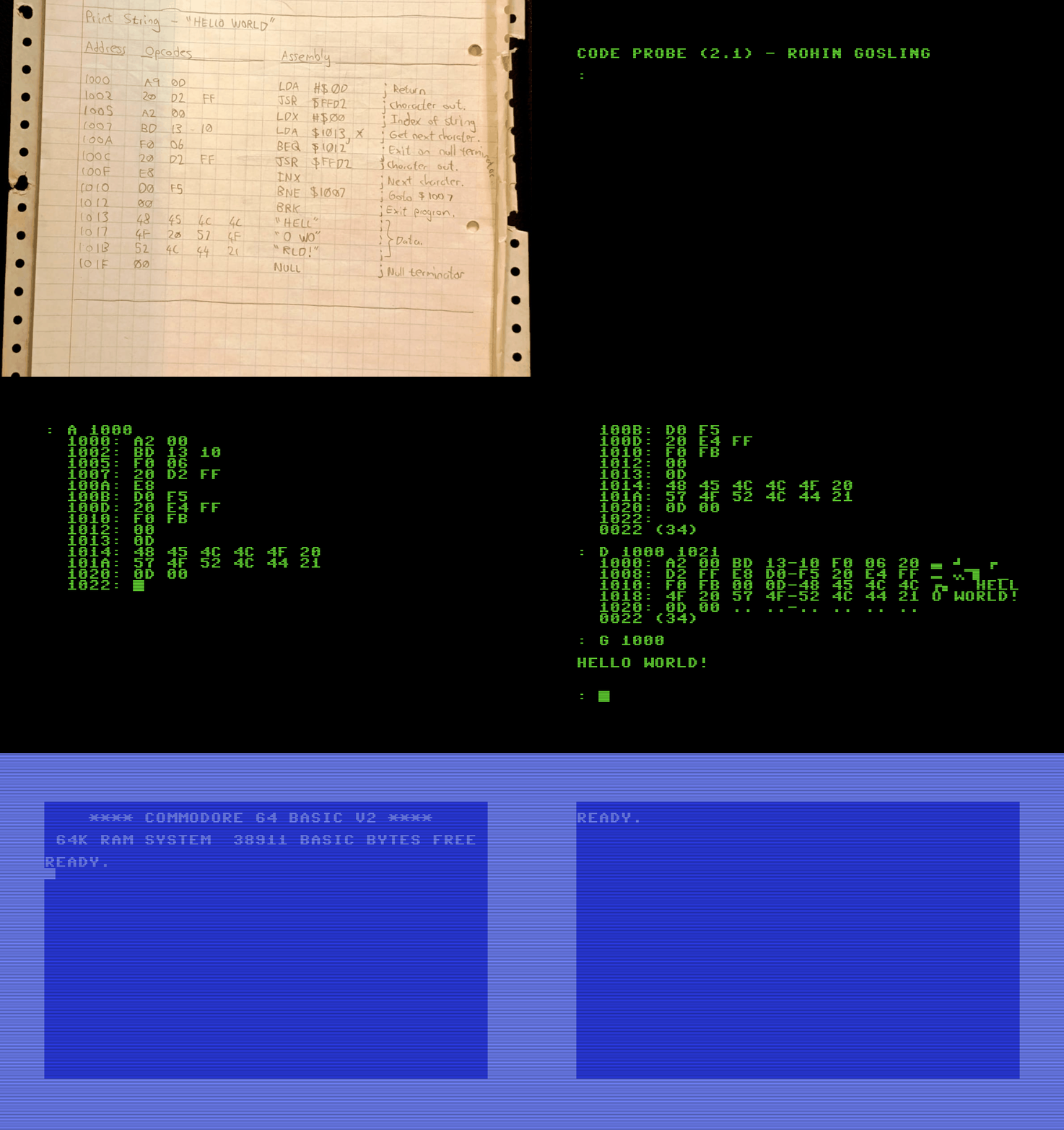
HELLO is one of the demo programs on the distribution disk image (see Disk Image Listing). It writes "HELLO WORLD!" to the screen and terminates with BRK, which hands control back to Code Probe and snapshots the live CPU registers into the shadow block where R can read them.
For deeper walkthroughs, including patching live code, writing machine language programs, fill-and-copy recipes, save/load round-trips, and shadow-register manipulation, see docs/user-manual.pdf.
📂 Project Structure
The repository layout matches the released distribution exactly — what you see here is what ships in the GitHub release archive.
code-probe-c64/
├── LICENSE
├── README.md
├── build/
│   └── codeprobe.prg
├── dist/
│   └── code-probe-2.1.d64
├── docs/
│   └── user-manual.pdf
├── images/
│   ├── animation-1.gif
│   └── animation-2.gif
└── src/
    └── codeprobe.asm
src/ holds the 6502 assembly source; build/ the pre-built .prg; dist/ the distribution disk image; docs/ the rendered user manual; images/ the demo GIFs and supporting images.
💻 Building From Source
Code Probe is a single-file assembly project built with Kick Assembler. Java is required.
Assemble:
java -jar KickAss.jar src/codeprobe.asm -odir build
or, on Windows, run the supplied driver:
build-code-probe.bat
The build produces build/codeprobe.prg — a PRG that loads at $C000
Questions
What is code-probe-c64?
rohingosling/code-probe-c64 is a public repo on GitHub by rohingosling. A machine language monitor for the Commodore 64.
Is code-probe-c64 open source?
It declares the MIT license on GitHub.
Does code-probe-c64 run on macOS, Windows or Linux?
Its maker tagged it for Windows and Linux. That is declared by the maker; Take My Repo has not tested it.
How do I install code-probe-c64?
Open "Take it" on its page: Take My Repo writes an install plan for your machine and hands it to your AI agent (Claude Code, Codex or Cursor), which asks you before each step. Take My Repo has not tested it on any machine.