
term-wrapper
Terminal emulator with web backend - PTY-based terminal sessions via HTTP/WebSocket APIs
- 12
- MIT
- 10 mo ago
Repo rom1504/term-wrapper, read from GitHub 15 min ago. rom1504 has not joined Take My Repo.
In short
rom1504/term-wrapper is a public repo on GitHub by rom1504. Terminal emulator with web backend - PTY-based terminal sessions via HTTP/WebSocket APIs. It declares the MIT license on GitHub. It is written mainly in Python, has 12 stars and last changed on 2026-01-20. Nobody has reviewed it on Take My Repo yet, which says nothing about its quality. Read from GitHub on 2026-11-24.
Term Wrapper
A full-featured terminal emulator with web backend that can run any TUI (Text User Interface) application and control it via HTTP/WebSocket APIs.
Recent Updates
v0.7.3 (2026-01-20) - 🎉 Mobile touch scrolling now works! Fixed critical bug preventing touch gestures from scrolling on mobile devices. Verified on Android 13 emulator. All 56 JavaScript tests passing.
v0.7.2 (2026-01-20) - Added comprehensive JavaScript testing infrastructure with Jest. 56 tests covering unit tests, integration tests, and mobile emulation.
See CHANGELOG.md for complete release history.
Features
- PTY-based Terminal Emulation: Full pseudo-terminal support for running terminal applications
- FastAPI Backend: RESTful API and WebSocket endpoints for terminal control
- Session Management: Create, manage, and control multiple terminal sessions
- CLI Subcommands: Scriptable terminal control from bash/shell without writing Python
- Python Client Library: High-level primitives (wait_for_text, wait_for_quiet, get_text)
- Comprehensive Tests: 118 tests covering unit, integration, and e2e scenarios
What's Supported
✅ Fully Working
- Simple commands:
ls,cat,echo, shell scripts - Interactive programs: Python REPL, bash, interactive shells
- Text editors:
vim(fully tested with comprehensive test suite) - System monitors:
htop(fully tested with screen buffer parsing) - AI CLI tools:
claudeCLI (tested with both print and interactive modes) - Full-screen TUI apps: Complete support for any terminal application
- ANSI colors & formatting: Complete support for escape sequences
- Terminal resize: Dynamic window resizing with SIGWINCH
- Multiple sessions: Concurrent terminal sessions with session management
🌐 Optional Web Frontend
The included web frontend (frontend/) serves as a universal web mirror for any TUI application:
- Access any terminal app through your browser with full rendering
- Built with xterm.js for complete ANSI escape sequence support
- Mobile-friendly with touch scrolling - Run TUI apps on phones/tablets with natural swipe gestures (v0.7.3+)
- Not required - the REST/CLI API works standalone for programmatic control
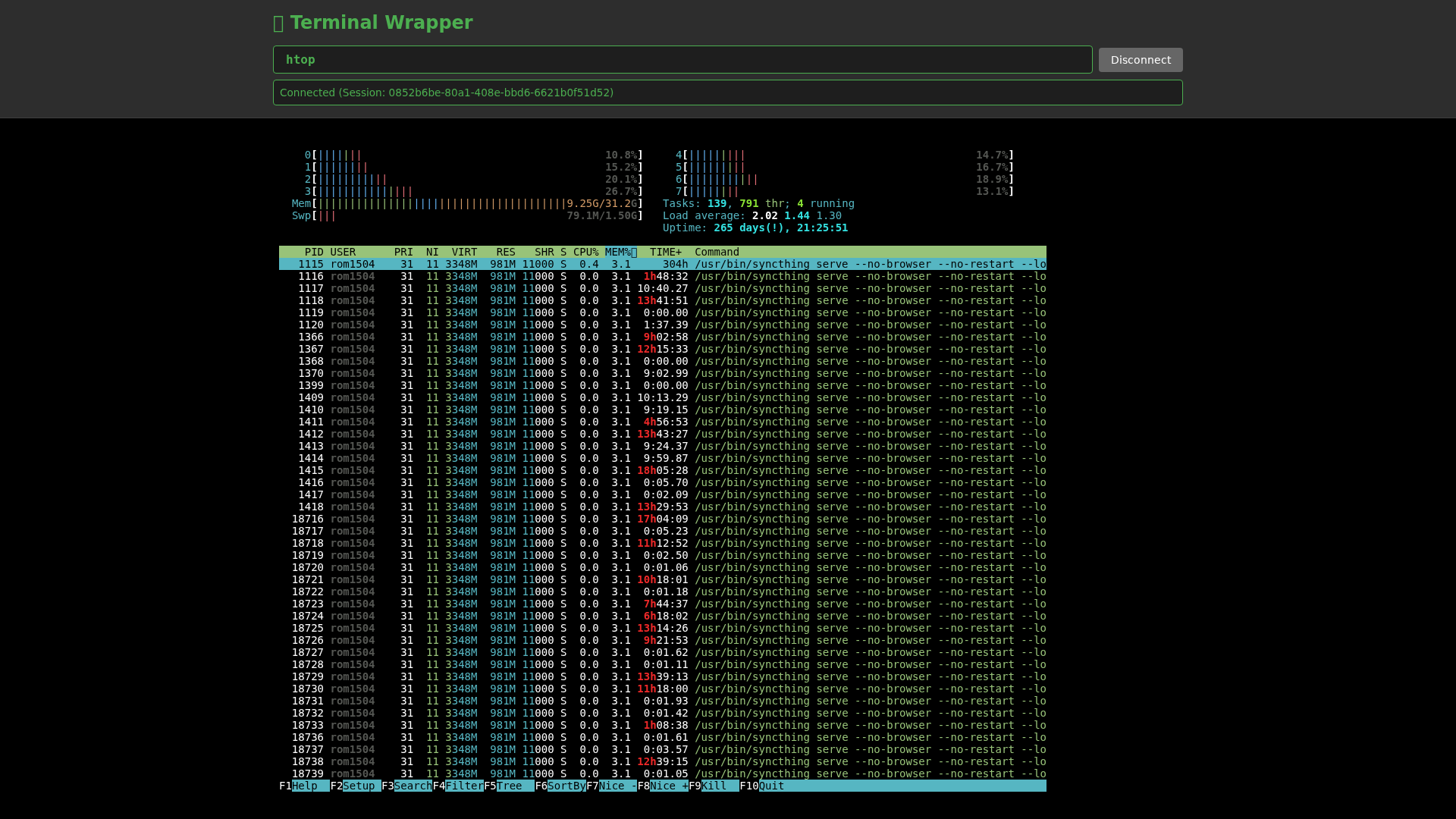
Example: htop running in the web terminal UI
Architecture
┌─────────────────┐
│   CLI Client    │ ← Python client for interactive control
└────────┬────────┘
         │ HTTP/WebSocket
         ↓
┌─────────────────┐
│  FastAPI Server │ ← Web backend with REST + WebSocket
└────────┬────────┘
         │
         ↓
┌─────────────────┐
│ Session Manager │ ← Manages multiple terminal sessions
└────────┬────────┘
         │
         ↓
┌─────────────────┐
│ PTY Terminal    │ ← Pseudo-terminal for running TUI apps
└────────┬────────┘
         │
         ↓
┌─────────────────┐
│   TUI App       │ ← Any terminal application (vim, htop, etc.)
└─────────────────┘
Installation
From PyPI (Recommended for Users)
pip install term-wrapper
This installs the term-wrapper command:
term-wrapper --help
term-wrapper create htop
The server starts automatically! When you run a term-wrapper command, it automatically starts the backend server if it's not already running. The server picks an available port and saves it to ~/.term-wrapper/port for future commands.
From Source (For Development)
git clone https://github.com/rom1504/term-wrapper.git
cd term-wrapper
uv sync
When developing with uv, prefix commands with uv run:
uv run term-wrapper --help
uv run term-wrapper create htop
Quick Start
Run a TUI App
The server starts automatically when you use the CLI!
Option A: Using CLI Subcommands (Recommended)
# Create a session
SESSION=$(term-wrapper create bash -c "cd /tmp && claude" | python3 -c "import sys, json; print(json.load(sys.stdin)['session_id'])")

# Wait for text to appear
term-wrapper wait-text $SESSION "Welcome" --timeout 10

# Send input (supports \n, \r, \t, \x1b escape sequences)
term-wrapper send $SESSION "create hello.py\r"

# Get clean text output (ANSI codes stripped)
term-wrapper get-text $SESSION

# Wait for output to stabilize
term-wrapper wait-quiet $SESSION --duration 2

# Delete session
term-wrapper delete $SESSION
See all available subcommands:
term-wrapper --help
Note: In development with uv, prefix commands with uv run, e.g., `uv run term-wrapper --help
#### Option B: Using Python Client Library

```python
from term_wrapper.cli import TerminalClient

client = TerminalClient()
session_id = client.create_session(command=["bash"], rows=40, cols=120)

# High-level primitives
client.wait_for_text(session_id, "Welcome", timeout=10)
client.write_input(session_id, "ls -la\r")
text = client.get_text(session_id)  # Clean text, ANSI stripped
client.wait_for_quiet(session_id, duration=2)  # Wait for stability

client.delete_session(session_id)
client.close()
Option C: Using HTTP API Directly
# Create a session
curl -X POST http://localhost:8000/sessions \
  -H "Content-Type: application/json" \
  -d '{"command": ["python3", "examples/simple_tui.py"], "rows": 24, "cols": 80}'

# Returns: {"session_id": "xxx-xxx-xxx"}

# Get output
curl http://localhost:8000/sessions/{session_id}/output

# Send input
curl -X POST http://localhost:8000/sessions/{session_id}/input \
  -H "Content-Type: application/json" \
  -d '{"data": "+"}'

# Delete session
curl -X DELETE http://localhost:8000/sessions/{session_id}
CLI Subcommands
The term-wrapper CLI command is installed automatically when you install the package via pip. It provides scriptable terminal control without writing Python code. All commands output JSON for easy parsing.
Installation: The CLI entry point is defined in pyproject.toml as:
[project.scripts]
term-wrapper = "term_wrapper.cli:sync_main"
After pip install term-wrapper, the term-wrapper command will be available in your PATH. During development with uv, use uv run term-wrapper.
Available Subcommands
# Session Management
term-wrapper create [--rows N] [--cols N] [--env JSON] COMMAND...
term-wrapper list
term-wrapper info SESSION_ID
term-wrapper delete SESSION_ID

# Input/Output
term-wrapper send SESSION_ID TEXT           # Supports \n, \r, \t, \x1b
term-wrapper get-output SESSION_ID          # Raw output with ANSI codes
term-wrapper get-text SESSION_ID            # Clean text (ANSI stripped)
term-wrapper get-screen SESSION_ID          # Parsed 2D screen buffer

# Waiting Primitives
term-wrapper wait-text SESSION_ID TEXT [--timeout SECS]
term-wrapper wait-quiet SESSION_ID [--duration SECS] [--timeout SECS]

# Interactive
term-wrapper attach SESSION_ID              # WebSocket interactive mode
term-wrapper web SESSION_ID                 # Open session in browser

# Server Management
term-wrapper stop                           # Stop the background server
Quick Example: Open Session in Browser
# Create a session
SESSION=$(term-wrapper create htop | python3 -c "import sys, json; print(json.load(sys.stdin)['session_id'])")

# Open it in your browser - that's it!
term-wrapper web $SESSION
Shell Script Example
#!/bin/bash
# Automate vim file editing

SESSION=$(term-wrapper create vim myfile.txt | \
          python3 -c "import sys, json; print(json.load(sys.stdin)['session_id'])")

# Enter insert mode
term-wrapper send $SESSION "i"
sleep 0.3

# Type content
term-wrapper send $SESSION "Hello World\nLine 2"
sleep 0.5

# Save and quit (ESC + :wq)
term-wrapper send $SESSION "\x1b"
term-wrapper send $SESSION ":wq\r"
sleep 0.5

# Cleanup
term-wrapper delete $SESSION
See examples/ directory for more examples with vim, htop, and Claude Code.
Python Client Library
The TerminalClient class provides high-level primitives for terminal control:
from term_wrapper.cli import TerminalClient

client = TerminalClient(base_url="http://localhost:8000")

# Session management
session_id = client.create_session(command=["bash"], rows=40, cols=120)
sessions = client.list_sessions()
info = client.get_session_info(session_id)
client.delete_session(session_id)

# Input/Output
client.write_input(session_id, "ls -la\r")
output = client.get_output(session_id, clear=True)
text = client.get_text(session_id, strip_ansi_codes=True)
screen = client.get_screen(session_id)  # 2D screen buffer

# Waiting primitives
client.wait_for_text(session_id, "username:", timeout=10)
client.wait_for_condition(session_id, lambda text: "done" in text, timeout=30)
client.wait_for_quiet(session_id, duration=2.0, timeout=30)

# Incremental reading
new_lines = client.get_new_lines(session_id)
client.mark_read(session_id)

client.close()
API Reference
REST Endpoints
POST /sessions- Create a new terminal sessionGET /sessions- List all active sessionsGET /sessions/{id}- Get session informationDELETE /sessions/{id}- Delete a sessionPOST /sessions/{id}/input- Send input to terminalPOST /sessions/{id}/resize- Resize terminal windowGET /sessions/{id}/output- Get raw terminal outputGET /sessions/{id}/screen- Get parsed 2D screen buffer (clean text)
WebSocket Endpoint
WS /sessions/{id}/ws- Real-time bidirectional terminal I/O
Testing
Run all tests:
uv run pytest tests/ -v
Run specific test suites:
# Unit tests
uv run pytest tests/test_terminal.py tests/test_api.py -v

# End-to-end tests
uv run pytest tests/test_e2e.py -v

# Integration tests with TUI apps
uv run pytest tests/test_ink_integration.py -v

# Vim tests
uv run pytest tests/test_vim.py -v
Application Reports
We've tested various TUI applications with detailed reports:
| Application | Status | Report | Tests |
|---|---|---|---|
| vim | ✅ Fully Functional | reports/vim_report.md | tests/test_vim.py |
| htop | ✅ Fully Functional | reports/htop_report.md | tests/test_htop.py |
| Claude CLI | ✅ Fully Functional | reports/claude_report.md | tests/test_claude.py |
Each report includes:
- Test methodology and results
- Usage examples (HTTP & WebSocket)
- Technical details (escape sequences, commands)
- Performance metrics
- Best practices
Want to add a new application? See reports/TESTING_GUIDE.md for a comprehensive step-by-step guide on testing and documenting new TUI applications.
Claude Code Skill
Want to use term-wrapper with Claude Code? Check out the Term Wrapper skill!
The skill enables Claude to control any terminal application programmatically. See skill/SKILL.md for complete instructions on using term-wrapper with CLI commands, Python, or HTTP APIs.
Web Frontend
Access any terminal application through your browser with the included web frontend.
Quick Start
The server starts automatically when you use the CLI. To access the web frontend:
# Option 1: Use any term-wrapper command (auto-starts server)
term-wrapper create bash

# Find the port (saved in ~/.term-wrapper/port)
PORT=$(cat ~/.term-wrapper/port)

# Open in browser
http://localhost:$PORT/
Or start the server manually for development:
# Start server on fixed port
uv run python main.py

# Open in browser
http://localhost:8000/
Launch Any Application
Use URL parameters to launch specific apps:
# Launch htop
http://localhost:8000/?cmd=htop

# Launch vim with a file
http://localhost:8000/?cmd=vim&args=/tmp/myfile.txt

# Launch Python REPL
http://localhost:8000/?cmd=python3
One-Command Launch
Shell function to start server and open browser automatically:
# Add to ~/.bashrc or ~/.zshrc
tweb() {
    local cmd="${1:-bash}"
    if ! curl -s http://localhost:8000/health > /dev/null 2>&1; then
        cd /path/to/term_wrapper && uv run python main.py > /tmp/term-wrapper.log 2>&1 &
        sleep 2
    fi
    open "http://localhost:8000/?cmd=${cmd}"  # or xdg-open on Linux
}

# Usage
tweb htop                # Launch htop in browser
tweb vim /tmp/test.txt   # Launch vim in browser
Full documentation: See frontend/README.md for complete guide including mobile support, customization, and troubleshooting.
Example TUI Apps
Interactive htop Demo (examples/htop_demo.py)
Demonstrates full interaction with htop system monitor:
uv run python examples/htop_demo.py
Features:
Questions
What is term-wrapper?
rom1504/term-wrapper is a public repo on GitHub by rom1504. Terminal emulator with web backend - PTY-based terminal sessions via HTTP/WebSocket APIs.
Is term-wrapper open source?
It declares the MIT license on GitHub.
Does term-wrapper run on macOS, Windows or Linux?
Its maker has not tagged a system, so it is unknown here. Its README says what it needs.
How do I install term-wrapper?
Open "Take it" on its page: Take My Repo writes an install plan for your machine and hands it to your AI agent (Claude Code, Codex or Cursor), which asks you before each step. Take My Repo has not tested it on any machine.