
pushd
Blazing fast multi-protocol mobile and web push notification service
- 1.2k
- MIT
- 6 y ago
Repo rs/pushd, read from GitHub 27 min ago. rs has not joined Take My Repo.
In short
rs/pushd is a public repo on GitHub by rs. Blazing fast multi-protocol mobile and web push notification service. It declares the MIT license on GitHub. It is written mainly in CoffeeScript, has 1,153 stars and last changed on 2020-07-15. Nobody has reviewed it on Take My Repo yet, which says nothing about its quality. Read from GitHub on 2026-11-24.
Universal Mobile Push Daemon
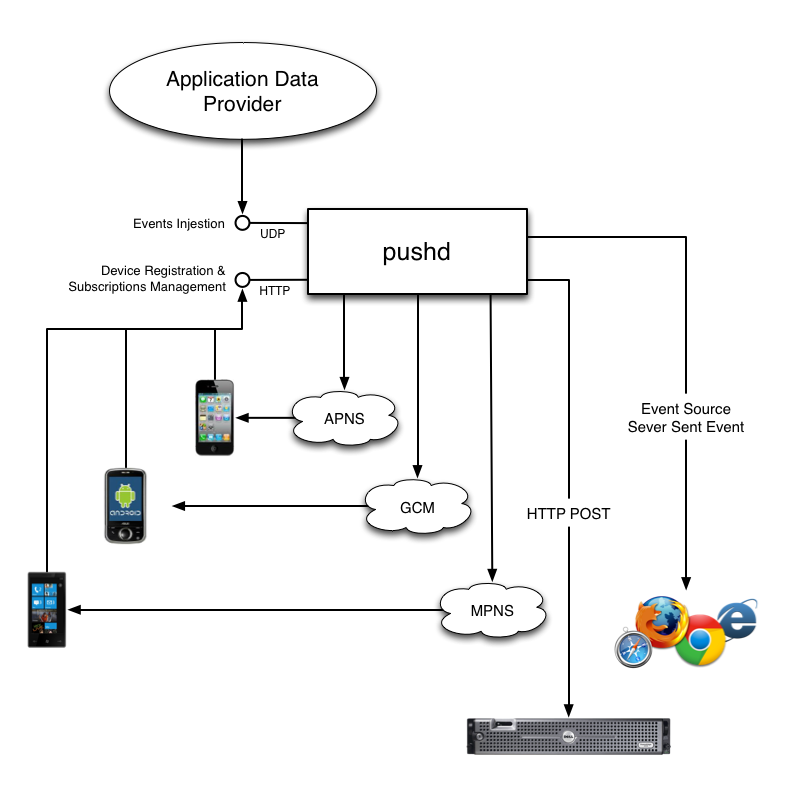
Pushd is a pluggable unified push server for server-side notification to mobile native apps, web apps etc. With pushd you can send push notifications to any supported mobile platform, web app or HTTP server from a single entry point. Pushd takes care of which device is subscribed to which event and is designed to support an unlimited amount of subscribable events.
Features
- Multi protocols APNs (iOS), C2DM/GCM (Android), MPNS (Windows Phone), HTTP POST, EventSource, WNS (Windows Notification Service)
- Pluggable protocols
- Register unlimited number of subscribers (device)
- Subscribe to unlimited number of events
- Automatic badge increment for iOS
- Silent subscription mode (no alert message, only data or badge increment)
- Server side message translation
- Message template
- Broadcast
- Direct messages
- GCM multicast messaging
- Events statistics
- Automatic failing subscriber unregistration
- Built-in Apple Feedback API handling
- Redis backend
- Fracking fast!
Installation
- Install redis, node.js, npm and coffeescript.
- Clone the repository:
git clone git://github.com/rs/pushd.git && cd pushd - Install dependancies:
npm install - Configure the server:
cp settings-sample.coffee settings.coffee && vi settings.coffee - Start redis:
redis-server - Start the server:
sudo coffee pushd.coffee
Glossary
Application Data Provider: The service emittingEvents(i.e: other users actions) to be notified toSubscribers(i.e.: mobiles app)Subscribers: Entities wanting to be notified about certain type ofEvents. There's two kind of subscribers: offline subscribers and online subscribers. The current implementation of pushd does only support offline subscribers. Difference between online and offline subscribers is that online subscribers are required to stay connected to maintain subscriptions while offline subscribers are persisted in pushd database, and only have to instruct pushd when they change their status (subscriptions etc.).Event: A string with associated metadata representing an action performed on theApplication Data Provider. Events are emitted by theApplication Data Provider(i.e.: a web site or your application's server-side backend), andSubscriberscan subscribe to them in order to be notified by theProtocolof their choice.Protocol: A communication standard to send notification back to theSubscriber. Protocols are pluggable in pushd so you can add your own custom protocol. By default, pushd is bundled with support for APNs (iOS), C2DM/GCM (Android) and MPNS (Windows Phone). More protocols will be added in the future.
Getting Started
Register
At first launch, your app must register with the push notification service to get a registration id. It then provides this registration id to pushd in exchange for a subscriber id (This subscriber id will be used with all further communications with pushd). Some informations can be sent with the request to pushd like: subscriber language, version or current badge value.
Subscriber registration is performed through a HTTP REST API (see later for more details). Here is an example of a subscriber registration simulated using the curl command. As an example, we will register the iOS device with the registration id FE66489F304DC75B8D6E8200DFF8A456E8DAEACEC428B427E9518741C92C6660. For iOS, we have to specify the apns protocol. We also set the subscriber language to fr for French and init the badge to 0. We suppose the command is run on the same machine as pushd:
$ curl -d proto=apns \
       -d token=FE66489F304DC75B8D6E8200DFF8A456E8DAEACEC428B427E9518741C92C6660 \
       -d lang=fr \
       -d badge=0 \
       -d category=show \
       -d contentAvailable=true \
       http://localhost/subscribers
In reply, we get the following JSON structure:
{
    "proto":"apns",
    "token":"fe66489f304dc75b8d6e8200dff8a456e8daeacec428b427e9518741c92c6660",
    "lang":"fr",
    "badge":0,
    "updated":1332953375,
    "created":1332953375,
    "id":"J8lHY4X1XkU"
}
Your app must save the id field value, it will be used for all further communication with pushd.
Note: If you perform a registration using an already registered token, the server will respond with the same subscriber id and will just update the transmitted informations. You may choose to always register the given token instead of calling the ping endpoint.
Ping
Once the app is registered, it has to ping the pushd server each time the app is launched to let pushd know the subscriber still exists. The subscriber may have been unregistered automatically in case of repeated errors for instance. To ping pushd, you perform a POST on the /subscriber/SUBSCRIBER_ID url as follow:
$ curl -d lang=fr -d badge=0 http://localhost/subscriber/J8lHY4X1XkU
On iOS, you must update the badge value to inform pushd the user read the pending notifications. You may call this URL several times, each time the badge is updated, so the next notification will still increment the badge with the correct value.
Subscriptions
Depending on your service, your app may auto-subscribe the subscriber to some events or ask the user which events he wants to be subscribed to (an event is identified as an arbitrary string meaningful for your service). For each event your app wants to be subscribed to, a call to the pushd API must be performed.
For instance, if your app is news related, you may want to create one subscriptable event for each news category. So if your user wants to subscribe to sport events, the following call to pushd has to be performed:
$ curl -X POST http://localhost/subscriber/J8lHY4X1XkU/subscriptions/sport
You may later unsubscribe by switching from the POST to the DELETE method.
You may also prefer to set all subscriptions at once by using the bulk subscription endpoint:
$ curl -H 'Content-Type: application/json' -d '{"sport":{}, "music":{}}' http://localhost/subscriber/J8lHY4X1XkU/subscriptions
We recommend to auto-subscribe your users to some global event like for instance a country event if your app is international. This will let you send targeted messages to all of a given country’s users.
Typical App Launch Tasks
- Obtain device token from the OS
- Post the token on
/subscriber/:tokenwith parameters likelang,badgeandversion - Extract the
idfrom the response (you don't need to store it, treat it like a session id) - Resubscribe the device to all its previously subscribed events by posting on
/subscriber/:id/subscriptions
This workflow ensures device stay registered and subscriptions are always up-to-date.
Event Ingestion
Once subscribers are registered, your service may start to send events. Events are composed of a message, optionally translated in several languages and some additional data to be passed to your application. To send an event, you may either use the HTTP REST API or send UDP datagrams.
You don't need to create events before sending them. If nobody is subscribed to a given event, it will be simply ignored. It's thus recommended to send all the possible types of events and let your application choose which to subscribe to.
Here we will send a message to all subscribers subscribed to the sport event:
$ curl -d msg=Test%20message http://localhost/event/sport
Event Source
Pushd supports the Event Source protocol, also known as Server Sent Events. This allows your web application to benefits from the same pushed event than your native apps.
This protocol is very different from other pushd supported protocol because it doesn't involve subscriber registration nor stored subscriptions. The web service connects to the pushd server and declars which event it is interested in, and then pushd will push subscribed events in this same connections until the client stays connected.
You may want to use Yaffle EventSource polyfill on the client side in order to support CORS requests with older browsers (see code example bellow).
When Event Source is enabled, a new /subscribe API endpoint is available. Use the events query-string parameter with a list of events separated by spaces:
> GET /subscribe?events=event1+event2+event3 HTTP/1.1
> Accept: text/event-stream
>
---
< HTTP/1.1 200 OK
< Content-Type: text/event-stream
< Cache-Control: no-cache
< Access-Control-Allow-Origin: *
< Connection: close
<
... some time passes ...
< data: {"event": "event1", "title": {"default": "Title", "fr": "Titre"}, "message": {...}, "data": {"var1": "val1", "var2": "val2"}}
... some time passes ...
< data: {"event": "event2", "title": {"default": "Title", "fr": "Titre"}, "message": {...}, "data": {"var1": "val1", "var2": "val2"}}
Or in Javascript:
<script src="https://raw.github.com/Yaffle/EventSource/master/eventsource.js"></script>
<script>
var es = new EventSource('http://localhost/subscribe?events=event1+event2+event3');
es.addEventListener('message', function (e)
{
    var event = JSON.parse(e.data);
    document.body.appendChild(document.createTextNode(event.message.default));
    document.body.appendChild(document.createElement('br'));
});
</script>
See codepen example: http://codepen.io/rs/pen/xAjpy
API
Subscriber Registration
Register a subscriber ID
Register a subscriber by POSTing on /subscribers with some subscriber information like registration id, protocol, language, OS version (useful for Windows Phone OS) or initial badge number (only relevant for iOS, see bellow).
> POST /subscribers HTTP/1.1
> Content-Type: application/x-www-form-urlencoded
>
> proto=apns&
> token=FE66489F304DC75B8D6E8200DFF8A456E8DAEACEC428B427E9518741C92C6660&
> lang=fr&
> badge=0
>
---
< HTTP/1.1 201 Created
< Location: /subscriber/JYJ1ehuEHbU
< Content-Type: application/json
<
< {
<   "created":1332638892,
<   "updated":1332638892,
<   "proto":"apns",
<   "token":"FE66489F304DC75B8D6E8200DFF8A456E8DAEACEC428B427E9518741C92C6660",
<   "lang":"fr",
<   "badge":10
< }
Carriage returns are added for readability
Mandatory parameters:
proto: The protocol to be used for the subscriber. Use one of the following values:apns: iOS (Apple Push Notification service)gcmorc2dm: Android (Cloud to subscriber Messaging)mpnsWindow Phone (Microsoft Push Notification Service)
token: The device registration id delivered by the platform's push notification service
Allowed parameters:
lang: The language code for the of the subscriber. This parameter is used to determine which message translation to use when pushing text notifications. You may use the 2 chars ISO code or a complete locale code (i.e.: en_CA) or any value you want as long as you provide the same values in your events. See below for info about events formatting.badge: The current app badge value. This parameter is only applicable to iOS for which badge counters must be maintained server side. On iOS, when a user read or loads more unread items, you must inform the server of the badge's new value. This badge value will be incremented automatically by pushd each time a new notification is sent to the subscriber.category: The category for the push notification action. This parameter is only applicable to iOS8.contentAvailable: The 'content-available' flag value. This parameter is only applicable to iOS7 and applications which support Silent Remote Notifications or Newsstand capability. With iOS7 it is possible to have the application wake up before the user opens the app.version: This is the OS subscriber version. This parameter is only needed by Windows Phone OS. By setting this value to 7.5 or greater anmpnssubscriber ids will enable new MPNS push features.
Return Codes
200subscriber previously registered201subscriber successfully registered400Invalid specified registration id or protocol
Update subscriber Registration Info
On each app launch, it is highly recommended to update your subscriber information in order to inform pushd your subscriber is still alive and registered for notifications. Do not forget to check if the app notifications hasn't been disabled since the last launch, and call DELETE if so. If this request returns a 404 error, it means your subscriber registration has been cancelled by pushd. You must then delete the previously obtained subscriber id and restart the registration process for this subscriber. Registration can be cancelled after pushd error count for the subscriber reached a predefined threshold or if the target platform push service informed pushd about an inactive subscriber (i.e. Apple Feedback Service).
> POST /subscriber/SUBSCRIBER_ID HTTP/1.1
> Content-Type: application/x-www-form-urlencoded
>
> lang=fr&badge=0
>
---
< HTTP/1.1 204 No Content
Allowed parameters:
lang
Questions
What is pushd?
rs/pushd is a public repo on GitHub by rs. Blazing fast multi-protocol mobile and web push notification service.
Is pushd open source?
It declares the MIT license on GitHub.
Does pushd run on macOS, Windows or Linux?
Its maker has not tagged a system, so it is unknown here. Its README says what it needs.
How do I install pushd?
Open "Take it" on its page: Take My Repo writes an install plan for your machine and hands it to your AI agent (Claude Code, Codex or Cursor), which asks you before each step. Take My Repo has not tested it on any machine.
Is pushd still maintained?
Its last change on GitHub was on 2020-07-15. Take My Repo does not judge from that whether it is maintained.