
rt-carousel
An Interactivity API-powered carousel system for the WordPress Block Editor. Designed for enterprise-grade performance and extensibility.
- 45
- GPL-2.0
- 5 d ago
Repo rtCamp/rt-carousel, read from GitHub 6 h ago. rtCamp has not joined Take My Repo.
In short
rtCamp/rt-carousel is a public repo on GitHub by rtCamp. An Interactivity API-powered carousel system for the WordPress Block Editor. Designed for enterprise-grade performance and extensibility. It declares the GPL-2.0 license on GitHub. It is written mainly in TypeScript, has 45 stars and last changed on 2026-11-17. Nobody has reviewed it on Take My Repo yet, which says nothing about its quality. Read from GitHub on 2026-11-22.
rtCarousel – Flexible Carousel & Slider Block for Images, Videos, Testimonials & More
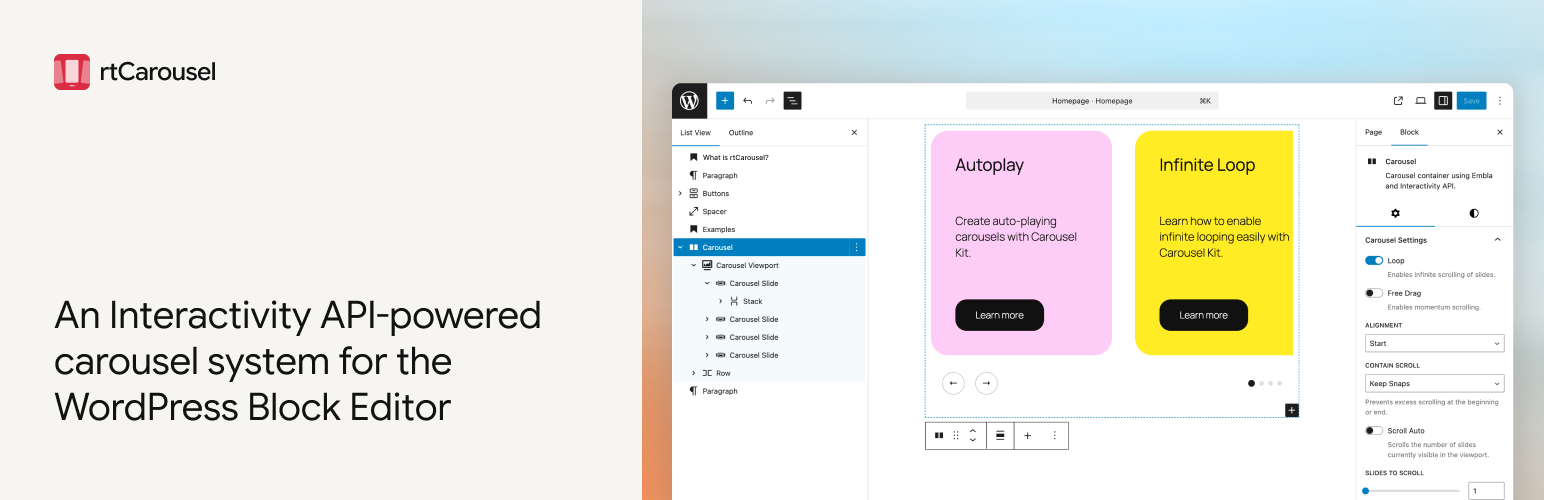
A modular, high-performance carousel block for WordPress, powered by the Interactivity API and Embla Carousel.
Easily create dynamic, accessible, and customizable carousels for any content type—posts, testimonials, images, and more. Designed for speed, flexibility, and seamless integration with the WordPress block editor.
Features
- Flexible Compound Block Architecture: Mix and match any blocks inside the carousel.
- High Performance: Viewport & Slide Engine powered by Embla Carousel.
- Interactivity API: Reactive state management with
data-wp-interactive. - Dynamic Content: Full support for WordPress Query Loop and Terms Query blocks.
- Accessibility: W3C-compliant roles, labels, keyboard navigation, and reduced-motion support.
- RTL Support: Built-in support for Right-to-Left languages.
Documentation
- Installation: How to install via ZIP or Composer.
- Usage Guide: Configuration, Attributes, and Patterns.
- Styling & Theming: CSS Variables and Customization.
- Developer API: Context, State, and Interactivity API integration.
- Contributing: Guidelines for contributing to the project.
- Command Reference: Build commands and tools.
Requirements
| Requirement | Minimum | Recommended |
|---|---|---|
| WordPress | 6.6+ | 7.0+ |
| PHP | 8.2+ | 8.2+ |
| Gutenberg | Not required | — |
Note: This plugin works with WordPress core—no Gutenberg plugin required.
Browser Support
rtCarousel supports all modern browsers:
| Browser | Minimum Version |
|---|---|
| Chrome | 80+ |
| Firefox | 74+ |
| Safari | 14+ |
| Edge | 80+ |
Note: Internet Explorer is not supported. The plugin requires ES2020+ features (optional chaining, nullish coalescing) and CSS custom properties.
Block Structure
The plugin provides a suite of blocks that work together:
- Carousel (Parent): The main wrapper and controller.
- Carousel Viewport: The visible area that handles scrolling.
- Carousel Slide: A wrapper for individual slides.
- Carousel Controls: Previous/Next buttons.
- Carousel Dots: Pagination indicators.
FAQ
Does it work with Full Site Editing (FSE)?
Yes! rtCarousel is fully compatible with Full Site Editing. You can use the carousel block in templates, template parts, and anywhere blocks are supported.
Can I nest other blocks inside slides?
Absolutely. Each slide is a container that accepts any WordPress block—images, paragraphs, groups, columns, and even other third-party blocks.
How do I add content to an empty Carousel Viewport?
Use Add Slide for static/manual slides, Add Query Loop for dynamic post slides, or Add Terms Query for dynamic taxonomy term slides.
Does it support the Query Loop and Terms Query blocks?
Yes. Add a Query Loop or Terms Query block inside the Carousel Viewport, and each post or term becomes a slide automatically. You can also start from the bundled Query Loop Carousel or Terms Query Carousel patterns.
Do not place Query Loop or Terms Query inside a Carousel Slide block. Their generated posts or terms are used as the carousel slides automatically; Carousel Slide is intended for static or manually created slide content.
Is it accessible?
Yes. The carousel follows W3C accessibility guidelines with proper ARIA roles, labels, and full keyboard navigation support. It also respects the reduced-motion setting: slides, dots and the progress bar change without animation, and Autoplay / Auto Scroll do not start.
Can I have multiple carousels on the same page?
Yes. Each carousel instance maintains its own independent state.
What data is removed on uninstall?
On uninstall, rtCarousel removes its cached pattern transient (rt_carousel_patterns_cache). It does not remove your posts or block content.
Changelog
See CHANGELOG.md for full release history.
Live Demo
🚀 Try the Interactive Demo in WordPress Playground
Feature Request
Have a feature request? Open an issue on GitHub.
Contributors
- rtCamp
- Danish Shakeel
- Masud Rana
- Gagan Deep Singh
- Utsav Patel
- Sagar Tamang
- Aviral Mittal
- Vishal Kotak
- Raj Patel
- Aishwarrya Pande
License
GPL-2.0-or-later
Questions
What is rt-carousel?
rtCamp/rt-carousel is a public repo on GitHub by rtCamp. An Interactivity API-powered carousel system for the WordPress Block Editor. Designed for enterprise-grade performance and extensibility.
Is rt-carousel open source?
It declares the GPL-2.0 license on GitHub.
Does rt-carousel run on macOS, Windows or Linux?
Its maker has not tagged a system, so it is unknown here. Its README says what it needs.
How do I install rt-carousel?
Open "Take it" on its page: Take My Repo writes an install plan for your machine and hands it to your AI agent (Claude Code, Codex or Cursor), which asks you before each step. Take My Repo has not tested it on any machine.
Is rt-carousel still maintained?
Its last change on GitHub was on 2026-11-17. GitHub counts 41 open issues and pull requests. Take My Repo does not judge from that whether it is maintained.
What do people who ran rt-carousel say?
Nobody has reviewed it on Take My Repo yet, which says nothing about its quality.