claude-hud
A Claude Code plugin that shows what's happening - context usage, active tools, running agents, and todo progress
- 29k
- JavaScript
- MIT
- 2 d ago
StackOverflow for PowerToys Run. Instant Access to Millions of Programming Solutions
Repo ruslanlap/PowerToysRun-StackOverflow, read from GitHub 16 h ago. ruslanlap has not joined Take My Repo.
ruslanlap/PowerToysRun-StackOverflow is a public repo on GitHub by ruslanlap. StackOverflow for PowerToys Run. Instant Access to Millions of Programming Solutions. It declares the MIT license on GitHub. It is written mainly in C#, has 2 stars and last changed on 2025-10-03. Nobody has reviewed it on Take My Repo yet, which says nothing about its quality. Read from GitHub on 2026-11-24.
A Claude Code plugin that shows what's happening - context usage, active tools, running agents, and todo progress

Stop alt-tabbing to your browser for every coding question.
Search StackOverflow directly from PowerToys Run → Alt+Space → so python async → Done! ✨

"Stop context-switching to find that solution you saw yesterday"
| ❌ Before | ✅ With StackOverflow Plugin |
|---|---|
| Open browser → Google → StackOverflow → Scroll → Click | Alt+Space → so react hooks → Enter |
| 30+ seconds, lost focus | 2 seconds, zero interruption |
Alt+Space → so python async await           # 🐍 Python questions
Alt+Space → so javascript promises          # 💛 JavaScript help
Alt+Space → so git merge conflict          # 🌿 Git issues
Alt+Space → so sql join types              # 🗄️ Database queries
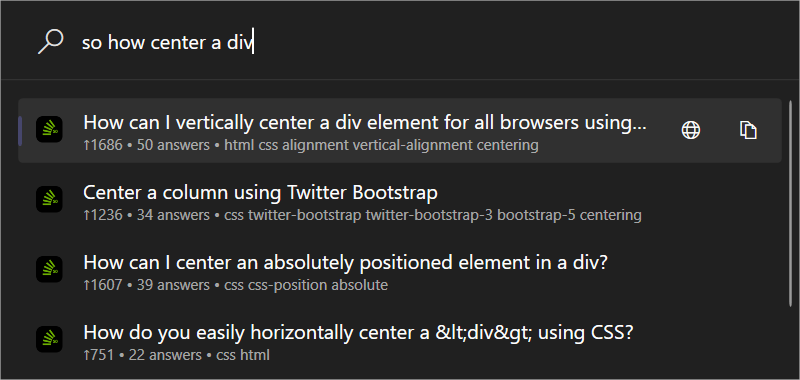
Search results showing vote counts, answer counts, accepted answers, and tags
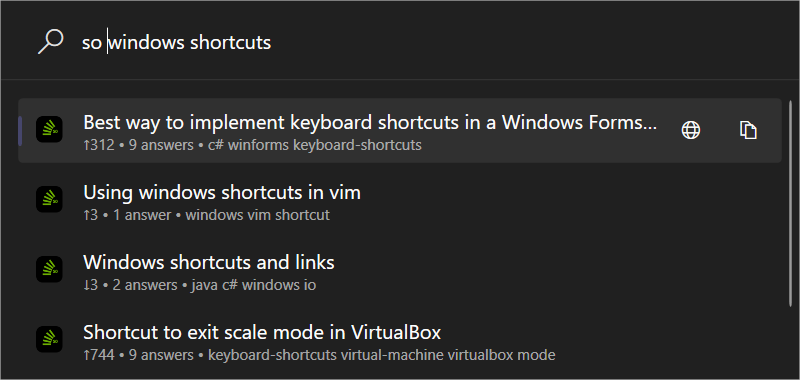
Live search with rich metadata and instant results
⬇️ Ready to boost your productivity?
StackOverflow Plugin brings the world's largest programming Q&A platform directly into PowerToys Run. Search millions of StackOverflow questions without leaving your IDE or terminal. Get instant answers with smart caching, vote counts, accepted answers, and tags—all from Alt+Space → so your question.
FFCA3E1DBB5247549B71A712AF2F03ECso (customizable)

🔍 Instant Search Search StackOverflow without opening your browser |

📊 Rich Metadata Votes, answers, tags, and accepted answer indicators |

⚡ Lightning Fast Smart caching with sub-second responses |

🔗 One-Click Open Press Enter to open in default browser |

💾 Smart Cache 1-hour TTL, 50 queries max LRU eviction |

🔒 Optional API Key Encrypted storage for 10,000 requests/day |
Download the plugin
StackOverflow-1.0.0-x64.zip for 64-bit WindowsStackOverflow-1.0.0-ARM64.zip for ARM64 WindowsExtract to PowerToys plugins directory
Navigate to:
%LOCALAPPDATA%\Microsoft\PowerToys\PowerToys Run\Plugins\
Full path example:
C:\Users\YourName\AppData\Local\Microsoft\PowerToys\PowerToys Run\Plugins\
Extract the downloaded ZIP file here. You should have:
Plugins\StackOverflow\plugin.json
Plugins\StackOverflow\Community.PowerToys.Run.Plugin.StackOverflow.dll
Plugins\StackOverflow\Images\...
Restart PowerToys
Verify installation
Alt+Space to open PowerToys Runso test and press EnterTo remove the plugin:
%LOCALAPPDATA%\Microsoft\PowerToys\PowerToys Run\Plugins\StackOverflow folderChoose your architecture from Latest Releases:
StackOverflow-1.0.0-x64.zip (6.4 MB)StackOverflow-1.0.0-ARM64.zip (6.4 MB)%LOCALAPPDATA%\Microsoft\PowerToys\PowerToys Run\Plugins\StackOverflow
Example:
C:\Users\YourName\AppData\Local\Microsoft\PowerToys\PowerToys Run\Plugins\StackOverflow\
Right-click PowerToys tray icon → Exit → Restart from Start Menu
Hit Alt+Space → Type so python async → See instant results! ✨
Pro Tip: Get an API key for 10,000 requests/day instead of 300! See API Key Setup
# 🐛 Error Lookups
so TypeError: NoneType object is not subscriptable
so CORS error javascript
so NullPointerException java

# 🎯 Language-Specific Questions
so python async await              # Python questions
so javascript promises vs async    # JavaScript comparisons
so c# linq query syntax           # C# questions
so sql window functions           # Database queries

# 🔧 Framework & Tool Help
so react hooks explained
so docker compose networking
so git merge vs rebase
so kubernetes deployment yaml

# 📚 Best Practices & Patterns
so dependency injection best practices
so microservices design patterns
so clean code principles
✅ Good queries:
so python list comprehension syntax
so react useState update object
so sql group by having clause
❌ Avoid:
so help              # Too vague
so a                 # Too short (min 2 chars)
so [very long text exceeding 200 characters...]  # Too long
Increase your rate limit from 300 to 10,000 requests/day with a free API key.
Security: Your API key is stored securely by PowerToys!
📖 Full Guide: See API_KEY_SETUP.md for detailed instructions
git clone https://github.com/ruslanlap/PowerToysRun-StackOverflow.git
cd PowerToysRun-StackOverflow
./build-and-zip.sh  # Creates distribution-ready packages for x64 and ARM64
StackOverflow/
├── Models/              # Domain models (StackOverflowQuestion, SearchQuery, etc.)
├── Services/            # API client, caching, settings management
├── Formatters/          # Result presentation logic
└── Main.cs             # Plugin entry point
Want to contribute?
If this plugin saves you time, consider starring the repo and sharing with fellow developers!
%LOCALAPPDATA%\Microsoft\PowerToys\PowerToys Run\Plugins\StackOverflow plugin.json and DLL files exist in the folderso prefix (or your custom keyword)ruslanlap/PowerToysRun-StackOverflow is a public repo on GitHub by ruslanlap. StackOverflow for PowerToys Run. Instant Access to Millions of Programming Solutions.
It declares the MIT license on GitHub.
Its maker tagged it for Windows. That is declared by the maker; Take My Repo has not tested it.
Microsoft PowerToys is a collection of utilities that supercharge productivity and customization on Windows
Open "Take it" on its page: Take My Repo writes an install plan for your machine and hands it to your AI agent (Claude Code, Codex or Cursor), which asks you before each step. Take My Repo has not tested it on any machine.
Its last change on GitHub was on 2025-10-03. Take My Repo does not judge from that whether it is maintained.
Nobody has reviewed it on Take My Repo yet, which says nothing about its quality.
Take My Repo cannot say: it does not audit code and has not run PowerToysRun-StackOverflow. What is known comes from GitHub. It declares the MIT license on GitHub. Its last change was on 2025-10-03. It has 2 stars, which measure popularity, not safety. Nobody has reviewed it on Take My Repo yet, which says nothing about its quality. Read the source before you run it. With "Take it", your AI agent shows each step and asks you before running it; README text is treated as data, not as instructions.