rea
Reverse engineer anything with agents, from app behavior down to native binaries.
- 478k
- TypeScript
- MIT
- 47 min ago
ICSee runs on small portable devices (smartphones, tablets) and makes reading and object identification easier. Simply, conveniently and always available!
Repo scify/ICSee, read from GitHub 2 h ago. scify has not joined Take My Repo.
scify/ICSee is a public repo on GitHub by scify. ICSee runs on small portable devices (smartphones, tablets) and makes reading and object identification easier. Simply, conveniently and always available! It declares the Apache-2.0 license on GitHub. It is written mainly in Java, has 14 stars and last changed on 2026-08-24. Nobody has reviewed it on Take My Repo yet, which says nothing about its quality. Read from GitHub on 2026-11-25.

ICSee is an application that helps people with visual impairments see more clearly. It is developed by SciFY.
We created an application that allows people with visual impairments to read!
You can watch a video of the application in action here.
With ICSee:
How does it work? ICSee:
It is an application for small portable devices (smart phones, tablets) that will help people with severe visual impairments see more clearly. How? The user simply directs the camera of his/her smartphone or tablet to the point he/she wants and… that was it! The application processes the image on the screen according to the user’s needs (conversion to negative or greyscale, increase the contrast, etc.) and provides in real time an image that is is easier for the user to see! Who is it for? It is intended to be used by people with severe visual impairments. The Application provides an audio tutorial when starting.
The ICSee project involves a software solution for Android hand-held devices. We can support filtering on a camera-streamed image (real-time), applying a wide variety of filters on it.
The minimum SDK version is 16 (Android 4.1).
A device with a camera is required. For the auto-focus feature, the camera should support auto-focus.
This is a Gradle-based project. The required Open-CV library is included in the Android project (see app/build.gradle
file).
Make sure to make a copy of sentry.properties.example:
cp sentry.properties.example sentry.properties
And fill out the fields in the file.
To produce a signed release build, also make a copy of keystore.properties.example:
cp keystore.properties.example keystore.properties
And fill it out with the path to your upload keystore and its credentials. Without this file, assembleRelease /
bundleRelease still work but produce an unsigned build.
This Application is deployed as a normal Android app. To ship a new release to the Play Store:
Locate the existing ICSee upload keystore and its credentials. Play Store updates must be signed with the same upload key as previous releases — signing with a different/newly generated keystore will make Play Console reject the update permanently for this app.
Wire the keystore into the build, if not already set up on your machine:
cp keystore.properties.example keystore.properties
Edit keystore.properties with the path to the keystore file and its credentials:
storeFile=/absolute/path/to/your-existing.jks
storePassword=...
keyAlias=...
keyPassword=...
keystore.properties is gitignored and never committed. Without it, assembleRelease/bundleRelease still
build, but produce an unsigned artifact.
Bump the version — update versionCode and versionName in app/build.gradle.
Build the signed release App Bundle:
./gradlew bundleRelease
The signed .aab is output to app/build/outputs/bundle/release/app-release.aab.
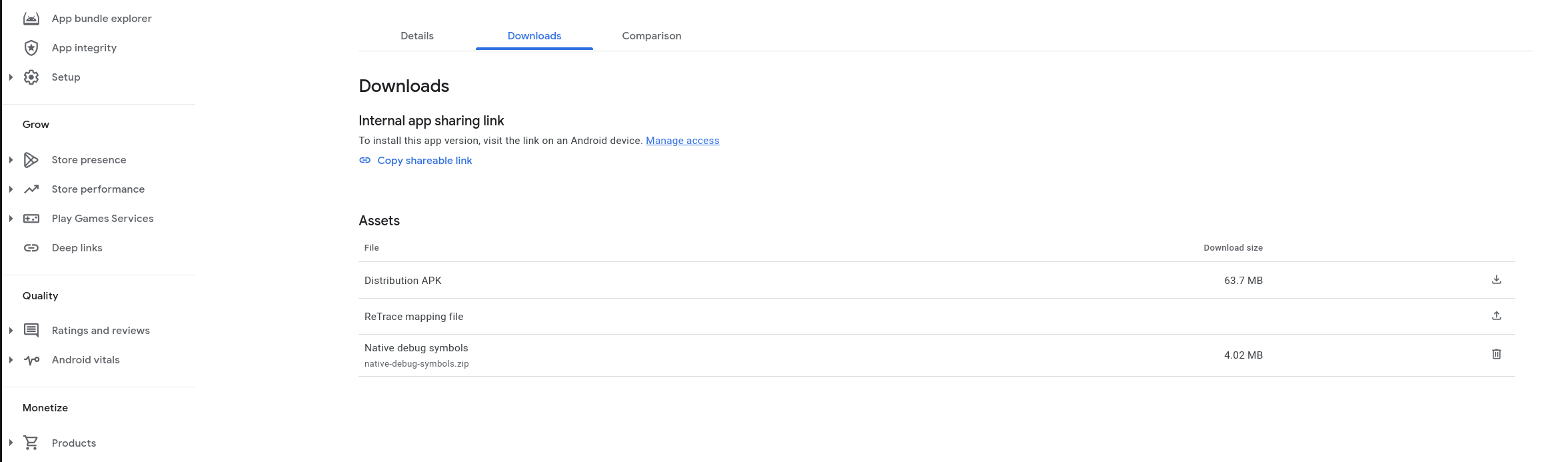
Upload to the Play Console (App bundle explorer → "Create new release") — this is a manual step, not automated by this repo. Also upload the mapping file and native symbols so crashes can be deobfuscated:
Navigate to the "App Bundle Explorer" section of the Play Console, and click on the "Downloads" tab:
app/build/outputs/mapping/release/mapping.txt.app/build/intermediates/merged_native_libs/release/mergeReleaseNativeLibs/out/lib, zip the arm64-v8a,
armeabi-v7a, and x86_64 directories (the zip's name doesn't matter), and upload that zip to the Play
Console.
Copyright 2022
Licensed under the Apache License, Version 2.0 (the "License"); you may not use this file except in compliance with the License. You may obtain a copy of the License at
http://www.apache.org/licenses/LICENSE-2.0
Unless required by applicable law or agreed to in writing, software distributed under the License is distributed on an "AS IS" BASIS, WITHOUT WARRANTIES OR CONDITIONS OF ANY KIND, either express or implied. See the License for the specific language governing permissions and limitations under the License.

|

|

|
scify/ICSee is a public repo on GitHub by scify. ICSee runs on small portable devices (smartphones, tablets) and makes reading and object identification easier. Simply, conveniently and always available!
It declares the Apache-2.0 license on GitHub.
Its maker has not tagged a system, so it is unknown here. Its README says what it needs.
Open "Take it" on its page: Take My Repo writes an install plan for your machine and hands it to your AI agent (Claude Code, Codex or Cursor), which asks you before each step. Take My Repo has not tested it on any machine.
Flutter makes it easy and fast to build beautiful apps for mobile and beyond
OpenPose: Real-time multi-person keypoint detection library for body, face, hands, and foot estimation
Its last change on GitHub was on 2026-08-24. Take My Repo does not judge from that whether it is maintained.
Nobody has reviewed it on Take My Repo yet, which says nothing about its quality.
Take My Repo cannot say: it does not audit code and has not run ICSee. What is known comes from GitHub. It declares the Apache-2.0 license on GitHub. Its last change was on 2026-08-24. It has 14 stars, which measure popularity, not safety. Nobody has reviewed it on Take My Repo yet, which says nothing about its quality. Read the source before you run it. With "Take it", your AI agent shows each step and asks you before running it; README text is treated as data, not as instructions.