
academic-research-skills
Academic Research Skills for Claude Code: research → write → review → revise → finalize
- 58k
- Python
- 3 d ago
A Python toolkit — AI for Science
Repo scitex-ai/scitex-python, read from GitHub 1 min ago. scitex-ai has not joined Take My Repo.
scitex-ai/scitex-python is a public repo on GitHub by scitex-ai. A Python toolkit — AI for Science. It declares the AGPL-3.0 license on GitHub. It is written mainly in Python, has 86 stars and last changed on 2026-11-20. Nobody has reviewed it on Take My Repo yet, which says nothing about its quality. Read from GitHub on 2026-11-22.

scitex)A Python toolkit — AI for Science
SciTeX connects specialized scientific packages through a shared Python namespace, command-line tools, and interfaces for AI agents. Use individual packages for a focused task, or combine them in a research workflow.
Documentation · PyPI · SciTeX Cloud · Ecosystem
Full Documentation · uv pip install scitex
| # | Problem | Solution |
|---|---|---|
| 1 | Fragmentation between literature, analysis, figures, and writing | Shared entry points backed by independent, specialized packages |
| 2 | Traceability gaps between reported results and their source data | Recorded provenance through scitex-clew and supported package integrations |
| 3 | Interfaces that differ across researchers and AI agents | Access through Python, CLI, MCP, skills, and Web APIs |
After installation, create a figure from a synthetic signal and save it with its FigRecipe recipe:
from pathlib import Path

import numpy as np
import scitex

x = np.linspace(0, 2 * np.pi, 200)
y = np.sin(x)

fig, ax = scitex.plt.subplots()
ax.plot(x, y)
ax.set_xyt("Time", "Amplitude", "Synthetic signal")

output = Path("outputs/signal.png").resolve()
scitex.io.save(fig, str(output))
Run the code in your project directory. It writes outputs/signal.png and the figure's recipe beside it. The absolute path makes the output location explicit.
| Task | Python entry point | Owning package |
|---|---|---|
| Scientific file I/O | scitex.io |
scitex-io |
| Statistics | scitex.stats |
scitex-stats |
| Figures and recipes | scitex.plt |
figrecipe |
| Literature | scitex.scholar |
scitex-scholar |
| Manuscripts | scitex.writer |
scitex-writer |
| Experiment sessions | scitex.session |
scitex-session |
Table 1. Selected Python entry points and their owning packages.
The umbrella delegates implementation to the owning packages. Their documentation describes detailed APIs, dependencies, and configuration.
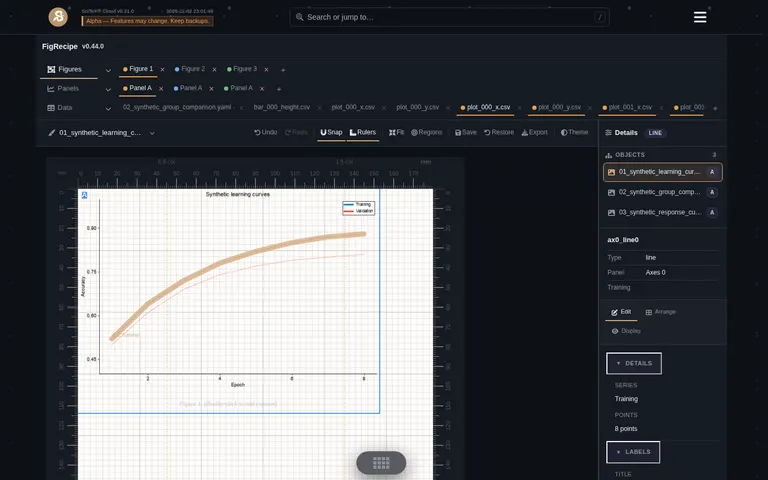
SciTeX Hub provides the graphical workspace; specialized packages provide the apps. These screenshots show development builds with synthetic/demo content, not research findings.
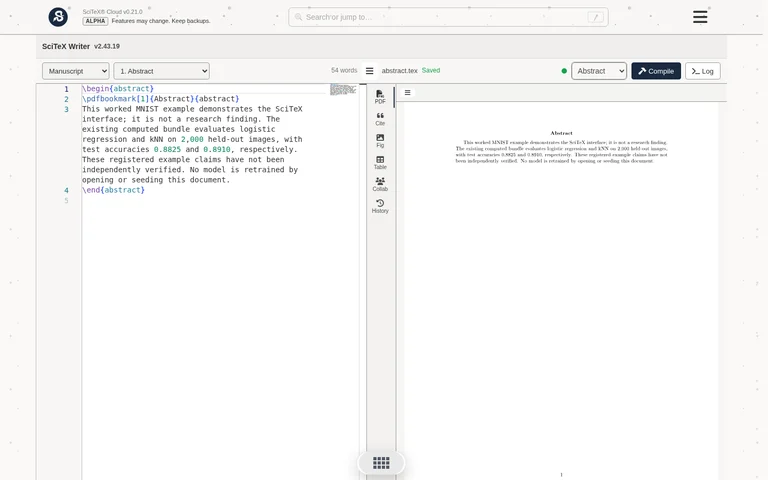
Figure 1. FigRecipe: editable figures and recipes. Figure 2. Writer: manuscript editing and section previews. Captured November 2–3, 2026; image sources and hashes.
SciTeX Cloud is in alpha. Features and data formats may change. Keep backups.
Explore the apps · Watch the research demo and inspect its outputs
Create a virtual environment and install the toolkit:
uv venv .venv
source .venv/bin/activate
uv pip install scitex
scitex --help
Use the equivalent activation command for your shell. Python requirements are declared on PyPI. Optional integrations may have additional runtime or platform requirements.
Choose extras for the work you need, for example:
uv pip install "scitex[scholar,writer]"See the installation guide for package and environment setup.
| Role | Package |
|---|---|
| Python umbrella and integration | scitex — shared namespace and user entry points |
| Development tools and dispatchers | scitex-dev — discovery, shared checks, hooks, and skills |
| Standalone apps and Hub plugins | scitex-sdk — shared web/app primitives |
| Browser workspace and Web API hosting | scitex-hub |
| Domain logic and providers | Specialized leaf packages, each with its own APIs, documentation, and license |
Table 2. Responsibilities across the ecosystem.
Leaves own their expertise; shared dispatchers discover and integrate their declared interfaces. Browse the ecosystem.
| Interface | Entry point |
|---|---|
| Python API | import scitex |
| CLI | scitex --help, then the selected command's --help |
| MCP tools | scitex mcp --help; package tools are discovered from the installed environment |
| Skills | Packaged guidance and each leaf package's skills |
| Web API | Hub and app endpoints, served through scitex-hub and its plugins |
Table 3. The five ecosystem interfaces; availability depends on the installed packages.
Available interfaces depend on installed packages, their versions, and configuration. Use documentation that matches your installed release.
For clients using an mcpServers configuration:
{
  "mcpServers": {
    "scitex": {
      "command": "/absolute/path/to/.venv/bin/scitex",
      "args": ["mcp", "start", "--transport", "stdio"]
    }
  }
}
Set command to the executable in your SciTeX environment. Inspect only the tool groups relevant to your task, for example:
scitex mcp list-tools --module stats
Provider credentials and external services are configured by the packages that use them.
In scitex 2.30.8, the skills CLI imports scitex_dev.skills, but its pinned scitex-dev 0.28.0 does not provide that module. Read the package-owned skill files directly for that release. The compatibility and interface updates are tracked in #387.
Record Forward. Verify Backward.
scitex-clew records source data and inputs–executable–outputs relationships. Verification follows recorded dependencies back toward source data. Consult the owning package's integration and session guidance to enable the tracking appropriate to your workflow.
This package is licensed under AGPL-3.0, with commercial licensing described in the CLA. Check each leaf package's license for its terms.
scitex is part of SciTeX, providing the Python umbrella and integration entry points.
Four Freedoms for Research
- The freedom to run your research anywhere — your machine, your terms.
- The freedom to study how every step works — from raw data to final manuscript.
- The freedom to redistribute your workflows, not just your papers.
- The freedom to modify any module and share improvements with the community.
AGPL-3.0 — because we believe research infrastructure deserves the same freedoms as the software it runs on.

scitex-ai/scitex-python is a public repo on GitHub by scitex-ai. A Python toolkit — AI for Science.
It declares the AGPL-3.0 license on GitHub.
Its maker has not tagged a system, so it is unknown here. Its README says what it needs.
Open "Take it" on its page: Take My Repo writes an install plan for your machine and hands it to your AI agent (Claude Code, Codex or Cursor), which asks you before each step. Take My Repo has not tested it on any machine.
Its last change on GitHub was on 2026-11-20. GitHub counts 13 open issues and pull requests. Take My Repo does not judge from that whether it is maintained.
Nobody has reviewed it on Take My Repo yet, which says nothing about its quality.
Academic Research Skills for Claude Code: research → write → review → revise → finalize
The open-source AI research workbench for scientific research and agent workflows. Local-first, model-agnostic desktop app with extensible skills, MCP tools and connectors, Python/R execution and traceable artifacts for reproducible research on macOS, Windows and Linux.
Bring data to life with SVG, Canvas and HTML. :bar_chart::chart_with_upwards_trend::tada:
The agent harness performance optimization system. Skills, instincts, memory, security, and research-first development for Claude Code, Codex, Opencode, Cursor and beyond.
Reverse engineer anything with agents, from app behavior down to native binaries.




