MonitorControl
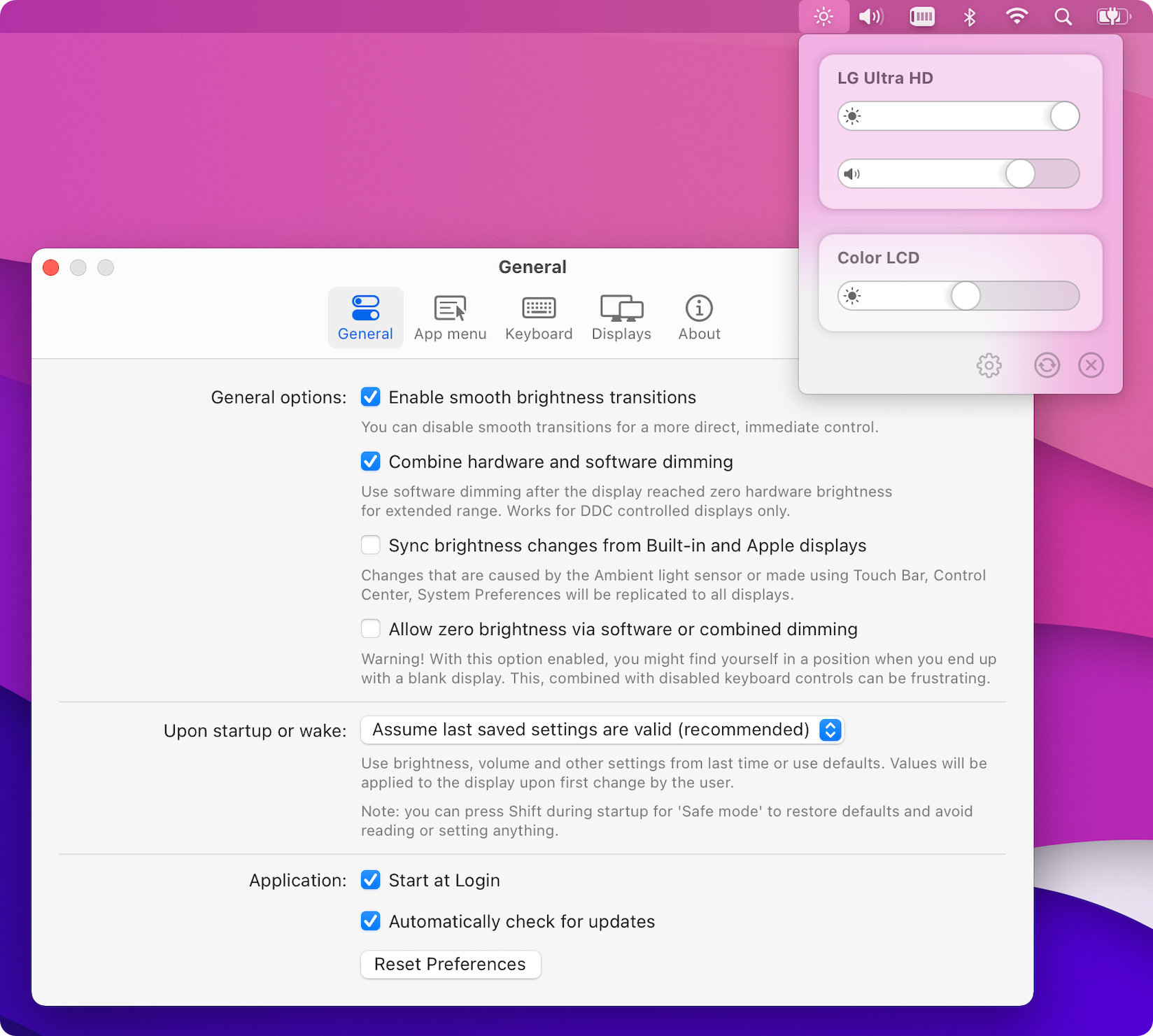
🖥 Control your display's brightness & volume on your Mac as if it was a native Apple Display. Use Apple Keyboard keys or custom shortcuts. Shows the native macOS OSDs.
- 35k
- Swift
- MIT
- 6 wk ago
Scribe-iOS: Keyboards for language learners & Conjugate-iOS: Wikidata based verb conjugation app
Repo scribe-org/Scribe-iOS, read from GitHub 2 d ago. scribe-org has not joined Take My Repo.
scribe-org/Scribe-iOS is a public repo on GitHub by scribe-org. Scribe-iOS: Keyboards for language learners & Conjugate-iOS: Wikidata based verb conjugation app. It declares the GPL-3.0 license on GitHub. It is written mainly in Swift, has 174 stars and last changed on 2026-11-17. Nobody has reviewed it on Take My Repo yet, which says nothing about its quality. Read from GitHub on 2026-11-20.


Scribe-iOS is a pack of iOS and iPadOS keyboards for language learners. Features include translation (beta), verb conjugation and word annotation that give users the tools needed to communicate with confidence.
Scribe is fully open-source and does not collect usage data or ask for system access. Feature data is sourced from Wikidata and stored in-app, meaning Scribe is a highly responsive experience that does not require an internet connection.
[!NOTE]
The contributing section has information for those interested, with the articles and presentations in featured by also being good resources for learning more about Scribe.
Also available on Android (WIP), Desktop (planned) and for the data processes see Scribe-Data.
Check out Scribe's architecture diagrams for an overview of the organization including our applications, services and processes. It depicts the projects that Scribe is developing as well as the relationships between them and the external systems with which they interact.
The following are the preview videos for the App Store:
Scribe uses Matrix for communications. You're more than welcome to join us in our public chat rooms to share ideas, ask questions or just say hi to the team :) We'd suggest that you use the Element client and Element X for a mobile app.
Please also see the contribution guidelines if you are interested in contributing to Scribe-iOS. Work that is in progress or could be implemented is tracked in the issues and projects.
[!NOTE]
Just because an issue is assigned on GitHub doesn't mean the team isn't open to your contribution! Feel free to write in the issues and we can potentially reassign it to you.
Those interested can further check the -next release- and -priority- labels in the issues for those that are most important, as well as those marked good first issue that are tailored for first-time contributors. For those new to coding or our tech stack, we've collected links to helpful documentation pages in the contribution guidelines.
After your first few pull requests organization members would be happy to discuss granting you further rights as a contributor, with a maintainer role then being possible after continued interest in the project. Scribe seeks to be an inclusive and supportive organization. We'd love to have you on the team!


The Scribe road map can be followed in the organization's project board where we list the most important issues along with their priority, status and an indication of which sub projects they're included in (if applicable).
[!NOTE]
Consider joining our bi-weekly developer syncs!

The designs for Scribe are made using Figma. The App Store videos, images and text can be found in the AppStore directory. Those with interest in contributing can open a design issue to make suggestions! Design related issues are marked with the design label.
[!NOTE]
Please see the Wikidata and Scribe Guide and the data contracts guide and Wikidata for an overview of Wikidata and how Scribe uses it.
Scribe does not accept direct edits to the queries or any resulting Scribe-Data data files as they are sourced from data contracts and Wikidata. Edits can be discussed and the contracts themselves will be changed used to generate queries before an update. If there is a problem with data in Scribe applications, then the fix should be made on Wikidata and not on Scribe. Feel free to let us know that edits have been made by opening a data issue or contacting us in the issues for Scribe-Data and we'll be happy to integrate them!
Scribe-iOS is developed using the Swift coding language. Those new to Swift or wanting to develop their skills are more than welcome to contribute! The first step on your Swift journey would be to read through the Swift documentation. The general steps to setting up a development environment are:
Download Xcode
Fork the Scribe-iOS repo, clone your fork, and configure the remotes:
[!NOTE]
Consider using SSH
Alternatively to using HTTPS as in the instructions below, consider SSH to interact with GitHub from the terminal. SSH allows you to connect without a user-pass authentication flow.
To run git commands with SSH, remember then to substitute the HTTPS URL,
https://github.com/..., with the SSH one,git@github.com:....
- e.g. Cloning (with submodules) now becomes
git clone --recurse-submodules git@github.com:<your-username>/Scribe-iOS.gitGitHub also has their documentation on how to Generate a new SSH key 🔑
[!NOTE] Cloning this repository with
--recurse-submodulesalso clones a copy of Scribe-i18n where the texts for Scribe projects are localized. When pulling changes frommain, you should also run the following command:git submodule update --init --recursiveto get the copy of the localization files currently on main (you can also run update_project_and_submodule.sh). To get the most up to date version of Scribe-i18n, change to its directory inScribe/i18nand rungit pull origin main.
# Clone your fork of the repo into the current directory (including submodules).
git clone --recurse-submodules https://github.com/<your-username>/Scribe-iOS.git
# Navigate to the newly cloned directory.
cd Scribe-iOS
# Assign the original repo to a remote called "upstream".
git remote add upstream https://github.com/scribe-org/Scribe-iOS.git
git remote -v you should see two remote repositories named:origin (forked repository)upstream (Scribe-iOS repository)pip install --upgrade pip # make sure that pip is at the latest version
pip install prek
prek install
# prek --all-files
Open the Scribe-iOS directory in Xcode
In order to run Scribe on an emulator:
Start the active schemeBuild the developer documentation by selecting Product > Build Documentation (^⇧⌘D)
[!NOTE] Feel free to contact the team in the iOS room on Matrix if you're having problems getting your environment setup!
[!WARNING]
Note on Debugging: Because Scribe is a keyboard extension, the Xcode debugger doesn't work as expected when debugging a regular app. Please see the note on debugging in CONTRIBUTING.md to learn how to get it working properly.
The Scribe-iOS codebase consists of two separate applications.
Keyboard Application — the Scribe Language Keyboards application (IME)
Conjugate Application — the Scribe verb conjugations application
To select each variant you should select the scheme from the top bar next to device selection.
Users access Scribe language keyboards through the following:


For more information on features and use cases, see Keyboard Features below!
Scribe's goal is functional, feature-rich keyboards for all languages. You can check the currently available languages and data for Scribe applications on our website at scri.be/docs/server/available-data.
See scribe_data/wikidata/language_data_extraction for queries in the Scribe-Data project for currently supported languages and those that have substantial data on Wikidata. Also see the new keyboard label in the Issues for keyboards that are currently in progress or being discussed, and suggest a new keyboard if you don't see it being worked on already!
Keyboard features are accessed via the Scribe key at the top left of any Scribe keyboard. Pressing this key gives the user three new selectable options: Translate, Conjugate and Plural in the keyboard's language. These keys allow for words to be queried and inserted into the text field followed by a space.
Current features include:
The beta Translate feature can translate single words or phrases from English into the language of the current keyboard when the return key is pressed. The goal is that Translate will eventually provide options for entered words where a user can use grammatical categories and synonyms to select the best option. Then the feature will expand to allow translations from system and chosen languages. More advanced methods will be planned once this feature is out of beta.
As of now translations are not widely available on Wikidata. The current functionality is thus based on 🤗 Transformers machine translations of words queried from Wikidata. The ultimate goal is for the translations to be directly queried.
With the Conjugate feature, a user is presented with the grammar charts for an entered verb instead of the keyboard. Pressing an example in the charts inserts the chosen conjugation into the text field.
The Plural feature allows a user to enter a noun and then insert its plural into the text field when the return key is pressed.
Scribe further annotates words in the command bar to help users understand the context of what they're typing. Annotations are displayed once a user has typed a given word and pressed space, after commands, by pressing the Scribe key while it is selected as well as under autocompletions and autosuggestions. The hope is that annotation will help a user remember grammar rules even when not using Scribe.
Scribe annotates nouns in the command bar according to the following conventions:
The above form abbreviations are translated into their equivalents in the keyboard's language.
Scribe also annotates the grammatical cases (accusative, dative, etc) of prepositions in the command bar if there is a relation in the given language.
Annotations for preposition cases can also be pressed to provide a conjugation display where the user can select the proper pronoun for the given case. The conjugation view will also provide appropriate interfaces to subset the available pronouns based on the desired subject and object combinations to help the user make the correct choice.
The goal is for Scribe to have all the functionality of system keyboards. See the issues if interested in helping.
., ? and !Please see the blog posts page on our website for a list of articles on Scribe, and feel free to open a pull request to add one that you've written at scribe-org/scri.be!
The following organizations have supported the development of Scribe projects through various programs. Thank you all! 🩵



Many thanks to all the Scribe-iOS contributors! 🚀
The Scribe community would like to thank all the great software that made Scribe-iOS' development possible, with special thanks going to:


scribe-org/Scribe-iOS is a public repo on GitHub by scribe-org. Scribe-iOS: Keyboards for language learners & Conjugate-iOS: Wikidata based verb conjugation app.
It declares the GPL-3.0 license on GitHub.
Its maker tagged it for macOS. That is declared by the maker; Take My Repo has not tested it.
Open "Take it" on its page: Take My Repo writes an install plan for your machine and hands it to your AI agent (Claude Code, Codex or Cursor), which asks you before each step. Take My Repo has not tested it on any machine.
Its last change on GitHub was on 2026-11-17. Take My Repo does not judge from that whether it is maintained.
Nobody has reviewed it on Take My Repo yet, which says nothing about its quality.
🖥 Control your display's brightness & volume on your Mac as if it was a native Apple Display. Use Apple Keyboard keys or custom shortcuts. Shows the native macOS OSDs.
ANTLR (ANother Tool for Language Recognition) is a powerful parser generator for reading, processing, executing, or translating structured text or binary files.
🤗 Transformers: the model-definition framework for state-of-the-art machine learning models in text, vision, audio, and multimodal models, for both inference and training.
Scribe-Android: Keyboards for language learners & Conjugate-Android: Wikidata based verb conjugation app