
amazon-scraper
Scrape Amazon search results with a simple API. Get products with their ASINs, titles, prices, ratings, reviews, delivery, and thumbnails.
- 0
- 11 d ago
Repo serpapi/amazon-scraper, read from GitHub 1 min ago. serpapi has not joined Take My Repo.
In short
serpapi/amazon-scraper is a public repo on GitHub by serpapi. Scrape Amazon search results with a simple API. Get products with their ASINs, titles, prices, ratings, reviews, delivery, and thumbnails. It declares no license on GitHub. Public does not mean open source: without a license, nobody is granted the right to reuse it. It has 0 stars and last changed on 2026-11-11. Nobody has reviewed it on Take My Repo yet, which says nothing about its quality. Read from GitHub on 2026-11-22.
Amazon Scraper
Scrape Amazon search results with SerpApi's Amazon Search API. Search products by keyword or category, and get each product's ASIN, title, link, thumbnail, price, rating, reviews, delivery, and offers, plus the videos, featured products, sponsored brands, related searches, and filters on the page.
How to scrape Amazon search results
Search Amazon with a simple GET request:
https://serpapi.com/search?engine=amazon&k=coffee&api_key=SERPAPI_API_KEY
kis the search query: anything you'd use in a regular Amazon search. Usenodewith a category ID instead to browse a category.api_keyis your SerpApi API key. ReplaceSERPAPI_API_KEYwith it.amazon_domainsets the Amazon marketplace, e.g.,amazon.co.ukoramazon.de. Defaults toamazon.com.ssorts the products, e.g., by price, customer reviews, or newest arrivals.rhfilters the products with therhvalues infiltersfrom a previous response, e.g.,p_72:1248897011for 4 Stars & Up.pagegets the next pages of results.
Register at SerpApi to get your API key, and keep it private.
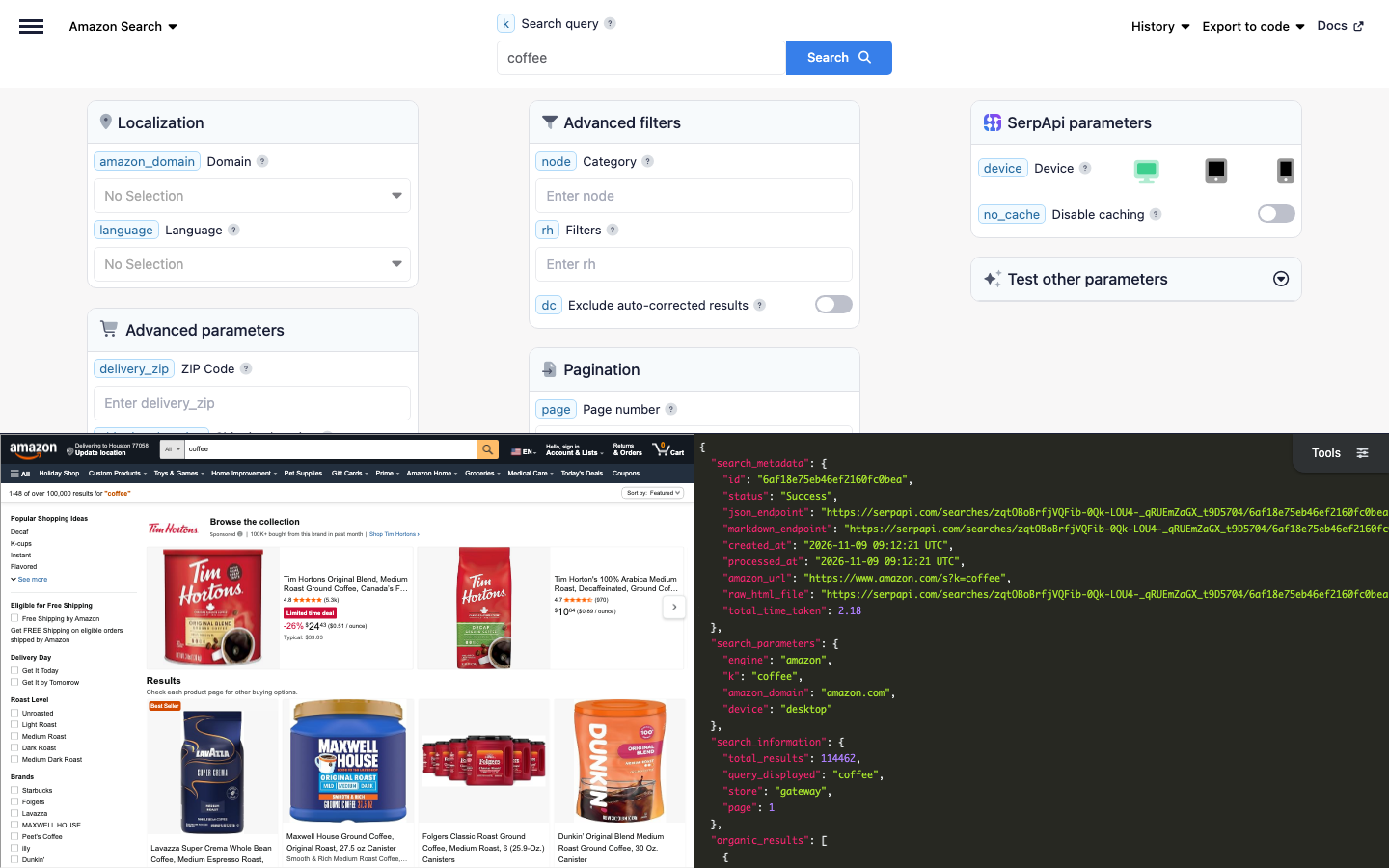
Playground
Try the request live in the SerpApi Playground.
Code examples
The code examples read your API key from the SERPAPI_API_KEY environment variable:
export SERPAPI_API_KEY="SERPAPI_API_KEY"
Each example searches Amazon for coffee and prints the position, title, and price of each product.
curl integration
Send the request with curl, which prints the full JSON response:
curl --get https://serpapi.com/search \
 --data-urlencode engine="amazon" \
 --data-urlencode k="coffee" \
 --data-urlencode api_key="$SERPAPI_API_KEY"
JavaScript integration
Install the SerpApi JavaScript library and set your project to use ES modules:
npm install serpapi
npm pkg set type=module
Create an index.js file:
import { getJson } from "serpapi";

const results = await getJson({
  engine: "amazon",
  api_key: process.env.SERPAPI_API_KEY,
  k: "coffee",
});

for (const product of results.organic_results ?? []) {
  console.log(product.position, product.title, product.price);
}
Run it with node index.js.
Python integration
Install the SerpApi Python library:
pip install serpapi
Create a main.py file:
import os
import serpapi

client = serpapi.Client(api_key=os.getenv("SERPAPI_API_KEY"))
results = client.search({
    "engine": "amazon",
    "k": "coffee",
})

for product in results.get("organic_results", []):
    print(product["position"], product["title"], product.get("price"))
Run it with python main.py.
Ruby integration
Install the SerpApi Ruby library:
gem install serpapi
Create a main.rb file:
require "serpapi"

client = SerpApi::Client.new(engine: "amazon", api_key: ENV.fetch("SERPAPI_API_KEY"))
results = client.search(k: "coffee")

results.fetch(:organic_results, []).each do |product|
  puts "#{product[:position]} #{product[:title]} #{product[:price]}"
end

client.close
Run it with ruby main.rb.
PHP integration
Install the SerpApi PHP library:
composer require serpapi/serpapi-php
Create an index.php file:
<?php
require 'vendor/autoload.php';

use SerpApi\Client;

$client = new Client(getenv('SERPAPI_API_KEY'), 'amazon');
$results = $client->search([
  'k' => 'coffee',
]);

foreach ($results->organic_results ?? [] as $product) {
  echo $product->position . ' ' . $product->title . ' ' . ($product->price ?? '') . PHP_EOL;
}
Run it with php index.php.
Go integration
Create a Go module and install the SerpApi Go library:
go mod init example.com/amazon
go get github.com/serpapi/serpapi-golang
Create a main.go file:
package main

import (
	"fmt"
	"os"

	"github.com/serpapi/serpapi-golang"
)

func main() {
	setting := serpapi.NewSerpApiClientSetting(os.Getenv("SERPAPI_API_KEY"))
	setting.Engine = "amazon"
	client := serpapi.NewClient(setting)

	results, err := client.Search(map[string]string{
		"k": "coffee",
	})
	if err != nil {
		panic(err)
	}

	organicResults, _ := results["organic_results"].([]interface{})
	for _, item := range organicResults {
		product := item.(map[string]interface{})
		fmt.Println(product["position"], product["title"], product["price"])
	}
}
Run it with go run ..
Rust integration
Create a Cargo project and add the SerpApi Rust library and Tokio:
cargo new amazon && cd amazon
cargo add serpapi tokio --features tokio/full
Replace src/main.rs with:
use serpapi::serpapi::Client;
use std::collections::HashMap;
use std::env;

#[tokio::main]
async fn main() -> Result<(), Box<dyn std::error::Error>> {
    let mut default = HashMap::new();
    default.insert("api_key".to_string(), env::var("SERPAPI_API_KEY")?);
    default.insert("engine".to_string(), "amazon".to_string());
    let client = Client::new(default)?;

    let mut parameter = HashMap::new();
    parameter.insert("k".to_string(), "coffee".to_string());

    let results = client.search(parameter).await?;
    if let Some(organic_results) = results["organic_results"].as_array() {
        for product in organic_results {
            println!(
                "{} {} {}",
                product["position"],
                product["title"].as_str().unwrap_or_default(),
                product["price"].as_str().unwrap_or_default()
            );
        }
    }
    Ok(())
}
Run it with cargo run.
Other programming languages
Official libraries are also available for Java, .NET, Swift, and C++. See SerpApi integrations for setup guides, or use a simple GET request from any programming language.
Errors
Failed requests return an HTTP error status and a JSON body with an error message. The most common are 401 for an invalid API key, 400 for a missing or invalid parameter, and 429 when you exceed your hourly throughput limit or run out of searches. See API status and error codes for the full list.
Output formats: JSON and Markdown
Choose structured JSON for applications or Markdown for LLMs and AI agents:
- JSON is the default output and is useful when you need individual result fields.
- Add
output=mdto receive Markdown instead, which is more token-efficient.
Markdown is plain text, not JSON: YAML front matter with the search metadata, followed by tables of the products, videos, related searches, sponsored brands, categories, and filters, and a link to the next page. Read the response body as text instead of parsing it.
| Client | Markdown request |
|---|---|
| curl | --data-urlencode output="md" |
| Python | client.search({..., "output": "md"}) |
| PHP | $client->md([...]) |
| Rust | client.md(parameter).await? |
If your SDK doesn't have a Markdown helper yet, send a plain HTTP request with output=md and read the body as text. Learn more about Markdown output.
Amazon Search API parameters
See the Amazon Search API documentation for more details.
| Name | Description | Requirement |
|---|---|---|
| Search query | ||
k |
The search query: anything you'd use in a regular Amazon search (e.g., coffee). Can't be used with node. |
Optional |
| Localization | ||
amazon_domain |
The Amazon domain to use. Defaults to amazon.com. See Amazon domains for supported domains. |
Optional |
language |
The language of the results, as a <language>_<REGION> locale (e.g., en_US or es_US on amazon.com, ja_JP on amazon.co.jp). See Amazon languages for supported languages. |
Optional |
| Advanced parameters | ||
delivery_zip |
The ZIP or postal code to filter the products that ship to an area. | Optional |
shipping_location |
The country to filter the products that ship to it, as a two-letter country code (e.g., GB, CA). |
Optional |
s |
The sort order: relevanceblender for Featured (default), price-asc-rank for Price: Low to High, price-desc-rank for Price: High to Low, review-rank for Avg. Customer Review, date-desc-rank for Newest Arrivals, or exact-aware-popularity-rank for Best Sellers. |
Optional |
| Advanced filters | ||
node |
The ID of a category to browse instead of searching. Node IDs are specific to each Amazon domain (e.g., 6563140011 for Smart Home on amazon.com). Find it after node= in the URL of an Amazon category, or in categories of the response. Can't be used with k. See Amazon category nodes for a full list. |
Optional |
rh |
Filters as comma-separated key:value pairs (e.g., n:16318031,p_n_cpf_eligible:21512497011,p_72:1248897011 for Climate Pledge Friendly products rated 4 Stars & Up in the Coffee department). The available filters are in filters of the response. |
Optional |
dc |
Set to true to exclude results from an auto-corrected query when the original query is misspelled, or false to include them (default). |
Optional |
| Pagination | ||
page |
The page number (e.g., 1 for the first page, 2 for the second). Defaults to 1. |
Optional |
| SerpApi parameters | ||
engine |
Set to amazon. |
Required |
api_key |
Your private SerpApi API key. | Required |
device |
Set to desktop (default), tablet, or mobile. |
Optional |
no_cache |
Set to true to request fresh results instead of using the one-hour cache. Can't be combined with async. |
Optional |
async |
Set to true for later retrieval through the Searches Archive API. Can't be combined with no_cache or used with Ludicrous Speed enabled. |
Optional |
zero_trace |
Enterprise only. Set to true to skip storing search parameters, files, and metadata on SerpApi servers. |
Optional |
output |
Set to json (default), html for the raw HTML retrieved, or md for Markdown. |
Optional |
json_restrictor |
Limit the JSON response to the fields you need. See the JSON Restrictor documentation. | Optional |
Available data on Amazon search results (JSON response)
Each item in organic_results is a product. The page can also include video_results and featured_products with more products, sponsored_brands, related_searches, categories, and filters to refine the search. The field guides below describe the possible fields and their types; they aren't literal API responses.
What you get depends on the product
Some fields appear only when Amazon shows them:
| Product | Fields |
|---|---|
| A sponsored product | sponsored set to true |
| A product on sale | old_price and extracted_old_price with the price before the discount |
| A best seller or a deal | badges, e.g., Best Seller in Roasted Coffee Beans or Limited time deal |
| A product with a coupon or other offers | save_with_coupon, e.g., Extra 10% off when you subscribe, and offers |
| A product in several sizes, flavors, or colors | tags, options, e.g., 12 sizes, 9 flavors, and variants with the ASIN of each variant |
| A product with offers from other sellers | more_buying_choices, e.g., $22.35 (4 new offers) |
| A book, a movie, or other media | The type of each format in purchase_options, e.g., Paperback, Kindle, or Prime Video |
| A product with sustainability certifications | climate_pledge_friendly and sustainability_features, e.g., certified by Rainforest Alliance |
Each product has an asin and a serpapi_link to its details with the Amazon Product API. Prices are returned as displayed, e.g., $26.99, and as numbers in the matching extracted_ fields.
To get the next page, increase page or follow serpapi_pagination.next.
Organic results
Each product in organic_results can include these fields:
{
  "organic_results": [
    {
      "position": "Integer - Position of the product on the page",
      "asin": "String - Amazon Standard Identification Number (ASIN) of the product, e.g., B000SDKDM4",
      "title": "String - Title of the product",
      "link": "String - Link to the product on Amazon",
      "link_clean": "String - Link to the product on Amazon, without tracking parameters",
      "serpapi_link": "String - SerpApi link to the details of the product with the Amazon Product API",
      "thumbnail": "String - Link to the image of the product",
      "sponsored": "Boolean - Whether the product is sponsored",
      "amazon_brand": "Boolean - Whether the product is from an Amazon brand",
      "brand": "String - Brand of the product, e.g., LEGO",
      "badges": "Array[String] - Badges of the product, e.g., Best Seller in Roasted Coffee Beans or Limited time deal",
      "tags": "Array[String] - Details of the product, e.g., Whole Bean, 2.2 Pound (Pack of 1)",
      "options": "String - Available options, e.g., 12 sizes, 9 flavors or See options",
      "options_link": "String - Link to the options of the product",
      "variants": {
        "options": [
          {
            "position": "Integer - Position of the variant",
            "asin": "String - ASIN of the variant",
            "title": "String - Name of the variant, e.g., Green",
            "link": "String - Link to the variant on Amazon"
          }
        ],
        "more_variants": "String - Number of other variants, e.g., +1",
        "more_variants_link": "String - Link to the product with the other variants"
      },
      "rating": "Float - Average rating out of 5, e.g., 4.5",
      "reviews": "Integer - Number of reviews, e.g., 43400",
      "bought_last_month": "String - Purchases in the past month, e.g., 90K+ bought in past month",
      "price": "String - Price, as displayed, e.g., $26.99",
      "extracted_price": "Float - Price as a number, e.g., 26.99",
      "price_unit": "String - Price per unit, as displayed, e.g., $0.77/ounce",
      "extracted_price_unit": "Float - Price per unit as a number, e.g., 0.77",
      "old_price": "String - Price before the discount, as displayed, e.g., $75.38",
      "extracted_old_price": "Float - Price before the discount as a number",
      "save_with_coupon": "String - Coupon or subscription discount, e.g., Extra 10% off when you subscribe",
      "offers": "Array[String] - Other offers, e.g., Save $4.62 on 2 select item(s) or SNAP EBT eligible",
      "specs": "Object - Specifications of the product by snake_case name, e.g., display_size: 7 inches",
      "prime": "Boolean - Whether the product is eligible for Amazon Prime",
      "snap_ebt_eligible": "Boolean - Whether the product is eligible for SNAP EBT",
      "amazon_fresh": "Boolean - Whether the product is from Amazon Fresh",
      "whole_foods_market": "Boolean - Whether the product is from Whole Foods Market",
      "delivery": "Array[String] - Delivery options, e.g., Join Prime to get FREE delivery Tomorrow, Nov 10",
      "stock": "String - Stock status, e.g., Only 1 left in stock - order soon.",
      "customizable": "Boolean - Whether the product can be customized",
      "more_buying_choices": "String - Lowest price from other offers, e.g., $22.35 (4 new offers)",
      "more_buying_choices_link": "String - Link to the other offers",
      "top_rated": "Boolean - Whether Amazon labels the product as top rated",
      "small_business": "Boolean - Whether the product is from a small business",
      "climate_pledge_friendly": "Boolean - Whether the product is Climate Pledge Friendly",
      "sustainability_features": [
        {
          "position": "Integer - Position of the feature",
          "name": "String - Name of the feature, e.g., Farming practices",
          "snippet": "String - Description of the feature",
          "thumbnail": "String - Link to the icon of the certification",
          "certified_by": "String - Certifying organization, e.g., Rainforest Alliance",
          "certified_info": "String - Description of the certification"
        }
      ],
      "origin_country": {
        "name": "String - Country of origin, e.g., Made in Italy",
        "link": "String - Link to the Amazon page of products from the country",
        "thumbnail": "String - Link to the icon of the country"
      },
      "age_rating": "String - Age rating of the product, e.g., 36 months - 8 years",
      "purchase_options": [
        {
          "type": "String - Format of the product, e.g., Paperback, Kindle, or Prime Video",
          "primary_price": "String - Price of the format, as displayed, e.g., $26.99 or For $1.99 to buy episode",
          "extracted_primary_price": "Float - Price of the format as a number",
          "old_primary_price": "String - Price of the format before the discount",
          "extracted_old_primary_price": "Float - Price of the format before the discount as a number",
          "secondary_price": "String - Second price of the format, e.g., For $14.99 to buy season",
          "extracted_secondary_price": "Float - Second price of the format as a number",
          "more_buying_choices": "String - Lowest price from other offers for the format",
          "more_buying_choices_link": "String - Link to the other offers for the format",
          "free_with_subscription": "Boolean - Whether the format is free with a subscription",
          "free_with_ads": "Boolean - Whether the format is free with ads",
          "listen_with_amazon_music": "Boolean - Whether the format can be played with Amazon Music",
          "no_featured_offers_available": "Boolean - Whether the format has no featured offers"
        }
      ]
    }
  ]
}
purchase_options is returned for most products. It has a type and separate prices when the product comes in several formats, such as a paperback and a Kindle edition.
Video results and featured products
video_results are product videos, and featured_products are sections of products such as Today's deals. Their products have the same fields as organic_results:
{
  "video_results": [
    {
      "block_position": "String - Where the video is on the page: top or bottom",
      "video_thumbnail": "String - Link to the thumbnail of the video",
      "video_src": "String - Link to the video file",
      "video_link": "String - Link to the product page the video leads to",
      "products": "Array[Object] - Products in the video, often sponsored"
    }
  ],
  "featured_products": [
    {
      "title": "String - Title of the section, e.g., Today's deals or Picks from Amazon Influencers",
      "description": "String - Description of the section, e.g., From Amazon Influencer storefronts",
      "products": "Array[Object] - Products in the section"
    }
  ]
}
Some searches also return product_ads, a sponsored brand ad with a logo, a headline, an image or a video, a link to the store of the brand, and its products.
Sponsored brands and related searches
sponsored_brands lists the brands advertised for the search, and related_searches lists other searches on Amazon:
{
  "sponsored_brands": {
    "title": "String - Title of the section, e.g., Brands related to your search",
    "brands": [
      {
        "position": "Integer - Position of the brand",
        "name": "String - Name of the brand, e.g., Tim Hortons",
        "headline": "String - Headline of the ad, e.g., Find Your Flavor with Tims at Home",
        "image": "String - Link to the image of the ad",
        "logo": "String - Link to the logo of the brand",
        "link": "String - Link to the store of the brand on Amazon"
      }
    ]
  },
  "related_searches": [
    {
      "position": "Integer - Position of the related search",
      "query": "String - Related search query, e.g., coffee makers",
      "link": "String - Link to the search on Amazon"
    }
  ]
}
Categories and filters
categories lists Amazon departments with their node for the node parameter, and filters lists the filters available for the search with their rh value for the rh parameter:
{
  "categories": [
    {
      "position": "Integer - Position of the category",
      "name": "String - Name of the category, e.g., Smart Home",
      "link": "String - Link to the category on Amazon",
      "node": "String - ID of the category, e.g., 6563140011",
      "serpapi_link": "String - SerpApi link to browse the category"
    }
  ],
  "filters": {
    "brands": [
      {
        "position": "Integer - Position of the filter in its group",
        "name": "String - Name of the filter, e.g., Starbucks",
        "description": "String - Description of the filter, e.g., Get FREE Shipping on eligible orders shipped by Amazon",
        "rh": "String - Value for the rh parameter, e.g., p_123:660401",
        "link": "String - Link to the filtered search on Amazon",
        "serpapi_link": "String - SerpApi link to the filtered search"
      }
    ]
  }
}
filters has a key for each group of filters on the page, e.g., brands, price, customer_reviews, delivery_day, and seller, plus groups that depend on the search, such as roast_level for coffee. Join several rh values with commas to combine filters. The items in popular_shopping_ideas are related searches, so they have no rh.
Search information and pagination
search_information describes the search, and serpapi_pagination links to the other pages:
{
  "search_information": {
    "total_results": "Integer - Number of results shown by Amazon, e.g., 114462",
    "query_displayed": "String - Query or category shown by Amazon, e.g., coffee",
    "store": "String - Amazon department of the search, e.g., gateway for all departments, or books",
    "page": "Integer - Current page"
  },
  "serpapi_pagination": {
    "current": "Integer - Current page",
    "previous": "String - SerpApi link to the previous page",
    "next": "String - SerpApi link to the next page"
  }
}
AI agents and no-code
MCP
Give AI agents and assistants an Amazon product search tool with the hosted SerpApi MCP server at https://mcp.serpapi.com/mcp.
Claude Code:
claude mcp add --transport http serpapi https://mcp.serpapi.com/mcp --header "Authorization: Bearer $SERPAPI_API_KEY"Codex, which reads the key from SERPAPI_API_KEY:
codex mcp add serpapi --url https://mcp.serpapi.com/mcp --bearer-token-env-var SERPAPI_API_KEY
Other MCP clients:
{
  "mcpServers": {
    "serpapi": {
      "type": "http",
      "url": "https://mcp.serpapi.com/SERPAPI_API_KEY/mcp"
    }
  }
}
The server's engine catalog includes the amazon engine, and its serpapi://engines/amazon resource describes the parameters. Ask your agent to search Amazon with the amazon engine. The resulting tool call looks like this:
{
  "name": "search",
  "arguments": {
    "params": {
      "engine": "amazon",
      "k": "coffee"
    }
  }
}
See the MCP integration guide for more clients and self-hosting.
CLI
Search Amazon from your terminal or from AI agent workflows with the SerpApi CLI:
brew tap serpapi/homebrew-tap
brew install serpapi-cli
The CLI picks up SERPAPI_API_KEY from your environment. You can also run serpapi login to save a key.
serpapi search engine=amazon k=coffee
serpapi search engine=amazon k=coffee --fields "organic_results[].{title, price, rating}"
serpapi search engine=amazon k=coffee output=md
No-code tools
Use SerpApi APIs without writing code:
Use cases
- Track the prices, discounts, and coupons of products over time.
- Monitor where your products and your competitors' products rank for a search, including sponsored placements.
- Research a product category with ratings, reviews, and purchases in the past month.
- Find best sellers and new arrivals in a category with
sandnode. - Collect ASINs to get full product details with the Amazon Product API.
- Give AI agents and RAG pipelines a product search tool.
Related scrapers
- Amazon Product Scraper: product pages by ASIN
- Amazon Autocomplete Scraper: search suggestions from Amazon
- Google Shopping Scraper: products and prices from Google Shopping
Resources
- Amazon ASIN Lookup API: Find and Fetch Product Details
- Automate Amazon Price Tracker using Python to See Real World Inflation
- Product Market Research using Amazon Search API
- Visualizing Amazon Search Data Using Python
- Scrape Amazon Product Data (complete 2026 tutorial)
Contact
Feel free to reach out at contact@serpapi.com.
Questions
What is amazon-scraper?
serpapi/amazon-scraper is a public repo on GitHub by serpapi. Scrape Amazon search results with a simple API. Get products with their ASINs, titles, prices, ratings, reviews, delivery, and thumbnails.
Is amazon-scraper open source?
It declares no license on GitHub. Public does not mean open source: without a license, nobody is granted the right to reuse it.
Does amazon-scraper run on macOS, Windows or Linux?
Its maker has not tagged a system, so it is unknown here. Its README says what it needs.
How do I install amazon-scraper?
Open "Take it" on its page: Take My Repo writes an install plan for your machine and hands it to your AI agent (Claude Code, Codex or Cursor), which asks you before each step. Take My Repo has not tested it on any machine.
Is amazon-scraper still maintained?
Its last change on GitHub was on 2026-11-11. GitHub counts 0 open issues and pull requests. Take My Repo does not judge from that whether it is maintained.