
apple-maps-scraper
Scrape Apple Maps search results with a simple API. Get places with their addresses, phone numbers, websites, ratings, opening hours, and photos.
- 0
- 3 wk ago
Repo serpapi/apple-maps-scraper, read from GitHub 1 min ago. serpapi has not joined Take My Repo.
In short
serpapi/apple-maps-scraper is a public repo on GitHub by serpapi. Scrape Apple Maps search results with a simple API. Get places with their addresses, phone numbers, websites, ratings, opening hours, and photos. It declares no license on GitHub. Public does not mean open source: without a license, nobody is granted the right to reuse it. It has 0 stars and last changed on 2026-11-04. Nobody has reviewed it on Take My Repo yet, which says nothing about its quality. Read from GitHub on 2026-11-24.

Apple Maps Scraper
Scrape Apple Maps search results with SerpApi's Apple Maps API. Search places by keyword and area, and get each place's MUID, name, coordinates, address, phone, website, ratings, reviews, opening hours, amenities, photos, and the guides that feature it.
How to scrape Apple Maps
Search Apple Maps with a simple GET request:
https://serpapi.com/search?engine=apple_maps&query=coffee&location=Austin,+Texas,+United+States&api_key=SERPAPI_API_KEY
queryis the search query: anything you'd use in an Apple Maps search, such as a category, a business name, or an address.locationis the area to search in, e.g.,Austin, Texas, United States. Usecenterwithlatitude,longitudecoordinates instead for a precise point. One of them is required.api_keyis your SerpApi API key. ReplaceSERPAPI_API_KEYwith it.sortorders the places bydistanceorratingsinstead of the best match.togglesandmulti_select_optionsfilter the places with the keys inrefinementfrom a previous response, e.g.,OPEN_NOW.localesets the language and region of the results, e.g.,en-USorfr-FR.
Register at SerpApi to get your API key, and keep it private.
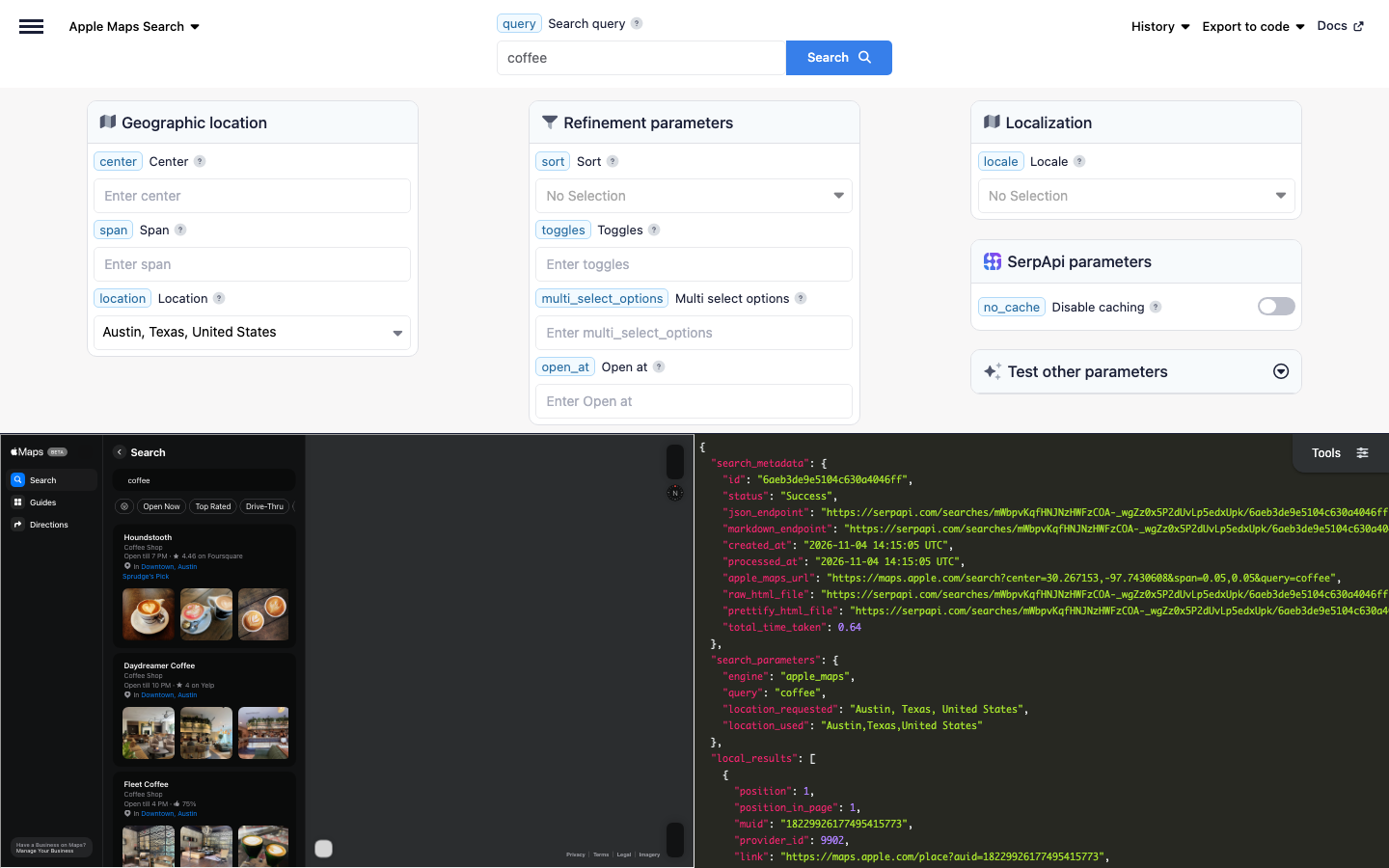
Playground
Try the request live in the SerpApi Playground.
Code examples
The code examples read your API key from the SERPAPI_API_KEY environment variable:
export SERPAPI_API_KEY="SERPAPI_API_KEY"
Each example searches Apple Maps for coffee in Austin, Texas, and prints the position, title, and address of each place.
curl integration
Send the request with curl, which prints the full JSON response:
curl --get https://serpapi.com/search \
 --data-urlencode engine="apple_maps" \
 --data-urlencode query="coffee" \
 --data-urlencode location="Austin, Texas, United States" \
 --data-urlencode api_key="$SERPAPI_API_KEY"
JavaScript integration
Install the SerpApi JavaScript library and set your project to use ES modules:
npm install serpapi
npm pkg set type=module
Create an index.js file:
import { getJson } from "serpapi";

const results = await getJson({
  engine: "apple_maps",
  api_key: process.env.SERPAPI_API_KEY,
  query: "coffee",
  location: "Austin, Texas, United States",
});

for (const place of results.local_results ?? []) {
  console.log(place.position, place.title, place.address);
}
Run it with node index.js.
Python integration
Install the SerpApi Python library:
pip install serpapi
Create a main.py file:
import os
import serpapi

client = serpapi.Client(api_key=os.getenv("SERPAPI_API_KEY"))
results = client.search({
    "engine": "apple_maps",
    "query": "coffee",
    "location": "Austin, Texas, United States",
})

for place in results.get("local_results", []):
    print(place["position"], place["title"], place["address"])
Run it with python main.py.
Ruby integration
Install the SerpApi Ruby library:
gem install serpapi
Create a main.rb file:
require "serpapi"

client = SerpApi::Client.new(engine: "apple_maps", api_key: ENV.fetch("SERPAPI_API_KEY"))
results = client.search(query: "coffee", location: "Austin, Texas, United States")

results.fetch(:local_results, []).each do |place|
  puts "#{place[:position]} #{place[:title]} #{place[:address]}"
end

client.close
Run it with ruby main.rb.
PHP integration
Install the SerpApi PHP library:
composer require serpapi/serpapi-php
Create an index.php file:
<?php
require 'vendor/autoload.php';

use SerpApi\Client;

$client = new Client(getenv('SERPAPI_API_KEY'), 'apple_maps');
$results = $client->search([
  'query' => 'coffee',
  'location' => 'Austin, Texas, United States',
]);

foreach ($results->local_results ?? [] as $place) {
  echo $place->position . ' ' . $place->title . ' ' . $place->address . PHP_EOL;
}
Run it with php index.php.
Go integration
Create a Go module and install the SerpApi Go library:
go mod init example.com/maps
go get github.com/serpapi/serpapi-golang
Create a main.go file:
package main

import (
	"fmt"
	"os"

	"github.com/serpapi/serpapi-golang"
)

func main() {
	setting := serpapi.NewSerpApiClientSetting(os.Getenv("SERPAPI_API_KEY"))
	setting.Engine = "apple_maps"
	client := serpapi.NewClient(setting)

	results, err := client.Search(map[string]string{
		"query":    "coffee",
		"location": "Austin, Texas, United States",
	})
	if err != nil {
		panic(err)
	}

	localResults, _ := results["local_results"].([]interface{})
	for _, item := range localResults {
		place := item.(map[string]interface{})
		fmt.Println(place["position"], place["title"], place["address"])
	}
}
Run it with go run ..
Rust integration
Create a Cargo project and add the SerpApi Rust library and Tokio:
cargo new maps && cd maps
cargo add serpapi tokio --features tokio/full
Replace src/main.rs with:
use serpapi::serpapi::Client;
use std::collections::HashMap;
use std::env;

#[tokio::main]
async fn main() -> Result<(), Box<dyn std::error::Error>> {
    let mut default = HashMap::new();
    default.insert("api_key".to_string(), env::var("SERPAPI_API_KEY")?);
    default.insert("engine".to_string(), "apple_maps".to_string());
    let client = Client::new(default)?;

    let mut parameter = HashMap::new();
    parameter.insert("query".to_string(), "coffee".to_string());
    parameter.insert("location".to_string(), "Austin, Texas, United States".to_string());

    let results = client.search(parameter).await?;
    if let Some(local_results) = results["local_results"].as_array() {
        for place in local_results {
            println!(
                "{} {} {}",
                place["position"],
                place["title"].as_str().unwrap_or_default(),
                place["address"].as_str().unwrap_or_default()
            );
        }
    }
    Ok(())
}
Run it with cargo run.
Other programming languages
Official libraries are also available for Java, .NET, Swift, and C++. See SerpApi integrations for setup guides, or use a simple GET request from any programming language.
Errors
Failed requests return an HTTP error status and a JSON body with an error message. The most common are 401 for an invalid API key, 400 for a missing required parameter such as query, and 429
Questions
What is apple-maps-scraper?
serpapi/apple-maps-scraper is a public repo on GitHub by serpapi. Scrape Apple Maps search results with a simple API. Get places with their addresses, phone numbers, websites, ratings, opening hours, and photos.
Is apple-maps-scraper open source?
It declares no license on GitHub. Public does not mean open source: without a license, nobody is granted the right to reuse it.


