rea
Reverse engineer anything with agents, from app behavior down to native binaries.
- 473k
- TypeScript
- MIT
- 4 h ago
CLI for Shopware Account and Shopware 6
Repo shopware/shopware-cli, read from GitHub 1 min ago. shopware has not joined Take My Repo.
shopware/shopware-cli is a public repo on GitHub by shopware. CLI for Shopware Account and Shopware 6. It declares the MIT license on GitHub. It is written mainly in Go, has 126 stars and last changed on 2026-11-21. Nobody has reviewed it on Take My Repo yet, which says nothing about its quality. Read from GitHub on 2026-11-22.
Shopware CLI is a command line companion for common Shopware account, project, and extension workflows.
Use this CLI to create and set up Shopware projects, manage Shopware accounts, build and validate extensions, automate project maintenance, or run everyday developer tasks without leaving the terminal.
shopware-cli accountgo install github.com/shopware/shopware-cli@latest
git clone https://github.com/shopware/shopware-cli.git
cd shopware-cli
go build -o ./bin/shopware-cli .
Show the available commands:
shopware-cli --help
Common command groups:
shopware-cli account --help
shopware-cli extension --help
shopware-cli project --help
Generate a CycloneDX SBOM for a project without running the full CI build:
shopware-cli project sbom
shopware-cli project sbom ./my-shop --format cyclonedx-json --output sbom.json
If you need CI-friendly behavior, disable prompts:
shopware-cli --no-interaction <command>
Silence update notifications for a single command:
shopware-cli --no-update-hint
Shop URL and Admin API credentials belong under named environments in
.config/shopware-project.yml. Project-level keys such as build, dump,
docker, and php_version stay at the top level.
environments:
  local:
    type: local
    url: http://127.0.0.1:8000
    admin_api:
      username: admin
      password: shopware
  staging:
    url: https://staging.example.com
    admin_api:
      client_id: ...
      client_secret: ...
Omit -e / --env to target environments.local. Use -e staging (or another
name) to target a different environment.
shopware-cli project create and shopware-cli project config init write
environments.local. Top-level url and admin_api are deprecated: they are
used only when environments.local is absent. When both are present,
environments.local wins.
To disable update notifications for the current shell session, set:
export SHOPWARE_CLI_NO_UPDATE_NOTIFICATION=trueTo make the setting persistent, set no_update_hint: true in the user
config file (see below), or add the export command to your shell profile, such
as ~/.bashrc or ~/.zshrc. Pass --no-update-hint to skip the check for a
single command. --no-interaction (-n) also skips it, but additionally
disables prompts, so commands use defaults or fail where input is needed.
Shopware CLI reads optional user preferences from config.yaml in a
shopware-cli folder inside your user config directory:
$XDG_CONFIG_HOME/shopware-cli/config.yaml (default
~/.config/shopware-cli/config.yaml)~/Library/Application Support/shopware-cli/config.yaml%AppData%\shopware-cli\config.yamlSet SHOPWARE_CLI_CONFIG to use a different path. The CLI never creates or
writes this file. Without it, telemetry and update hints are enabled.
telemetry: false # disable anonymous usage telemetry
no_update_hint: true # disable update notifications
Command-line flags and environment variables take precedence over the file:
--no-update-hint (or -n) > SHOPWARE_CLI_NO_UPDATE_NOTIFICATION >
no_update_hint, and DO_NOT_TRACK > telemetry. See
docs/TELEMETRY.md for what telemetry collects.
cmd/: Cobra command groups for account, extension, and project workflowsinternal/: implementation packages for APIs, build steps, validation, TUI,
and utilities.github/: automation and workflow definitionsscripts/: repository helper scriptsenv-bridge/: environment bridge helper entrypointShopware CLI maintainers provide official Agent Skills in this repository's
skills/ folder. These skills teach compatible AI coding agents how to use
Shopware CLI workflows safely and correctly.
Install them with:
npx skills add shopware/shopware-cli
Available skills:
shopware-cli — Use Shopware CLI for project, extension, and account
workflows. Validate, build, format, and troubleshoot extensions. Reason about
command safety and side effects.shopware-cli-docker — For Docker-backed projects. Run commands in the
correct container, manage development environment lifecycle, and troubleshoot
Docker execution.shopware-cli-extension-store — Assess an extension's readiness for
Shopware Store distribution. Read-only: classifies metadata, localization, and
asset findings against Store requirements and cites a re-checkable source for
each, without modifying files.shopware-cli-extension-anonymize — Fill an extension's anonymize
section in .config/shopware-extension.yml from its tables and system config
secrets so project dump --anonymize includes them.Contributions are welcome. If you want to improve commands, docs, or developer workflows, open an issue or send a pull request. See CONTRIBUTING.md.
See LICENSE.
shopware/shopware-cli is a public repo on GitHub by shopware. CLI for Shopware Account and Shopware 6.
It declares the MIT license on GitHub.
Its maker tagged it for macOS, Windows and Linux, or as Docker or cross-platform. That is declared by the maker; Take My Repo has not tested it.
Open "Take it" on its page: Take My Repo writes an install plan for your machine and hands it to your AI agent (Claude Code, Codex or Cursor), which asks you before each step. Take My Repo has not tested it on any machine.
Its last change on GitHub was on 2026-11-21. GitHub counts 69 open issues and pull requests. Take My Repo does not judge from that whether it is maintained.
Nobody has reviewed it on Take My Repo yet, which says nothing about its quality.
Reverse engineer anything with agents, from app behavior down to native binaries.
The agent harness performance optimization system. Skills, instincts, memory, security, and research-first development for Claude Code, Codex, Opencode, Cursor and beyond.
A handy collection of more than 500 native Swift extensions to boost your productivity.
Fair-code workflow automation platform with native AI capabilities. Combine visual building with custom code, self-host or cloud, 400+ integrations.
Makes your AI agent think like the laziest senior dev in the room. The best code is the code you never wrote.
Shopware 6 is an open commerce platform based on Symfony Framework and Vue and supported by a worldwide community and more than 3.100 community extensions
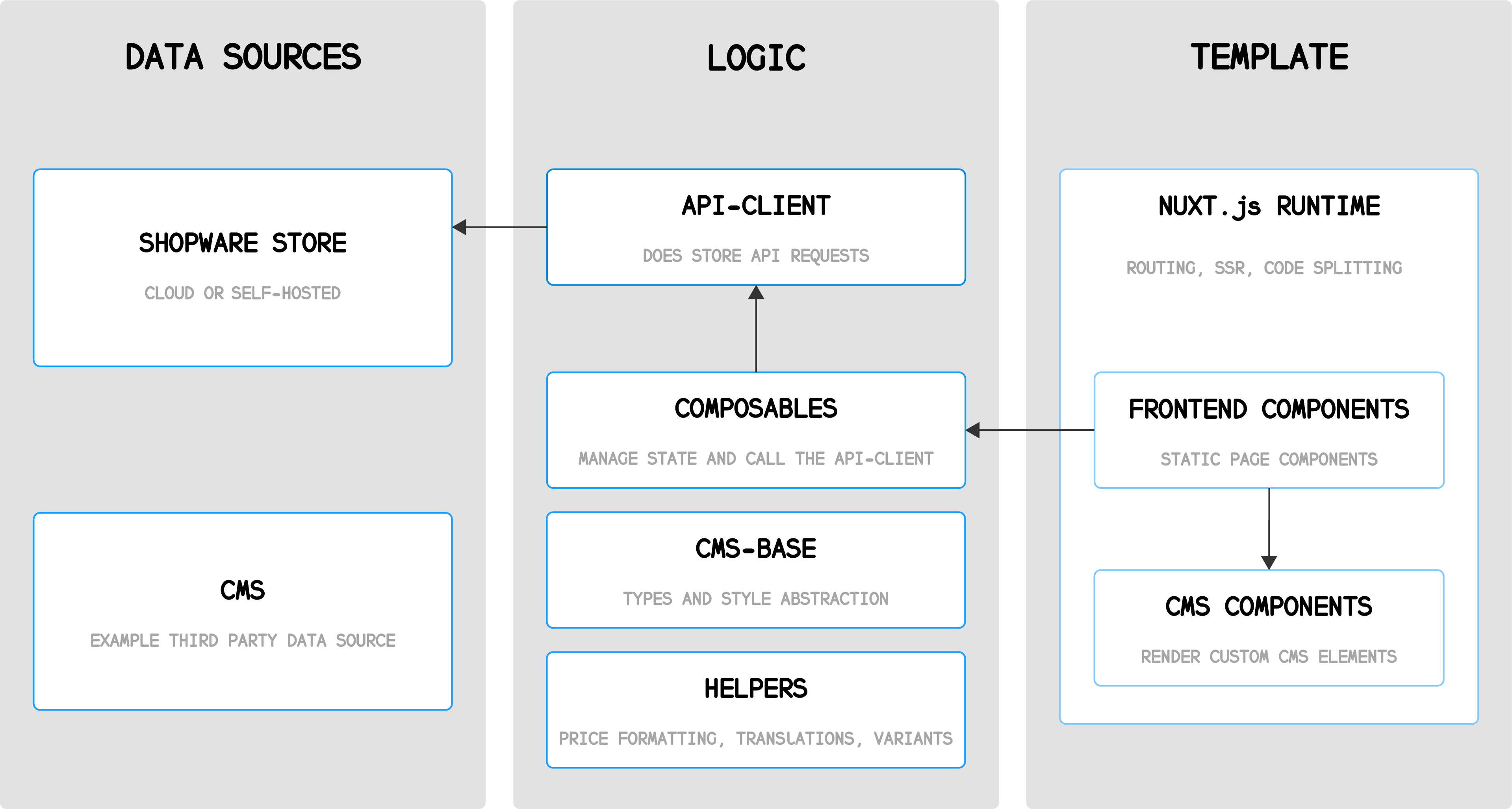
Shopware Frontends is a framework for building custom, headless storefronts with Shopware 6.