
docu-notion
Download Notion pages as markdown and image files, preserving hierarchy and enabling workflow properties. Works with Docusaurus.
- 183
- TypeScript
- MIT
- 5 d ago
Lexbox, SIL linguistic data hub
Repo sillsdev/languageforge-lexbox, read from GitHub 25 min ago. sillsdev has not joined Take My Repo.
sillsdev/languageforge-lexbox is a public repo on GitHub by sillsdev. Lexbox, SIL linguistic data hub. It declares the MIT license on GitHub. It is written mainly in C#, has 10 stars and last changed on 2026-11-23. Nobody has reviewed it on Take My Repo yet, which says nothing about its quality. Read from GitHub on 2026-11-23.
Looking for FieldWorks Lite?
files related to a specific service should be in a folder named after the service. There are some exceptions:
LexBox.slnx visual studio expects the solution to be at the root of the repo and can make things difficult otherwiseSummary of setup steps below. See the appropriate file for your operating system for more details:
tilt version to check that Tilt is installed correctlygit push to make sure your GitHub credentials are set upgit remote set-url --push origin git@github.com:sillsdev/languageforge-lexboxSet-ExecutionPolicy -ExecutionPolicy RemoteSignedtask setup below, which uses a PowerShell script to download seed datatask setup, which:task up
The full app will be running at http://localhost after everything starts. There are some additional urls below to access specific parts of the system.
There are various ways to run the project. Here are a few suggestions:
For developing the .NET API
task infra-up starts all necessary infrastructure in k8stask api:only starts the api locallyFor developing the SvelteKit UI
task backend-up starts all necessary infrastructure + the .NET API in k8stask ui:only starts the ui locallytask ui-devThe SvelteKit UI will be available at http://localhost:3000.
[!IMPORTANT] The SvelteKit UI is always available in k8s at http://localhost, but will not be reliable unless the entire project is started with
task up.
For developing the .NET API and the SvelteKit UI
task infra-up starts all necessary infrastructure in k8stask api:only starts the api locallytask ui:only starts the ui locallyIf the k8s deployments are already running
task k8s:infra-forward forwards the infrastructure ports for the APItask k8s:backend-forward forwards the infrastructure + backend ports for the UIOnce the database is created by the dotnet backend, it will also seed some data in the database.
The following users are available, password for them all is just pass:
There will also be a single project, Sena 3. There will not be an hg repository however, see optional setup below if this is desired.
flowchart TD
    Chorus --> lexbox-api

    subgraph lexbox pod
        lexbox-api --> otel
    end
    lexbox-api --> hgweb
    lexbox-api --> hgresumable
    subgraph hg pod
        hgweb
        hgresumable
    end
    hgweb --> hg[hg file system]
    hgresumable --> hg
    lexbox-api --> hg

    ui["ui (sveltekit)"] --> lexbox-api
    lexbox-api ---> db[(postgres)]
More info on the following subfolders can be found in their respective READMEs:
flowchart LR
    Chorus(["Chorus (e.g. FLEx)"]) -- "https:(hg-staging|resumable-staging)" --- proxy
    Web -- https://staging.languagedepot.org --- proxy([ingress])

    proxy ---|http:5158/api or /hg| api([lexbox-api])
    proxy ---|http:3000| node([sveltekit])

    api -- postgres:5432 --- db([db])
    db -- volume-map:db-data --- data[//var/lib/postgresql/]

    api -- http:8088/hg --- hgweb([hgweb])
    hgweb -- /var/hg/repos --- repos

    api -- "http:8080 (resumable + /api/manage)" --- hgresumable([hgresumable])
    hgresumable -- /var/vcs/public --- repos
    hgresumable -- hgresumable-cache --- cache[//var/cache/hgresume/]

    node <-->|http:5158/api & email| api

    api -- gRPC:4317 --- otel-collector([otel-collector])
    proxy ---|http:4318/traces| otel-collector
    node -- gRPC:4317 --- otel-collector
This project is instrumented with OpenTelemetry (OTEL). The exported telemetry data can be viewed in Honeycomb.
For your local environment to send traces to Honeycomb, you will need to set the HONEYCOMB_API_KEY environment variable in
the deployment/local-dev/local.env file.
You can get the key from here.
Traces can be accessed directly with a URL like this: https://ui.honeycomb.io/sil-language-forge/environments/[test|staging|prod]/trace?trace_id=_TRACE_ID_. Yes, bookmark it!
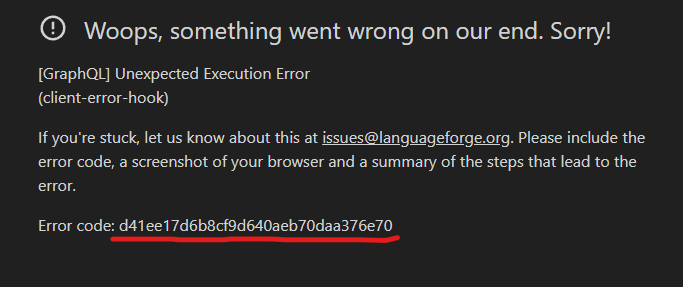
In the application, a trace ID (aka "Error code") shown at the bottom of an error message can be Ctrl+clicked to navigate to the trace in Honeycomb.
Run the Playwright tests with npx playwright test or npx playwright test some_test_filter. You can also use npx playwright test --ui to step through individual tests.
We're using Kopia to backup the Postgres DB and HG repos to an S3 bucket
Tim E and Kevin H both have access to the credentials. The k8s secret backups in prod has everything needed to run a restore job
If you need to restore a backup take a look at this readme.
sillsdev/languageforge-lexbox is a public repo on GitHub by sillsdev. Lexbox, SIL linguistic data hub.
It declares the MIT license on GitHub.
Its maker has not tagged a system, so it is unknown here. Its README says what it needs.
Open "Take it" on its page: Take My Repo writes an install plan for your machine and hands it to your AI agent (Claude Code, Codex or Cursor), which asks you before each step. Take My Repo has not tested it on any machine.
Its last change on GitHub was on 2026-11-23. Take My Repo does not judge from that whether it is maintained.
Nobody has reviewed it on Take My Repo yet, which says nothing about its quality.
Download Notion pages as markdown and image files, preserving hierarchy and enabling workflow properties. Works with Docusaurus.
FieldWorks is a suite of software tools for language and cultural data, with support for complex scripts.
Language Forge: Online Collaborative Dictionary Building on the Web and Phone. Replaced by FieldWorks Lite.
Palaso Library: A set of .Net libraries useful for developers of Language Software.
A set of pipelines for performing experiments on various NLP tasks with a focus on resource-poor/minority languages.
