
slack-ruby-bot-server
A library that enables you to write a complete Slack bot service with Slack button integration, in Ruby.
- 268
- MIT
- 4 wk ago
Repo slack-ruby/slack-ruby-bot-server, read from GitHub 10 h ago. slack-ruby has not joined Take My Repo.
In short
slack-ruby/slack-ruby-bot-server is a public repo on GitHub by slack-ruby. A library that enables you to write a complete Slack bot service with Slack button integration, in Ruby. It declares the MIT license on GitHub. It is written mainly in Ruby, has 268 stars and last changed on 2026-10-25. Nobody has reviewed it on Take My Repo yet, which says nothing about its quality. Read from GitHub on 2026-11-20.
Slack Ruby Bot Server
Build a complete Slack bot service with Slack button integration, in Ruby.
Table of Contents
- What is this?
- Stable Release
- Make Your Own
- Usage
- Testing
- Sample Bots Using Slack Ruby Bot Server
- Copyright & License
What is this?
A library that contains a web server and a RESTful Grape API serving a Slack bot to multiple teams. Use in conjunction with slack-ruby-bot-server-events to build a complete Slack bot service. Your customers can use a Slack button to install the bot.
Stable Release
You're reading the documentation for the next release of slack-ruby-bot-server. Please see the documentation for the last stable release, v2.3.0 unless you're integrating with HEAD. See UPGRADING when upgrading from an older version. See MIGRATING for help with migrating Legacy Slack Apps to Granular Scopes.
Make Your Own
This library alone will only register a new bot, but will not include any bot functionality. To make something useful, we recommend you get started from either slack-ruby-bot-server-events-app-mentions-sample (handles a single kind of event), or slack-ruby-bot-server-events-sample (handles all kinds of events) to bootstrap your project.
Usage
Storage
A database is required to store teams.
MongoDB
Use MongoDB with Mongoid as ODM. Configure the database connection in mongoid.yml. Add the mongoid gem in your Gemfile.
gem 'mongoid'
gem 'kaminari-mongoid'
gem 'mongoid-scroll'
gem 'slack-ruby-bot-server'
ActiveRecord
Use ActiveRecord with, for example, PostgreSQL via pg. Add the activerecord, pg, otr-activerecord and pagy_cursor gems to your Gemfile.
Currently supports ActiveRecord/Rails major versions 6.0, 6.1 and 7.0.
gem 'pg'
gem 'activerecord', require: 'active_record'
gem 'slack-ruby-bot-server'
gem 'otr-activerecord'
gem 'pagy_cursor'
Configure the database connection in config/postgresql.yml.
default: &default
  adapter: postgresql
  pool: 10
  timeout: 5000
  encoding: unicode

development:
  <<: *default
  database: bot_development

test:
  <<: *default
  database: bot_test

production:
  <<: *default
  database: bot
Establish a connection in your startup code.
yml = ERB.new(File.read(File.expand_path('config/postgresql.yml', __dir__))).result
db_config = if Gem::Version.new(Psych::VERSION) >= Gem::Version.new('3.1.0.pre1')
              ::YAML.safe_load(yml, aliases: true)[ENV['RACK_ENV']]
            else
              ::YAML.safe_load(yml, [], [], true)[ENV['RACK_ENV']]
            end
ActiveRecord::Base.establish_connection(db_config)
Extending Team
The installation model is the top-level ::Team class for both adapters, not SlackRubyBotServer::Models::Team. Load slack-ruby-bot-server before extending it. The model already includes its database adapter and timestamps; do not include them again or declare a different superclass.
Mongoid Attributes
Add fields by reopening the existing class in an application file, for example lib/team_extensions.rb:
require 'slack-ruby-bot-server'

class Team
  field :subscription_plan, type: String, default: 'free'

  def paid_plan?
    subscription_plan == 'paid'
  end
end
Require that file from your startup code after loading the framework and before serving requests or starting the service. Mongoid does not require a schema migration for the new field.
Active Record Attributes
Add a column to the existing teams table with an application migration. Use your application's migration version; this example is also compatible with older supported Active Record versions:
class AddSubscriptionPlanToTeams < ActiveRecord::Migration[6.0]
  def change
    add_column :teams, :subscription_plan, :string, default: 'free', null: false
  end
end
Run the migration before code uses the attribute. Active Record provides its reader and writer from the column; do not use attr_accessor, which would bypass persistence. Add methods by reopening class Team after loading the framework, as above, but omit the Mongoid-only field declaration.
Rails Loading and Reloading
Putting another app/models/team.rb in a Rails app is not a reliable way to extend a class already loaded by a gem. Put reloadable behavior in a concern instead:
# app/models/concerns/team_extensions.rb
module TeamExtensions
  extend ActiveSupport::Concern

  def paid_plan?
    subscription_plan == 'paid'
  end
end
Include it in ::Team from a reloader callback, rather than autoloading the concern directly during initializer execution:
# config/initializers/team_extensions.rb
require 'slack-ruby-bot-server'

if SlackRubyBotServer.config.mongoid?
  ::Team.field :subscription_plan, type: String, default: 'free'
end

Rails.application.config.to_prepare do
  ::Team.include(TeamExtensions)
end
With Active Record, use the migration above instead of declaring a field in the initializer. The callback runs at boot and after development reloads; including the same concern more than once is safe. Keep one-time field declarations outside the callback. Do not query the database or swallow database errors just to attach methods: the extension can be loaded before the teams table exists.
The framework currently owns the global Team constant. An unrelated application model with the same name is a separate name-collision limitation, not an extension mechanism.
OAuth Version and Scopes
Configure your app's OAuth version and scopes as needed by your application.
SlackRubyBotServer.configure do |config|
  config.oauth_version = :v2
  config.oauth_scope = ['channels:read', 'chat:write']
end
The "Add to Slack" button uses the standard OAuth code grant flow as described in the Slack docs. Once clicked, the user is taken through the authorization process at Slack's site. Upon successful completion, a callback containing a temporary code is sent to the redirect URL you specified. The endpoint at that URL contains code that persists the bot token each time a Slack client is instantiated for the specific team.
Slack App
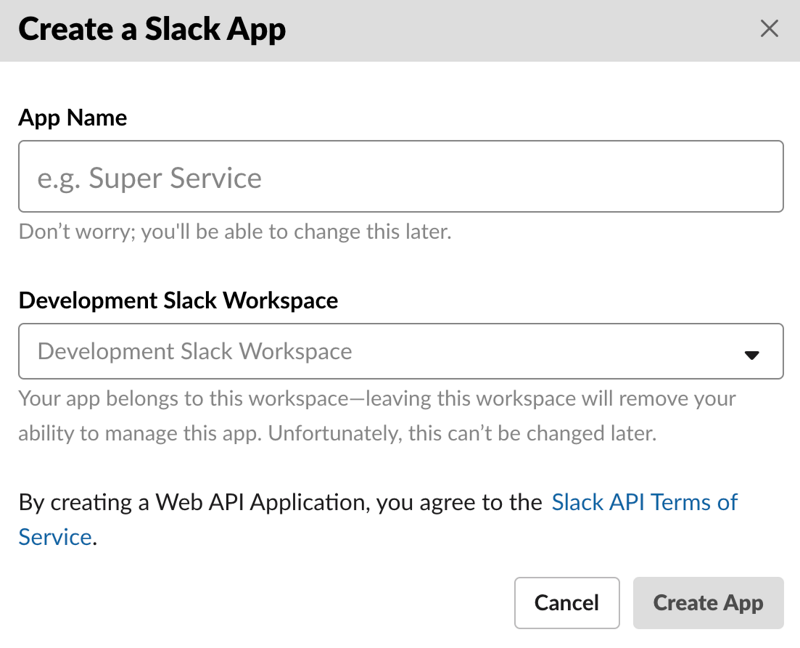
Create a new Slack App here.

Follow Slack's instructions, note the app client ID and secret, give the bot a default name, etc.
Within your application, edit your .env file and add SLACK_CLIENT_ID=... and SLACK_CLIENT_SECRET=... in it.
Run bundle install and foreman start to boot the app.
$ foreman start
07:44:47 web.1  | started with pid 59258
07:44:50 web.1  | * Listening on tcp://0.0.0.0:5000
Set the redirect URL in "OAuth & Permissions" be the location of your app. Since you cannot receive notifications on localhost from Slack use a public tunneling service such as ngrok to expose local port 9292 for testing.
$ ngrok http 5000
Forwarding https://ddfd97f80615.ngrok.io -> http://localhost:5000
Navigate to either localhost:9292 or the ngrok URL above. You should see an "Add to Slack" button. Use it to install the app into your own Slack team.
API
This library implements an app, SlackRubyBotServer::App and a service manager, SlackRubyBotServer::Service. It also provides default HTML templates and JS scripts for Slack integration.
Custom Endpoints
Set config.api to a Rack application, typically a Grape::API class, to customize the API without reopening the framework's classes. The default is nil, which uses SlackRubyBotServer::Api::Endpoints::RootEndpoint, including extensions mounted there by other gems. SlackRubyBotServer::Config.reset! restores this default.
To add an endpoint alongside the default API:
class ExtraApi < Grape::API
  prefix 'api'
  format :json

  get :foobar do
    { ok: true }
  end
end

class ApplicationApi < Grape::API
  mount SlackRubyBotServer::Api::Endpoints::RootEndpoint
  mount ExtraApi
end

SlackRubyBotServer.configure do |config|
  config.api = ApplicationApi
end
Configure this before starting the application. In config.ru, continue running SlackRubyBotServer::Api::Middleware.instance; both /api/foobar and the existing /api routes then share the framework's CORS, URL-rewrite, and page middleware. A separate Rack::Cascade stack is unnecessary.
In Rails, require the file defining ApplicationApi from your initializer before assigning config.api. For reloadable classes, make the assignment inside Rails.application.config.to_prepare so it references the current class. Mount SlackRubyBotServer::Api::Middleware.instance in your routes, for example mount SlackRubyBotServer::Api::Middleware.instance => '/', rather than bypassing that middleware stack.
Team Endpoint Visibility
The default API exposes GET /api/teams and GET /api/teams/:id publicly. To retain OAuth registration without those read endpoints, use the separately mountable TeamsEndpoint::Create. TeamsEndpoint::Read contains the list and detail routes; TeamsEndpoint continues to mount both for backward compatibility.
class RegistrationApi < Grape::API
  include SlackRubyBotServer::Api::Helpers::ErrorHelpers

  prefix 'api'
  format :json
  formatter :json, Grape::Formatter::Roar

  mount SlackRubyBotServer::Api::Endpoints::TeamsEndpoint::Create
end

SlackRubyBotServer.configure do |config|
  config.api = RegistrationApi
end
This replaces the default root API: it does not expose its status, root discovery, Swagger, or team-read routes. Do not also mount RootEndpoint or TeamsEndpoint, since either would restore the public team reads. If you use the Events extension or other custom endpoints, explicitly mount their routes with their required signature verification too. Add your own authentication before mounting TeamsEndpoint::Read if you need protected team queries. OAuth registration still requires a valid Slack authorization code; this configuration does not add a general authentication layer.
App
The app instance checks for a working database connection, ensures indexes, performs migrations, sets up bot aliases and log levels. You can introduce custom behavior into the app lifecycle by subclassing SlackRubyBotServer::App and creating an instance of the child class in config.ru.
class MyApp < SlackRubyBotServer::App
  def prepare!
    super
    deactivate_sleepy_teams!
  end

  private

  def deactivate_sleepy_teams!
    Team.active.each do |team|
      next unless team.sleepy?
      team.deactivate!
    end
  end
end
MyApp.instance.prepare!
Service Manager
Lifecycle Callbacks
You can introduce custom behavior into the service lifecycle via callbacks. This can be useful when new team has been registered via the API or a team has been deactivated from Slack.
instance = SlackRubyBotServer::Service.instance

instance.on :started, :stopped do |team|
  # team has been started or stopped
end

instance.on :created do |team, error, options|
  # a new team has been registered
end

instance.on :deactivated do |team, error, options|
  # an existing team has been deactivated in Slack
end

instance.on :error do |team, error, options|
  # an error has occurred
end
The following callbacks are supported. All callbacks receive a team, except error, which receives a StandardError object.
| callback | description |
|---|---|
| error | an error has occurred |
| creating | a new team is being registered |
| created | a new team has been registered |
| booting | the service is starting and is connecting a team to Slack |
| booted | the service is starting and has connected a team to Slack |
| stopping | the service is about to disconnect a team from Slack |
| stopped | the service has disconnected a team from Slack |
| starting | the service is (re)connecting a team to Slack |
| started | the service has (re)connected a team to Slack |
| deactivating | a team is being deactivated |
| deactivated | a team has been deactivated |
The Add to Slack button also allows for an optional state parameter that will be returned on completion of the request. The creating and created callbacks include an options hash where this value can be accessed (to check for forgery attacks for instance).
auth = OpenSSL::HMAC.hexdigest("SHA256", "key", "data")
<a href="<%= SlackRubyBotServer::Config.oauth_authorize_url %>?scope=<%= SlackRubyBotServer::Config.oauth_scope_s %>&client_id=<%= ENV['SLACK_CLIENT_ID'] %>&state=#{auth)"> ... </a>
instance = SlackRubyBotServer::Service.instance
instance.on :creating do |team, error, options|
  raise "Unauthorized response" unless options[:state] == auth
end
Service Timers
You can introduce custom behavior into the service lifecycle on a timer. For example, check whether a team's trial has expired, or periodically clean-up data. Timers can run once on start (once_and_every) and start running after a certain period (every).
instance = SlackRubyBotServer::Service.instance

instance.every :hour do
  Team.each do |team|
    begin
      # do something with every team once an hour
    rescue StandardError
    end
  end
end

instance.once_and_every :minute do
  # called once on start, then every minute
end

instance.every :minute do
  # called every minute
end

instance.every :second do
  # called every second
end

instance.every 30 do
  # called every 30 seconds
end
Note that, unlike callbacks, timers are global for the entire service. Timers are independent, and a failing timer will not terminate other timers.
Extensions
A number of extensions use service manager callbacks and service timers to implement useful functionality.
- slack-ruby-bot-server-events: Easily handle Slack slash commands, interactive buttons and events.
- slack-ruby-bot-server-mailchimp: Subscribes new bot users to a Mailchimp mailing list.
- slack-ruby-bot-server-stripe: Enables paid bots with trial periods and commerce through Stripe.
Service Class
You can override the service class to handle additional methods.
class MyService < SlackRubyBotServer::Service
  def url
    'https://www.example.com'
  end
end

SlackRubyBotServer.configure do |config|
  config.service_class = MyService
end

SlackRubyBotServer::Service.instance # MyService
SlackRubyBotServer::Service.instance.url # https://www.example.com
HTML Templates
This library provides a default HTML template and JS scripts that implement the "Add to Slack" button workflow. Customize your pages by adding a public directory in your application and starting with a index.html.erb template. The application's views and public folders are loaded by default.
You can add to or override template paths as follows.
SlackRubyBotServer.configure do |config|
  config.view_paths << File.expand_path(File.join(__dir__, 'public'))
end
Page Middleware Configuration
Use config.server_pages to configure the underlying Rack::ServerPages middleware in an initializer, before SlackRubyBotServer::Api::Middleware.instance is first accessed. The block receives its configuration object after the framework applies view_paths, so it can customize any option supported by your installed rack-server-pages version.
For example, with rack-server-pages 0.3.0 or newer:
SlackRubyBotServer.configure do |config|
  config.server_pages do |pages|
    pages.cache_control = 'private, no-cache'
    pages.static_cache_control = 'public, no-cache'
  end
end
cache_control sets the default Cache-Control header for rendered templates, including generated CSS. static_cache_control sets it for static files. no-cache allows storage but requires revalidation before reuse; use private, no-store for sensitive pages. You can also configure static_etags and static_timestamps with version 0.3.0 or newer. These settings do not change downstream API responses.
Without a block, the framework preserves the installed library's defaults and existing view_paths behavior. Registering another block replaces the previous one, and SlackRubyBotServer::Config.reset! clears it. The block runs when the middleware stack is built, not on each request. If you change configuration after initialization, rebuild the stack with SlackRubyBotServer::Api::Middleware.reset!; configure it before startup in production.
Access Tokens
By default the implementation of Team stores the value of the token with all the requested OAuth scopes in both token and activated_user_access_token (for backwards compatibility), along with oauth_version and oauth_scope. If a legacy Slack bot integration bot_access_token is present, it is stored as token, and activated_user_access_token is the token that has all the requested OAuth scopes.
Testing
The optional test helpers use Fabrication and Faker. Add fabrication and faker to your application's test dependencies; neither is a runtime dependency of this gem.
To use the framework's installation defaults without reserving your application's :team fabricator name, load the prefixed-only helper:
require 'slack-ruby-bot-server/rspec/fabricators'

team = Fabricate(:slack_ruby_bot_server_team)
This fabricator creates the existing ::Team model with unique token/team ID sequences and a generated name. Applications can register their own :team before or after this helper, or inherit the framework defaults:
Fabricator(:team, from: :slack_ruby_bot_server_team) do
  name { 'My application team' }
end
The existing require 'slack-ruby-bot-server/rspec' remains supported. It loads the prefixed fabricator and registers the legacy :team alias only when no :team definition already exists. If your application defines :team later, replace the legacy require with slack-ruby-bot-server/rspec/fabricators; loading both entry points still opts into the legacy alias.
Sample Bots Using Slack Ruby Bot Server
- slack-ruby-bot-server-events-sample, a generic sample
- slack-rails-bot-starter, an all-in-one Rails starter kit
- slack-sup2, see sup2.playplay.io
- slack-gamebot2, see gamebot2.playplay.io
Copyright & License
Copyright Daniel Doubrovkine and Contributors, 2015-2025
Questions
What is slack-ruby-bot-server?
slack-ruby/slack-ruby-bot-server is a public repo on GitHub by slack-ruby. A library that enables you to write a complete Slack bot service with Slack button integration, in Ruby.
Is slack-ruby-bot-server open source?
It declares the MIT license on GitHub.
Does slack-ruby-bot-server run on macOS, Windows or Linux?
Its maker has not tagged a system, so it is unknown here. Its README says what it needs.
How do I install slack-ruby-bot-server?
Open "Take it" on its page: Take My Repo writes an install plan for your machine and hands it to your AI agent (Claude Code, Codex or Cursor), which asks you before each step. Take My Repo has not tested it on any machine.
Is slack-ruby-bot-server still maintained?
Its last change on GitHub was on 2026-10-25. Take My Repo does not judge from that whether it is maintained.
What do people who ran slack-ruby-bot-server say?
Nobody has reviewed it on Take My Repo yet, which says nothing about its quality.