nera.vim
Named Entities (Rasa-like) syntax Annotator for vim editor
- 4
- 4 y ago
Repo solyarisoftware/nera.vim, read from GitHub 16 min ago. solyarisoftware has not joined Take My Repo.
In short
solyarisoftware/nera.vim is a public repo on GitHub by solyarisoftware. Named Entities (Rasa-like) syntax Annotator for vim editor. It declares no license on GitHub. Public does not mean open source: without a license, nobody is granted the right to reuse it. It is written mainly in Vim Script, has 4 stars and last changed on 2022-10-09. Nobody has reviewed it on Take My Repo yet, which says nothing about its quality. Read from GitHub on 2026-11-25.
Similar repos
openmed
Local-first healthcare AI: clinical NER and HIPAA PII de-identification on hardware you control. 2,200+ medical models, 35 model-backed PII languages, and Python, MLX, Android and browser runtimes. Apache-2.0 SDK.

Nera.vim
Named Entities Recognition (Rasa-like syntax) Annotator for the vim editor.
🤔 what is it for?
This vim plugin helps to annotate named entities using simple entity annotation syntax, using inline-text mark-up tags, following the format used in RASA YAML files.
The final goal is to possibly demonstrate how fast is annotate with a text editor (specifically vim) a text file of intents + entities examples of a training set.
What the named entity [entity_value](entity_label) syntax format is?
[entity_value](entity_label)
 ^             ^
 |             |
 |             entity name (label)
 |
 value (sequence of characters/words) for entity referenced with `entity_label`
Where:
entity_value- is any sequence of characters or words,
- delimited by characters
[and]
entity_label- is the entity name (label)
is a string of kind "variable name" in a programming language style,
by example the label is made by alphabet letters and the character
_ - the label is delimited by characters
(e)
- is the entity name (label)
is a string of kind "variable name" in a programming language style,
by example the label is made by alphabet letters and the character
By example, given the sentence
my name is Giorgio Robino and I live in Genova, corso Magenta 35/4
You want to annotate three entities (entity_label = entity_value):
person=Giorgio Robinocity=Genovaaddress=corso Magenta 35/4
Using above described syntax, the annotated sentence is:
my name is [Giorgio Robino](person) and I live in [Genova](city), [corso Magenta 35/4](address)
What the plugin does?
With the vim plugin command :NeraSet,
you can map up to 12 function keys (<F1>,...,<F12>) to a syntax substitution/decoration "macro"
that add a entity label
- to a visual selected text,
- or to the current word and a configurable number of adjacent words, setting the cursor to the start of the word (entity) you want to tag.
👊 Commands
In vim command mode (:) these commands are available:
| command | description |
|---|---|
:NeraSet functionKey label [contiguousWords] |
maps the specified functionKey to a substitution macro with argument label, and optional argument contiguousWords. functionKey valid values are number 1 ... 12 or strings F1 ... F12, or <F1> ... <F12> key pressing.label is the entity name (single word in camelCase or snake_case). contiguousWords is a number of contiguous words to be selected, this is an optional argument (default value is 1). |
Utilities:
| command | description |
|---|---|
:NeraMapping |
shows function keys mapping |
:NeraLoad command_script_file |
load and execute a script file containing Nera commands or any other vim : commands |
:NeraLabels label ... [label] |
Set a list of labels, to be used afterward with NeraSet |
:NeraLabelsClear |
Clear the list of preset labels, to be used afterward with NeraSet |
Usage
:NeraSet for current (single) word annotation
Given the sentence (line):
my name is Giorgio Robino and I live in Genova, corso Magenta 35/4
To assign to function key <F1> a substitution for visual mode and single word selection:
assign a new "macro" substitution to
<F1>:NeraSet f1 person_nameput the cursor at the begin of the word you want to annotate:
my name is Giorgio Robino  nd I live in Genova, corso Magenta 35/4
           ^
           |
           set the vim cursor here
press
<F1>. The line is updated with the entity notation syntax decoration:my name is [Giorgio](person_name) Robino and I live in Genova, corso Magenta 35/4
:NeraSet for Multiple contiguous words annotation
Maybe the example above is not what you exactly want, because a full person name is usually composed
by two consecutive words (Giorgio Robino),
so you maybe want to preset (another or the same) function key <F1>
to automatically substitute the current and the successive word.
In this case, set the mapping with argument contiguousWords set to 2:
assign a new "macro" substitution to
<F2>:NeraSet F2 person_name 2again put the cursor at the begin of the word you want to annotate:
my name is Giorgio Robino and I live in Genova, corso Magenta 35/4
           ^
           |
           set the vim cursor here
press
<F2>. The line is updated and in this casemy name is [Giorgio Robino](person_name) and I live in Genova, corso Magenta 35/4
:NeraSet for visual mode annotation
Anyway, even if you do not specify the words number argument,
you can proceed withe visual selection mode. So:
assign a new "macro" substitution to
<F3>:NeraSet <F3> addressgo in vim visual mode (pressing
v) and select the span you want to annotate:my name is Giorgio Robino and I live in Genova, corso Magenta 35/4 ^ ^ | | start visual selection end visual selectionpress
escand<F3>. The line is updated and in this casemy name is [Giorgio Robino](person_name) and I live in [Genova, corso Magenta 35/4](address)
:NeraLabels :NeraLabelsClear
You want to prepare a precise (short) list of labels
you will use afterward to annotate with NeraSet:
:NeraLabels name surname address city age gender
This list act as the reference list, to validate NeraSet label argument.
By example,
NeraSet <F4> job
generates a warning message, because you are setting a label not previously declared:
warning: label 'job' is not one of the configured labels: name surname address city age gender
functionKey: <F4>, label: job, contiguous words: 1
Press ENTER or type command to continue
:NeraLoad
Execute all Nera commands previously saved in specified script file.
you create your script file
examples/my_project_configs.vimcontaining Nera or other vim commands, by example:" " my_project_configs.vim " " F1 - F4 NeraSet <F1> name 1 NeraSet <F2> address 1 NeraSet <F3> company 1 NeraSet <F4> location 1 " F5 - F8 NeraSet <F5> email NeraSet <F6> name 2 NeraSet <F7> name 3 NeraSet <F8> address 1 " F9 - F12 NeraSet <F9> gender NeraSet <F10> address 3 NeraSet <F12> company 2Afterward you run the script from command mode:
:NeraLoad examples/my_project_configs.vim
:NeraMapping
Suppose you run commands:
:NeraSet <F1>  name 1
:NeraSet <F2>  address 1
:NeraSet <F3>  company 1
:NeraSet <F4>  location 1
:NeraSet <F5>  email
Afterward, you want to show the key mappings:
:NeraMapping
<F1>  c1w[<C-R><C-O>"](name)<Esc>
<F2>  c1w[<C-R><C-O>"](address)<Esc>
<F3>  c1w[<C-R><C-O>"](company)<Esc>
<F4>  c1w[<C-R><C-O>"](location)<Esc>
<F5>  c1w[<C-R><C-O>"](email)<Esc>
<F6>
<F6>
<F7>
<F8>
<F9>
<F10>
<F11>
<F12>
Press ENTER or type command to continue
💡 Tips
Commands arguments auto completion
When using command
NeraSetyou can use arguments auto completion (function key, labels, etc.). When using commandNeraLoadyou can exploit file name argument auto completionUndo labeling
If you are unhappy with your
NeraSetlabeling, just undo in vim as usual, pressinguin normal mode!Visual mode is always on
Any time you assign a key with
NeraSet, you set the word mode for a specified number of contiguous words, but you also enable the visual mode! You can optionally- select set the cursor at the start of word and press afterward the function key
- select in visual mode a span of words and press afterward the function key
📦 Install
Using vim-plug, in your .vimrc file:
Plug 'solyarisoftware/nera.vim'
Live demo
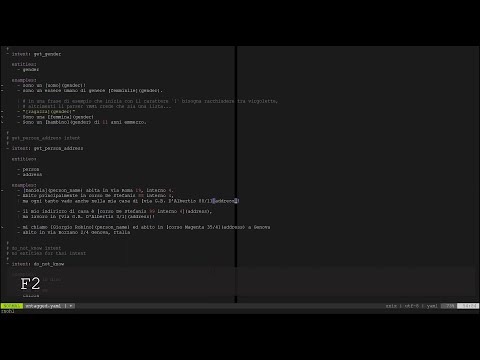
Some files available in examples directory of this repo. Here a live demo of this plugin commands usage to annotate entities:
⭐️ Status / How to contribute
This project is a work-in-progress proof-of-concept.
I'm not a vimscript expert, so any coding contribute is welcome.
For any proposal and issue, please submit here on github issues for bugs, suggestions, etc. You can also contact me via email (giorgio.robino@gmail.com).
I'm especially interested in any markup-based entity syntax formats alternative/different from RASA. Please let me know. Do not esitate to open a 'change request' issue.
IF YOU LIKE THE PROJECT, PLEASE ⭐️STAR THIS REPOSITORY TO SHOW YOUR SUPPORT! 🙏
To do
- add a help / online tutorial command
- improve arguments validation
- extend syntax, managing not only RASA-like style syntax annotation, but also other different systems' syntax:
Changelog
v. 0.5.0
- new commands
NeraLabelsandNeraLabelsClear NeraSetarguments auto-completion
- new commands
v. 0.4.1
NeraLoadnew command to load script of commandsNeraMappinghas now a cleaner list of key mappingsNeraSetnow accept the function key argument just pressing the corresponding function key!
👏 Acknowledgements
🤝 Related Project
- I made another plugin possibly complementary: Highlight.vim to colorize pattern of texts, with a random or specified background colors. A Possible usage is to highlight entity names and entity labels as show here: highlight entities having RASA-YAML entity annotation syntax
License
MIT (c) Giorgio Robino
Questions
What is nera.vim?
solyarisoftware/nera.vim is a public repo on GitHub by solyarisoftware. Named Entities (Rasa-like) syntax Annotator for vim editor.
Is nera.vim open source?
It declares no license on GitHub. Public does not mean open source: without a license, nobody is granted the right to reuse it.
Does nera.vim run on macOS, Windows or Linux?
Its maker has not tagged a system, so it is unknown here. Its README says what it needs.
How do I install nera.vim?
Open "Take it" on its page: Take My Repo writes an install plan for your machine and hands it to your AI agent (Claude Code, Codex or Cursor), which asks you before each step. Take My Repo has not tested it on any machine.