
phpmyflow
The modern phpMyAdmin replacement for MySQL and MariaDB: one folder of PHP, no page reloads.
- 0
- AGPL-3.0
- 7 d ago
Repo spiderjad/phpmyflow, read from GitHub 9 min ago. spiderjad has not joined Take My Repo.
In short
spiderjad/phpmyflow is a public repo on GitHub by spiderjad. The modern phpMyAdmin replacement for MySQL and MariaDB: one folder of PHP, no page reloads. It declares the AGPL-3.0 license on GitHub. It is written mainly in Svelte, has 0 stars and last changed on 2026-11-17. Nobody has reviewed it on Take My Repo yet, which says nothing about its quality. Read from GitHub on 2026-11-24.
phpMyFlow
The modern replacement for phpMyAdmin. Installs the same way, weighs less, and never reloads the page.
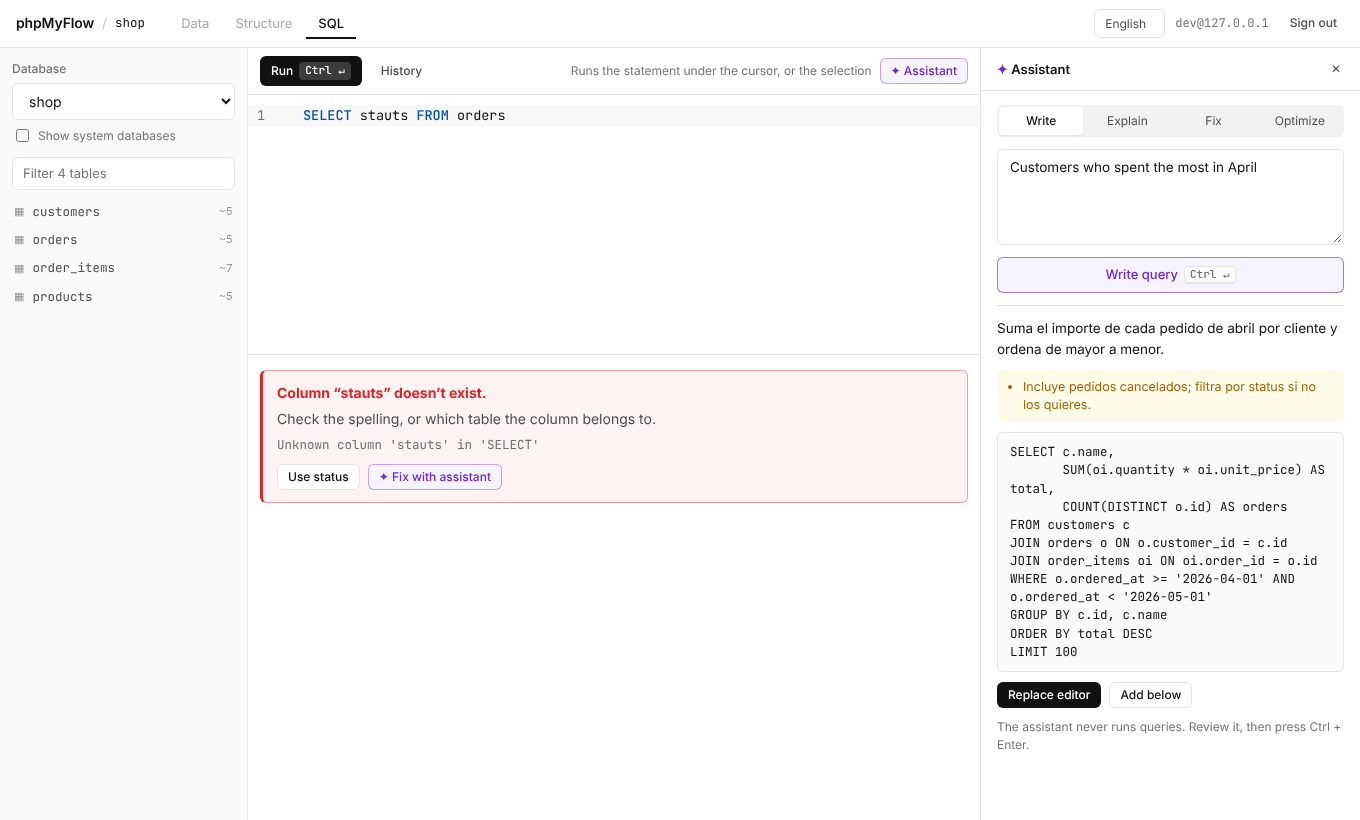
phpMyFlow is a web admin for MySQL and MariaDB. Like phpMyAdmin, it's a folder of PHP files you upload to any host. Unlike phpMyAdmin, it's a single-page app with a real SQL editor and an assistant that writes queries against your actual schema.
Status: early development (v0.1). Not ready for production data yet.
What makes it different
- No page reloads. Browse tables, sort, filter and edit cells instantly.
- An editor that knows your database. Tables and columns autocomplete as you type, with their types and keys.
- Mistakes caught before you run them. Typos in table or column names are underlined live, with a one-click fix ("Did you mean
customers?"). The server validates each statement withEXPLAIN, without executing it. - Errors in plain words. MySQL error codes are explained in your language, with a suggestion when there is one.
- Assistant (optional). Describe what you need and get the query; explain, fix or optimize existing queries. It sees your schema and the execution plan, and never runs anything by itself. Works with Anthropic, OpenAI, OpenRouter or a local model through Ollama.
- Safe by default. One statement per request, confirmation before
DROP,TRUNCATEorUPDATE/DELETEwithoutWHERE, CSRF protection, login rate limiting, an allow-list of servers and an optional read-only mode. - English, Spanish, Italian and French, light and dark themes.
Install on a PHP host
Requirements: PHP 8.1+ with pdo_mysql and openssl. No Composer, no Node on the server.
Use PHP 8.3 or newer when you can: 8.1 no longer gets security fixes and 8.2 stops getting them at the end of 2026.
- Download
phpmyflow-x.y.z.zipfrom Releases and unzip it into your site, e.g.public_html/phpmyflow/. - Copy
config.sample.phptoconfig.phpand set your database server(s). - Open
https://your-site/phpmyflow/and sign in with a MySQL user.
Don't expose it to the whole internet if you can avoid it: restrict by IP, VPN or HTTP auth.
Try it with Docker
docker compose up --build
# http://localhost:8080 — user root, password root
This starts MariaDB with a sample shop database.
Enable the assistant
In config.php:
'ai' => [
    'enabled' => true,
    'provider' => 'anthropic',      // or 'openai' for any OpenAI-compatible API
    'api_key' => 'sk-ant-…',
    'model' => 'claude-sonnet-5-5',
    'base_url' => '',               // e.g. http://localhost:11434/v1 for Ollama
],
The API key stays on the server. Your schema (table and column names, types, keys) is sent to the provider with each request; row data is not.
Monitor
The Monitor tab shows how the MySQL/MariaDB server is working: live counters and charts, running processes (with KILL), the heaviest queries from performance_schema, storage, a diagnosis and the last deadlock. It uses your login by default; panels that need more privileges say which one and show the exact GRANT.
Monitoring user (optional, needed for history)
Create a user with the minimum privileges:
CREATE USER 'phpmyflow_monitor'@'localhost' IDENTIFIED BY 'a long random password';
GRANT PROCESS, REPLICATION CLIENT ON *.* TO 'phpmyflow_monitor'@'localhost';
GRANT SELECT ON performance_schema.* TO 'phpmyflow_monitor'@'localhost';
-- optional: KILL other users' queries (MySQL 8: CONNECTION_ADMIN, MariaDB: SUPER or CONNECTION ADMIN)
-- optional: reset query statistics
GRANT DROP ON performance_schema.events_statements_summary_by_digest TO 'phpmyflow_monitor'@'localhost';
and add it to config.php (credentials only live there):
'monitor' => ['host' => '127.0.0.1', 'port' => 3306, 'user' => 'phpmyflow_monitor', 'password' => '…'],
History and peaks
collect.php takes one sample per minute: per-second rates, hourly database sizes and, when threads_running, queries/s or connections go over a threshold (fixed in monitor_peaks, or automatic: mean + 3σ of the last hour), a snapshot of the running statements (literals hidden) and the top 10 statement digests.
- With cron (preferred):
* * * * * php /path/to/phpmyflow/collect.php >/dev/null 2>&1. The History panel shows this line with the real path. - Without cron: set
'monitor_pseudo_cron' => true. A sample is taken at most once a minute while someone has the Monitor open.
Data goes to a subfolder with a random name inside server/data/ (SQLite with pdo_sqlite, otherwise daily JSON Lines files). The folders get .htaccess / web.config deny rules, and the random name keeps the files unguessable on servers that ignore them (nginx, Caddy); better, move it out of the web root with 'monitor_data_dir' => '/var/lib/phpmyflow'. Retention: 7 days at one-minute resolution, 90 days of hourly aggregates (min, avg, max, p95).
Alerts
'monitor_alerts' => [
    'thresholds' => ['threads_running' => ['warn' => 10, 'crit' => 30]],   // see Monitor::thresholds()
    'webhook' => 'https://hooks.slack.com/services/…',                    // optional
    'format' => 'slack',                                                   // slack | teams | generic
],
The Monitor tab shows a badge when a metric is over its threshold; the collector posts to the webhook at most once per metric every 15 minutes.
performance_schema off (MariaDB default)
Heavy queries need performance_schema = ON in the server configuration (restart required). Until then the Monitor shows the slow query log status and how to enable it.
Develop
# terminal 1: API
cd server && php -S 127.0.0.1:8080

# terminal 2: UI with hot reload (proxies api.php to :8080)
cd web && npm install && npm run dev
Load docker/sample.sql into a local MySQL/MariaDB to get the sample data. Build a release with scripts/build-release.sh.
Roadmap
Done: insert rows, export (SQL, CSV, JSON, Excel) and SQL import in resumable steps, create and alter tables, views, routines, triggers and events, virtualized grid with keyboard navigation, editor tabs and dated history, server monitor.
Next:
- Command palette (Ctrl+K)
- Named saved queries and CSV import
- Two-factor login (TOTP)
- PostgreSQL driver
Security
See SECURITY.md to report a vulnerability.
License
Copyright (C) 2026 Diego Pennisi. Licensed under the GNU AGPL-3.0. If you run a modified copy for other people, the AGPL asks you to offer them its source: set source_url in config.php (shown on the sign-in screen).
Questions
What is phpmyflow?
spiderjad/phpmyflow is a public repo on GitHub by spiderjad. The modern phpMyAdmin replacement for MySQL and MariaDB: one folder of PHP, no page reloads.
Is phpmyflow open source?
It declares the AGPL-3.0 license on GitHub.
Does phpmyflow run on macOS, Windows or Linux?
Its maker has not tagged a system, so it is unknown here. Its README says what it needs.
How do I install phpmyflow?
Open "Take it" on its page: Take My Repo writes an install plan for your machine and hands it to your AI agent (Claude Code, Codex or Cursor), which asks you before each step. Take My Repo has not tested it on any machine.