
mecatl
Open source agent harness, built from the ground up for cloud-native production workloads on infrastructure you control. Run the same provider-agnostic loop locally, remotely, or on Kubernetes, with durable state, permissions, and gRPC/HTTP-SSE APIs.
- 316
- Apache-2.0
- 2 d ago
Repo stacklok/mecatl, read from GitHub 1 d ago. stacklok has not joined Take My Repo.
In short
stacklok/mecatl is a public repo on GitHub by stacklok. Open source agent harness, built from the ground up for cloud-native production workloads on infrastructure you control. Run the same provider-agnostic loop locally, remotely, or on Kubernetes, with durable state, permissions, and gRPC/HTTP-SSE APIs. It declares the Apache-2.0 license on GitHub. It is written mainly in Go, has 316 stars and last changed on 2026-11-22. Nobody has reviewed it on Take My Repo yet, which says nothing about its quality. Read from GitHub on 2026-11-22.
Mecatl
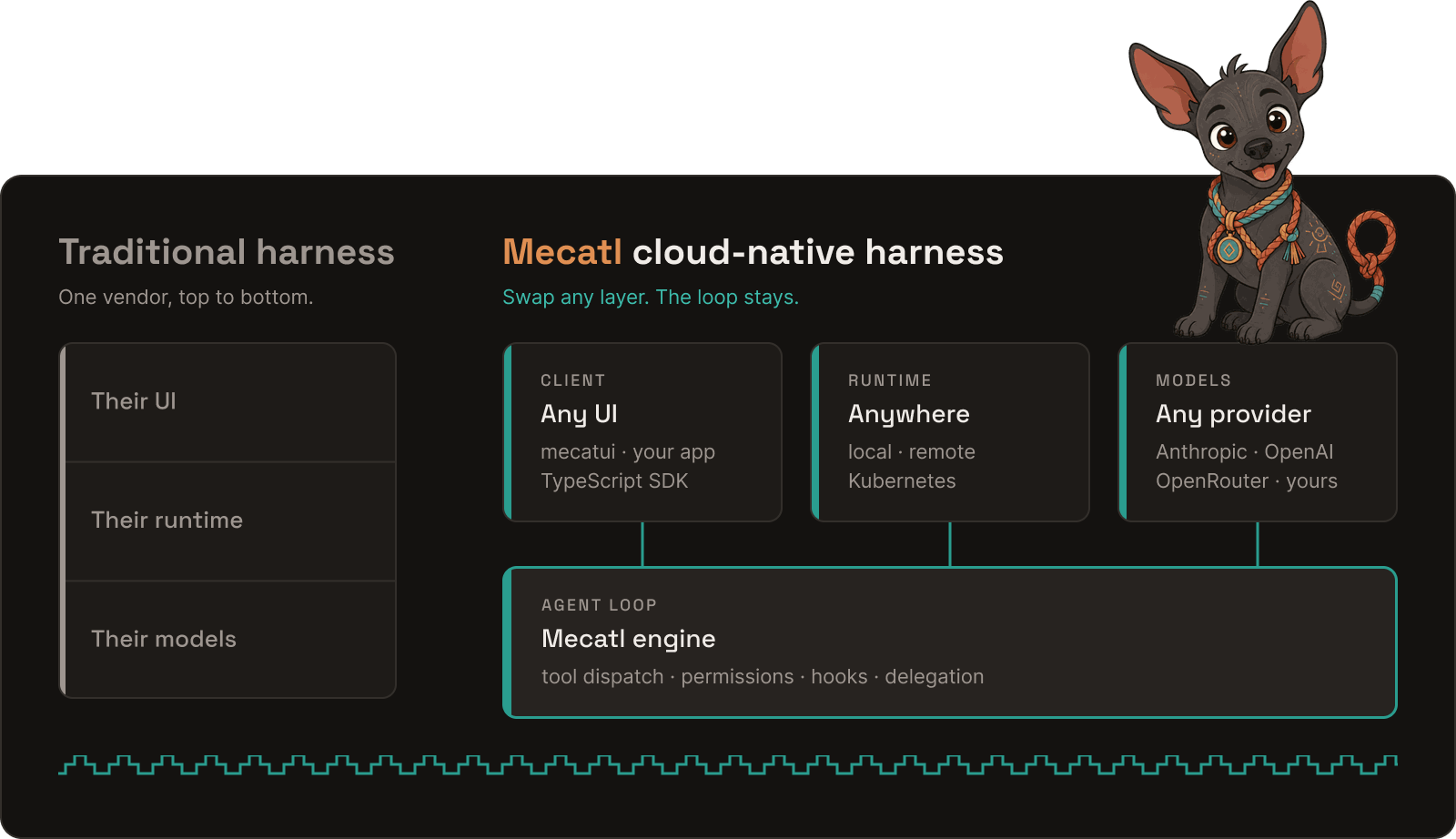
Mecatl is an open source, cloud-native agent harness. It provides the loop, tools, permissions, hooks, delegation, and service boundaries for running AI agents as production workloads on infrastructure you operate.
Mecatl keeps the agent loop independent of the client and execution environment, so the same runtime can start locally, run remotely with durable external state and a recorded event history, then scale across Kubernetes replicas without replacing the loop. It combines composable tools and skills with permissions, attribution, and audit records while keeping model providers and deployment infrastructure replaceable.
Run one of the supplied services or connect Mecatl to an existing application with the model provider, state store, filesystem, and UI that fit your workflow. These concerns connect through explicit interfaces, so changing one does not require replacing the agent loop.
Read the Mecatl documentation to get started.
What it provides
- A streaming agent loop with tool dispatch, permissions, compaction, hooks, subagents, and teams.
- Provider-agnostic model integration, with reference adapters and opt-in provider modules.
- Durable sessions and append-only event logs through pluggable stores, so a deployment can recover persisted work after process replacement.
- Client integration via gRPC and HTTP/SSE, the TypeScript SDK, and mecatui, a terminal client that can host a local server or connect to a remote one.
- A Kubernetes-native reference runtime that combines Redis-backed state, Kubernetes session leases, drain handling, and disposable replicas.
- Per-session execution environments, including an opt-in local microVM backend that keeps model providers and credentials on the host while filesystem tools and Bash run inside the VM.
Get started
| Goal | Start with |
|---|---|
| Run an agent service | mecated and the deployment guide |
| Run agents on Kubernetes | mecak8s and the Kubernetes deployment guide |
| Use an agent locally | Install, then use mecatui — or run the offline demo from a checkout |
| Isolate local filesystem and Shell tools | Local microVM execution (qualified on Linux amd64) |
| Connect an application | The TypeScript SDK guides or the gRPC and HTTP/SSE integration guide |
| Build unattended automation | mecatequi for one prompt, a patch, and a machine-readable result |
| Embed the runtime | engine and the embedding guide |
Install
Install mecatui, the terminal client, and mecated, the server, with
Homebrew:
brew install stacklok/tap/mecatl
Install and verify Mecatl covers Conda-forge,
release archives, verification, and source builds. Build mecademo,
mecatequi, and mecak8s from a checkout with task build.
Run agents as production workloads
An agent runtime needs more than a model call to operate as a workload. A replaceable process needs durable state outside the process, a record of work that survives a restart, and a way to coordinate access when replicas share a session. Mecatl supplies the seams and reference implementations for those concerns without making them part of the agent loop.
The supplied mecak8s runtime demonstrates this deployment model. It uses
Redis for session state and event logs, Kubernetes leases to ensure one writer
per session, and a drain path for replacing pods. You can also embed the engine
and provide the backing services and execution environment yourself. See
What is a cloud-native harness?
for the runtime guarantees and boundaries.
Open and modular by design
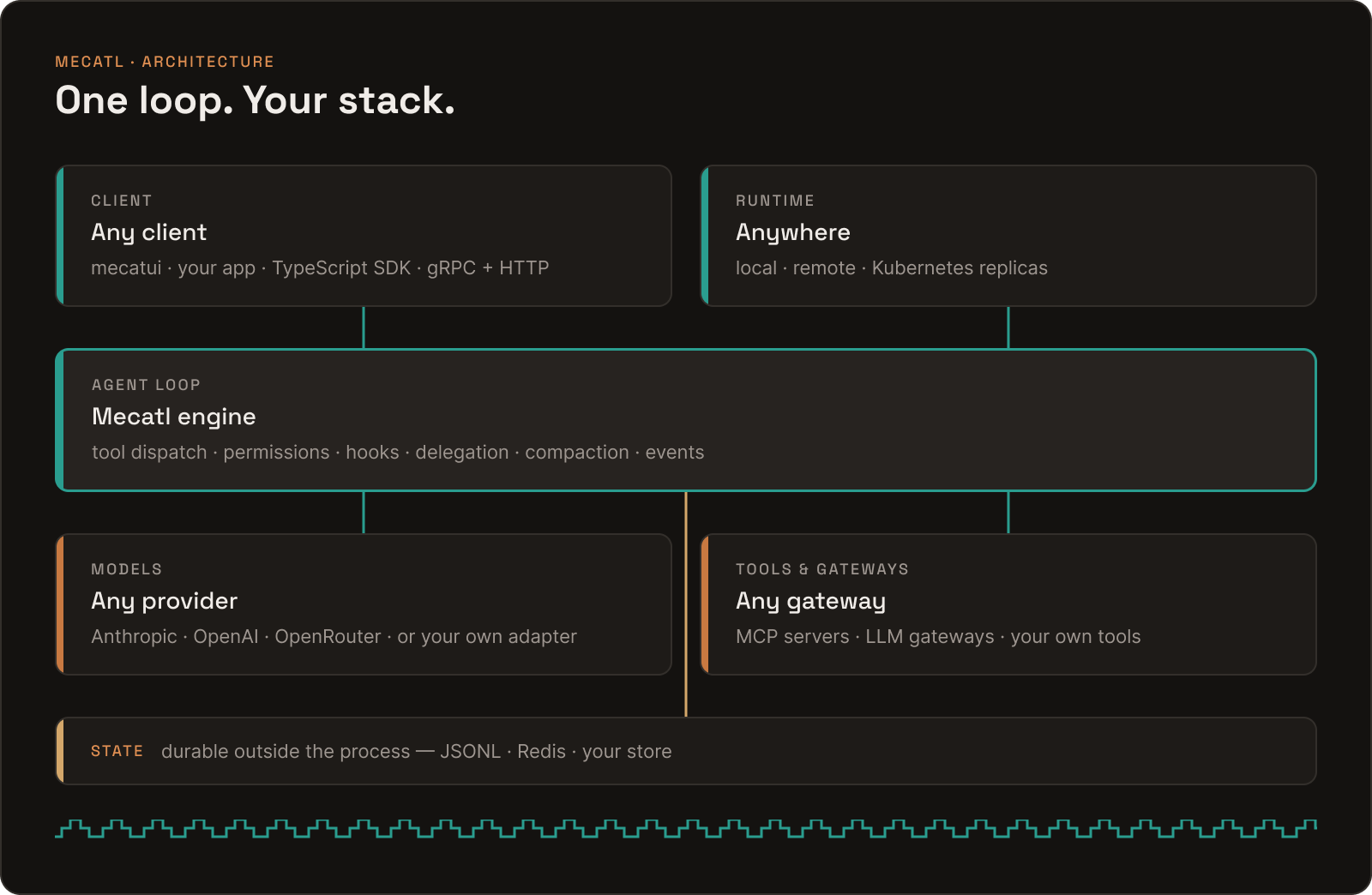
Mecatl keeps the agent loop independent of the provider and infrastructure behind it. Reference adapters support offline development, while integrations use the interfaces that match the parts of the system they connect. This lets you use the same harness with the model providers, state services, tools, and clients your system requires.
Mecatl provides the agent runtime and its contracts. Your application decides which capabilities a session receives, where code runs, and how it connects to its identity, policy, and data services.
Control and execution
Agents can act with a user's or service's authority, so Mecatl keeps the agent loop separate from the execution environment. It treats permissions and the event record as first-class runtime concerns. It includes deny-dominant permissions, approval flows, secret-scrubbed command environments, durable attribution, and an audit trail. Delegated runs receive derived capabilities that can only narrow at each in-process hop.
Caller identity and audit records are useful building blocks, not a complete tenant-isolation boundary. Cross-process cryptographic proof and authority attenuation remain active design work. See the agent identity tracker and the agent identity and authority design.
Try it locally
The offline demo runs a scripted session with tool calls, a permission approval,
delegation, and usage accounting. It does not require an API key. It runs from a
checkout of this repository; the Homebrew cask does not ship mecademo.
go run ./cmd/mecademo
To build every supplied runtime and client:
task build
For an embedded deployment, see the engine compatibility contract and the embedding guide.
Security:
mecatedis unauthenticated by default and intended for loopback, single-user use. Configure authentication and transport protection before binding it off-loopback. The deployment guide covers bearer auth, TLS/mTLS, OIDC, rate limits, and deployment posture.
Local microVM execution
For optional isolated local execution on Linux amd64, install and authenticate the
release-stamped host binaries: both mecatui and mecated for interactive use, or
just mecated for headless use. mecatui runs the embedded interactive server;
mecated supplies local microVM administration. Follow the
verified host-binary installation steps
before running either command sequence:
# Interactive embedded journey: configure the operator-owned deployment setting
# in ~/.config/mecatl/settings.yaml:
#
# execution:
#   default_placement: microvm-local
mecated microvm doctor
mecatui

# Or headless, mecated-only journey:
mecated microvm doctor
mecated serve --headless --default-placement microvm-local
# --headless declares an unattended server, so child asks do not wait for a local UI.
# Ordinary POST /v1/sessions uses the deployment default; clients send no path or placement.
Release binaries verify and prepare the required runtime when the deployment selects
microvm-local. Source builds do not support this profile; repository developers can
use the separate developer source workflow.
microvm doctor and microvm status are read-only mecated administration commands.
Guest IPv4 egress is permissive by default; external IPv6 is unrouted and unsupported.
The local host operator can instead select deny-all or allowlist in
execution.microvm.guest_egress, or use mecated serve's
--microvm-guest-egress=deny-all or --microvm-guest-egress=allowlist with repeatable
--microvm-guest-allow=HOST:PORT/tcp|udp rules. The allowlist requires at least one
valid hostname rule; invalid input or enforcement failure stops startup. HTTP/gRPC
clients and project configuration cannot set or weaken this host-only policy. Agent
edits live in an isolated session worktree, not in the original checkout. The local
microVM operator guide covers
verified installation, headless use, guest-egress controls, host-versus-guest
boundaries, and platform limits.
User documentation
- Mecatl documentation for user guides and deployment information.
- Client integration guide for gRPC and HTTP/SSE clients.
- TypeScript SDK guides for Node.js, Bun, and browser applications.
Architecture and engineering documentation
Contributing, security, and license
Contributions are welcome through pull requests. Start with CONTRIBUTING.md; coding agents should read AGENTS.md before changing the repository.
Report vulnerabilities privately through SECURITY.md.
Licensed under the Apache License 2.0. Community participation is governed by the Code of Conduct.
Questions
What is mecatl?
stacklok/mecatl is a public repo on GitHub by stacklok. Open source agent harness, built from the ground up for cloud-native production workloads on infrastructure you control. Run the same provider-agnostic loop locally, remotely, or on Kubernetes, with durable state, permissions, and gRPC/HTTP-SSE APIs.
Is mecatl open source?
It declares the Apache-2.0 license on GitHub.
Does mecatl run on macOS, Windows or Linux?
Its maker has not tagged a system, so it is unknown here. Its README says what it needs.
How do I install mecatl?
Open "Take it" on its page: Take My Repo writes an install plan for your machine and hands it to your AI agent (Claude Code, Codex or Cursor), which asks you before each step. Take My Repo has not tested it on any machine.