
ane-classifiers
Webcam hand gestures and facial expressions on Apple silicon: Core ML classifiers on the Neural Engine vs Liquid AI d1-2B ported to MLX Swift
- 0
- 7 d ago
Repo starkdmi/ane-classifiers, read from GitHub 7 h ago. starkdmi has not joined Take My Repo.
In short
starkdmi/ane-classifiers is a public repo on GitHub by starkdmi. Webcam hand gestures and facial expressions on Apple silicon: Core ML classifiers on the Neural Engine vs Liquid AI d1-2B ported to MLX Swift. It declares no license on GitHub. Public does not mean open source: without a license, nobody is granted the right to reuse it. It is written mainly in Swift, has 0 stars and last changed on 2026-11-16. Nobody has reviewed it on Take My Repo yet, which says nothing about its quality. Read from GitHub on 2026-11-23.
ANE Classifiers
A native macOS app that reads hand gestures and facial expressions from the webcam, two ways, behind one UI:
- Classic: three small Core ML models on the Apple Neural Engine. MediaPipe BlazeFace finds the face, EmotiEffLib (EfficientNet-B0) reads the expression, and a HaGRIDv2 YOLOv10n detector finds each hand and its gesture (33 gestures). About 10–15 ms per frame.
- d1-2B: Liquid AI's 1.9B-parameter decision model, ported to MLX Swift. One forward pass answers four questions: which gesture, which expression, where the face is and where the hand is. It generates no tokens. About 0.6 s per decision on an M1 Pro.
Switch between them with ⌘K / ⌘D. Everything runs on the Mac; no frame leaves it.
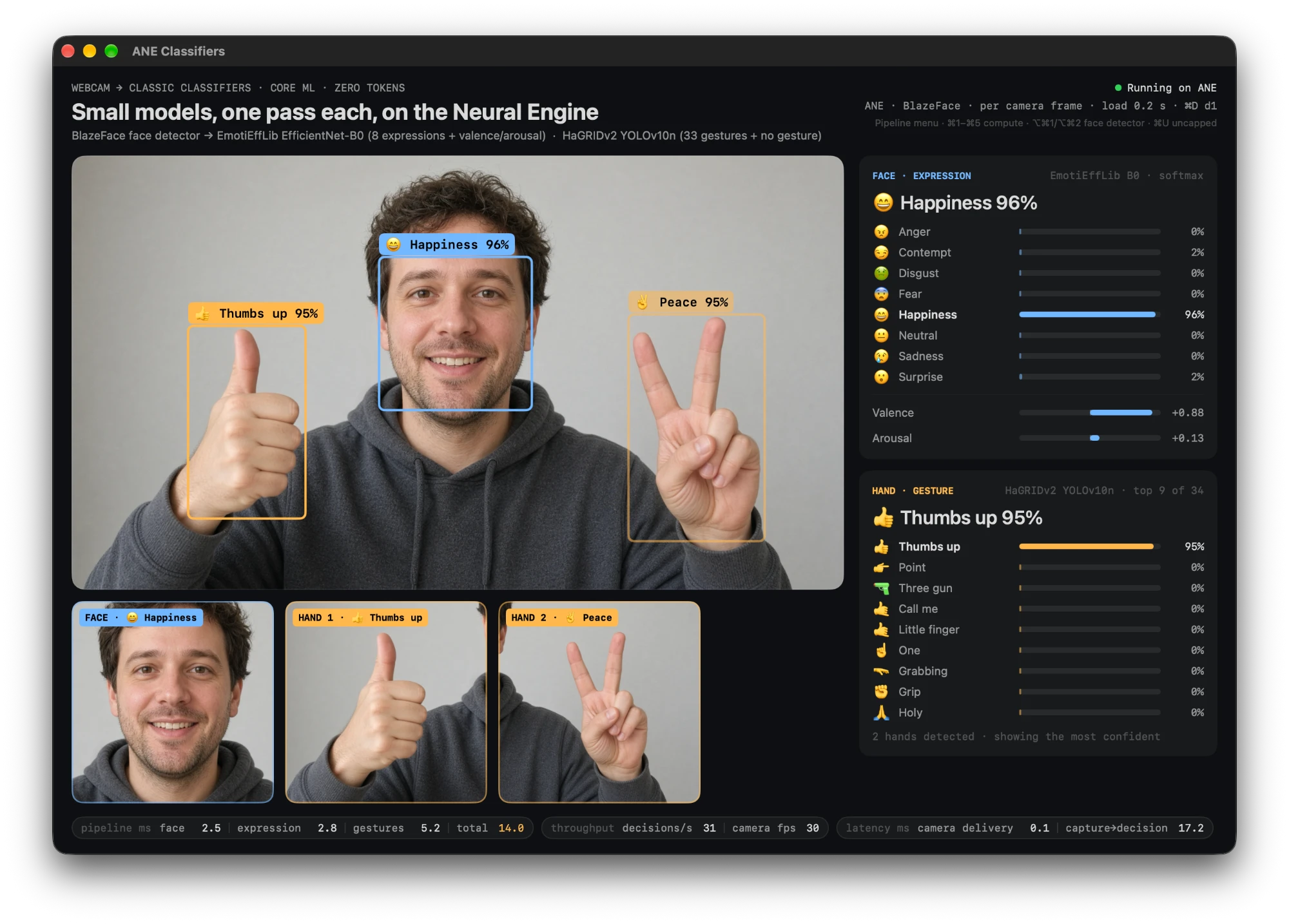 Classic mode on a generated test image: one face, two hands, two gestures, ~14 ms per frame.
Results
M1 Pro (14-inch MacBook Pro, 2021, 16 GB), built-in FaceTime HD camera (1080p, 30 fps), with everyday apps open, macOS's default camera processing and its Background effect on (Camera processing has faster settings).
| Classic (Core ML, ANE) | d1-2B (MLX, GPU) | |
|---|---|---|
| Model size | ~13 MB (BlazeFace 0.5 + EmotiEffLib 7.8 + YOLOv10n 4.5) | 2.1 GB (8-bit) |
| Time per decision | ~10–15 ms typical, ~20–25 ms when it waits on the ANE (see below) | ~620–665 ms (vision 110 + backbone 550) |
| Decisions per second | 30 (the camera's limit); 80–90 uncapped | 1.5–2 |
| Capture → decision | ~710–800 ms | |
| Two hands | Separate boxes and labels | One box, one answer |
| Added power (whole Mac) | ~4 W at 30 decisions per second | ~16 W (the GPU alone reads ~20 W); fans on after ~2 min |
| Energy per decision | ~0.15 J | ~10 J |
| App memory | ~0.3 GB | ~3.6 GB |
| Questions | Fixed classes | Any typed question (tools/d1_export_plan.py) |
The d1 numbers match mlx-vlm in Python on the same Mac (616 ms vs 606 ms in Swift for the same 528-token request). For scale, the mlx-d1-gestures demo reports about 70 ms for a similar ~670-token request on an M5 Max.
How power and memory were measured: mactop's whole-machine reading (mactop --headless --format json,
system_power), median over 15 s, minus the same app with the camera on and no model running. mactop reports no CPU
or Neural Engine power on this Mac, so the GPU reading alone would hide most of what Classic costs. Other apps add
about ±1–2 W of noise. App memory is footprint of the running app; with the camera on and no model it is already
~0.3 GB, and Core ML keeps much of a Neural Engine model outside the app's footprint.
What the measurements turned up:
- The camera uses the Neural Engine too. The camera daemon runs a neural denoiser on the Neural Engine for every stream, and the Background effect runs another model. Together they keep it around 40% busy, and many of our ANE calls wait 15–20 ms behind them. With the camera off, almost none do.
- The camera costs more power than the classic models. With the camera on and no model running, the Mac draws
7 W more than idle (19 W vs ~11–12 W). Classic adds ~4 W on top of that, d1 ~16 W. Most of the camera's share is its processing, which can be turned off (below). - Apple's Vision face detector costs 15–25 ms on the M1 Pro on any compute device; BlazeFace on the ANE takes ~1 ms.
- Most latency is the camera. About 90–110 ms pass between the capture timestamp and the frame reaching the app, ~60 ms with the Background effect off, ~30 ms with the camera's processing off too.
Camera processing
macOS processes every FaceTime HD frame before an app gets it: the camera daemon (appleh13camerad) runs a neural
denoiser on the Neural Engine, a temporal filter and a GPU enhancement, and Video menu effects such as Background run
on top. Three undocumented camera daemon settings turn off the daemon's part
(Disabling FaceTime HD camera post-processing on macOS).
Classic with the camera on, about 15 s each:
| Default, Background on | Default, Background off | Processing off, Background on | Processing off, Background off | |
|---|---|---|---|---|
| Camera → app | 90–107 ms | 57–62 ms | 43–47 ms | 29–30 ms |
| Classic per frame, typical / slowest | 12–21 / 24–37 ms | 25 / 31–33 ms | 9.3 / 12 ms | 13 / 14–15 ms |
| Neural Engine busy | 38% | 38% | 35% | 23% |
| Mac power | 19.1 W | 17.8 W | 19.5 W | 15.4 W |
Turning off Background alone saves latency but not Neural Engine time: the daemon throttles its denoiser while Background runs (its log says so) and probably runs it on every frame without it, so Classic still waits. With the processing off, Classic never waits. It settles at ~13 ms rather than ~9 ms when nothing else keeps the Neural Engine busy, but it doesn't stall.
The trade-offs: the settings are system-wide and undocumented, the picture is noisier in low light, and the camera drops out of the Video menu. Background keeps running with the processing off, so turn it off in the Video menu first for the fastest setup.
Turn the processing off:
for k in EnableAppleISPEmulator EnableVEIRL EnableMCTF; do sudo -u _cmiodalassistants defaults write com.apple.coremedia $k -bool NO; done; sudo killall appleh13camerad
Undo:
for k in EnableAppleISPEmulator EnableVEIRL EnableMCTF; do sudo -u _cmiodalassistants defaults delete com.apple.coremedia $k; done; sudo killall appleh13camerad
If the camera doesn't come back to the Video menu after undoing, run killall ControlCenter (it relaunches at once).
Requirements
- Apple silicon Mac, macOS 14 or later
- An Xcode with Swift 6.3 or later (MLX Swift 0.33 requires it; built with Xcode 27.2), with the Metal Toolchain component installed (Xcode › Settings › Components); MLX compiles its GPU kernels with it
- uv for
tools/setup.sh - XcodeGen only if you change
App/project.yml
Setup
tools/setup.sh          # classic models: downloads the original checkpoints, converts them to Core ML
tools/setup.sh --d1     # also d1-2B (2.2 GB of weights from Hugging Face)
The script creates local Python environments (.venv, .venv-d1), downloads each checkpoint from its authors,
lists every Python global the pickled checkpoints reference before loading them, and writes
App/Models/*.mlpackage. It is safe to re-run.
Then open App/ANEDemo.xcodeproj and run the ANEDemo scheme, ideally in Release for real timings. From the
command line:
xcodebuild -project App/ANEDemo.xcodeproj -scheme ANEDemo -configuration Release -derivedDataPath App/build build
open "App/build/Build/Products/Release/ANE Classifiers.app"
Signing: the project signs to run locally (ad-hoc). macOS ties camera permission to the signature, so it asks
again after each rebuild. To keep the permission, put your own identity in a git-ignored App/Config/Local.xcconfig,
as App/Config/Signing.xcconfig explains. You may also want to change the placeholder bundle ID com.example.ANEDemo.
d1 weights are found in weights/d1-2B-MLX-8bit above the app (the setup script's location), in
~/Library/Application Support/ANE Classifiers/d1-2B-MLX-8bit, or wherever you point Pipeline › Locate d1 Weights….
Using it
Settings are in the Pipeline menu:
| Shortcut | Setting |
|---|---|
| ⌘K / ⌘D | Classic / d1-2B |
| ⌘1 … ⌘5 | Classic compute: ANE, Hybrid (gestures on GPU in parallel), GPU, CPU, Auto |
| ⌥⌘1 / ⌥⌘2 | Classic face detector: BlazeFace / Vision |
| ⌘U | Uncapped: re-run on the newest frame as soon as a run ends (shows capacity beyond 30 fps) |
The stats row shows per-stage times, decisions per second and latency. A per-step profile (median / p95 / max of every CPU step and model call) goes to the system log every 3 seconds:
/usr/bin/log stream --info --predicate 'subsystem == "com.example.ANEDemo"'
Launch flags for scripted runs: -computeMode ANE|Hybrid|GPU|CPU|Auto, -faceDetector BlazeFace|Vision,
-uncapped YES, -aneWake off|arrival|predictive, -d1 YES, -d1ModelPath /path, for example
open "ANE Classifiers.app" --args -d1 YES.
How it works
Classic (App/ANEDemo/Engine.swift): each camera frame is downscaled once with vImage into a 640×384
letterbox. YOLOv10n runs on it, using its NMS-free one-to-one head with all class scores kept. BlazeFace runs on a
256×256 letterbox of the same pixels. The largest face is cropped from the full-resolution frame for EmotiEffLib.
A stabilizer (Stabilizer.swift) smooths the boxes with a One Euro filter, keeps labels sticky and tracks hands
across frames. Frames that arrive while a run is in progress are dropped, never queued.
d1 (App/ANEDemo/D1/): with fixed questions and a fixed 640×352 input, d1's packed token row is constant, so
tools/d1_export_plan.py compiles it once into App/Models/d1_plan.json. The plan holds the token ids, the
set-attention layout, the answer slots, the readout tables and the calibration. The Swift side runs the vision tower
and projector, then the LFM3 backbone (short-conv, sliding and full attention layers under d1's set attention). It
reads option logits at each answer slot, then the calibrated probabilities and the box edge medians. The port matches
mlx-vlm to within 0.001 on the probabilities and exactly on the boxes. To change the questions, edit
QUESTIONS in the exporter and re-run it; no Swift changes are needed.
To check the port against Python on your own image:
.venv-d1/bin/python -I tools/d1_export_plan.py weights/d1-2B-MLX-8bit App/Models/d1_plan.json my_photo.jpg weights/d1_reference.safetensors
xcodebuild -project App/ANEDemo.xcodeproj -scheme d1check -configuration Release -derivedDataPath App/build build
App/build/Build/Products/Release/d1check weights/d1-2B-MLX-8bit App/Models/d1_plan.json weights/d1_reference.safetensors
Layout
App/project.yml            XcodeGen spec (App/ANEDemo.xcodeproj is generated from it)
App/Config/                Signing.xcconfig: ad-hoc by default; optional Local.xcconfig for your identity
App/ANEDemo/               the app: camera, classic engine, stabilizer, UI
App/ANEDemo/D1/            d1-2B in MLX Swift (LFM Open License / Apache-2.0, see its LICENSE)
App/Tools/d1check/         command-line check of the d1 port against mlx-vlm
App/Models/d1_plan.json    the compiled d1 question set (*.mlpackage files are generated here)
tools/                     setup, converters, safety check, timing scripts
License
This repository's own code is under the MIT License. The d1 port in App/ANEDemo/D1/ keeps the licenses
of the code it was ported from (LFM Open License v1.0 and Apache-2.0). Models are downloaded from their authors under
their own licenses: EmotiEffLib (Apache-2.0, trained on AffectNet), HaGRID (CC BY-SA 4.0 variant, trained with
Ultralytics, AGPL-3.0), BlazeFace (Apache-2.0), d1-2B (LFM Open License v1.0). Details are in
THIRD_PARTY_NOTICES.md.
The d1 comparison follows ivanfioravanti/mlx-d1-gestures: the same model build, question types and input size.
Questions
What is ane-classifiers?
starkdmi/ane-classifiers is a public repo on GitHub by starkdmi. Webcam hand gestures and facial expressions on Apple silicon: Core ML classifiers on the Neural Engine vs Liquid AI d1-2B ported to MLX Swift.
Is ane-classifiers open source?
It declares no license on GitHub. Public does not mean open source: without a license, nobody is granted the right to reuse it.
Does ane-classifiers run on macOS, Windows or Linux?
Its maker has not tagged a system, so it is unknown here. Its README says what it needs.