

Step-Audio
The maintainer has not written a description at the source.
- 49
- Apache-2.0
- 8 mo ago
Repo stepfun-ai/Step-Audio, read from GitHub 17 h ago. stepfun-ai has not joined Take My Repo.
In short
stepfun-ai/Step-Audio is a public repo on GitHub by stepfun-ai. It declares the Apache-2.0 license on GitHub. It is written mainly in Python, has 49 stars and last changed on 2026-03-16. Nobody has reviewed it on Take My Repo yet, which says nothing about its quality. Read from GitHub on 2026-11-24.
开发者微信交流群、Developer Group
This repository is no longer maintained, please refer to:
Step-Audio2&Step-Audio2-mini for End-to-end speech conversation
Step-Audio-R1&Step-Audio-R1.1 for Speech Reasoning.
Step-Audio-EditX for Audio Editing.
Step-Audio

🔥🔥🔥 News!!
- Aug 29, 2025: 👋 We release Step-Audio 2 & Step-Audio 2 mini and their corresponding inference examples. Technical report is also updated.
- Jun 10, 2025: 👋 We release the technical report of Step-Audio-AQAA.
- Feb 17, 2025: 👋 We release the inference code and model weights of Step-Audio-Chat, Step-Audio-TTS-3B and Step-Audio-Tokenizer
- Feb 17, 2025: 👋 We release the multi-turn audio benchmark of StepEval-Audio-360.
- Feb 17, 2025: 👋 We release the technical report of Step-Audio.
Table of Contents
- Introduction
- Model Summary
- Model Download
- Model Usage
- Benchmark
- Online Engine
- Examples
- Acknowledgements
- License Agreement
- Citation
1. Introduction
Step-Audio is the first production-ready open-source framework for intelligent speech interaction that harmonizes comprehension and generation, supporting multilingual conversations (e.g., Chinese, English, Japanese), emotional tones (e.g., joy/sadness), regional dialects (e.g., Cantonese/Sichuanese), adjustable speech rates, and prosodic styles (e.g., rap). Step-Audio demonstrates four key technical innovations:
130B-Parameter Multimodal Model: A single unified model integrating comprehension and generation capabilities, performing speech recognition, semantic understanding, dialogue, voice cloning, and speech synthesis. We have made the 130B Step-Audio-Chat variant open source.
Generative Data Engine: Eliminates traditional TTS's reliance on manual data collection by generating high-quality audio through our 130B-parameter multimodal model. Leverages this data to train and publicly release a resource-efficient Step-Audio-TTS-3B model with enhanced instruction-following capabilities for controllable speech synthesis.
Granular Voice Control: Enables precise regulation through instruction-based control design, supporting multiple emotions (anger, joy, sadness), dialects (Cantonese, Sichuanese, etc.), and vocal styles (rap, a cappella humming) to meet diverse speech generation needs.
Enhanced Intelligence: Improves agent performance in complex tasks through ToolCall mechanism integration and role-playing enhancements.
2. Model Summary
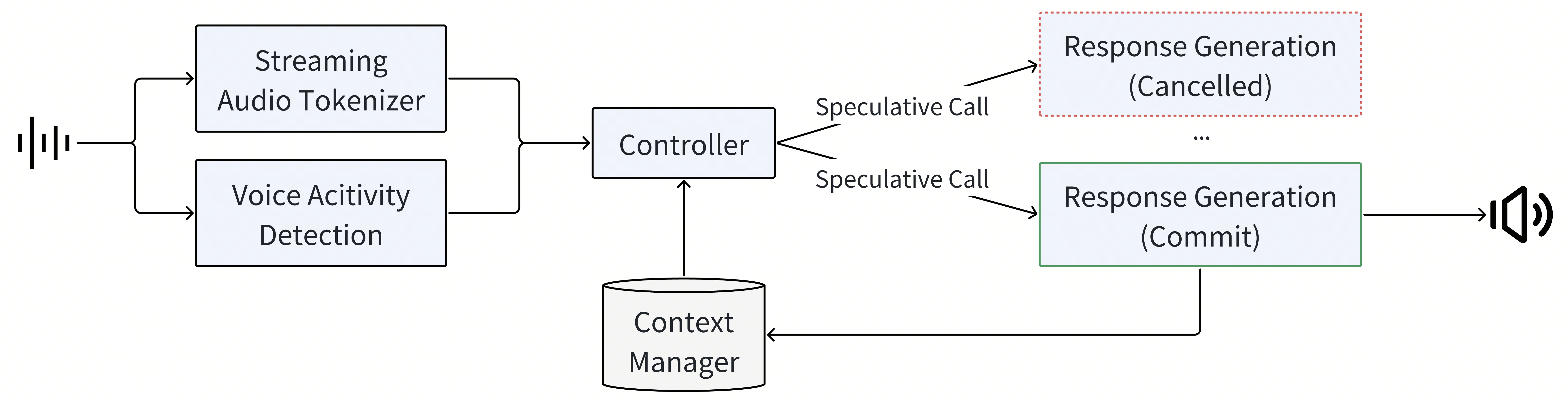
In Step-Audio, audio streams are tokenized via a dual-codebook framework, combining parallel semantic (16.7Hz, 1024-entry codebook) and acoustic (25Hz, 4096-entry codebook) tokenizers with 2:3 temporal interleaving. A 130B-parameter LLM foundation (Step-1) is further enhanced via audio-contextualized continual pretraining and task-specific post-training, enabling robust cross-modal speech understanding. A hybrid speech decoder combining flow matching with neural vocoding, optimized for real-time waveform generation. A streaming-aware architecture featuring speculative response generation (40% commit rate) and text-based context management (14:1 compression ratio) for efficient cross-modal alignment.
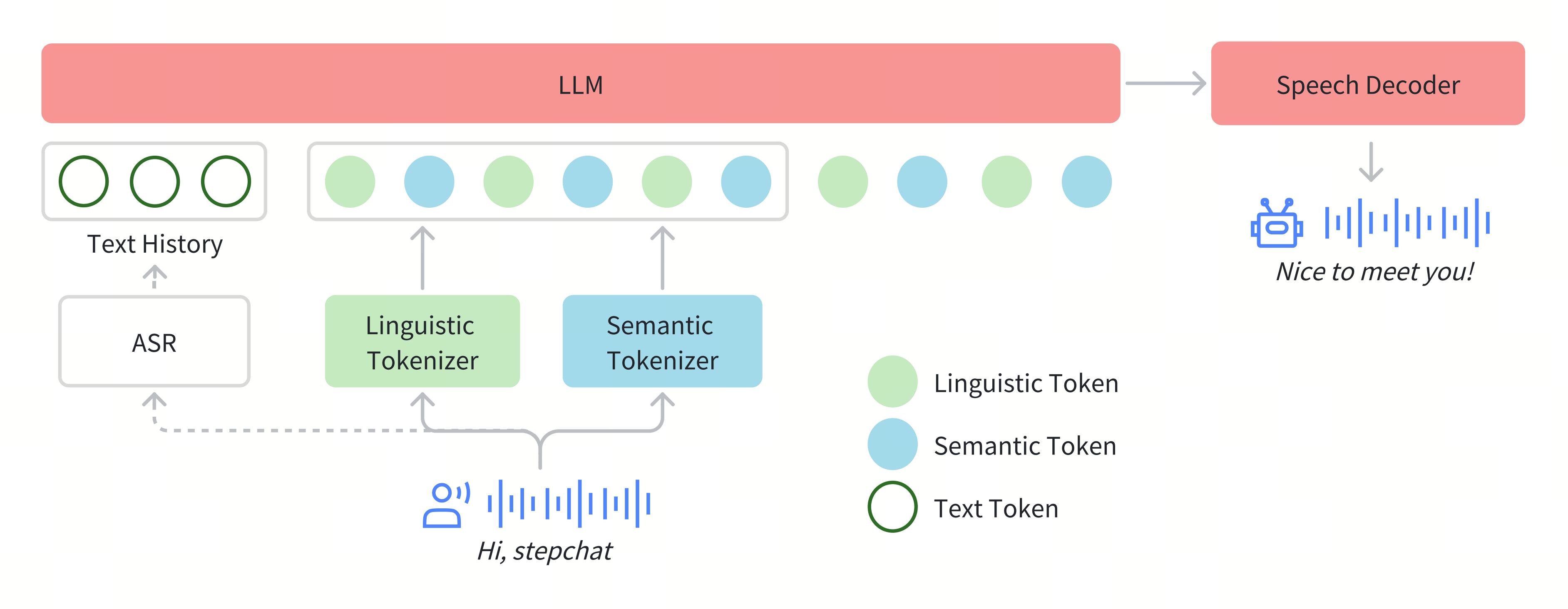
2.1 Tokenizer
We implement a token-level interleaving approach to effectively integrate semantic tokenization and acoustic tokenization. The semantic tokenizer employs a codebook size of 1024, while the acoustic tokenizer utilizes a larger codebook size of 4096 to capture finer acoustic details. Given the differing token rates, we establish a temporal alignment ratio of 2:3, where every two semantic tokens are paired with three acoustic tokens.
2.2 Language Model
To enhance Step-Audio’s ability to effectively process speech information and achieve accurate speech-text alignment, we conducted audio continual pretrain-ing based on Step-1, a 130-billion parameter pretrained text-based large language model (LLM).
2.3 Speech Decoder
The speech decoder in Step-Audio serves a critical function in converting discrete speech tokens, which contain both semantic and acoustic information, into continuous time-domain waveforms that represent natural speech. The decoder architecture incorporates a flow matching model and a mel-to-wave vocoder. To optimize the intelligibility and naturalness of the synthesized speech, the speech decoder is trained using a dual-code interleaving approach, ensuring seamless integration of semantic and acoustic features throughout the generation process.
2.4 Real-time Inference Pipeline
To enable real-time interactions, we have designed an optimized inference pipeline. At its core, the Controller module manages state transitions, orchestrates speculative response generation, and ensures seamless coordination between critical subsystems. These subsystems include Voice Activity Detection (VAD) for detecting user speech, the Streaming Audio Tokenizer for processing audio in real-time, the Step-Audio language model and Speech Decoder for processing and generating responses, and the Context Manager for preserving conversational continuity.
2.5 Post training details
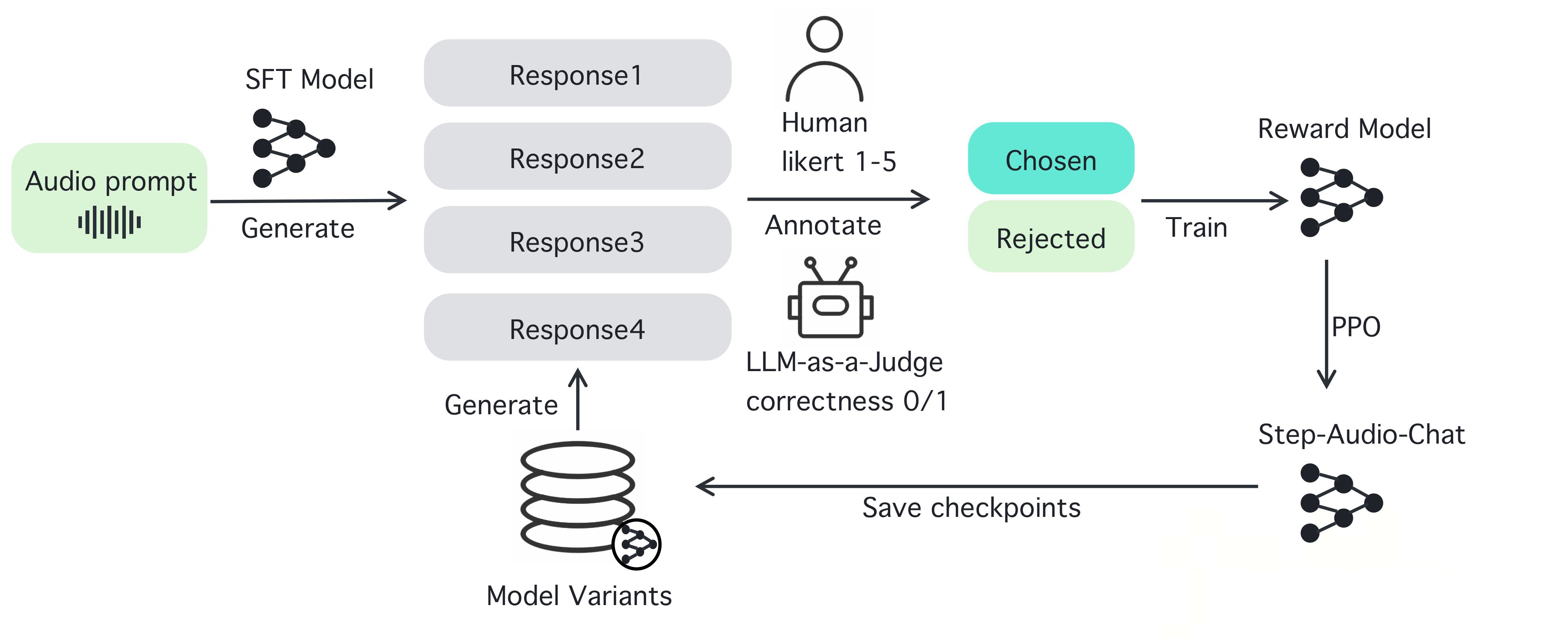
In the post-training phase, we conducted task-specific Supervised Fine-Tuning (SFT) for Automatic Speech Recognition (ASR) and Text-to-Speech (TTS). For Audio Input Text Output (AQTA) tasks, we implemented SFT using diversified high-quality datasets combined with Reinforcement Learning from Human Feedback (RLHF) to enhance response quality, enabling fine-grained control over emotional expression, speech speed, dialect, and prosody.
3. Model Download
3.1 Huggingface
| Models | Links |
|---|---|
| Step-Audio-Tokenizer | 🤗huggingface |
| Step-Audio-Chat | 🤗huggingface |
| Step-Audio-TTS-3B | 🤗huggingface |
3.2 Modelscope
| Models | Links |
|---|---|
| Step-Audio-Tokenizer | modelscope |
| Step-Audio-Chat | modelscope |
| Step-Audio-TTS-3B | modelscope |
4. Model Usage
📜 4.1 Requirements
The following table shows the requirements for running Step-Audio model (batch size = 1):
| Model | Setting (sample frequency) |
GPU Minimum Memory |
|---|---|---|
| Step-Audio-Tokenizer | 41.6Hz | 1.5GB |
| Step-Audio-Chat | 41.6Hz | 265GB |
| Step-Audio-TTS-3B | 41.6Hz | 8GB |
- An NVIDIA GPU with CUDA support is required.
- The model is tested on a four A800 80G GPU.
- Recommended: We recommend using 4xA800/H800 GPU with 80GB memory for better generation quality.
- Tested operating system: Linux
🔧 4.2 Dependencies and Installation
- Python >= 3.10.0 (Recommend to use Anaconda or Miniconda)
- PyTorch >= 2.3-cu121
- CUDA Toolkit
git clone https://github.com/stepfun-ai/Step-Audio.git
conda create -n stepaudio python=3.10
conda activate stepaudio

cd Step-Audio
pip install -r requirements.txt

git lfs install
git clone https://huggingface.co/stepfun-ai/Step-Audio-Tokenizer
git clone https://huggingface.co/stepfun-ai/Step-Audio-Chat
git clone https://huggingface.co/stepfun-ai/Step-Audio-TTS-3B
After downloading the models, where_you_download_dir should have the following structure:
where_you_download_dir
├── Step-Audio-Tokenizer
├── Step-Audio-Chat
├── Step-Audio-TTS-3B
Run with Docker
You can set up the environment required for running Step-Audio using the provided Dockerfile.
# build docker
docker build . -t step-audio

# run docker
docker run --rm -ti --gpus all \
    -v /your/code/path:/app -v /your/model/path:/model \
    -p 7860:7860 \
    step-audio \
    -- bash

# build vLLM docker
docker build -f Dockerfile-vllm -t step-audio-vllm .

# run vLLM docker
docker run --rm -ti --gpus all \
    -v /your/code/path:/app -v /your/model/path:/model \
    -p 7860:7860 \
    -p 8000:8000 \
    step-audio-vllm \
    -- bash
🚀 4.3 Inference Scripts
Offline inference
Inference with e2e audio/text input and audio/text output.
python offline_inference.py --model-path where_you_download_dir
TTS inference
Inference tts with default speaker or clone with a new speaker
python tts_inference.py --model-path where_you_download_dir --output-path where_you_save_audio_dir --synthesis-type use_tts_or_clone
A speaker information dict is required for clone mode, formatted as follows:
{
    "speaker": "speaker id",
    "prompt_text": "content of prompt wav",
    "wav_path": "prompt wav path"
}
Launch Web Demo
Start a local server for online inference. Assume you have 4 GPUs available and have already downloaded all the models.
# Step-Audio-Chat demo
python app.py --model-path where_you_download_dir

# Step-Audio-TTS-3B demo
python tts_app.py --model-path where_you_download_dir
Inference Chat Model with vLLM (recommended)
Step-Audio-Chat is a 130B LLM Model, it is recommended to use vLLM to inference with tensor parallelism. * Since vLLM does not load Tokenizer and TTS, the model does not support audio input for inference.
Currently, the official vLLM does not support the Step 1 model. You can temporarily use our development branch for local installation.
Because our attention mechanism is a variant of ALIBI, the official flash attention library is not compatible. We have provided a custom flash attention library in the Step-Audio-Chat repository. Make sure export the custom flash attention library to the environment variable before running the model.
export OPTIMUS_LIB_PATH=where_you_download_dir/Step-Audio-Chat/lib

vllm serve where_you_download_dir/Step-Audio-Chat --dtype auto -tp $tp --served-model-name step-audio-chat --trust-remote-code

# vLLM chat example code
python call_vllm_chat.py
5. Benchmark
5.1 ASR result comparison
| Hidden Feature Modeling | Discrete Audio Token Modeling | ||||||||
|---|---|---|---|---|---|---|---|---|---|
| Whisper Large-v3 | Qwen2-Audio | MinMo | LUCY | Moshi | GLM-4-voice Base | GLM-4-voice Chat | Step-Audio Pretrain | Step-Audio-Chat |
Questions
What is Step-Audio?
stepfun-ai/Step-Audio is a public repo on GitHub by stepfun-ai. Its maker has not written a description.
Is Step-Audio open source?
It declares the Apache-2.0 license on GitHub.
Does Step-Audio run on macOS, Windows or Linux?
Its maker has not tagged a system, so it is unknown here. Its README says what it needs.
How do I install Step-Audio?
Open "Take it" on its page: Take My Repo writes an install plan for your machine and hands it to your AI agent (Claude Code, Codex or Cursor), which asks you before each step. Take My Repo has not tested it on any machine.
Is Step-Audio still maintained?
Its last change on GitHub was on 2026-03-16. Take My Repo does not judge from that whether it is maintained.