
awesome-mac
This project is dedicated to collecting high-quality macOS software and organizing them systematically by different categories for easy search and use.
- 119k
- Swift
- CC0-1.0
- 15 h ago
Parallel Constraint Decoding using Java and Llama.cpp compared to Python 🔥
Repo stephanj/parallelConstraintDecoding, read from GitHub 14 h ago. stephanj has not joined Take My Repo.
stephanj/parallelConstraintDecoding is a public repo on GitHub by stephanj. Parallel Constraint Decoding using Java and Llama.cpp compared to Python 🔥. It declares the Apache-2.0 license on GitHub. It is written mainly in Java, has 15 stars and last changed on 2026-09-29. Nobody has reviewed it on Take My Repo yet, which says nothing about its quality. Read from GitHub on 2026-11-25.
This project is dedicated to collecting high-quality macOS software and organizing them systematically by different categories for easy search and use.
Fill a whole JSON schema of booleans and enums in two forward passes instead of generating it token by token — with calibrated confidence per field and output that is schema-valid by construction.
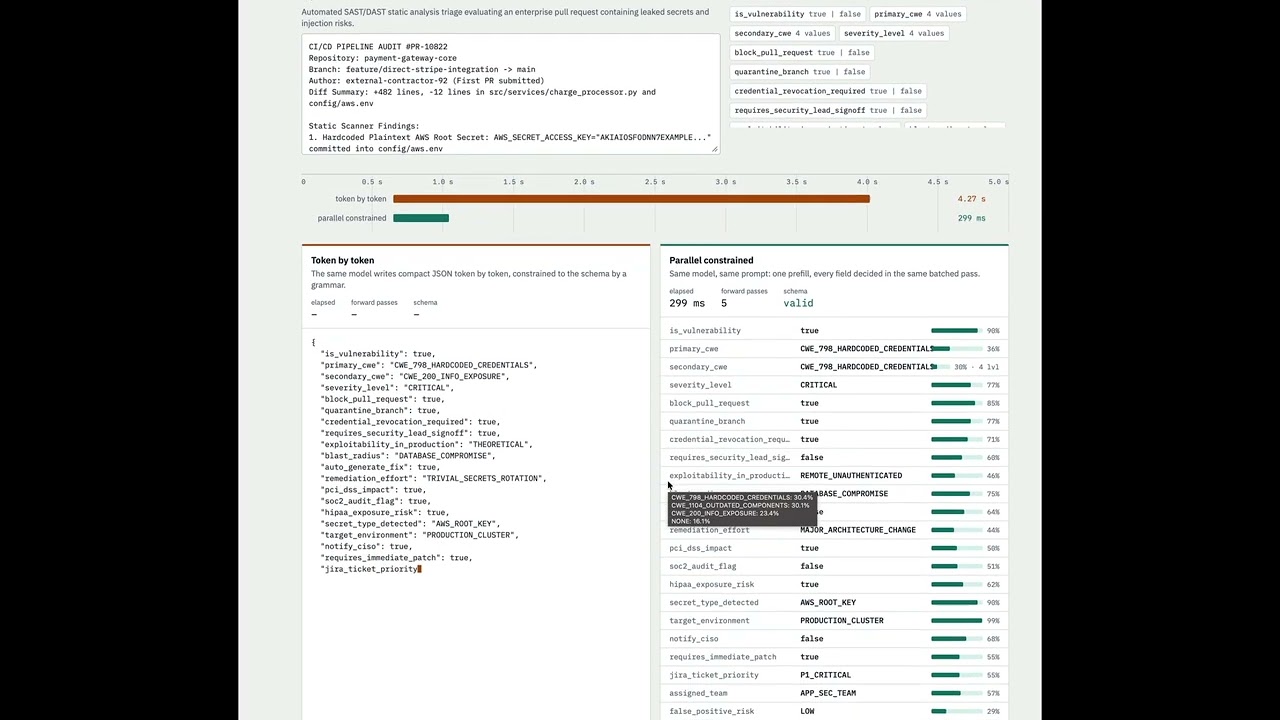
Watch the demo (YouTube, Devoxx): the web app races the parallel engine against grammar-constrained token-by-token generation on the same model.
This repository contains:
java/ — a Java implementation of the technique that drives
llama.cpp directly through the JDK
Foreign Function & Memory API (no JNI). It is the fastest engine measured
here, and it ships with a local web app that races it against a
grammar-constrained token-by-token baseline on the same model, lets you
build your own extraction scenarios, and charts benchmarks. It can load any
GGUF, including the models of a local Ollama install.python/ — a port of the original engine published at
harshatheg/Qwen-2.5-1B-RLCD
(MLX, Apple Silicon only), kept for reference and comparison. Despite the
name, that Hugging Face repo contains no weights and no fine-tune — it is
source code running stock Qwen2.5-1.5B-Instruct with a custom decoding
strategy. See NOTICE for what was vendored and changed.presets/ — extraction scenarios shared by both engines (fraud
triage, code-security audit, support triage, a 255-choice tariff router,
spam/phishing triage, and Devoxx CFP talk routing with a bank of 100 real
talks).| Preset | Fields | Token-by-token JSON (Python, MLX) | Python parallel (MLX) | Java native, cold | Java native, warm |
|---|---|---|---|---|---|
| FinTech fraud / AML | 28 | 2388 ms | 337 ms | 266 ms (1.27× vs Python) | 130 ms |
| Code security triage | 28 | 2473 ms | 344 ms | 277 ms (1.24×) | 131 ms |
| Incident triage | 28 | 2360 ms | 361 ms | 269 ms (1.34×) | 131 ms |
| 255-choice tariff | 4 | 476 ms | 170 ms | 158 ms (1.08×) | 67 ms |
"Cold" is the head-to-head: same prompt tokens, full prefill every call, same timing boundary as the Python engine. "Warm" keeps the schema's KV cells between calls (single-pass mode) — a production optimization the Python engine does not have. Full details, per-phase breakdowns and caveats are in Java engine details below.
| Required | Notes | |
|---|---|---|
| OS / hardware | macOS on Apple Silicon (recommended) or Linux x86-64 / arm64 | On a Mac the engine runs on the GPU through Metal (sub-second races). On Linux it runs on the CPU: expect seconds per race, same 2-passes-vs-50 story. |
| JDK | 22 or newer (25 and 27 tested, identical speed) | e.g. brew install openjdk |
| Maven | 3.9+ | brew install maven |
| llama.cpp shared library | v0.4.1 (the tag the Java bindings were generated against) |
brew install llama.cpp on macOS; build from source on Linux (below) |
| A GGUF model | any decoder LLM | Qwen2.5-1.5B-Instruct Q8_0 is the default (1.9 GB) |
| Optional | Ollama | its already-downloaded models appear in the model dropdown |
| Optional | Python ≥ 3.10 + uv |
only for the Python reference port (Apple Silicon only) |
git clone https://github.com/stephanj/parallelConstraintDecoding.git
cd parallelConstraintDecoding

# 1. llama.cpp (libllama + libggml; Homebrew installs ggml as a separate formula)
brew install llama.cpp

# 2. a model (the default one; any GGUF works, see "Models" below)
mkdir -p models
curl -L -o models/qwen2.5-1.5b-instruct-q8_0.gguf \
  https://huggingface.co/Qwen/Qwen2.5-1.5B-Instruct-GGUF/resolve/main/qwen2.5-1.5b-instruct-q8_0.gguf

# 3. build (compiles and runs the unit tests, produces java/target/pcd-benchmark.jar)
cd java && mvn -q package && cd ..

# 4. run the web app, then open http://localhost:8000
java -jar java/target/pcd-benchmark.jar serve
The first race on a scenario includes a one-off warm-up (Metal compiles kernels for that schema's batch shapes); numbers from the second run on are representative.
Same as above, except llama.cpp is built from source at the pinned tag and the engine is told where the libraries are:
git clone --depth 1 --branch v0.4.1 https://github.com/ggml-org/llama.cpp.git /tmp/llama.cpp
cmake -S /tmp/llama.cpp -B /tmp/llama.cpp/build -DCMAKE_BUILD_TYPE=Release -DBUILD_SHARED_LIBS=ON \
      -DGGML_NATIVE=ON -DLLAMA_CURL=OFF -DLLAMA_BUILD_TESTS=OFF -DLLAMA_BUILD_EXAMPLES=OFF \
      -DLLAMA_BUILD_TOOLS=OFF -DLLAMA_BUILD_SERVER=OFF
cmake --build /tmp/llama.cpp/build --target llama ggml-cpu -j
mkdir -p ~/llama-lib && find /tmp/llama.cpp/build -name 'lib*.so*' -exec cp -a {} ~/llama-lib/ \;

export PCD_LLAMA_LIB_DIR=~/llama-lib LD_LIBRARY_PATH=~/llama-lib
java -jar java/target/pcd-benchmark.jar serve
The CPU backend is built with OpenMP; install libgomp1 (Debian/Ubuntu) if
the JVM reports libgomp.so.1: cannot open shared object file. The engine
uses all available cores.
*.gguf in models/; the web app's header dropdown lists them
all and switches in place. PCD_GGUF=/path/to/model.gguf picks the one
loaded at start (default models/qwen2.5-1.5b-instruct-q8_0.gguf).ollama:<name>:<tag>
(Ollama's store is a directory of GGUF blobs; nothing talks to Ollama and it
needn't be running; $OLLAMA_MODELS is honoured). Some Ollama blobs are
Ollama-specific conversions upstream llama.cpp cannot load (gemma4:*,
qwen3-vl:* at the time of writing) — the dropdown reports the error and
keeps the previous model.Qwen2.5-3B-Instruct Q8_0 (2× slower per
pass, better judgement) and Qwen3.5-0.8B Q8_0 from ggml-org (smaller,
but its hybrid attention is slower in llama.cpp than the 1.5B).| Variable / flag | Default | Meaning |
|---|---|---|
PCD_GGUF |
models/qwen2.5-1.5b-instruct-q8_0.gguf |
model loaded at start |
PCD_LLAMA_LIB_DIR |
/opt/homebrew/opt/ggml/lib:/opt/homebrew/opt/llama.cpp/lib:/opt/llama/lib:/usr/local/lib |
where libllama / libggml* live (colon-separated) |
PORT / --port |
8000 |
web app port |
PCD_BIND / --bind |
127.0.0.1 |
bind address (0.0.0.0 to expose on a network) |
PCD_READ_ONLY / --read-only |
false |
demo mode for a shared instance: scenarios, model and stored benchmark runs cannot be changed; races still run |
PCD_SEQUENTIAL_RACE |
false |
show the two engines one after the other, each timed live, instead of replayed on one timeline (the honest display on a shared CPU) |
ZipFile invalid LOC header in the browser: the jar was rebuilt while
the server was running (the JVM maps the jar). Stop the server, build,
start again.brew upgrade llama.cpp: the
FFM bindings bake in llama.cpp's struct layouts. Re-run
java/tools/gen-bindings.sh (downloads jextract 22 into java/tools/ on
first use) and rebuild.mlx_lm.server, an Ollama runner with a large model) roughly doubles both
engines' times.PCD_TEST_GGUF points at a model
(PCD_TEST_GGUF=… mvn test); otherwise they are skipped.java -jar java/target/pcd-benchmark.jar serve # http://localhost:8000
One page, three views, no build step (JDK HttpServer + vanilla JS; Chart.js
is vendored so it works offline).
Race — opens on the Devoxx CFP routing scenario with a random talk from
its bank; pick another scenario, or paste your own text (an email, a ticket,
an abstract), and press Run the race. Both engines run on the same input
and the same prompt. The parallel result lands as a block of fields with a
confidence bar each (hover for the runner-up probabilities); the baseline
streams its JSON, pretty-printed, as it is generated. The verdict line gives
the speedup and the forward passes each needed. For scenarios with a sample
bank, both panes state per field whether they agree with the human filing
("✓ same as the CFP" / "✗ CFP filed it as …"). By default the two are
replayed on one time ruler; PCD_SEQUENTIAL_RACE=true runs them visibly one
after the other, each timed live.
Presets — create and edit scenarios in the browser: title, example
input, and a table of fields (true / false or a list of allowed values,
each with a one-line description). Saved to presets/*.json, the same files
the CLI benchmark reads. Save and run the race jumps straight to the demo.
Any preset may carry a samples bank ([{label, context, expected}]); the
editor leaves it untouched.
Benchmarks — runs every scenario through both engines, stores runs in
results/, shows a latency table, a token-by-token vs parallel chart and
the parallel engine's per-phase breakdown. Runs record which model made them.
Tetris — the decoder plays Tetris: every falling piece is one
extraction call whose single field, placement, ranges over the legal
placements of that piece (so an illegal move is impossible). The board goes
in as text, and each candidate's label leads with its outcome computed by
the game engine (clears 2 lines - column 4, rotation 0), so the decoder's
first scored token is about the outcome and the token tree only then
resolves the position. It decides 3 pieces per second (≈105 ms, 2 forward
passes each) and shows the probability of every candidate next to the
board, plus what a simple heuristic would have picked. By default the engine
offers only the best outcome class — every placement completing the most
lines, or, failing that, those creating the fewest holes — so a line is
completed whenever the piece can do it and the model chooses among the
remaining candidates (60 pieces, ~13 lines per game). "All legal
placements" shows how a small model does on its own: it mostly stacks on
the left and dies within ~15 pieces. A temperature slider samples from the
distribution instead of taking the argmax. ?view=tetris&autorun starts it.
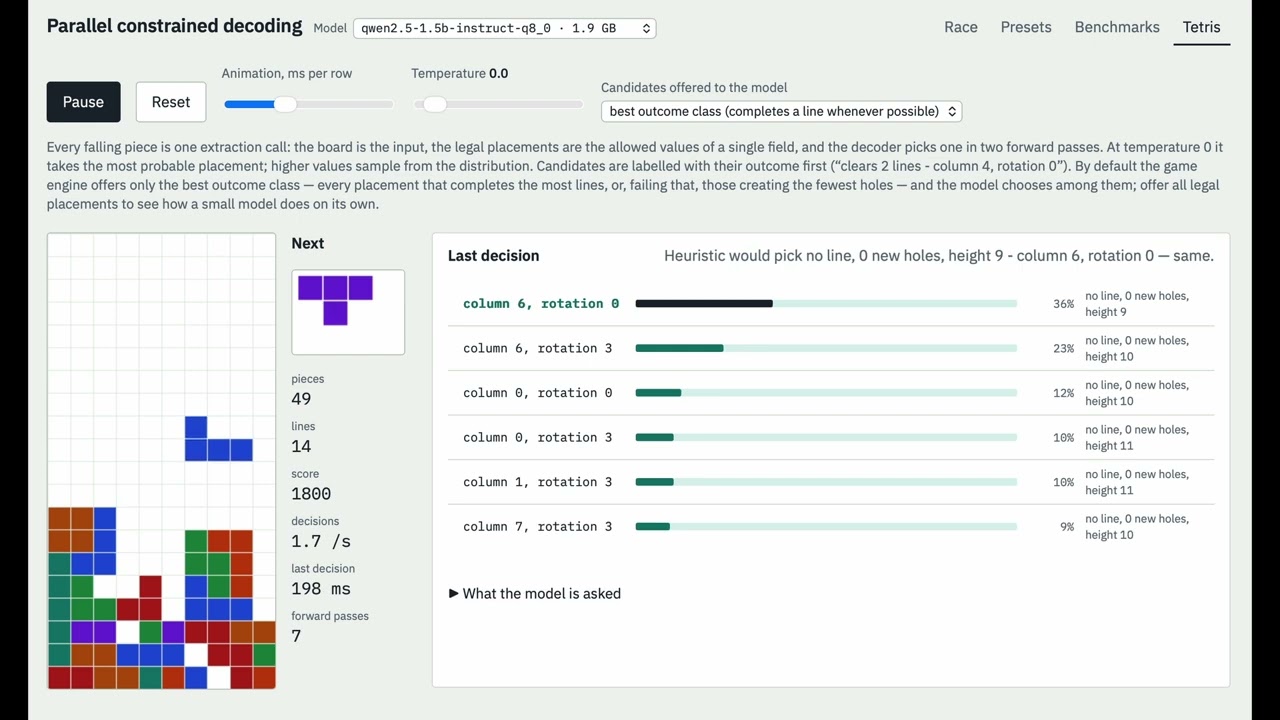
Watch it play (YouTube, Devoxx): Tetris controlled by an LLM Decoder.
?preset=<id> and ?autorun in the URL pre-select a scenario and start a
race on load — handy when presenting. For a live talk on a Mac, expose the
local server to the audience with a tunnel (e.g. cloudflared tunnel --url http://localhost:8000) and start it with PCD_READ_ONLY=true.
The token-by-token pane uses GrammarJsonEngine: the same loaded model
generates compact JSON one token at a time under a llama.cpp GBNF grammar that
enforces every field in schema order, boolean types and exact enum strings,
with no extra keys. So both panes are schema-valid by construction and the
race isolates decoding strategy: one forward pass per token versus two
passes for the whole schema. (NaiveJsonEngine, the original prompt-only
baseline that can drop keys or invent values, is still in the code base; the
Python-comparison numbers above were measured against it.)
dvbe26.cfp.dev), plus audience level, main technology and three booleans
(AI central, live coding, laptop needed). The preset carries the 100
most-favourited real talks with the track and level the CFP filed them
under; each run moves to the next talk (or use Next talk). Refresh the
bank with java -jar target/pcd-benchmark.jar devoxx-samples [--event dvbe26] [--count 100].
Session format is deliberately not a field: any talk can be submitted in
any format, so it isn't inferable from an abstract.stephanj/parallelConstraintDecoding is a public repo on GitHub by stephanj. Parallel Constraint Decoding using Java and Llama.cpp compared to Python 🔥.
It declares the Apache-2.0 license on GitHub.
Its maker tagged it for macOS. That is declared by the maker; Take My Repo has not tested it.
Reverse engineer anything with agents, from app behavior down to native binaries.
Jan is an open source alternative to ChatGPT that runs 100% offline on your computer.
Flutter makes it easy and fast to build beautiful apps for mobile and beyond
Open "Take it" on its page: Take My Repo writes an install plan for your machine and hands it to your AI agent (Claude Code, Codex or Cursor), which asks you before each step. Take My Repo has not tested it on any machine.
Its last change on GitHub was on 2026-09-29. Take My Repo does not judge from that whether it is maintained.
Nobody has reviewed it on Take My Repo yet, which says nothing about its quality.
Take My Repo cannot say: it does not audit code and has not run parallelConstraintDecoding. What is known comes from GitHub. It declares the Apache-2.0 license on GitHub. Its last change was on 2026-09-29. It has 15 stars, which measure popularity, not safety. Nobody has reviewed it on Take My Repo yet, which says nothing about its quality. Read the source before you run it. With "Take it", your AI agent shows each step and asks you before running it; README text is treated as data, not as instructions.


