rea
Reverse engineer anything with agents, from app behavior down to native binaries.
- 479k
- TypeScript
- MIT
- 52 min ago
Native Parallel Constrained Decoder Server for Apple and Linux
Repo stephanj/pcdServer, read from GitHub 42 min ago. stephanj has not joined Take My Repo.
stephanj/pcdServer is a public repo on GitHub by stephanj. Native Parallel Constrained Decoder Server for Apple and Linux. It declares the MIT license on GitHub. It is written mainly in C++, has 7 stars and last changed on 2026-10-26. Nobody has reviewed it on Take My Repo yet, which says nothing about its quality. Read from GitHub on 2026-11-26.
Reverse engineer anything with agents, from app behavior down to native binaries.
Non-autoregressive System 1 decision engine. Typed choice, score and yes/no decisions over any text in a single forward pass, in 100+ languages, with a router that picks the right checkpoint per request.
Turn text into guaranteed bounded JSON with a local GGUF model.
Quick start · Try the API · Web UI · REST reference · How it works
PCD Server is a native C++ REST service for Parallel Constrained Decoding. Give it text and a list of bounded fields; it selects exactly one allowed value for every field and returns both the assembled JSON and the probability distribution behind each decision.
The model never writes JSON syntax. It only scores values your application allows, so there is nothing to parse, repair, or retry.
| Always-valid output | Results are assembled by the server from allowed booleans and string enums—not generated token by token. |
| Parallel decisions | Every field shares one prompt prefix and is evaluated in batched forward passes. |
| Local by default | Run a GGUF model through the embedded, pinned llama.cpp runtime. Your input stays on your machine. |
| Probabilities included | Get a normalized probability for every allowed value, not just the winner. |
| Fast repeated schemas | Immutable, bounded LRU checkpoints reuse the expensive schema prefix across requests. |
| Batteries included | The binary embeds a Playground, scenario library, Tetris visualization, and OpenAPI specification. |
PCD Server is a good fit for routing, triage, moderation, tagging, policy decisions, feature extraction, and any workflow where every output must come from a known finite set.
[!NOTE] This release supports booleans and bounded string enums. See current scope before integrating.
No compiler needed. Download pcd_server-vX.Y.Z-windows-x64.zip from the latest release and unzip it, then:
scripts\download-default-model.cmd to download and verify the default model (about 1 GB, once).start-server.cmd.The release exe needs 64-bit Windows 10 or 11 and a CPU with AVX2, and runs on the CPU. It is not code-signed: if Windows shows Windows protected your PC, click More info → Run anyway. Press Ctrl+C in the server window to stop it.
To build from source on Windows instead, follow the steps below.
sudo xcodebuild -license accept)brew install cmake)curl and shasum (included with macOS)jq for the end-to-end script (brew install jq)llama.cpp offloads all model layers to Metal on an Apple Silicon Mac.
Linux uses the backend selected by llama.cpp and runs on CPU by default. To use a supported GPU backend, pass the corresponding llama.cpp CMake option—for example, -DGGML_CUDA=ON for CUDA.
curl.exe and certutil (included with Windows 10 and 11)Windows runs on CPU by default. To use a GPU, add -DGGML_VULKAN=ON (NVIDIA, AMD, and Intel; requires the Vulkan SDK) or -DGGML_CUDA=ON (NVIDIA; requires the CUDA Toolkit) to the configure command.
If a native setup is not an option, install WSL 2 with Ubuntu and follow the Linux steps inside it.
git clone https://github.com/stephanj/pcdServer.git
cd pcdServer

./scripts/download-default-model.sh
cmake -S . -B build -DCMAKE_BUILD_TYPE=Release
cmake --build build -j
ctest --test-dir build --output-on-failure

./build/pcd_server
On Windows, run the equivalent from a Developer Command Prompt for VS 2022:
git clone https://github.com/stephanj/pcdServer.git
cd pcdServer

scripts\download-default-model.cmd
cmake -S . -B build
cmake --build build --config Release
ctest --test-dir build -C Release --output-on-failure

build\Release\pcd_server.exe
The first configure/build fetches pinned dependencies and compiles llama.cpp, so it can take a few minutes. The download script installs Qwen3.5-0.8B-Q8_0.gguf under models/ and verifies its SHA-256 checksum.
When the server is ready:
loaded Qwen3.5-0.8B-Q8_0.gguf (qwen35 0.8B Q8_0) on MTL0
pcd_server v1 listening on http://127.0.0.1:8090
curl -s http://127.0.0.1:8090/health
{
  "apiVersion": "v1",
  "backend": "MTL0",
  "description": "qwen35 0.8B Q8_0",
  "model": "Qwen3.5-0.8B-Q8_0.gguf",
  "ready": true,
  "status": "ok"
}
Then open:
This request classifies a suspicious transfer into two independently bounded fields:
curl -s http://127.0.0.1:8090/v1/pcd/decode \
  -H 'Content-Type: application/json' \
  -d '{
    "context": "Customer requested an unusual wire transfer of 48,000 EUR to a newly added beneficiary in another country.",
    "fields": [
      {
        "name": "priority",
        "description": "Required handling priority",
        "choices": ["LOW", "MEDIUM", "HIGH"]
      },
      {
        "name": "fraudulent",
        "description": "Whether fraud is suspected",
        "choices": [false, true]
      }
    ]
  }'
Representative response:
{
  "model": "Qwen3.5-0.8B-Q8_0.gguf",
  "values": {
    "priority": "HIGH",
    "fraudulent": true
  },
  "fields": [
    {
      "name": "priority",
      "value": "HIGH",
      "probability": 0.76,
      "probabilities": {
        "LOW": 0.08,
        "MEDIUM": 0.16,
        "HIGH": 0.76
      },
      "levels": 1
    },
    {
      "name": "fraudulent",
      "value": true,
      "probability": 0.98,
      "probabilities": {
        "false": 0.02,
        "true": 0.98
      },
      "levels": 1
    }
  ],
  "metrics": {
    "elapsedMs": 39.8,
    "forwardPasses": 2,
    "schemaCacheStatus": "hit",
    "checkpointBytes": 22332068,
    "phasesMs": {
      "tokenize": 0.2,
      "restoreOrPrefill": 5.8,
      "dynamicContext": 13.5,
      "broadcast": 0.04,
      "suffix": 20.8,
      "tree": 0.0
    }
  }
}
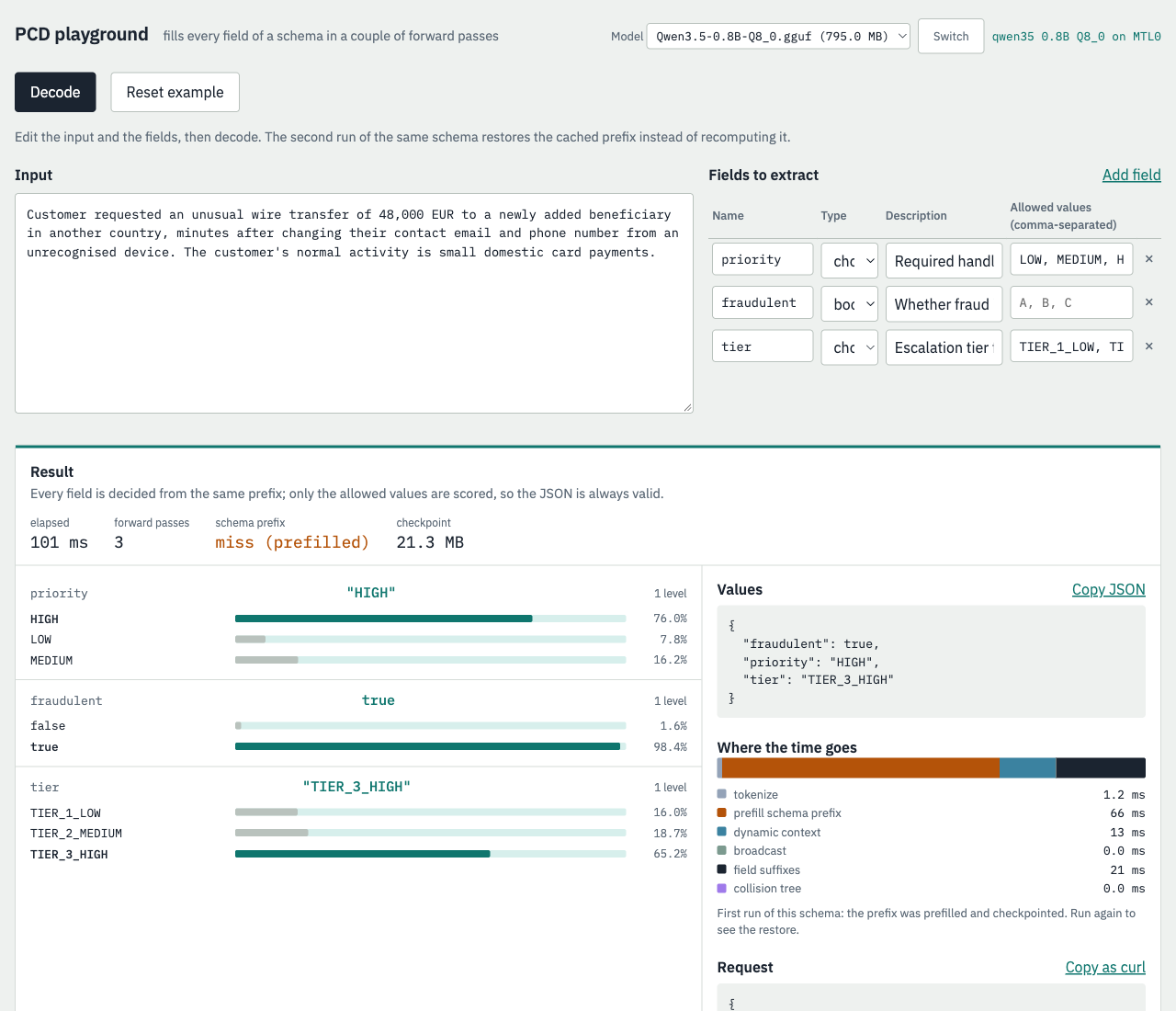
values is the ready-to-use result object.fields[].probabilities is a softmax over the allowed values only and sums to 1.fields[].probability is the winning value's probability.fields[].levels reports collision-tree depth; 1 means every choice began with a distinct token.metrics exposes end-to-end latency, native forward passes, cache behavior, and phase timings.The browser UI is compiled into pcd_server; there is no separate frontend process to install or deploy.
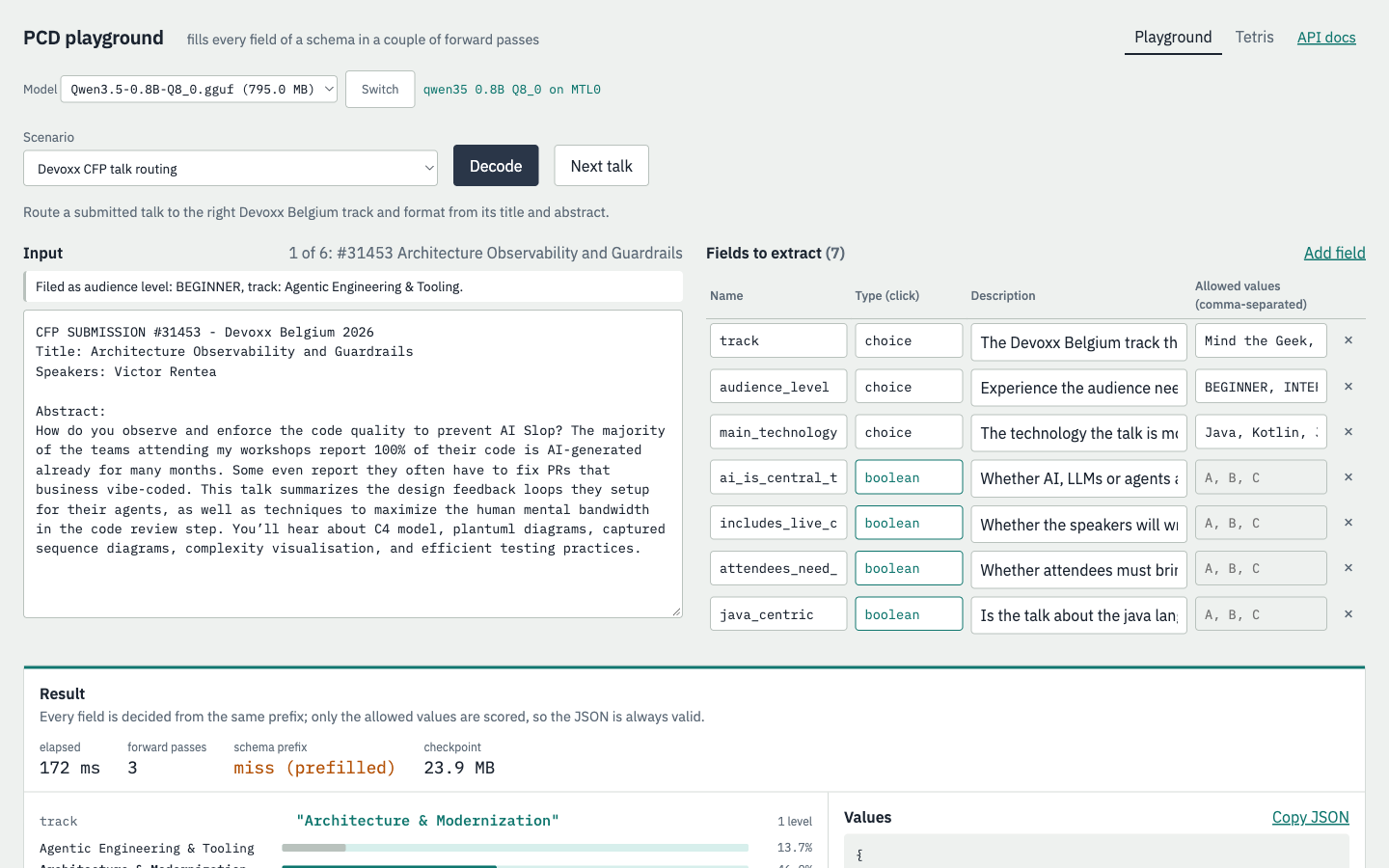
Edit the input, fields, descriptions, and allowed values, then inspect every probability, the assembled result, phase timings, and the equivalent curl command. The scenario picker includes spam and phishing triage, Devoxx CFP routing, large enterprise schemas, and a 255-choice customs router.
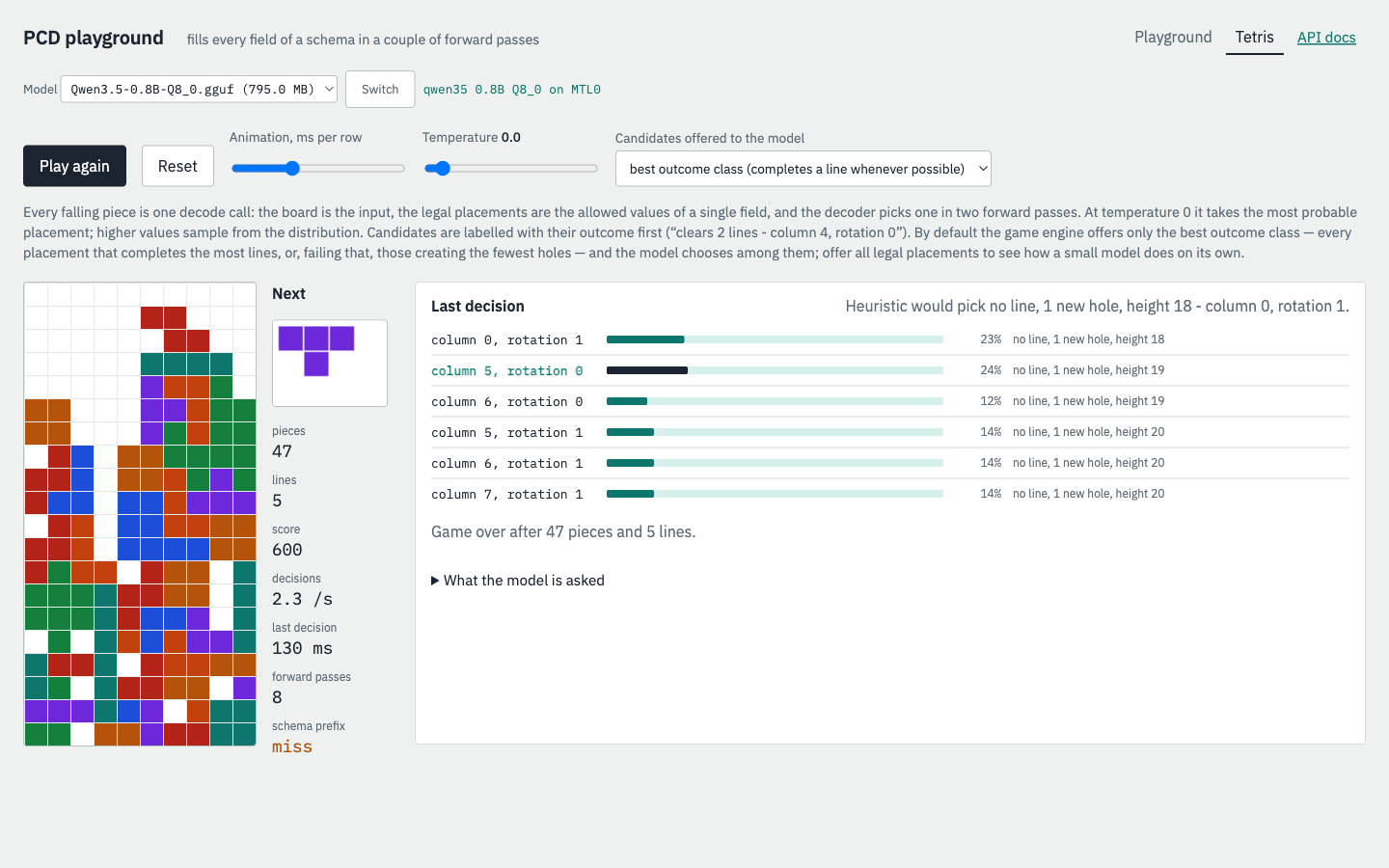
The Tetris view makes constrained decoding visible: every piece is one POST /v1/pcd/decode request. The board is the context, legal placements are the allowed values, and the selected move comes with its probability distribution.
/docs renders all four endpoints as interactive Swagger UI documentation. The OpenAPI document itself is embedded and always available at /openapi.json; the /docs renderer loads Swagger UI assets from jsDelivr and therefore needs internet access.
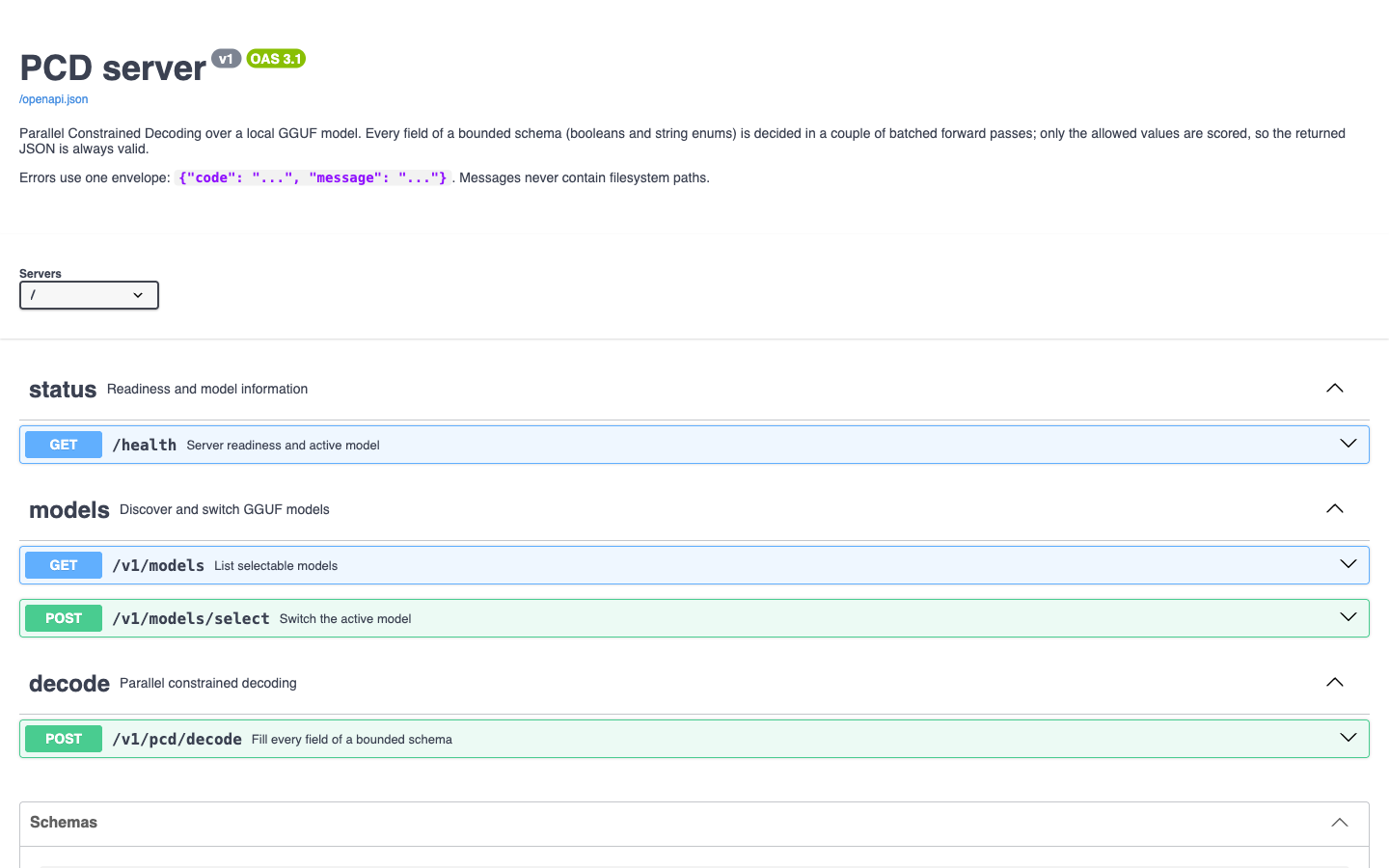
All API responses are application/json. The versioned endpoints live under /v1; readiness remains at /health.
| Method | Path | Purpose |
|---|---|---|
GET |
/health |
Report API version, readiness, active model, model description, and backend. |
GET |
/v1/models |
Rescan the model directory and list selectable GGUF files. |
POST |
/v1/models/select |
Load, validate, and transactionally activate a model by identifier. |
POST |
/v1/pcd/decode |
Fill every field of a bounded schema and return values, probabilities, and metrics. |
The canonical machine-readable contract is ui/openapi.json.
{
  "context": "Text the model should classify or extract from.",
  "fields": [
    {
      "name": "sentiment",
      "description": "Overall sentiment of the text",
      "choices": ["NEGATIVE", "NEUTRAL", "POSITIVE"]
    },
    {
      "name": "needs_review",
      "description": "Whether a human should review this item",
      "choices": [false, true]
    }
  ]
}
Fields are ordered and names must be unique. A field's choices must be either:
[false, true].Descriptions are shown to the model and may be empty. Field names become keys in the returned values object.
GET /v1/models rescans --models-dir on every request, so a newly copied .gguf appears without a restart:
curl -s http://127.0.0.1:8090/v1/models
{
  "active": "Qwen3.5-0.8B-Q8_0.gguf",
  "activeModel": {
    "id": "Qwen3.5-0.8B-Q8_0.gguf",
    "description": "qwen35 0.8B Q8_0",
    "architecture": "qwen35",
    "backend": "MTL0",
    "contextSize": 8192,
    "cacheEntries": 1,
    "cacheBytes": 22332068
  },
  "models": [
    {
      "id": "Qwen3.5-0.8B-Q8_0.gguf",
      "bytes": 833592096,
      "active": true
    }
  ]
}
Select an identifier returned by that endpoint:
curl -s http://127.0.0.1:8090/v1/models/select \
  -H 'Content-Type: application/json' \
  -d '{"id":"Qwen3.5-0.8B-Q8_0.gguf"}'
The replacement is fully loaded and validated before it becomes active. If loading fails, the current model stays active. Client input is matched against discovered identifiers and is never treated as an arbitrary filesystem path. A successful switch clears the old model's schema checkpoints.
Errors use one stable envelope:
{
  "code": "invalid_request",
  "message": "duplicate field name: priority"
}
Messages never expose filesystem paths.
| Status | When |
|---|---|
400 |
Malformed JSON, invalid request shape, duplicate names, mixed choice types, exceeded limits, or a request that does not fit the model context. |
404 |
Unknown model identifier or route. |
413 |
Request body exceeds 1 MiB. |
422 |
The chat template or candidate tokenization cannot be compiled safely. |
500 |
llama.cpp or an unexpected internal operation failed. |
503 |
No model is loaded. |
| Resource | Limit |
|---|---|
| Fields | 1–63 |
| Choices per field | 2–256 |
| Context text | 64 KiB |
| Total candidate tokens | 4096 |
| Request body | 1 MiB |
| Collision-tree depth | 24 levels |
The complete rendered request—schema prefix, context, field suffixes, and candidate paths—must also fit the active model's context window. The default model is configured for 8192 tokens.
stephanj/pcdServer is a public repo on GitHub by stephanj. Native Parallel Constrained Decoder Server for Apple and Linux.
It declares the MIT license on GitHub.
Its maker has not tagged a system, so it is unknown here. Its README says what it needs.
Open "Take it" on its page: Take My Repo writes an install plan for your machine and hands it to your AI agent (Claude Code, Codex or Cursor), which asks you before each step. Take My Repo has not tested it on any machine.
Its last change on GitHub was on 2026-10-26. Take My Repo does not judge from that whether it is maintained.
RAG (Retrieval-augmented generation) ChatBot that provides answers based on contextual information extracted from a collection of Markdown files.
Web labeling tool for bitmap images and point clouds
A list of Free Software network services and web applications which can be hosted on your own servers
Nobody has reviewed it on Take My Repo yet, which says nothing about its quality.
Take My Repo cannot say: it does not audit code and has not run pcdServer. What is known comes from GitHub. It declares the MIT license on GitHub. Its last change was on 2026-10-26. It has 7 stars, which measure popularity, not safety. Nobody has reviewed it on Take My Repo yet, which says nothing about its quality. Read the source before you run it. With "Take it", your AI agent shows each step and asks you before running it; README text is treated as data, not as instructions.