
collaborative-lesson-development
10 Simple Rules paper on collaborative lesson development
- 21
- 5 y ago
Repo swcarpentry/collaborative-lesson-development, read from GitHub 18 h ago. swcarpentry has not joined Take My Repo.
In short
swcarpentry/collaborative-lesson-development is a public repo on GitHub by swcarpentry. 10 Simple Rules paper on collaborative lesson development. It declares no license on GitHub. Public does not mean open source: without a license, nobody is granted the right to reuse it. It is written mainly in TeX, has 21 stars and last changed on 2021-11-10. It is archived: its maker no longer maintains it. Nobody has reviewed it on Take My Repo yet, which says nothing about its quality. Read from GitHub on 2026-11-24.
In the maintainer's words. Shown from GitHub; Take My Repo does not keep a copy.
Ten Simple Rules for Collaborative Lesson Development
Gabriel A. Devenyi1, Rémi Emonet2, Rayna M. Harris3, Kate L. Hertweck4, Damien Irving5, Ian Milligan6, Greg Wilson7*
- Douglas Mental Health University Institute, McGill University / gdevenyi@gmail.com
- Univ Lyon, UJM-Saint-Etienne, F-42023, France / remi.emonet@univ-st-etienne.fr
- The University of Texas at Austin / rayna.harris@utexas.edu
- The University of Texas at Tyler / khertweck@uttyler.edu
- CSIRO Oceans and Atmosphere / irving.damien@gmail.com
- University of Waterloo / i2millig@uwaterloo.ca
- DataCamp / gvwilson@third-bit.com (corresponding author)
These authors contributed equally to this work.
Abstract
Lessons take significant effort to build and maintain. The collaborative development methods pioneered by the open source software community offer an effective, economical way to create and sustain lessons that can be used by large numbers of people in a wide variety of contexts. The ten simple rules outlined in this paper summarize the best practices that have been implemented by several successful open education projects aimed at researchers and research librarians in a wide range of disciplines.
Introduction
Lessons take significant effort to build and even more to maintain. Most academics do this work on their own, but leveraging a community approach can make educational resource development more sustainable, robust, and responsive. Treating lessons as a community resource to be updated, adapted, and improved incrementally, can free up valuable time while increasing quality.
Despite the success of openness in software development and the curation of Wikipedia, it is an uncommon approach in the academic instructional setting. Each year, thousands of university lecturers teach subjects ranging from first year biology, to graduate-level courses in Indian film. Some use textbooks written by one or a few authors, but beyond that, they develop and maintain their course materials in isolation.
Given that academic research often depends on sharing, the differing approach to developing pedagogical materials is interesting, but the sociology and psychology behind this blind spot are beyond the scope of this paper.
The authors have many years of experience with community-developed lessons in the context of research computing in the sciences and humanities, through organizations like Software Carpentry and Programming Historian. Software Carpentry was founded in 1998 to teach scientists basic computing skills, and has since spawned two sibling organizations called Data Carpentry and Library Carpentry. Programming Historian was founded in 2008, and has evolved into a collaboratively-edited site providing lessons to humanities scholars. Their guiding principles are that lessons should be:
open and easily accessible, and
continually maintained, refined, and improved by a community of contributors.
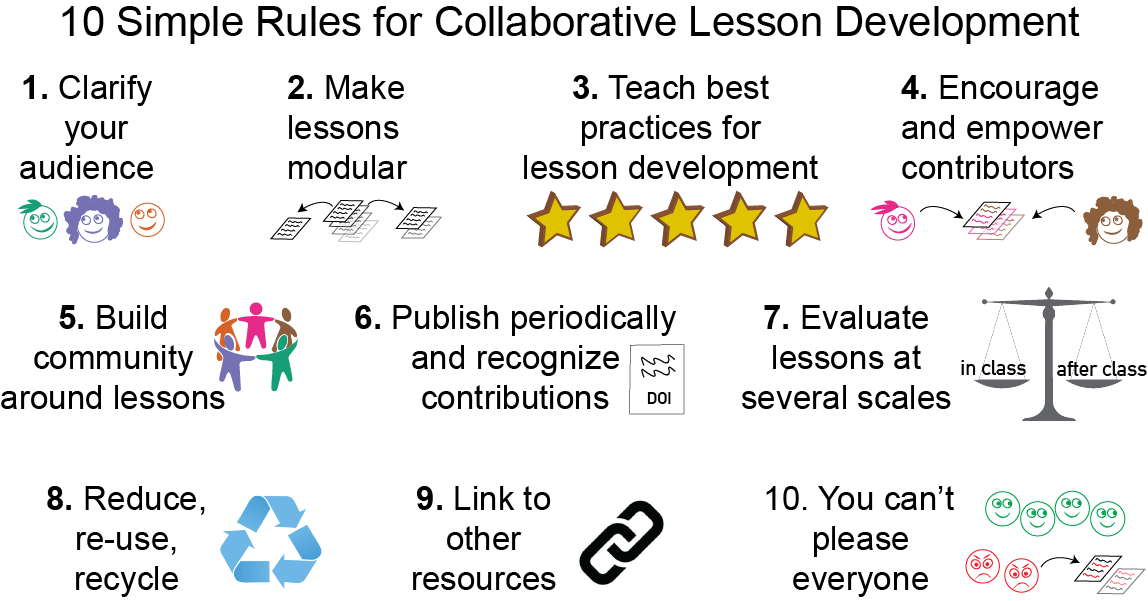
All open education projects (e.g. massive open online courses) satisfy the first criterion by definition, but very few satisfy the second. In other words, while it is common for open education projects to be occasionally updated by an individual or small team (as happens when a new edition of a book is edited and published), this is not the same as continuous improvement by a large community of contributors. The ten simple rules that follow summarize what we have learned about doing that as maintainers, editors, and reviewers of lessons used by tens of thousands of people (Fig. 1, 2). By following these rules, we contend that it is possible to create higher quality lessons than could be created by an individual or small team, both in terms of accuracy and pedagogy. As an added bonus, the lessons are always up-to-date and require less time per author to develop and maintain.
1) Clarify your audience
The first requirement for building lessons together is to know who they are being built for. ``Archaeology students'' is far too vague: are you and your collaborators thinking of first-year students who need an introduction to the field, graduate students who intend to specialize in the sub-discipline which is the lesson's focus, or someone in between? If different contributors believe different things about prerequisite knowledge, equipment or software required, or how much time learners will have, they will find it difficult to work together.
Instead of starting with learning objectives (Rule 3), it can be helpful to write learner profiles to clarify the learner's general background, what they already know, what they think they want to do, how the material will help them, and any special needs they might have. This technique is borrowed from user interface design, and a typical learner profile is presented in Box 1.
2) Make lessons modular
Every instructor's needs are different, so build small chunks that can be re-purposed in many ways. A university lecturer in meteorology, for instance, might construct a course for their students by bringing together lessons on differential equations, fluid mechanics, and absorption spectroscopy. Creating courses this way shifts the instructor's burden from writing to finding and synthesizing, which are easier if lessons clearly define what they cover (Rule 1), and if lessons have been designed by people with a shared world-view (Rule 3).
One way to achieve this is to take existing courses and break them down into smaller, single-purpose modules (a change which has pedagogical and administrative advantages in its own right). When this is done, these modules can be made more discoverable by referencing specific points in the model curricula promulgated by many professional societies (e.g., as learning objectives). Smaller modules are also more approachable for new contributors (Rule 4).
3) Teach best practices for lesson development
Decades of pedagogical research have yielded many insights into how best to build and deliver lessons. Unfortunately, many college and university faculty have little or no formal training in education \cite{brownell}, so this knowledge is rarely applied in the classroom.
Our experience is that even a brief introduction to a few key practices helps collaborative lesson development. If people have a shared understanding of how lessons should be developed, it is easier for them to work together. Less obviously, if people have a shared model of how lessons will be \emph{used}, they are more likely to build reusable material. Finally, teaching people how to teach is a great way to introduce them to each other and build community (Fig. 2).
By way of example, Software Carpentry encourages its volunteers to use the popular lesson development methodology presented by, whereby learning objectives and assessments are created before any lesson materials are developed. In particular, summative assessments are created to determine whether the learning objectives have been met, and formative assessments are created to gauge learners' progress and to give them a chance to practice key skills. The completed formative assessments are put in order and only then are the lessons written, with the aim of connecting each formative assessment to the next. This method is effective in its own right, but its greatest benefit is that it gives everyone a framework for collaboration.
An example of how to teach such pedagogical practices is Software Carpentry's instructor training program. First offered in 2012, it is now a two-day course delivered both in-person and online. In addition to a focus on pedagogy, the course introduces everyone who takes it to who Software Carpentry's lessons are for, how they are delivered, and how they are maintained. Largely as a result of this training, several hundred people per year now contribute to Software Carpentry's lessons.
4) Encourage and empower contributors
Making the process for contributing to a lesson simple and transparent is the key to receiving contributions. Licensing, code of conduct, governance, and the review and publication process must all be explicit rather than implicit to lower the social barriers to contribution.
Tools can help, especially if they allow proposed changes to be viewed and discussed prior to their incorporation into the lessons. (In software development this is known as "pre-merge review".) However, some tools that are popular in open source software development have considerable up-front learning costs. Portals like GitHub, for example, support everything that open lesson development needs, but require contributors to use Git, which has a notoriously steep learning curve.
Complicating matters further, some file formats make collaboration easier or more difficult. Despite their ubiquity, open source version control systems do not directly support review or merge of Microsoft Office or LibreOffice file formats, which raises an additional burden for newcomers. Programmers may look down on Google Docs and wikis for their lack of pre-merge review and other capabilities, but their low barrier to entry make them more welcoming to newcomers.
The best way to choose tools for managing lessons is to ask potential contributors what they are comfortable with rather than requiring them to come to you. Remember also that contributing to a lesson is probably not their top priority, and look for ways to reduce their cognitive load. For example, threaded discussion forums can improve the signal-to-noise ratio by reducing long reply-all email exchanges. Several open frameworks are available to facilitate development of new lessons, such as R-based learnr or GitHub-based Morea and DataCamp's templates.
5) Build community around lessons
Software versions and dependencies are constantly changing, while the academic literature is advancing at an ever-increasing pace. As a result, what is cutting edge one year may be out of date the next and simply wrong the year after. Collaborative lesson development groups must therefore focus on creating a community in which contributors support each other rather than on relying on a small group of stewards. Authors cannot be expected to maintain continual vigilance on a lesson, but this is necessary for continual use.
A key part of doing this is to create opportunities for legitimate peripheral participation. Curating a list of small tasks that newcomers can easily tackle, encouraging them to give feedback on proposed changes, or asking them to add new exercises and tweak diagrams and references can all provide an on-ramp for people who might question their authority or ability to change the main body of a lesson. Equally, acknowledging all contributions, however small, gives new contributors an early reward for taking part.
Finally, working in the open can be great, but can also unintentionally suppress voices. Programming Historian makes an ombudsperson is available for private chats and facilitation to ensure that no one is excluded.
6) Publish periodically and recognize contributions
Like software, specific versions of lessons should be published or released periodically so that learners or instructors have something stable to refer to for the duration of their use. Periodic releases also provide an opportunity for recognizing the contributions of new authors and maintainers.
Academia has only a few ways of recognizing contributions. Until these are expanded, it is important to publish lessons in ways that traditional academic systems can digest. One is to give releases DOIs supplied by providers such as Zenodo (https://zenodo.org/) or DataCite (https://www.datacite.org/). Contributors can be listed as authors and the maintainers of the lesson as editors to differentiate recognition of their contributions. Each time the lesson is published, names (and identifiers such as ORCIDs (https://orcid.org)) should be gathered for all contributors.
A lesson release is a good opportunity to bring the material into a stable shape by fixing outstanding issues and merging contributions. Version control automatically maintains a list of contributors, and can also be used to track what content is in what release (e.g., using branches or tags). Lesson releases should use a consistent naming scheme; Software Carpentry has used the year and month of release (e.g., "2017.05") in its releases.
If lessons are being released regularly, automate the process and archive old versions in a discoverable location. Also make sure that everyone involved knows what "done" look like, i.e., which outstanding issues have to be addressed and how it has to be formatted in order for the next release to go out. A simple checklist stored with the lesson materials is good enough to start, but as time goes by, the community may want to use an issue tracking system of some sort so that work items can be assigned to specific people and then ticked off as they are completed.
7) Evaluate lessons at several scales
What people immersed in developing lessons think needs fixing can easily differ from what learners think. It is therefore critical to gather and act on feedback at several scales to check assumptions and stay on course.
Micro-scale feedback can be gathered by an instructor while teaching a particular lesson. Learners can provide feedback on everything from typographical errors and the clarity of quiz questions to the order in which topics are presented, all of which the instructor should record at the end of each class in some shared location (such as a Google Doc or GitHub issues). As well as encouraging direct verbal feedback, it's a good idea to provide learners with a means to provide feedback anonymously during class (e.g., on small pieces of paper like sticky notes or through anonymous surveys).
Pre- and post-class surveys and interviews should be used to uncover larger issues, particularly those arising from developers not fully understanding their audience, e.g., assuming prior knowledge that learners do not have. Post-class surveys are most effective when conducted 30-90 days after class; this gives people time to reflect, so their feedback will more accurately reflect what they learned rather than how entertained they were. Clearly-stated learning objectives (Rule 3) are essential here, as they tell assessors what they should be measuring.
8) Reduce, re-use, recycle
Just as a scholar would not write a paper without a literature review, an instructor should not create a new lesson if there is an existing one they could use or contribute to. A short online search can discover if someone has written what you need, whether it is complementary to your goals, and if it can be tweaked or modified to meet your needs.
Questions
What is collaborative-lesson-development?
swcarpentry/collaborative-lesson-development is a public repo on GitHub by swcarpentry. 10 Simple Rules paper on collaborative lesson development.
Is collaborative-lesson-development open source?
It declares no license on GitHub. Public does not mean open source: without a license, nobody is granted the right to reuse it.
Does collaborative-lesson-development run on macOS, Windows or Linux?
More from swcarpentry
Everything by swcarpentry- swcarpentryA meta-repository to help navigate the many lessons and repos of the Software Carpentry Community 595
- shell-noviceThe Unix Shell 449
- git-noviceVersion Control with Git 379
- python-novice-inflammationProgramming with Python 337
- DEPRECATED-bcDEPRECATED: This repository is now frozen - please see individual lesson repositories. 302
- python-novice-gapminderPlotting and Programming in Python 190