

karakeep
A self-hostable bookmark-everything app (links, notes and images) with AI-based automatic tagging and full text search
- 31k
- TypeScript
- AGPL-3.0
- 23 h ago
Your Chrome bookmarks as a board on the new tab page: spaces, stacks, search, themes and a one-click tab stash. Free, no account.
Repo swole/stackboard, read from GitHub 1 d ago. swole has not joined Take My Repo.
swole/stackboard is a public repo on GitHub by swole. Your Chrome bookmarks as a board on the new tab page: spaces, stacks, search, themes and a one-click tab stash. Free, no account. It declares the MIT license on GitHub. It is written mainly in TypeScript, has 28 stars and last changed on 2026-11-22. Nobody has reviewed it on Take My Repo yet, which says nothing about its quality. Read from GitHub on 2026-11-22.
A self-hostable bookmark-everything app (links, notes and images) with AI-based automatic tagging and full text search
Your Chrome bookmarks as a board on the new tab page. Spaces down the side, stacks of links across, and you can drag anything anywhere.
Get it free on the Chrome Web Store Website and guides: getstackboard.com
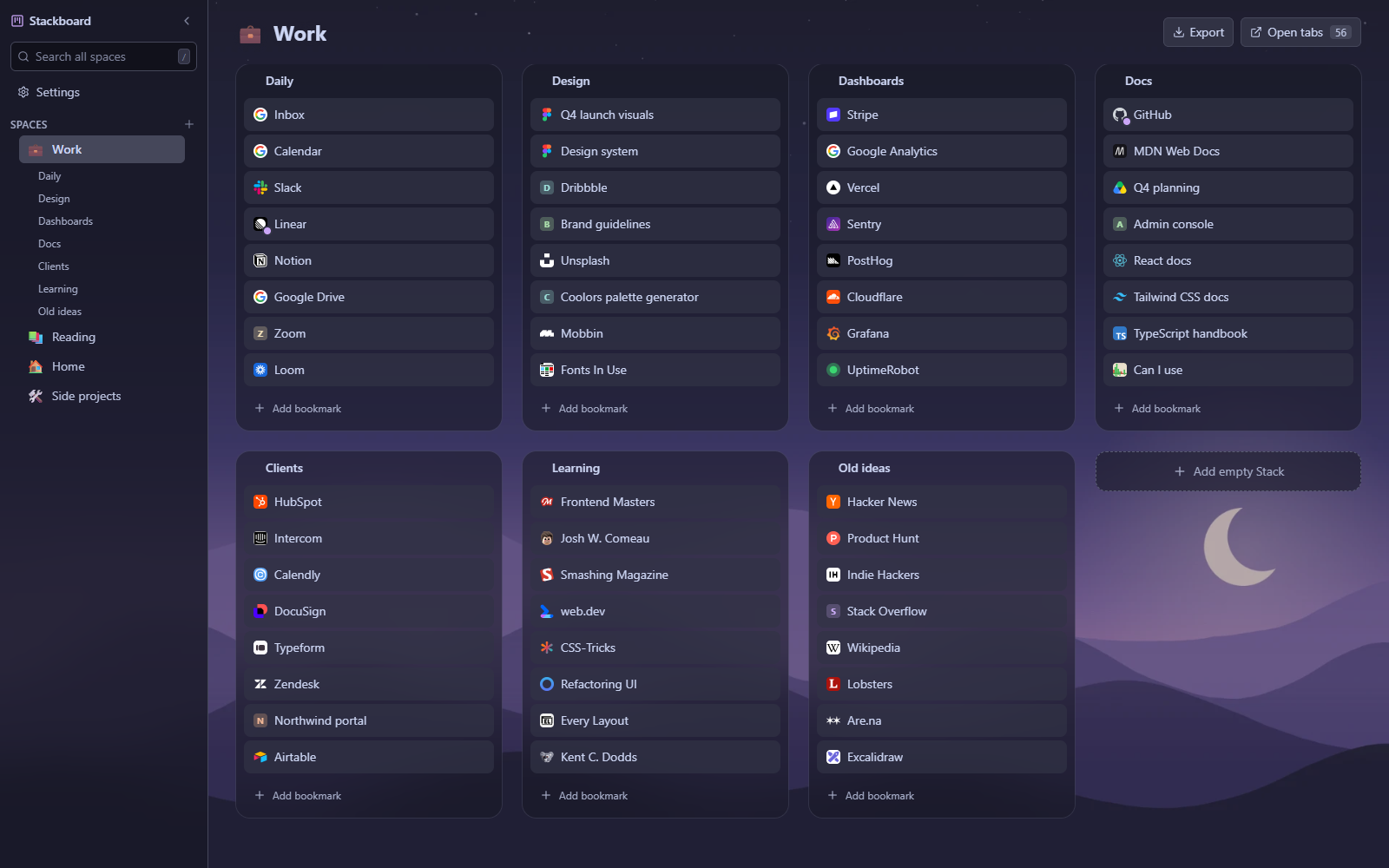
/).go, a space and part of a link's name in the address bar to open it.Everything is plain Chrome bookmarks under Other bookmarks → Stackboard (space folders, then stack folders, then bookmarks). So it syncs through Chrome sync, works offline, and if you uninstall the extension your bookmarks stay put.
Coming from another tool? See Stackboard as a OneTab alternative or as a Toby alternative, and the Catppuccin, Gruvbox and Nord themes.
To-do items are the one exception: they live in Chrome's extension sync storage, so they sync through Chrome with your extension settings, and uninstalling Stackboard deletes them. Each list keeps one bookmark in its stack folder so every device knows which list goes where.
No account and no analytics, and the free extension contacts no server. A few preferences (last space opened, your theme, whether you've answered the one-time rating ask) stay in local storage on your device, and a wallpaper you pick stays in the browser's local database on that device.
Pro goes online only for its own features: it checks your license key with Polar, the payment provider, every few days; AI tidy sends one space's link titles and addresses to getstackboard.com, which asks Anthropic's API to sort them, only when you press Tidy; and clean-up's link check asks each site whether it still loads. The privacy policy has the details.
Moving tabs out of another app, or cleaning up the bookmarks you already have? These run in your browser at getstackboard.com/tools, and your files never leave your computer:
| Permission | Why |
|---|---|
bookmarks |
Read and write the Stackboard folder; read your other folders only when you choose to copy them in |
tabs, tabGroups |
The "already open" dot, saving the current tab, stashing a window and reopening it as a group |
storage |
A few local flags (first-run hints), your appearance settings, your to-do items, and the Pro key and settings |
favicon |
Site icons from Chrome's own favicon cache |
search |
Go links: when nothing on your board matches, the text goes to your default search engine |
externally_connectable lets two getstackboard.com pages talk to the extension: a shared-stack page can add the stack to your board, and the page after checkout hands over your Pro key.
npm install
npm run build
Then open chrome://extensions, turn on Developer mode, click Load unpacked and pick the dist folder. npm run dev gives you hot reload while you work.
Unit (pure logic: titles, icons, import and stash planning, the rating rule, and contrast checks for every palette):
npx esbuild tests/unit.test.ts --bundle --platform=node --format=esm --loader:.css=text --outfile=unit.mjs && node unit.mjs
End to end in a real browser: Chrome for Testing plus puppeteer-core, because branded Chrome ignores --load-extension since Chrome 137. Setup and run instructions are in the header of tests/e2e.mjs.
Manifest V3, React 18, TypeScript, Vite with the crxjs plugin, Tailwind 4, Zustand and dnd-kit. Built with Claude Code.
tokyo51 tracked down why Stackboard froze in Brave (a background tab holding the root-folder lock forever, with failed writes showing nothing) and sent the fix that shipped in 0.5.2.
swole/stackboard is a public repo on GitHub by swole. Your Chrome bookmarks as a board on the new tab page: spaces, stacks, search, themes and a one-click tab stash. Free, no account.
It declares the MIT license on GitHub.
Its maker has not tagged a system, so it is unknown here. Its README says what it needs.
Open "Take it" on its page: Take My Repo writes an install plan for your machine and hands it to your AI agent (Claude Code, Codex or Cursor), which asks you before each step. Take My Repo has not tested it on any machine.
Linux命令大全搜索工具,内容包含Linux命令手册、详解、学习、搜集。https://git.io/linux
Flutter makes it easy and fast to build beautiful apps for mobile and beyond
f.k.a. Awesome ChatGPT Prompts. Share, discover, and collect prompts from the community. Free and open source — self-host for your organization with complete privacy.
⚡️⚡️⚡️ Self-hosted collaborative bookmark manager to collect, read, annotate, and fully preserve what matters, all in one place.
Its last change on GitHub was on 2026-11-22. Take My Repo does not judge from that whether it is maintained.
Nobody has reviewed it on Take My Repo yet, which says nothing about its quality.
Take My Repo cannot say: it does not audit code and has not run stackboard. What is known comes from GitHub. It declares the MIT license on GitHub. Its last change was on 2026-11-22. It has 28 stars, which measure popularity, not safety. Nobody has reviewed it on Take My Repo yet, which says nothing about its quality. Read the source before you run it. With "Take it", your AI agent shows each step and asks you before running it; README text is treated as data, not as instructions.


