GPT-Load
A self-hosted AI gateway for multi-channel, multi-credential setups
API keys, subscription accounts, traffic scheduling, failure handling, request logs, and usage accounting — behind a single entry point.
English · 中文 · 日本語 | Official Website

Sponsors
Become a sponsor
Sponsor details (collapsible)
 |
Thank you to Qiniu Cloud for sponsoring this project!
Qiniu Cloud (02567.HK) offers an enterprise MaaS platform that gives you one-stop access to over 150 leading models worldwide. It supports major model providers' protocols and handles text, images, audio, video, and files, serving more than 1.8 million enterprise developers.
New enterprise users can claim 20 million tokens for free. With the year-end offer, new users can get up to 1 billion free tokens per day. |
 |
Thank you to Fenno.ai for sponsoring this project!
Fenno.ai is an API gateway for coding, with a focus on Codex. Use one API key for coding models such as GPT, Claude, and Grok. It supports both OpenAI and Anthropic protocols and connects directly to tools such as Codex, Claude Code, Cline, and OpenCode. Business-to-business payments and invoicing are available for entities in China and overseas.
New users can try $50 in credits for $1.99. Earn up to 20% in referral commissions when you invite friends. The more you invite, the more you earn. |
 |
OfoxAI: Text, image, and video AI in one platform
OfoxAI is a unified AI API platform bringing together text, image, and video models from multiple providers. With OpenAI-compatible endpoints and native Anthropic and Gemini interfaces, developers can access models for AI applications, agents, and content creation through one platform. Explore OfoxAI models and APIs → |
 |
Protect and accelerate websites and APIs, serving users in mainland China and around the world, and extend acceleration and security capabilities to native/mobile apps through a client SDK — self-built private-deployment CDN | subscription-based high-protection CDN | an independently controllable, flexibly composable CDN network. |
 |
Thanks to APIMart for sponsoring this project! APIMart is a low-cost API platform for AI image & video generation — GPT-Image-2 from $0.006/image, 160+ images per dollar. One async API covers both image and video: submit a task, get an ID, fetch results via polling or callback. Batch tens of thousands of images without timeouts, switch models without changing code. Pay-as-you-go with no monthly fee — sign up here to get started. |
Why GPT-Load
Your application only needs one base URL and one AccessKey. Providers, accounts, credentials, models, and routing policy are all configured in the management UI.
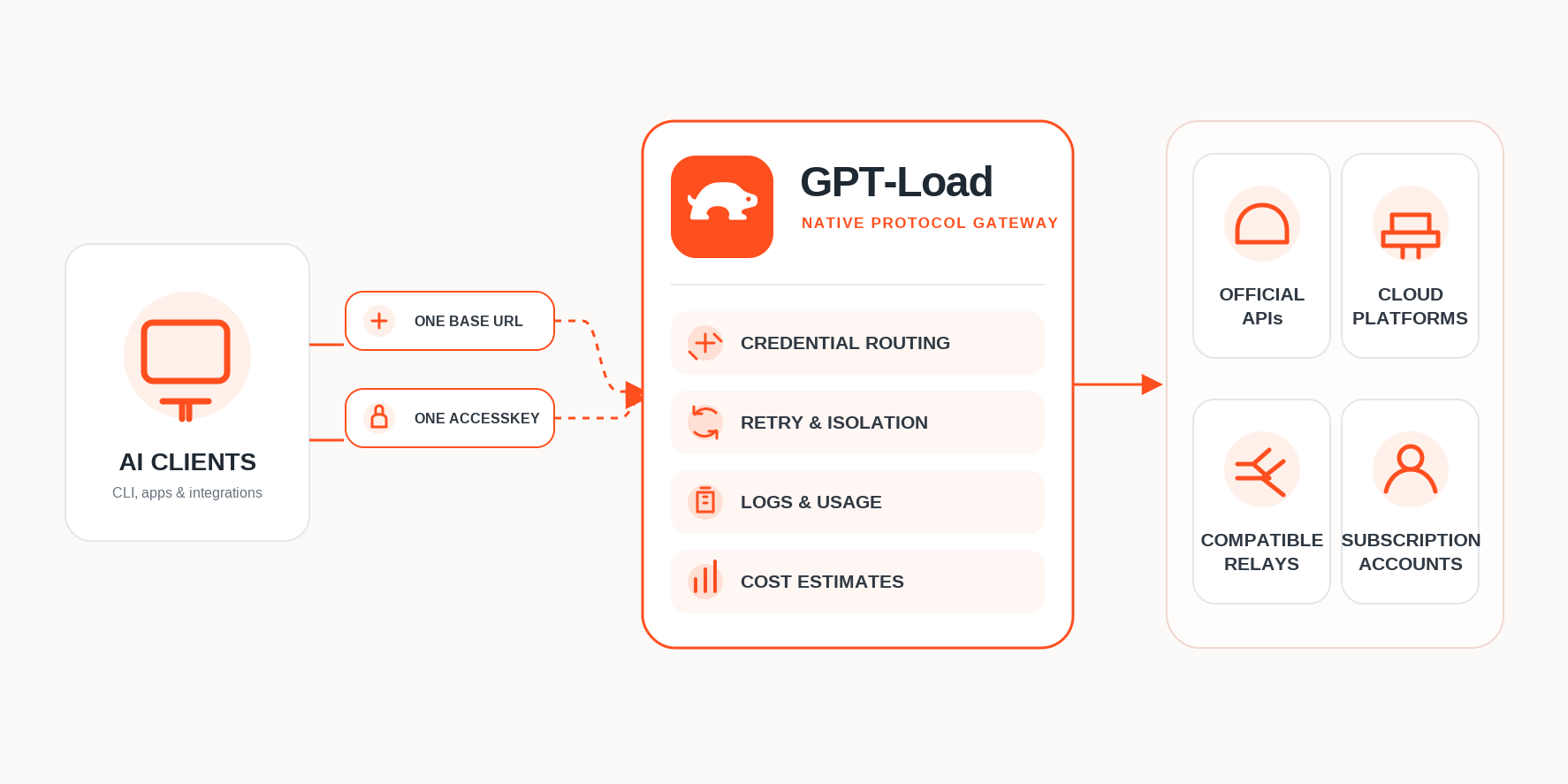
- One gateway, native protocols — Manage official APIs, cloud platforms, model services, and compatible relays together while clients keep their OpenAI, Anthropic, or Gemini native interfaces.
- One mechanism for API keys and subscriptions — Codex, Claude, Antigravity, Grok, and API-key channels share credential management, scheduling, and health handling.
- Scheduling and failure isolation built in — Multi-credential scheduling, configurable weights, retries, cooldown, blacklisting, and session affinity reduce the impact of overloaded or failing credentials.
- Observable, self-hosted, and simple to deploy — Inspect health, routes, logs, usage, and cost estimates in an embedded UI backed by SQLite, MySQL, or PostgreSQL with local credential encryption.
Online demo
https://demo.gpt-load.com
Login key: gpt-load-demo
Quick start
Warning
If you are using 1.x, read Moving from 1.x first. 2.0 cannot open, import, or migrate 1.x data in place.
1. Start the service
Requires Docker and Docker Compose.
git clone --depth 1 https://github.com/tbphp/gpt-load.git
cd gpt-load

cp .env.example .env
docker compose up -d
Confirm the service is up:
curl --fail http://127.0.0.1:3001/health
The first start generates a management key. Read it and store it safely:
docker compose exec gpt-load sh -c 'cat /app/data/auth.key'
Open http://127.0.0.1:3001 and sign in to the console with that key.
You can also set AUTH_KEY explicitly in .env before starting. By default the service listens on the loopback address only and is not exposed to the internet.
2. Initial configuration
Initial setup takes three steps:
- Add a channel — Choose an upstream service and add one or more API keys. For subscription channels, complete the OAuth flow or import credentials as prompted.
- Create a group — Pick a channel, then configure available models and runtime policy.
- Create an AccessKey — Set the groups and client protocols it may use, then give the generated AccessKey to your application.
OAuth callback ports for subscription channels
The Codex, Claude, and Antigravity OAuth clients use fixed callback ports. Compose publishes them on the address configured by HOST, which defaults to 127.0.0.1; setting HOST=0.0.0.0 also publishes these callback ports on all host interfaces. Because the ports are fixed by the upstream clients, only one default Compose instance can run on a host at a time.
When working over SSH or from a remote browser, the browser's localhost may not reach GPT-Load — paste the full callback URL into the authorization dialog to finish the flow.
Screenshots
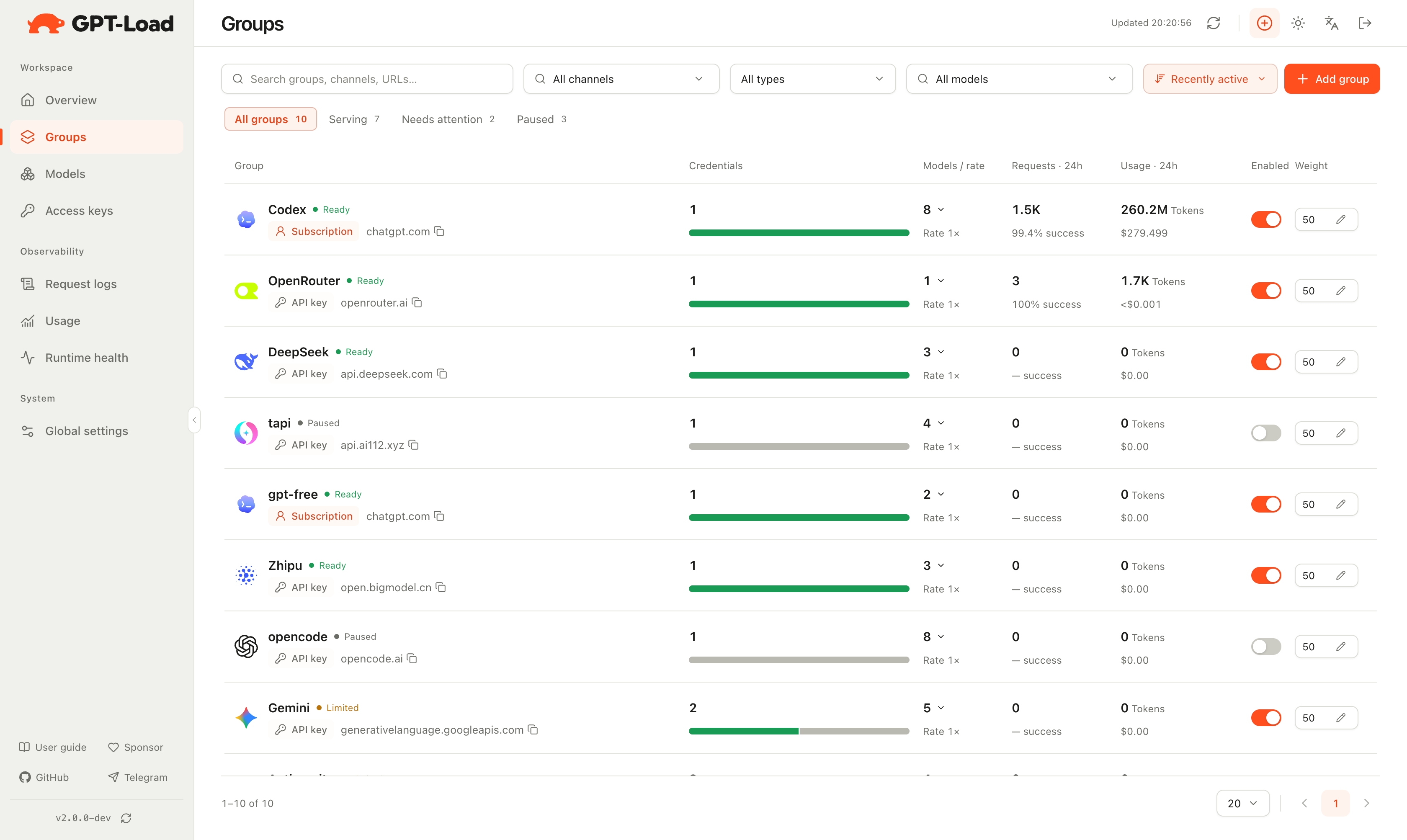
Groups — View channels, models, credential counts, traffic, and health in one place
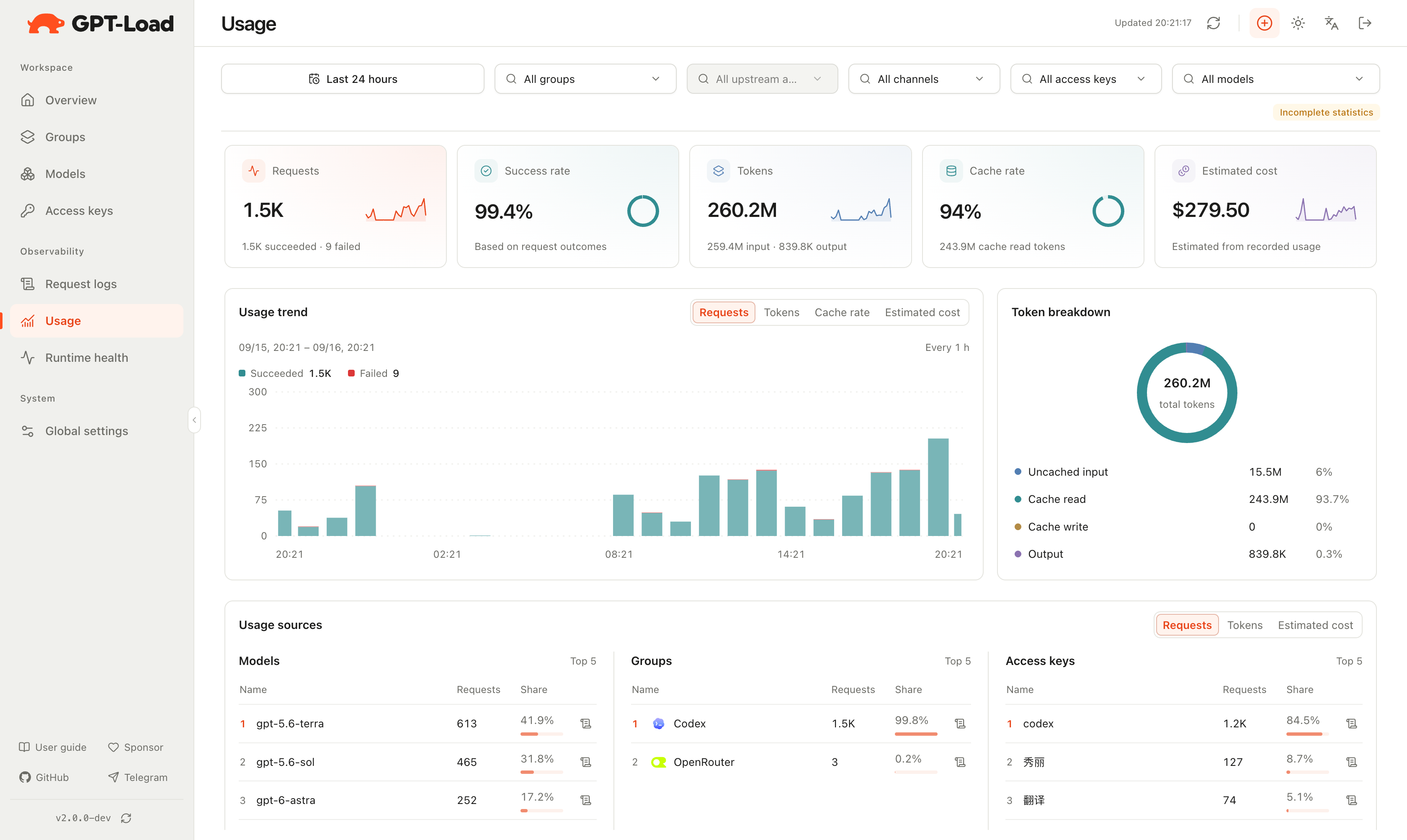
Usage statistics — Review request trends, cache hit rate, token categories, and cost estimates
Scope
Client protocols
| Protocol |
Main entry |
| OpenAI Chat Completions |
POST /v1/chat/completions |
| OpenAI Responses |
/v1/responses and its resource paths |
| OpenAI Images |
POST /v1/images/... |
| OpenAI Embeddings |
POST /v1/embeddings |
| Rerank |
POST /v1/rerank |
| Audio Speech |
POST /v1/audio/speech |
| Mistral native |
/v1/ocr, /v1/audio/transcriptions |
| Anthropic Messages |
POST /v1/messages |
| Gemini |
/v1beta/models/... |
| Gemini Embeddings |
POST /v1beta/models/{model}:embedContent / :batchEmbedContents |
| Gemini Decisions |
POST /v1beta/decisions |
Built-in channels
- Official and cloud — OpenAI, Anthropic, Gemini, xAI, Azure OpenAI, AWS Bedrock, Google Vertex AI
- Model services — DeepSeek, Moonshot AI, SiliconFlow, Zhipu AI, Alibaba, Volcengine, OpenRouter, Cline, Groq, Cerebras, Mistral, Nebius, Parasail, Wafer, Hugging Face (Chat), Cohere (text reranking), OpenCode Go, OpenCode Zen
- Subscription — Codex, Claude, Antigravity, Grok
- Custom — OpenAI Compatible (any compatible relay)
Deployment and data
Docker Compose uses application-managed SQLite by default. Data lives in the gpt-load-data named volume and includes the database, auth.key, and encryption.key.
Important
encryption.key decrypts channel credentials. When backing up or migrating, the database and the key must be kept together. Once the key is lost or replaced, existing encrypted credentials cannot be recovered, and this version does not support master key rotation.
Using an external database
Use the unified DATABASE_DSN to connect SQLite, MySQL, or PostgreSQL:
mysql://user:password@db.example:3306/gpt_load?charset=utf8mb4&collation=utf8mb4_bin
postgres://user:password@db.example:5432/gpt_load?sslmode=require
Common operations:
docker compose logs -f      # view logs
docker compose pull && docker compose up -d   # update to the latest 2.x image
docker compose stop         # stop the service
The official Compose file uses ghcr.io/tbphp/gpt-load:2. Before GA, 2 tracks verified 2.0 Beta and RC releases; after GA, it tracks stable 2.x releases only. Exact image tags omit the Git tag's v prefix (for example, 2.0.0-beta.25), while 2.0-beta remains the 2.0 Beta channel. latest remains on 1.x.
Using a native binary
Download the build for your platform from GitHub Releases, and verify it against the bundled SHA256SUMS first:
chmod +x ./gpt-load-linux-amd64

HOST=127.0.0.1 DATA_DIR=./data ./gpt-load-linux-amd64
Then open http://127.0.0.1:3001. Portable builds are provided for five targets across Linux, macOS (amd64 / arm64), and Windows; gpt-load-windows-amd64.exe keeps running in the foreground as before.