Portable-Diffusion
[Deprecated] Zero-configuration local AI studio. Active development has moved to Uncensored-Local-Studio.
- 159
- MIT
- 5 mo ago
Repo techjarves/Portable-Diffusion, read from GitHub 16 h ago. techjarves has not joined Take My Repo.
In short
techjarves/Portable-Diffusion is a public repo on GitHub by techjarves. [Deprecated] Zero-configuration local AI studio. Active development has moved to Uncensored-Local-Studio. It declares the MIT license on GitHub. It is written mainly in JavaScript, has 159 stars and last changed on 2026-06-25. It is archived: its maker no longer maintains it. Nobody has reviewed it on Take My Repo yet, which says nothing about its quality. Read from GitHub on 2026-11-22.
[!IMPORTANT] This repository (
Portable-Diffusion) is deprecated and is no longer actively maintained.All active development, features, and bug fixes (including the Windows crash/access violation fixes) have moved to:
👉 Uncensored-Local-Studio
Please visit the new repository to download the latest version, report issues, and follow the project's development.
⚡ Portable-Diffusion
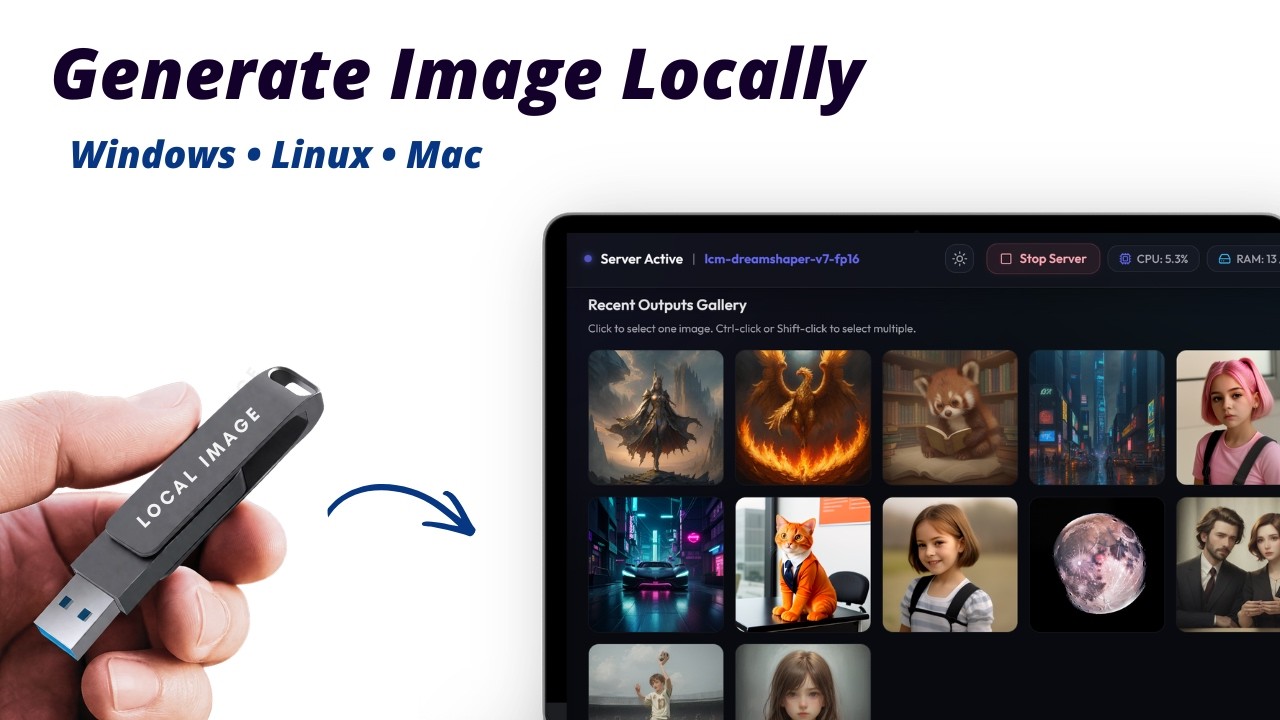
A premium, zero-configuration local AI image generator and offline Stable Diffusion GUI. Powered by hardware-accelerated GPU and NPU execution on Windows, Linux, and macOS.
🎥 Watch the Setup & Demo Video: https://youtu.be/Be8hKvZR4XE
📖 Table of Contents
- Key Features
- Folder Architecture
- Getting Started
- Hardware Compatibility & Acceleration
- Performance Benchmarks
- Troubleshooting & FAQ
- Building From Source
- Licensing
🌟 Key Features
- 100% Offline & Private: Run inferences locally. No internet, telemetry, cloud logging, or API keys required.
- Zero-Install Portability: Entire runtime (Node.js, models, GPU backends) is self-contained. Zero global system environment changes.
- Auto-Configured Acceleration: Auto-detects hardware specs to load CUDA (Nvidia), ROCm (AMD), Vulkan (Intel/AMD), Metal (macOS), or OpenVINO (Intel NPU) backends.
- Integrated Model Manager: Paste Hugging Face URLs to download weights directly, or drag-and-drop local
.safetensorsor.gguffiles. - Live Performance Monitor: Track CPU, RAM, GPU, and VRAM utilization in real-time directly inside the web UI.
- Local Output Gallery: Saves generated images side-by-side with prompt parameters and metadata JSON files.
📁 Folder Architecture
Portable-Diffusion/
├── windows.bat                # Windows Launcher (Double-click entrypoint)
├── linux.sh                   # Linux Launcher (Terminal entrypoint)
├── mac.sh                     # macOS Launcher (Terminal entrypoint)
├── LICENSE                    # MIT Open Source License
├── .gitignore                 # Excludes models and output images from version control
├── README.md                  # Detailed system documentation
├── scripts/
│   ├── setup.ps1              # Core installation & backend builder (Windows)
│   ├── setup.sh               # Core installation & backend builder (Linux/macOS)
│   ├── reset.ps1              # Clean install & environment repair (Windows)
│   ├── reset.sh               # Clean install & environment repair (Linux/macOS)
│   └── serve.cjs              # UI web server and backend lifecycle manager
└── app/
    ├── frontend/              # UI source code (Vite + React)
    ├── models/                # Place weights here (.safetensors, .gguf, .ckpt)
    └── outputs/               # Saved images and parameters metadata
🚀 Getting Started
Ensure you have a modern web browser installed. Follow the quick guide below for your platform:
Windows Setup
- Launch: Double-click
windows.bat.[!NOTE] On the first run, the script will automatically download a portable Node.js runtime and configure the pre-compiled GPU backend binaries (CUDA/Vulkan).
- Load Models: Put your
.safetensorsor.ggufweights inapp/models/or download them via the UI's Model Manager tab. - Generate: Open
http://localhost:1420in your browser, pick your model, and generate images.
Linux Setup
- Check glibc Version: Prebuilt Linux backends require glibc 2.38+ (e.g. Ubuntu 24.04+, Fedora 40+). Run
ldd --versionto check. - Launch: Run the launcher script:
./linux.sh- NVIDIA Users: Follow the prompt to install CUDA (attempts to download prebuilt binaries first, falls back to local compilation if conflicts occur).
- AMD Users: Run
./linux.sh --max-perfto download high-performance ROCm drivers. - Intel NPU Users: Ensure Intel NPU drivers are configured, then run
./linux.sh --setup-openvino.
- Generate: Open
http://localhost:1420in your web browser.
macOS Setup
- Compatibility: Requires Apple Silicon (M1, M2, M3, M4 or newer). Metal GPU acceleration is configured automatically.
- Launch: Run the script in terminal:
./mac.sh - Generate: Open
http://localhost:1420in your web browser.
🖥️ Hardware Compatibility & Acceleration
Windows Compatibility Matrix
| GPU Vendor | Primary Tech | Status | Notes |
|---|---|---|---|
| Nvidia | CUDA | ✅ Native | Runs sd-cuda.exe with Nvidia SDK 12 optimizations. |
| AMD Radeon | Vulkan | ✅ Native | Runs sd-vulkan.exe with Vulkan API acceleration. |
| Intel Arc | Vulkan | ✅ Native | Runs sd-vulkan.exe for Intel hardware. |
| Integrated / None | CPU | ⚠️ Fallback | Runs on logical CPU threads (slow). |
Linux Compatibility Matrix
| GPU Vendor | Primary Backend | Fallback Backend | Notes |
|---|---|---|---|
| NVIDIA | CUDA | Vulkan / CPU | Auto-detects NVIDIA. Downloads prebuilt or compiles from source. |
| AMD Radeon | ROCm | Vulkan / CPU | Best AMD performance. Requires host ROCm driver setup. |
| Intel Arc | Vulkan | CPU | Cross-vendor Vulkan support. |
| Intel Core Ultra | OpenVINO NPU | CPU | Requires Intel NPU drivers and ./linux.sh --setup-openvino. |
| Integrated / None | CPU | — | Runs on logical CPU threads (slow). |
macOS Compatibility Matrix
| Hardware | Primary Backend | Fallback | Notes |
|---|---|---|---|
| Apple Silicon (M1+) | Metal | CPU | Uses Darwin arm64 stable-diffusion.cpp backend. |
⏱️ Performance Benchmarks
Typical generation times for an image at 512x512 resolution with 20 steps:
| OS | Hardware / Acceleration | Avg. Generation Time | Notes |
|---|---|---|---|
| Windows | NVIDIA RTX (CUDA) | ~10s | Native CUDA with Tensor Core acceleration. |
| Windows | NVIDIA GTX (Vulkan) | ~30s | Vulkan is faster than CUDA on legacy GTX cards. |
| Windows | AMD Radeon / Intel Arc (Vulkan) | ~89s | Cross-vendor Vulkan GPU fallback. |
| Linux | NVIDIA RTX (CUDA) | ~10s | CUDA prebuilt / compiled from source. |
| Linux | AMD Radeon (ROCm) | ~15 - 30s | Native AMD performance (requires ROCm drivers). |
| Linux | Intel Core Ultra (OpenVINO NPU) | ~15 - 40s | Dedicated Intel NPU hardware acceleration. |
| macOS | Apple Silicon M-Series (Metal GPU) | ~12 - 25s | Native Metal backend on Apple Silicon. |
| macOS | Apple Silicon ANE (Apple NPU) | ~10 - 18s | CoreML compilation on Apple Neural Engine. |
| All OS | CPU Fallback | 150 - 300s+ | Slow logical thread processing. |
🔧 Troubleshooting & FAQ
[!TIP] How to reset the environment? If a setup fails or you want to install clean dependencies, run
scripts/reset.ps1(Windows) orscripts/reset.sh(Linux/macOS). This will preserve your models and generated images.
[!WARNING] Port Conflicts: The web UI runs on port
1420by default. The backend attempts port8080first, then auto-selects a free port if busy.
[!IMPORTANT] GLIBC Version Error (Linux): Prebuilt binaries require glibc 2.38+. If you are on an older system, you will need to compile the backend binaries from source (see compilation guide below).
🔨 Building From Source
If prebuilt binaries are incompatible with your system configuration, you can compile them manually:
Requirements
git,cmake,make(orninja), and a C++17 compiler (g++/clang++).- CUDA: NVIDIA CUDA Toolkit (
nvccin PATH). - Vulkan: Vulkan SDK / loader and drivers.
- ROCm: AMD ROCm development libraries.
- macOS Metal: Apple Command Line Tools / Xcode.
Manual Build Instructions
# 1. Clone the upstream repository
git clone https://github.com/leejet/stable-diffusion.git
cd stable-diffusion.cpp
mkdir build && cd build

# 2. Configure for your backend (choose ONE)
cmake .. -DSD_BUILD_SHARED_LIBS=ON -DCMAKE_BUILD_TYPE=Release                      # CPU only
cmake .. -DSD_CUDA=ON -DSD_BUILD_SHARED_LIBS=ON -DCMAKE_BUILD_TYPE=Release         # CUDA
cmake .. -DSD_VULKAN=ON -DSD_BUILD_SHARED_LIBS=ON -DCMAKE_BUILD_TYPE=Release       # Vulkan
cmake .. -DSD_HIPBLAS=ON -DSD_BUILD_SHARED_LIBS=ON -DCMAKE_BUILD_TYPE=Release      # ROCm
cmake .. -DSD_METAL=ON -DSD_BUILD_SHARED_LIBS=ON -DCMAKE_BUILD_TYPE=Release        # macOS Metal

# 3. Build the binary
cmake --build . --config Release -j$(getconf _NPROCESSORS_ONLN 2>/dev/null || sysctl -n hw.ncpu)

# 4. Copy and rename the binary into the project directory
# Rename the server binary to match what serve.cjs expects (e.g. sd-cpu, sd-vulkan, sd-cuda, sd-rocm, or sd-metal)
📝 Licensing
This project is licensed under the MIT License - see the LICENSE file. It bundles stable-diffusion.cpp (MIT License). Model weights are subject to their respective creators' licenses.
Questions
What is Portable-Diffusion?
techjarves/Portable-Diffusion is a public repo on GitHub by techjarves. [Deprecated] Zero-configuration local AI studio. Active development has moved to Uncensored-Local-Studio.
Is Portable-Diffusion open source?
It declares the MIT license on GitHub.
Does Portable-Diffusion run on macOS, Windows or Linux?
Its maker has not tagged a system, so it is unknown here. Its README says what it needs.
How do I install Portable-Diffusion?
Open "Take it" on its page: Take My Repo writes an install plan for your machine and hands it to your AI agent (Claude Code, Codex or Cursor), which asks you before each step. Take My Repo has not tested it on any machine.
Is Portable-Diffusion still maintained?
No. It is archived on GitHub: its maker no longer maintains it.
What do people who ran Portable-Diffusion say?
Nobody has reviewed it on Take My Repo yet, which says nothing about its quality.