

dfd
Official implementation of "Deep Feature Deformation Weights" CVPR 2026.
- 15
- 3 mo ago
Repo threedle/dfd, read from GitHub 9 min ago. threedle has not joined Take My Repo.
In short
threedle/dfd is a public repo on GitHub by threedle. Official implementation of "Deep Feature Deformation Weights" CVPR 2026. It declares no license on GitHub. Public does not mean open source: without a license, nobody is granted the right to reuse it. It is written mainly in Python, has 15 stars and last changed on 2026-09-11. Nobody has reviewed it on Take My Repo yet, which says nothing about its quality. Read from GitHub on 2026-11-25.
Deep Feature Deformation Weights (CVPR 2026 Highlight)
Official implementation of CVPR 2026 paper "Deep Feature Deformation Weights".
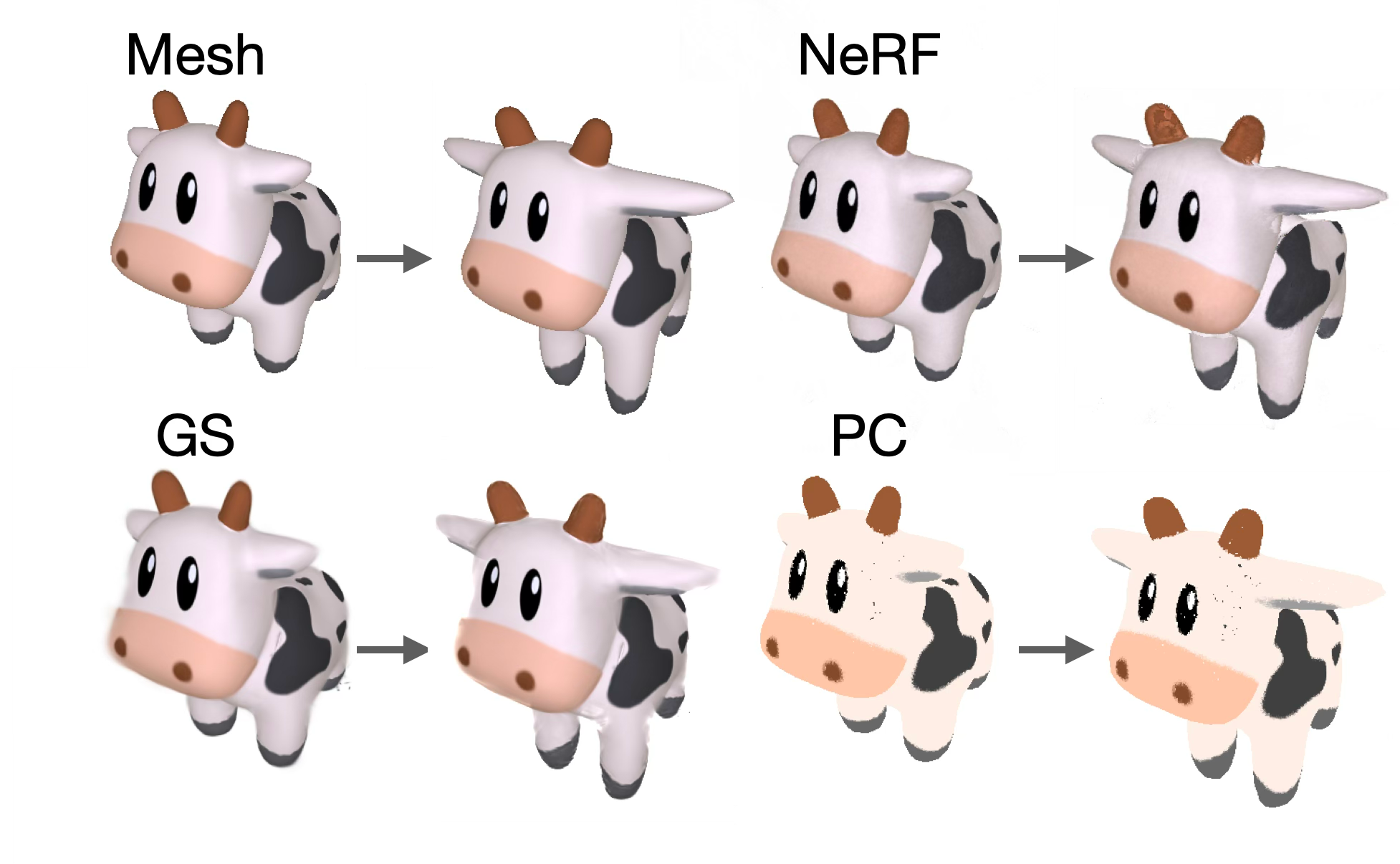
We have distillation and deformation support for implicit representations. Please see the Implicit Shape Representations section.
Prerequisites
- Python 3.10
- CUDA 12.8
- Node.js ≥ 18 (required only for GLB mesh simplification via
--reduction)
Installation
conda env create -f environment.yml
conda activate dfd
uv pip install -r requirements.txt --extra-index-url https://download.pytorch.org/whl/cu128 --prerelease=allow
uv pip install ninja
uv pip install git+https://github.com/NVlabs/nvdiffrast.git --no-build-isolation
npm install -g @gltf-transform/cli
distillation.py supports distillation for the following image models: dino2, dino3, radio, sam, sam2, clip.
The user is responsible for installing any prerequisite libraries or weights associated with use of these models.
Make sure to set -H, -W to an appropriate multiple of the patch size otherwise feature extraction will fail.
SAM2 installation is also required for using sam-based feature refinement during distillation (see below).
Barycentric Feature Distillation
You can call barycentric_distillation() in distillation.py to perform feature distillation, which distills per-pixel image features into a feature field via barycentric sampling. The script can be called directly using the example asset as follows:
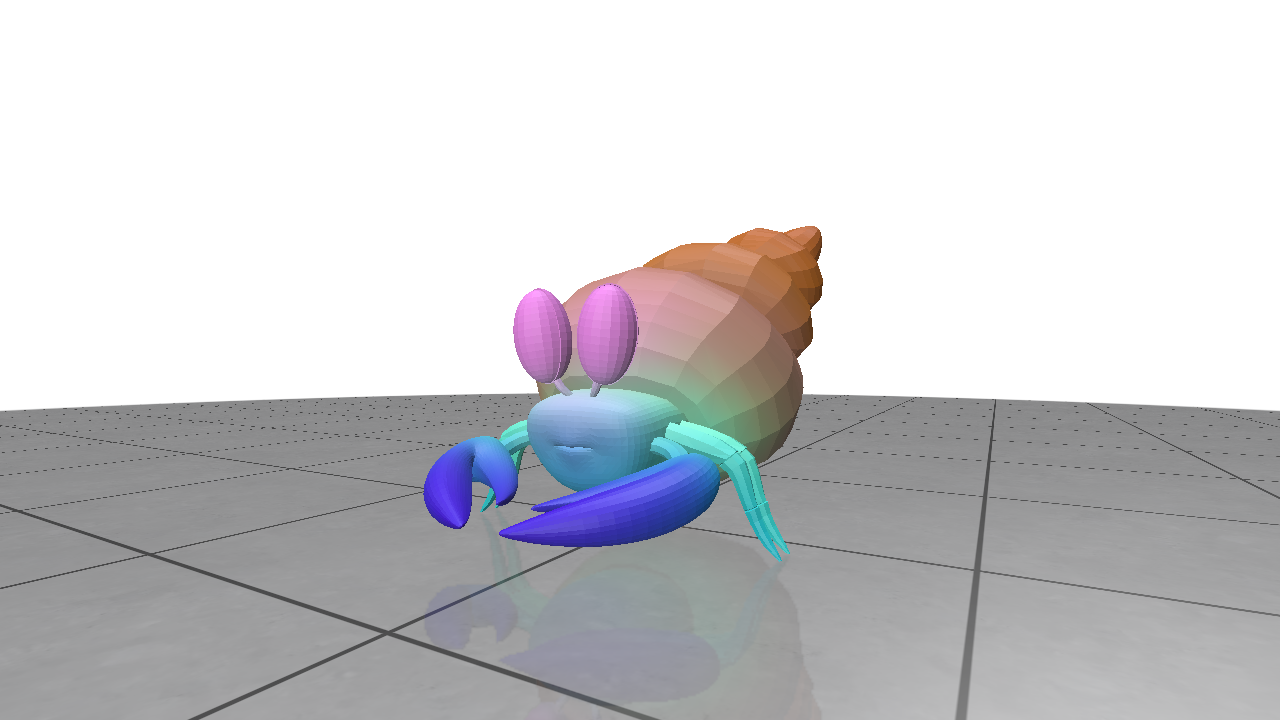
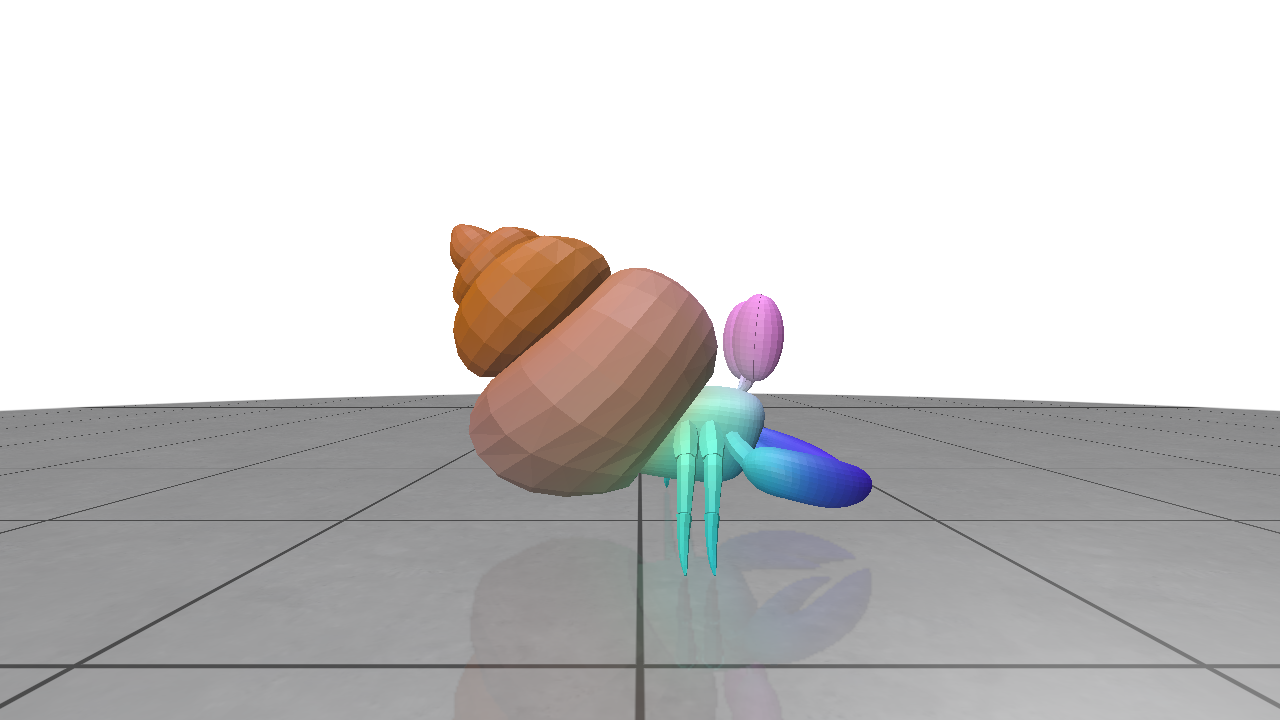
python distillation.py assets/crab/crab.glb outputs/crab/dinov2_vitg14_reg --model dino2 --arch dinov2_vitg14_reg -H 518 -W 518
Outputs are saved to outputs/crab/dinov2_vitg14_reg, including the trained MLP (final_encoder.pth), features sampled on mesh vertices (crab.pt), and PCA-colored screenshots.
Command Line Arguments
Objs with texture coordinates can be rendered with texture using the --texturedir kwarg.
High resolution meshes (>5m vertices) should be first downsampled before rendering by using the --reduction kwarg (0.9 or higher is recommended). This calls either GLTF-transform (for GLBs) or QEM decimation (other formats) under the hood. The distillation should take at most a few minutes for any choice of encoder/mesh, but for high resolution shapes the rendering can run into memory issues.
--use_sam will refine the render feature maps by using SAM segmentation to identify areas where patch-level features "bleed" into other parts of the shape and fix them. This will improve distilled feature quality but will increase runtime (~2 min longer).
| Argument | Default | Description |
|---|---|---|
--texturedir |
None |
Path to texture image for textured OBJ rendering. GLB models will automatically have their textures extracted using trimesh. |
--saveto |
vertices |
Saves output feature tensor sampled either over vertices (vertices) or face centroids (faces). |
--no_cache |
False |
Skip writing cached intermediates to disk (saves disk space). |
--reduction |
0 |
Fraction of edges to collapse for mesh simplification before processing. |
--viewradius |
2.8 |
Camera distance from the mesh center when sampling views. |
Image model parameters
| Argument | Default | Description |
|---|---|---|
--model |
dino2 |
Feature extractor: dino2, dino3, clip, sam, sam2, radio. |
--arch |
None |
Architecture name for the model (e.g. dinov2_vitg14_reg). |
--checkpoint |
None |
Path to local model checkpoint weights. |
--repodir |
None |
Path to local repository source for the model. |
--model_cfg |
None |
Path to model config file (only relevant for sam2). |
--sam2_hr |
False |
Concatenate high-resolution SAM2 features. |
Training parameters
| Argument | Default | Description |
|---|---|---|
-H / --imgh |
512 |
Render image height. Must be a multiple of the model's patch size. |
-W / --imgw |
512 |
Render image width. Must be a multiple of the model's patch size. |
--nviews |
24 |
Total views to render (should be a multiple of 3 for default viewtype). |
--viewtype |
default |
View sampling strategy: default or fib (fibonacci). |
--batchsize |
10000 |
Number of (flattened) training points sampled per MLP optimization step. |
--subsetepoch |
0.1 |
Fraction of all training points to randomly sample per epoch. Set to 0 to use the full training set every epoch. |
--viewbatchsize |
16 |
Number of views to batch for rendering. |
--featurebatchsize |
2 |
Number of views to batch for feature extraction. |
--lr |
1e-3 |
Learning rate. |
--iters |
20 |
Training iterations/epochs. |
Gaussian blurring
| Argument | Default | Description |
|---|---|---|
--noiseradius |
0.05 |
Maximum radius for sampling noisy positions about each training position. |
--noisen |
0 |
Number of noise samples per position sample (disabled by default). |
SAM feature reassignment
| Argument | Default | Description |
|---|---|---|
--use_sam |
0 |
If > 0, uses SAM masks to refine per-pixel features and reduce feature bleeding. Value determines the outlier threshold (L2 distance). Value of 1 is recommended. |
MLP parameters
| Argument | Default | Description |
|---|---|---|
--nlayers |
4 |
Number of MLP layers. |
--width |
256 |
Hidden layer width. |
--positional_encoding |
False |
Use Fourier features for positional encoding. |
--sigma |
5.0 |
Sigma for Fourier features. |
Interactive Deformation GUI
interactive_affine.py launches a Polyscope-based GUI for real-time handle-based mesh deformation using the distilled feature weights.
Click anywhere on the mesh to place a handle and visualize its influence weights over the surface. Then use the translation, rotation, and scale sliders to deform the mesh.
Capabilities
| Mesh with topological defects. | Symmetry, feature anchors, locality weighting. |
Example
Run the interactive GUI using the weights distilled above:
python interactive_affine.py assets/crab/crab.glb --weightsdir outputs/crab/dinov2_vitg14_reg/final_encoder.pth
Implicit Shape Representations
Our underlying feature field is 3D-representation agnostic, and thus we can distill over implicit shapes as well. We supply a separate distillation script for 3D GS, NeRFs, and point clouds.
| Script | Input | Extra dependency |
|---|---|---|
distillation.py |
mesh (.obj, .ply, .off, .glb) |
— |
distillation_gs.py |
3D Gaussian Splat .ply |
gsplat |
distillation_pc.py |
point cloud .ply |
— |
distillation_nerf.py |
nerfstudio config.yml |
nerfstudio |
gsplat and plyfile are in requirements.txt, so the splat and point-cloud paths work in the base dfd environment. Only NeRF needs nerfstudio — see NeRF below.
How features are baked onto each representation
Distillation relies on a closed-form mapping from pixel to 3D points. This mapping differes by representation.
| Forward render | Feature bake | |
|---|---|---|
| point cloud | one point wins each pixel | pixel feature → that point, weight 1 |
| gaussians | density-weighted composite, C = Σⱼ wᵢⱼ cⱼ |
fⱼ = Σᵢ wᵢⱼ Fᵢ / Σᵢ wᵢⱼ |
| NeRF | density-weighted ray integral, C = Σᵢ Tᵢαᵢ cᵢ |
every ray sample xᵢ gets F, weighted by wᵢ = Tᵢαᵢ |
Example versions of the spot asset ship in assets/spot/ so every entry point can be run as-is:
| File | Representation | Run with |
|---|---|---|
assets/spot/spot.obj (+ spot_texture.png) |
mesh | distillation.py |
assets/spot/spot_gs.ply |
Gaussian splat, cube-normalized and floater-pruned | distillation_gs.py --no_normalize |
assets/spot/spot_pc.ply |
200k-point colored cloud, cube-normalized | distillation_pc.py --no_normalize |
assets/spot/nerf/config.yml |
trained nerfacto checkpoint | distillation_nerf.py |
assets/spot/train_views/ |
100 posed renders + masks + transforms.json |
ns-train nerfacto, to retrain the NeRF from scratch |
assets/spot/handles_example.json |
two deformation handles (leg pull + head scale) | deform_asset.py |
Gaussian splats
python distillation_gs.py assets/spot/spot_gs.ply outputs/spot/gs_radio \
    --model radio -H 512 -W 512 --no_normalize
Reads the standard INRIA/3DGS .ply that every splat trainer exports (ns-export gaussian-splat included). Writes final_encoder.pth / final_encoder.json in exactly the same layout as distillation.py.
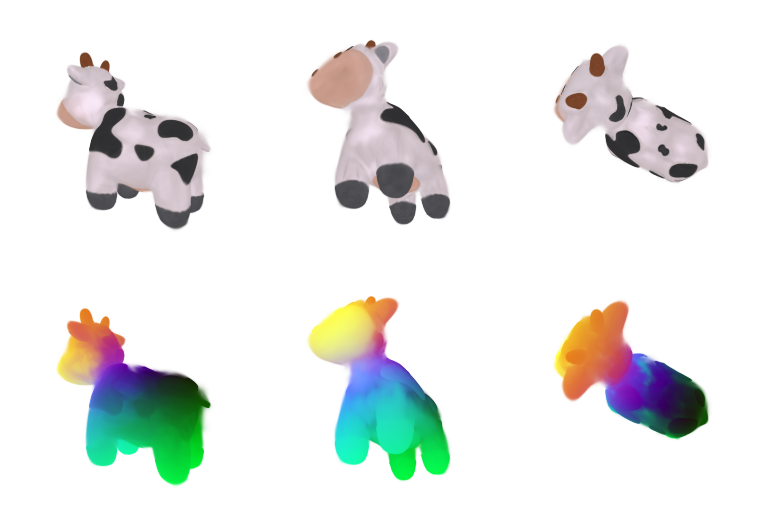
Top: a splat rendered from its .ply. Bottom: the distilled feature field queried at the gaussian centers, PCA-colored.
Framing. The feature field lives in the cube-normalized frame, so the splat is fitted into the unit cube on load and the transform saved to rep_transform.json (apply it to other geometry with gsply.apply_transform). Gaussians are binned into a coarse grid weighted by opacity / size, and only the dense voxels are used in normalization.
| Argument | Default | Description |
|---|---|---|
--prune_bound X,Y,Z |
None |
After normalization, keep only gaussians with |mean| ≤ bound per axis. Pruning also re-fits the framing on what survives, so the object ends up filling the cube. |
--min_opacity |
0 |
Drop gaussians below this activated opacity before rendering. |
--min_weight |
1e-3 |
Drop gaussians whose total accumulated weight is below this — never visible, so their baked feature is meaningless. |
--chanbatch |
32 |
Feature channels rasterized per bake pass. Lower it if the bake runs out of memory. |
--no_normalize |
False |
The splat is already in the unit cube; skip auto-framing. |
Point clouds
python distillation_pc.py assets/spot/spot_pc.ply outputs/spot/pc_radio --model radio -H 512 -W 512 --no_normalize
Any .ply with positions and (optionally) per-point color --radius sets the point radius and thus pixel occupancy (1 → 3×3).
NeRF
NeRF has no universal interchange format, so this reads a nerfstudio checkpoint:
python distillation_nerf.py assets/spot/nerf/config.yml outputs/spot/nerf_radio --model radio -H 512 -W 512
nerfstudio installs into the dfd environment without touching its torch (its requirement is >=1.13.1, uncapped), with two fixups:
Questions
What is dfd?
threedle/dfd is a public repo on GitHub by threedle. Official implementation of "Deep Feature Deformation Weights" CVPR 2026.
Is dfd open source?
It declares no license on GitHub. Public does not mean open source: without a license, nobody is granted the right to reuse it.
Does dfd run on macOS, Windows or Linux?
Its maker has not tagged a system, so it is unknown here. Its README says what it needs.
How do I install dfd?
Open "Take it" on its page: Take My Repo writes an install plan for your machine and hands it to your AI agent (Claude Code, Codex or Cursor), which asks you before each step. Take My Repo has not tested it on any machine.