MVVMHabit
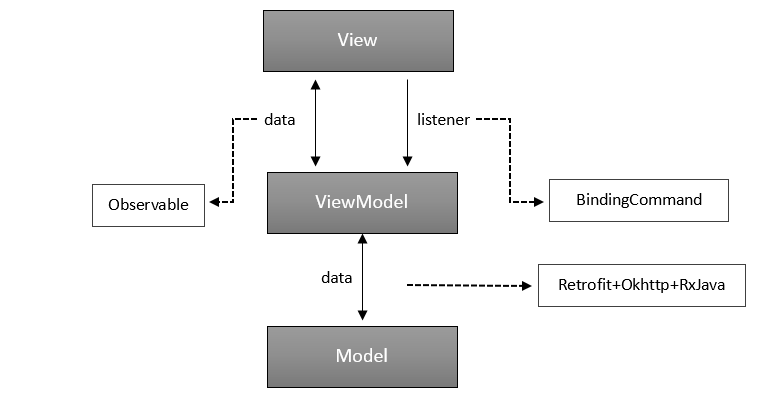
👕基于谷歌最新AAC架构,MVVM设计模式的一套快速开发库,整合Okhttp+RxJava+Retrofit+Glide等主流模块,满足日常开发需求。使用该框架可以快速开发一个高质量、易维护的Android应用。
- 7.7k
- Java
- Apache-2.0
- 4 y ago
ChapterForge is a library and CLI to mux Apple compatible chapters (text and optional images) into M4A.
Repo tillt/ChapterForge, read from GitHub 4 h ago. tillt has not joined Take My Repo.
tillt/ChapterForge is a public repo on GitHub by tillt. ChapterForge is a library and CLI to mux Apple compatible chapters (text and optional images) into M4A. It declares the MIT license on GitHub. It is written mainly in C++, has 3 stars and last changed on 2026-08-14. Nobody has reviewed it on Take My Repo yet, which says nothing about its quality. Read from GitHub on 2026-11-25.
👕基于谷歌最新AAC架构,MVVM设计模式的一套快速开发库,整合Okhttp+RxJava+Retrofit+Glide等主流模块,满足日常开发需求。使用该框架可以快速开发一个高质量、易维护的Android应用。
Manage, generate convert chapters for podcasts and other media via cli and web
ChapterForge is a library and CLI to mux chapters (text and optional images) into MP4 files while preserving metadata and handling Apple-compatible chapter tracks.
MPEG4 and its container MP4 standard do not explicitly describe chapter marks. Apple however did, implicitly.
Back in the days, under the umbrella of the QuickTime.framework, Apple had released authoring tools for audiobooks. With those tools you could add jump-marks to an M4A file. Those jump-marks could have a description text, an image and possibly more. That way a user could conveniently jump to specific sections of the audio -- useful for example as a mark for chapters. There are many players that understand those, but not all do. Specifically Apple who has pushed for this "extension" of the standard, has traditionally been understanding it in their players. That is true for Music.app, iTunes.app, QuickTime.app and even Books.app. All of them today support chapter marks. Windows has existing support there as well. That said it becomes clear, this is not standard but at least a functional solution for the challenge of encoding such thing into the audio file.
Apple did support authoring tools - but that was way back in PowerPC times. The QTKit is long gone. There appears to be not a single open source tool in the market that would support a recent OS. There are tools like ffmpeg - it does even support chapter marks for MP4 - but - no images for those. The only tool in the market supporting images in chapter marks in 2025 appears to be Auphonic - commercial.
All the existing libraries offered to application developers, even the big players like Bento4 do not support chapter marks with images. AVFoundation, the framework Apple offers these days for media playback and authoring does fully support reading of MP4 chapter marks including images. Thus creating a player supporting that feature is trivial. The kicker here is, Apple does not support any way of authoring / writing / creating such files - none at all.
No one had a strong enough interest to change this, until today.
My tinker project needs support for storing a track-list / set-list in the file itself. That way I can attribute those beautiful DJ sets and have neat track-mark thumbnails and descriptions on the player, persisted in the M4A file. A few thousand lines of code later, we have a new library based on no other works available which does the job for me - maybe also for you.
ChapterForge uses the audio track from the input. It then combines that with a text track for the description, an optional text track for per-chapter URLs, and a video track for optional chapter images. All of that information gets bundled in the resulting output M4A file. With that M4A file you can now see chapter marks in your player.
Supported players (just a selection of known goods):
| text | image | url | url-text | |
|---|---|---|---|---|
| QuickTime.app | X | X | o | o |
| Music.app | X | X | o | o |
| Books.app | X | X | o | o |
| VLC | X | o | o | o |
(X = full support and display, o = not displayed, all other functions remain)
Text commonly is displayed as the chapter title. Image commonly is displayed as a thumbnail. In QuickTime we additionally get a "movie" presented - a very nice experience. URL commonly is displayed nowhere. URL text commonly is displayed nowhere.
Note that AVFoundation supports all of those attributes for parsing and extraction - on macOS and iOS it is therefor trivial to support them.
We ship two reference files you can open in your favorite player to sanity-check chapter handling:
testdata/chapters_10s_2ch_normalimg_meta.jsonimages/cover_normal.jpgimages/normal*.jpgWhat to expect:
extraAttributes[HREF]), but players generally do not display them.Bonus: ChapterForge Bonus Track M4A File — 50 chapters, small images, and per-chapter URLs to stress-test players.
QuickTime.app on macOS playing our example file:

Music.app on macOS playing our example file:

Do you have more players showing our example file? Would be great to see them.
brew tap tillt/chapterforge https://github.com/tillt/ChapterForge.git
brew install --HEAD tillt/chapterforge/chapterforge
This builds the CLI and static library (and the universal macOS framework when enabled). Head-only for now; tags will become bottled when we ship stable releases.
chapterforge_cli.exe, chapterforge.lib, and include/.cmake -S . -B build -DCMAKE_BUILD_TYPE=Release
cmake --build build --config Release
build/Release/.chapterforge-<ver>-ubuntu-latest.tar.gz) and use chapterforge_cli + libchapterforge.a under include/.cmake -S . -B build -DCMAKE_BUILD_TYPE=Release
cmake --build build
ctest (mp4info/mp4dump from Bento4, AtomicParsley, xxd, gpac/mp4box optional).Add this repo as an overlay (or copy ports/chapterforge into your overlays), then:
vcpkg install chapterforge
The overlay tracks the current commit. Update REF/SHA512 in ports/chapterforge/portfile.cmake when you bump versions.
./chapterforge_cli <input.m4a|.mp4|.aac> <chapters.json> <output.m4a>
./chapterforge_cli <input.m4a> [--export-jpegs DIR]                     # read/extract
./chapterforge_cli --version
ilst),
it is reused by default. Fast-start is ON by default (moov before mdat); use --no-faststart if you
need the legacy layout.--export-jpegs DIR to dump coverchapterforge::set_log_verbosity(LogVerbosity::Warn|Info|Debug) or pass --log-level warn|info|debug
to the CLI. Debug-only logs stay hidden unless you raise the level.--faststart (write) Explicitly enable fast-start (default).--no-faststart (write) Disable fast-start; keep mdat before moov.--log-level LEVEL One of warn|info|debug.--export-jpegs DIR (read) Export cover/chapter JPEGs to DIR and reference them in the JSON.ChapterForge consumes a simple JSON document:
{
  "title": "Sample Podcast Episode",     // optional top-level metadata
  "artist": "John Doe",
  "album": "My Podcast",
  "genre": "Podcast",
  "year": "2024",
  "comment": "Created with ChapterForge",
  "cover": "cover.jpg",                  // optional; path is relative to the JSON file

  "chapters": [
    {
      "title": "Introduction",           // required
      "start_ms": 0,                     // required: chapter start time in milliseconds (first snaps to 0)
      "image": "chapter1.jpg",           // optional; path relative to the JSON file
      "url": "https://example.com",      // optional; creates a URL text track with HREF
      "url_text": "Intro link label"     // optional; text payload for the URL track (defaults empty)
    },
    {
      "title": "Main Discussion",
      "start_ms": 10000,
      "image": "chapter2.jpg",
      "url": ""
    }
  ]
}
Notes:
start_ms). Apple family players (QuickTime,
Music.app, AVFoundation) and VLC snap the first chapter to 0 even if you author a non-zero
start_ms. We warn on non-zero first starts; if you truly need a gap, add an explicit
leading “blank” chapter covering 0–gap_ms.image to create a text-only chapter.url_text is optional and defaults to empty (Apple-authored behavior). If set,
it travels in the URL tx3g samples; some players may surface it as visible text.url to skip the URL track entirely.ilst), that metadata is preserved automatically.cover and per-chapter image are resolved relative to the JSON file location.ChapterForge preserves the source audio track and metadata (ilst) and adds up to three new tracks for chapters:
Input (AAC in M4A/MP4)
├─ ftyp
├─ free (optional)
├─ moov
│  ├─ mvhd
│  ├─ trak (audio)
│  │  ├─ tkhd
│  │  └─ mdia → minf → stbl (reused, including stsd/stts/stsc/stsz/stco)
│  └─ udta/meta/ilst (reused if present)
└─ mdat

Output (ChapterForge)
├─ ftyp
├─ free (optional or moved for faststart)
├─ moov
│  ├─ mvhd
│  ├─ trak (audio, reused stbl when input is MP4/M4A)
│  ├─ trak (chapter titles, tx3g)
│  │  └─ stbl with stsd(tx3g) + stts/stsc/stsz/stco
│  ├─ trak (chapter URLs, tx3g with href) [only if any chapter has `url` or `url_text`]
│  │  └─ same structure as titles; text may be empty, href carries the URL
│  ├─ trak (chapter images, jpeg)
│  │  └─ stbl with stsd(jpeg) + stts/stsc/stsz/stco/stss
│  └─ udta/meta/ilst (reused if present, otherwise from JSON)
└─ mdat (audio + chapter samples)
Fast-start repacks moov ahead of mdat when requested.
These settings mirror Apple-authored “golden” files so that QuickTime, Music.app, and AVFoundation surface titles, URLs, and thumbnails reliably.
tref/chap): audio track points only to the title text track and the image track (when present); the URL track is deliberately not referenced. This matches Apple-authored files and keeps QuickTime showing titles while Music.app shows thumbnails.extraAttributes[HREF].tillt/ChapterForge is a public repo on GitHub by tillt. ChapterForge is a library and CLI to mux Apple compatible chapters (text and optional images) into M4A.
It declares the MIT license on GitHub.
Its maker tagged it for macOS, Windows and Linux, or as Docker or cross-platform. That is declared by the maker; Take My Repo has not tested it.
Open "Take it" on its page: Take My Repo writes an install plan for your machine and hands it to your AI agent (Claude Code, Codex or Cursor), which asks you before each step. Take My Repo has not tested it on any machine.
🤗 Transformers: the model-definition framework for state-of-the-art machine learning models in text, vision, audio, and multimodal models, for both inference and training.
Generate audiobooks from e-books, 50+ TTS engines with voice cloning and 1696 languages!
VoiceStudio is the open-source, fully-local ElevenLabs alternative — voice cloning, voice design, video dubbing, dictation, transcription & audiobook creation in 646 languages.
利用 AI 大模型和自动化工作流,根据主题或关键词一键生成高清短视频。Generate HD short videos from a topic or keyword with an automated AI workflow.
Its last change on GitHub was on 2026-08-14. GitHub counts 0 open issues and pull requests. Take My Repo does not judge from that whether it is maintained.
Nobody has reviewed it on Take My Repo yet, which says nothing about its quality.
Take My Repo cannot say: it does not audit code and has not run ChapterForge. What is known comes from GitHub. It declares the MIT license on GitHub. Its last change was on 2026-08-14. It has 3 stars, which measure popularity, not safety. Nobody has reviewed it on Take My Repo yet, which says nothing about its quality. Read the source before you run it. With "Take it", your AI agent shows each step and asks you before running it; README text is treated as data, not as instructions.