
ScreenSavy.com
Transform any display into a dynamic ambient screen — clocks, gradients, weather, news, screensavers. Web + portable.
- 7
- MIT
- 1 d ago
Repo timoncool/ScreenSavy.com, read from GitHub 1 d ago. timoncool has not joined Take My Repo.
In short
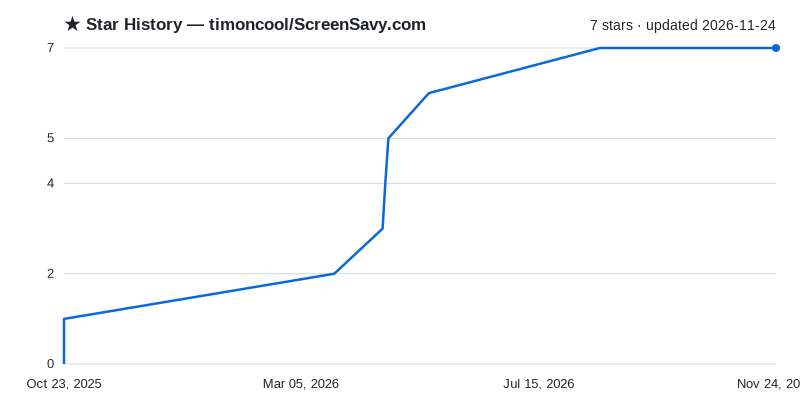
timoncool/ScreenSavy.com is a public repo on GitHub by timoncool. Transform any display into a dynamic ambient screen — clocks, gradients, weather, news, screensavers. Web + portable. It declares the MIT license on GitHub. It is written mainly in TypeScript, has 7 stars and last changed on 2026-11-23. Nobody has reviewed it on Take My Repo yet, which says nothing about its quality. Read from GitHub on 2026-11-23.
Similar repos
prompts.chat
f.k.a. Awesome ChatGPT Prompts. Share, discover, and collect prompts from the community. Free and open source — self-host for your organization with complete privacy.

ScreenSavy.com
Transform any display into a dynamic ambient screen — clocks, gradients, weather, visualizers.
🎨 What is ScreenSavy.com?
ScreenSavy.com is a modern web application that transforms any display into a dynamic ambient screen. Whether you're setting the mood for a movie night, calibrating monitor colors, creating backgrounds for photography, or simply want a beautiful clock display, ScreenSavy.com provides an elegant, browser-based solution that works on any device.
Live Demo: https://www.screensavy.com/
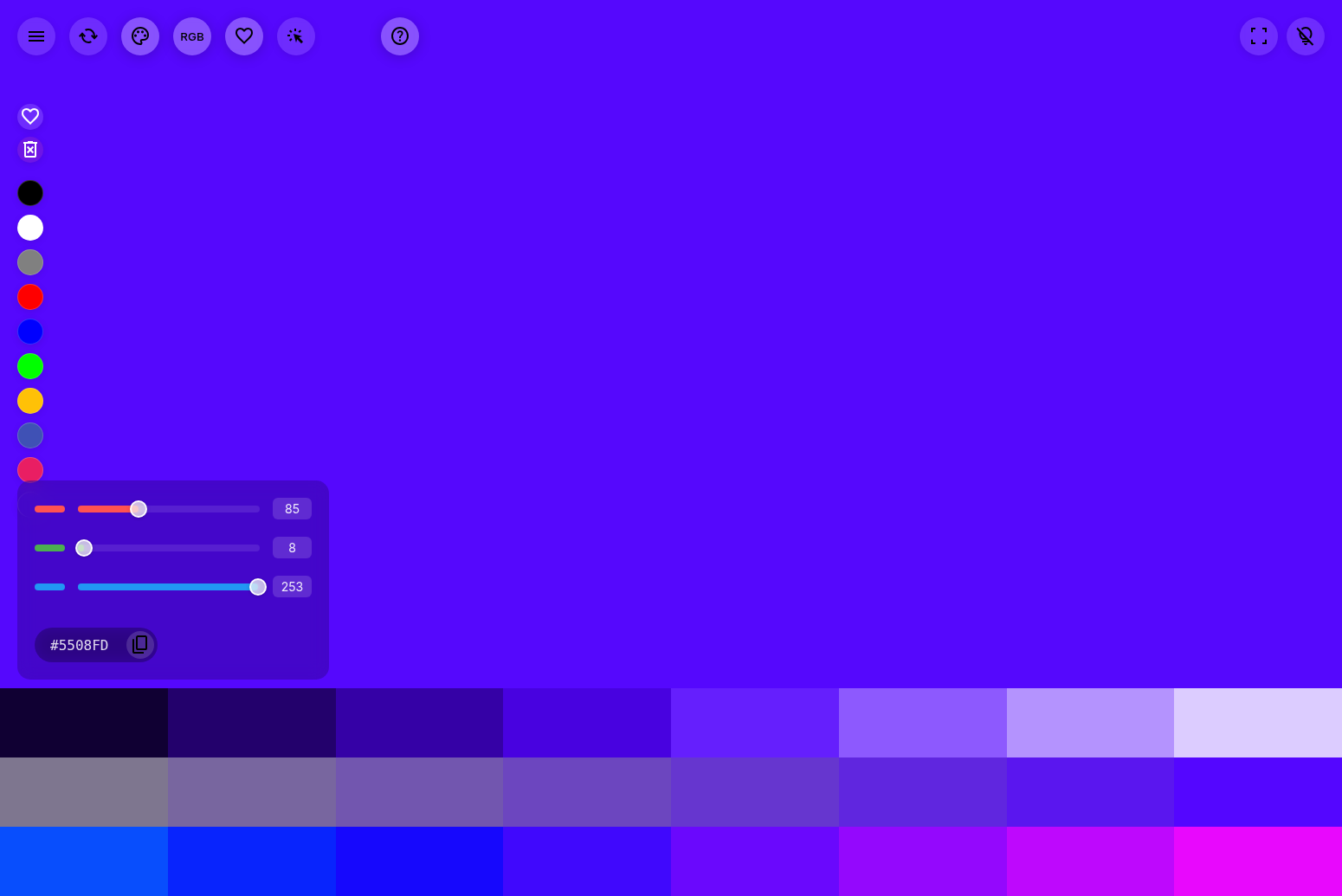
✨ Features
🎨 Color Modes
One Color Mode
- Display any solid color across your entire screen
- Perfect for monitor calibration, ambient lighting, or color therapy
- RGB sliders with real-time preview
- HEX color input with copy functionality
- Shade variations for quick color exploration
Color Transition Mode
- Create smooth animated transitions between your favorite colors
- Adjustable transition speed (1-10 scale)
- Build custom color palettes
- Perfect for ambient lighting and mood setting
🕐 Clock Modes
Three beautiful clock styles to choose from:
- Modern: Clean, minimalist time display
- Full: Time with date and day of week
- Minimal: Ultra-simple time-only display
All clocks feature:
- Automatic locale detection
- 12/24 hour format support
- Smooth animations
- Customizable colors
📝 Text Mode
Create stunning typography displays for:
- Event signage
- Digital posters
- Lyric displays
- Workshop prompts
- Creative presentations
Features:
- 28 font options
- 3 size presets (small, medium, large)
- Text alignment controls
- Color customization
- Text stroke/outline effects
- Style presets (Neon, Classic, Minimal, Bold, Elegant)
🌌 Visualizers
Audio-Reactive Visualizers (require microphone or system audio):
- Celestial Weaver: Cosmic particle effects that respond to sound
- Super Nova: Explosive visual patterns synchronized with audio
- Voyager: Space-themed audio visualization
Ambient Visualizers (no audio required):
- Lava Lamp: Classic lava lamp simulation
- RGB Lava: Colorful lava lamp with dynamic hues
Want to add your own visualizers? Check out the Custom Visualizers Guide to learn how to create and integrate your own visualizations.
💾 Favorites & Palettes
- Save unlimited favorite colors
- Quick access to saved palettes
- Export/import color collections
- Shade generator for color exploration
- Adjacent color suggestions
🌍 Multilingual Support
- English and Russian interfaces
- Automatic browser language detection
- Manual language toggle
- Localized date/time formatting
🚀 Quick Start
Online Version
Simply visit https://www.screensavy.com/ in any modern browser. No installation required!
Portable Windows Version
Download the portable version from the Releases page for offline use:
- Download
ScreenSavy-Portable-Windows.zip - Extract to any folder
- Double-click
start.bat - Your browser opens automatically at
http://127.0.0.1:3000
Requirements:
- Windows 7 or later
- 500 MB free disk space
- No internet connection required after extraction
💻 Development
Prerequisites
- Node.js 18.17 or newer
- npm 9 or newer
Installation
# Clone the repository
git clone https://github.com/timoncool/ScreenSavy.com.git
cd ScreenSavy.com

# Install dependencies
npm install
Development Server
npm run dev
Open http://localhost:3000 in your browser.
Production Build
npm run build
npm start
Linting
npm run lint
📁 Project Structure
ScreenSavy.com/
├── app/                          # Next.js App Router
│   ├── layout.tsx               # Root layout with metadata
│   ├── page.tsx                 # Main page (color modes)
│   └── modes/
│       ├── text/page.tsx        # Text mode
│       └── visualizers/         # Visualizer routes
│           ├── celestial/
│           ├── supernova/
│           ├── voyager/
│           ├── lava-lamp/
│           └── rgb-lava/
├── src/
│   ├── components/screensavy/
│   │   ├── MainExperience.tsx      # Main app component
│   │   ├── TextModeExperience.tsx  # Text mode component
│   │   ├── VisualizersCatalog.tsx  # Visualizer browser
│   │   ├── VisualizerDetail.tsx    # Visualizer display
│   │   ├── shared.tsx              # Shared UI components
│   │   ├── translations.ts         # i18n strings
│   │   └── textTranslations.ts     # Text mode i18n
│   └── lib/
│       ├── color.ts              # Color utilities
│       └── visualizers.ts        # Visualizer metadata
├── public/
│   └── visualizers/             # Visualizer HTML files
│       ├── CELESTIAL.html
│       ├── SUPER_NOVA.html
│       ├── Final_RGB_lava.html
│       └── optimized-lava-lamp.html
└── docs/
    ├── screenshots/             # Documentation images
    └── CUSTOM_VISUALIZERS.md    # Guide for adding visualizers
🎯 Use Cases
ScreenSavy.com is perfect for:
- Home Theater: Set ambient lighting for movie nights
- Photography: Create colored backgrounds for photo/video shoots
- Design Work: Monitor calibration and color palette testing
- Events: Digital signage and informational displays
- Workspaces: Ambient lighting and focus timers
- Hospitality: Mood lighting for restaurants, hotels, studios
- Education: Visual aids for classrooms and presentations
🛠️ Technology Stack
- Framework: Next.js 14 with React 18
- Styling: Tailwind CSS + custom CSS
- Language: TypeScript
- State Management: React hooks + localStorage
- Rendering: Client-side with static generation
- Internationalization: Built-in Russian/English support
🤝 Contributing
We welcome contributions! Here's how you can help:
Ways to Contribute
- New Visualizers: Create audio or ambient visualizations (guide)
- UI/UX: Enhance existing modes or add new features
- Translations: Add support for new languages
- Performance: Optimize rendering and animations
- Documentation: Improve guides and tutorials
- Bug Fixes: Help identify and resolve issues
Contribution Guidelines
- Fork the repository
- Create a feature branch from
main - Make your changes
- Run
npm run lintto ensure code quality - Test across different browsers and screen sizes
- Submit a pull request with clear description
- Include screenshots for UI changes
Code Style
- Follow existing code patterns
- Use meaningful variable names
- Add comments for complex logic
- Ensure all modes work after changes
- Test on multiple screen sizes
🗺️ Roadmap
Planned Features
- Gradient Modes: Multi-color gradients with customizable directions
- Particle Systems: Interactive particle effects
- Scheduling: Automated scene changes and timers
- Remote Control: Control from mobile devices
- Advanced Typography: Lyric video presets and animations
- Accessibility: Enhanced keyboard navigation and ARIA support
- Custom Visualizers: Upload your own HTML/JS visualizations
- Export: Save screenshots and video recordings
- Themes: Pre-built color schemes and style packs
📦 Portable Release
The portable Windows version includes:
- Portable Node.js v20.11.0
- Pre-built production bundle
- All dependencies (node_modules)
- Automatic setup scripts
Scripts:
start.bat: Launch the applicationupdate.bat: Update to latest version
The portable version works completely offline after extraction and requires no installation.
Support the Author
I build open-source software and do AI research. Most of what I create is free and available to everyone. Your donations help me keep creating without worrying about where the next meal comes from =)
All donation methods | dalink.to/nerual_dreming | boosty.to/neuro_art
- BTC:
1E7dHL22RpyhJGVpcvKdbyZgksSYkYeEBC - ETH (ERC20):
0xb5db65adf478983186d4897ba92fe2c25c594a0c - USDT (TRC20):
TQST9Lp2TjK6FiVkn4fwfGUee7NmkxEE7C
Other Projects by @timoncool
| Project | Description |
|---|---|
| ACE-Step Studio | AI music studio — songs, vocals, covers, videos |
| VideoSOS | AI video production in the browser |
| GitLife | Your life in weeks — interactive calendar |
| Bulka | Live-coding music platform |
| telegram-api-mcp | Full Telegram Bot API as MCP server |
Star History
License
MIT — LICENSE
Questions
What is ScreenSavy.com?
timoncool/ScreenSavy.com is a public repo on GitHub by timoncool. Transform any display into a dynamic ambient screen — clocks, gradients, weather, news, screensavers. Web + portable.
Is ScreenSavy.com open source?
It declares the MIT license on GitHub.
Does ScreenSavy.com run on macOS, Windows or Linux?
Its maker has not tagged a system, so it is unknown here. Its README says what it needs.
How do I install ScreenSavy.com?
Open "Take it" on its page: Take My Repo writes an install plan for your machine and hands it to your AI agent (Claude Code, Codex or Cursor), which asks you before each step. Take My Repo has not tested it on any machine.


