
disktree
A treemap for finding and removing what fills your disk, for Omarchy. Rust + GPUI.
- 4.3k
- MIT
- 4 wk ago
Repo tobi/disktree, read from GitHub 7 h ago. tobi has not joined Take My Repo.
In short
tobi/disktree is a public repo on GitHub by tobi. A treemap for finding and removing what fills your disk, for Omarchy. Rust + GPUI. It declares the MIT license on GitHub. It is written mainly in Rust, has 4,266 stars and last changed on 2026-10-23. Nobody has reviewed it on Take My Repo yet, which says nothing about its quality. Read from GitHub on 2026-11-23.
disktree
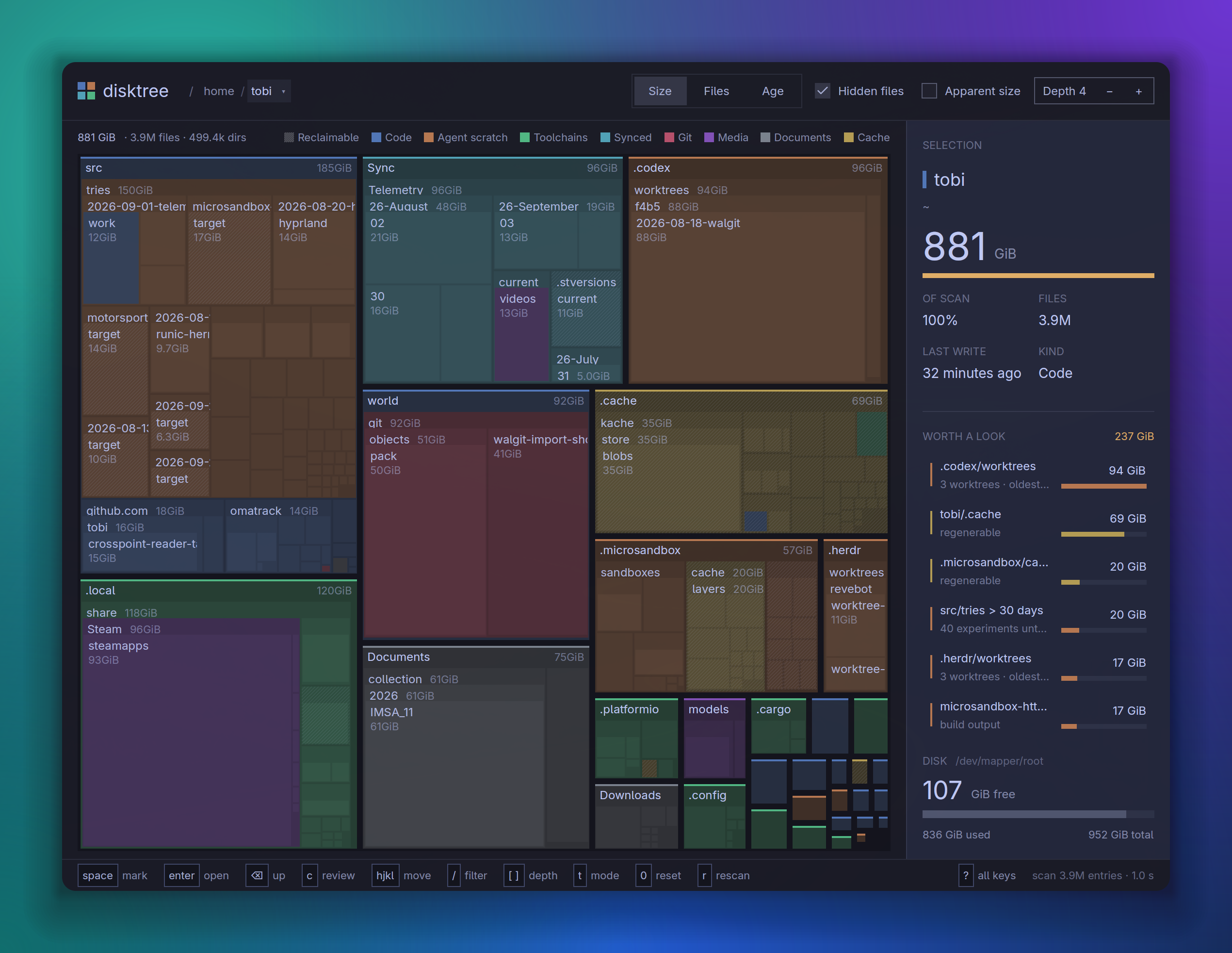
Find what is filling a disk, mark what should go, and remove it — with the volume's free space in view the whole time.
disktree is a treemap for Omarchy. Choose a local or SSH source, then a mounted volume or directory; no scan starts until you explicitly accept. It draws every directory as a nested mosaic sized by its real disk cost, and lets you walk into it with the keyboard or the mouse. Mark as much as you like; nothing happens until you review the list and commit, and the permanent path always asks first.
Built with GPUI through gpui-omarchy, so it follows your Omarchy theme and behaves like the rest of the desktop.
Install
Download disktree-*-x86_64-linux.tar.gz (aarch64-linux on ARM) from the
latest release, unpack
it, and run ./install.sh inside (or just copy disktree onto your
PATH). Or build it:
git clone https://github.com/tobi/disktree
cd disktree
make install
make install builds a release binary and puts three things under ~/.local
(no root needed):
~/.local/bin/disktree- a desktop entry, so disktree is in the launcher and in a file manager's Open with for a directory (it adds a handler; it never becomes the default)
- an icon
sudo make install PREFIX=/usr/local installs system-wide; make uninstall
removes exactly what was installed.
On Arch, including Omarchy, disktree is in the AUR:
disktree builds each release
from source, and
disktree-bin installs
the release binary:
yay -S disktree-bin
If another installed version wins on PATH, the installer warns which one.
Run export PATH="$HOME/.local/bin:$PATH" and add that setting to your shell
configuration so the locally installed build takes precedence.
For Linux builds with embedded SSH helpers, also install the two Rust standard-library targets (no external C cross-compiler is needed):
rustup target add x86_64-unknown-linux-musl aarch64-unknown-linux-musl
You need Rust 1.97 or newer and a Wayland or X11 session with a GPU that GPUI
can drive (Vulkan). Distributions often package an older Rust;
rustup installs a current one. The repo pins 1.97 in
rust-toolchain.toml, so with rustup the right toolchain is fetched on the
first build even if rustup default points at something older.
macOS
Download disktree-*-aarch64-macos.zip (x86_64-macos for an Intel Mac)
from the latest release,
unzip it, and drag disktree.app into Applications. macOS 11 or newer.
A release that was not signed and notarized is stopped by Gatekeeper: macOS says it "is damaged and can't be opened" or "cannot be verified". The app is fine; the browser marked the download as quarantined. Clear the mark once:
xattr -dr com.apple.quarantine /Applications/disktree.app
(Or open it once, then choose Open Anyway in System Settings › Privacy & Security.)
Or build it, with Rust 1.97 or newer and Xcode or its Command Line Tools. macOS does not come with Rust; install it with rustup.
make install     # ~/Applications/disktree.app, and ~/.local/bin/disktree
make uninstall
To see everything, give disktree Full Disk Access in System Settings › Privacy & Security (the panel offers a button when it is missing), then reopen it. Without it macOS hides Mail, Messages, Safari, other apps' data and the Trash, and disktree counts them as unreadable. Started from a terminal, it is the terminal that needs the access. macOS also asks once each for Desktop, Documents and Downloads.
What is different from Linux:
- Free space is what
dfreports. Finder's figure is larger: it counts purgeable space (caches and local snapshots macOS will clear on its own). - Cloned files (copies APFS shares blocks between, as Finder's Duplicate makes) are each counted in full, so a total can exceed what deleting them frees.
- Time Machine's local snapshots are not files and do not appear; they are part of the gap between the scan and the disk's used space.
- Cloud-only folders (iCloud Drive, Dropbox and the like, evicted to the server) are not opened, so a scan never downloads them.
To sign and notarize a build for others, with a Developer ID certificate in
the keychain and credentials saved by xcrun notarytool store-credentials:
NOTARY_PROFILE=<profile> cargo xtask bundle \
  --sign "Developer ID Application: Name (TEAMID)" --notarize
Windows
On Windows 10 or 11, download disktree-*-x86_64-windows.zip
(aarch64-windows on ARM) from the same release, unpack it anywhere and run
disktree.exe. Or build it with Rust 1.97 or newer, from
rustup, and the MSVC toolchain (Visual Studio Build
Tools, C++ workload):
git clone https://github.com/tobi/disktree
cd disktree
cargo build --release    # target\release\disktree.exe
See On Windows for what differs there.
Use
disktree            # choose a local/SSH source and root
disktree ~          # explicitly scan home
disktree --disk     # the whole disk it lives on
disktree ~/src      # or any directory
disktree --help     # options: apparent size, follow links, skip hidden, …
Servers over SSH (read-only)
disktree ssh dev                 # connect and choose a remote root
disktree ssh user@server /var    # an explicit remote path
disktree ssh dev --disk          # the disk containing the remote home
disktree ssh dev -a /srv         # apparent size instead of allocated blocks
Linux builds made with make build / cargo xtask portable include static
x86-64 and ARM64 Linux scanners appended to the executable. SSH detects
the server's OS/CPU and uploads the matching scanner only when its checked
cache is missing or damaged. The cache is private and content-addressed under
~/.cache/disktree/ssh/<sha256>/ (or the server's XDG_CACHE_HOME).
Uploads are checksum-verified and atomically installed; there is no sudo,
system-package change or dependency on the server's glibc version.
This uses stable Rust's musl targets rather than Cosmopolitan: the existing Rust/rayon/rustix scanner has no supported stable Cosmopolitan target. These are Linux binaries, not a single executable for every OS; ARM64 is built and ELF-validated, while x86-64 was also executed against a real server.
You can extract a helper without opening a window, or test the entire SSH/deployment/scan path headlessly:
disktree extract-scanner x86_64 ./disktree-scan
disktree extract-scanner aarch64 ./disktree-scan-arm64
disktree ssh dev --check /var/log
The appended manifest stores architecture, byte ranges and SHA-256 hashes.
Do not run strip after packaging: it discards the trailer. The Linux release
pipeline strips first, embeds last, and ships that single file. Appending to
signed macOS/Windows executables needs platform-specific signature handling;
those builds do not yet embed helpers.
For a development or non-Linux desktop build without the trailer, install the small disktree-scan helper on the server first:
# On the server, inside the checkout:
make install-scan               # ~/.local/bin/disktree-scan; no GUI deps
# Or:
cargo install --path crates/disktree-scan --locked
The helper can be on the server's non-interactive SSH PATH or at
~/.local/bin/disktree-scan (the default install location); disktree tries
both. A binary copied from another machine must match the server's OS,
architecture and runtime. The manually built native helper may need the
server's libc; the embedded Linux helpers are static. Disktree never runs
sudo or changes the server's configuration.
SSH keeps your normal authentication settings. When launched from a
terminal, it can ask for a password or key passphrase there; GUI launches
need key/agent access or a working SSH askpass helper. Connect once with
ssh dev to verify access and accept its host key.
The protocol also supports lightweight root discovery, separate from a scan: it reads the target's mount namespace without walking or probing the listed paths. Same-device mounts remain distinct choices; capacity is unknown until a root is explicitly selected. Discovery requests omit scan fields, so outdated helpers reject them instead of silently scanning their home.
The Linux/macOS helper streams a depth-first walk directly to stdout. It never constructs a tree or retains a directory's children: memory scales with open ancestors, not file count. Deep directories are not rejected at an arbitrary depth; filesystem errors are reported as unreadable. Hardlink identities are sent to the desktop, which uses the local scanner's compact identity index to count each inode once. The helper keeps no per-file identity table in negotiated desktop-de-duplication mode; links outside the chosen root cannot fill one. Older clients retain bounded helper-side accounting for wire compatibility. A resource limit fails explicitly instead of returning a partial tree. Symlinks are not followed, and every nested mount is skipped, even a bind mount or same-device subvolume. Select those as separate roots.
While indexing, a quiet sidebar shows live files, directories, measured bytes, read errors and elapsed time. Counters and paths use monospace type in fixed lanes; changing values do not re-center or reflow the screen. Narrow windows use a compact progress footer instead.
Ordinary local walks and current SSH helpers paint a live top-level overview before the full tree arrives. These are measured contributions, not complete directory sizes. Updates are limited to once a second, in arrival order, with at most 128 named buckets plus an overflow bucket. The preview is kept separate from the real tree: it cannot be navigated, marked or removed. On completion the full, actionable treemap replaces it; on error or cancellation the preview is discarded. The Windows file-table fast path still waits for its complete tree. Remote scans also show a sampled recent directory and connection / helper setup / indexing / treemap stages. Progress uses a single replaceable snapshot, not a growing event queue; path updates are throttled to five per second. There is no guessed percentage: the total is unknown until the walk finishes. Older helpers still provide counters from their streamed records, without path samples.
One compressed SSH connection carries a bounded JSON request on stdin and compact postorder records on stdout. The client keeps stdin open so the helper exits on disconnect, including while scanning or blocked on output. Linux helpers also enforce a 1 GiB address-space ceiling, disable core dumps, and stop after five minutes. File contents never cross the connection and paths are never interpolated into remote shell commands. Only the desktop retains the complete tree for offline navigation; its memory still scales with entry count. The native Windows helper currently retains the original tree-building scan path.
Remote mode is export-only. Mark with Space, open review with c, then:
- Copy as prompt (
a): includes the SSH host, remote OS, scan root, selected paths, sizes and cleanup precautions. It requires verifying the actual scanned hostname and machine ID before any destructive operation, and stopping if either check fails or cannot be performed. - Save list… (
s): remote paths, one per line, saved locally. - Copy delete script (
y), or Save delete script… (e): a GNU/Linux shell script, copied to the clipboard or saved locally. Running it without arguments only previews the selection. After reviewing it,sh disktree-delete.sh --deleteconnects to the named SSH host and runs the exported commands there, never against the local paths.
There are no trash/delete buttons or removal-mode choices in remote review.
Deletion shortcuts and removal entry points are disabled too. Git inspection,
local folder selection and file-manager reveal are disabled so remote names
cannot accidentally act on this computer. Free space is sampled when the
scan starts, not live; press r to refresh.
Before deleting, scripts compare the server's actual kernel hostname and machine ID against the identity captured in the scan—not the SSH alias. Missing identity or any mismatch aborts. The check runs on the SSH target, not the computer launching the wrapper. Pasting the script previews it by default and runs in a subshell, so its exit cannot close your terminal.
Exports are not an automatic cleanup recommendation. Scripts refuse system paths, the scan root, home or its ancestors, symlinked/changed canonical paths, and paths containing mount points. Control-character names are omitted. These checks do not eliminate filesystem races or tell you whether git work is backed up; review the script and prefer a tool's own cleanup command for tool-owned data. The remote helper itself has no delete operation.
The screen
- Top: the trail from
/, then what is measured — Size, Files or Age, Hidden files, Apparent size, and the depth drawn. In the tree a crumb goes there, and its ▾ lists its siblings, largest first with their share and size, to jump sideways (arrows and Enter work too). Above the scanned root a crumb is dimmer, and clicking it widens the scan to there (see below). - Under it: the scan totals, the filter when one is typed, and the legend.
- Mosaic: colour is the kind
Questions
What is disktree?
tobi/disktree is a public repo on GitHub by tobi. A treemap for finding and removing what fills your disk, for Omarchy. Rust + GPUI.
Is disktree open source?
It declares the MIT license on GitHub.
Does disktree run on macOS, Windows or Linux?
Its maker tagged it for macOS, Windows and Linux, or as Docker or cross-platform. That is declared by the maker; Take My Repo has not tested it.
How do I install disktree?
Open "Take it" on its page: Take My Repo writes an install plan for your machine and hands it to your AI agent (Claude Code, Codex or Cursor), which asks you before each step. Take My Repo has not tested it on any machine.