Adafruit_CircuitPython_Bundle
A bundle of useful CircuitPython libraries ready to use from the filesystem.
- 1k
- Shell
- MIT
- 1 d ago
tips, tricks, and examples of using CircuitPython synthio
Repo todbot/circuitpython-synthio-tricks, read from GitHub 16 min ago. todbot has not joined Take My Repo.
todbot/circuitpython-synthio-tricks is a public repo on GitHub by todbot. tips, tricks, and examples of using CircuitPython synthio. It declares the MIT license on GitHub. It has 99 stars and last changed on 2026-04-27. Nobody has reviewed it on Take My Repo yet, which says nothing about its quality. Read from GitHub on 2026-11-23.
A bundle of useful CircuitPython libraries ready to use from the filesystem.
This is a small list of tricks and techniques I use for my experiments
in making synthesizers with synthio, and similar to my "circuitpython-tricks" page.
Some of the synths/boards I've made that can use these techniques:
pico_touch_synth,
qtpy_synth,
pico_test_synth,
macropadsynthplug.
Also check out the "examples" directory for larger examples.
For a more lesson-based approach, with
videos for every lesson,
see the CircuitPython_Synthio_Tutorial.
synthio?AudioMixer system for use alongside audiocore.WaveFile sample playingsynthio differs from other synthesis systemsSignal flow in traditional sythesis systems is "wired up" once (either physically with circuits or virtually with software components) and then controlled with various inputs. For instance, one may create oscillator, filter, and amplifier objects, flowing audio from one to the other. You then twiddle these objects to, for example, adjust pitch and trigger filter and amplifier envelope generators.
In synthio, the signal chain is re-created each time a note is triggered.
The synthio.Note object is the holder of the oscillator (note.waveform),
the filter (note.filter), the amplitude envelope (note.envelope), among others.
In many cases, to change these features, you create new versions of them with different parameters, e.g.
note.filter = synth.low_pass_filter(1200,1.3) -- create a new LPF at 1200 Hz w/ 1.3 resonancenote.envelope = synthio.Envelope(release_time=0.8) -- create an envelope w/ 0.8 sec release timeThus, if you're getting started in the reference docs, the best place to start is synthio.Note.
synthio is notWhile synthio has extensive modulation capabilities, the signal flow is fixed. It is not a modular-style
synthesis engine. Conceptually it is VCO->VCF->VCA and that cannot be changed.
You cannot treat an oscillator as an LFO, nor can you use an LFO as an audio oscillator.
(however there is built-in ring modulation for multi-waveform mixing)
You cannot swap out the default 2-pole Biquad filter for a 4-pole Moog-style ladder filter emulation,
and you cannot stack filters.
But since each synthio.Note is its own entire signal chain, you can create interesting effects by creating
multiple Notes at the same frequency but with different waveform, filter, amplitude, and modulation settings.
If you're familiar with CircuitPython and synthesis, and want to dive in, there are larger synthio-tricks examples with wiring diagrams. In there you'll find:
synthio work on?There's a good chance synthio works on your CircuitPython board. Some boards I like:
audiopwmio and PWM circuitaudiopwmio and PWM circuitaudiobusio and PCM5102 I2S boardaudiobusio and PCM5102 I2S boardSince synthio is built in to CircuitPython and CirPy has varying support on different boards,
you will need to check your board's "Built-in modules avialble" section on
circuitpython.org/downloads.
Here's what that section looks like for the QTPy RP2040:
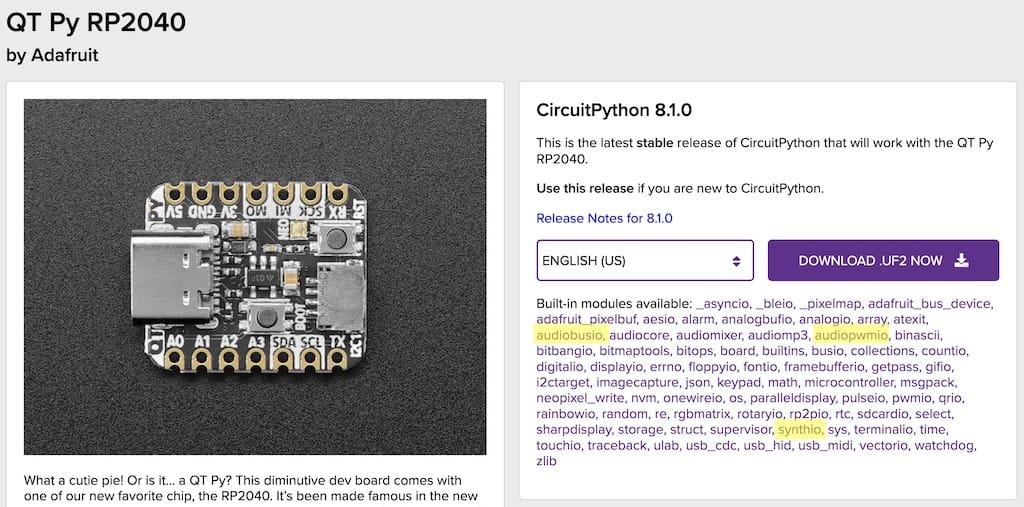
Note that synthio is there, and two audio output methods. CircuitPython supports three
different audio output techniques, with varying availability:
audioio.AudioOut
-- output to built-in DAC (usually SAMD51 "M4" boards)audiobusio.I2SOut
-- output to external I2S DAC board (RP2040, ESP32S2/3, SAMD51 "M4", nRF52)audiopwmio.PWMAudioOut
-- output PWM that needs external RC filter to convert to audio (RP2040, nRF52)Notice that not all audio output techniques are supported everywhere. An I2S DAC board is the most widely supported, and highest quality. Even so, this guide will focus mostly on PWMAudioOut on Pico RP2040 because it's quick and simple, but any of the above will work.
Because there are many audio output methods, there are many different circuits.
The simplest will be ready-made boards, like
These all have built in I2S DACs and use audiobusio.I2SOut.
audiopwmio.PWMAudioOutThe Pico and some other chips can output sound using PWM (~10-bit resolution) with an RC-filter. (R1=1k, C1=100nF, Sparkfun TRRS)
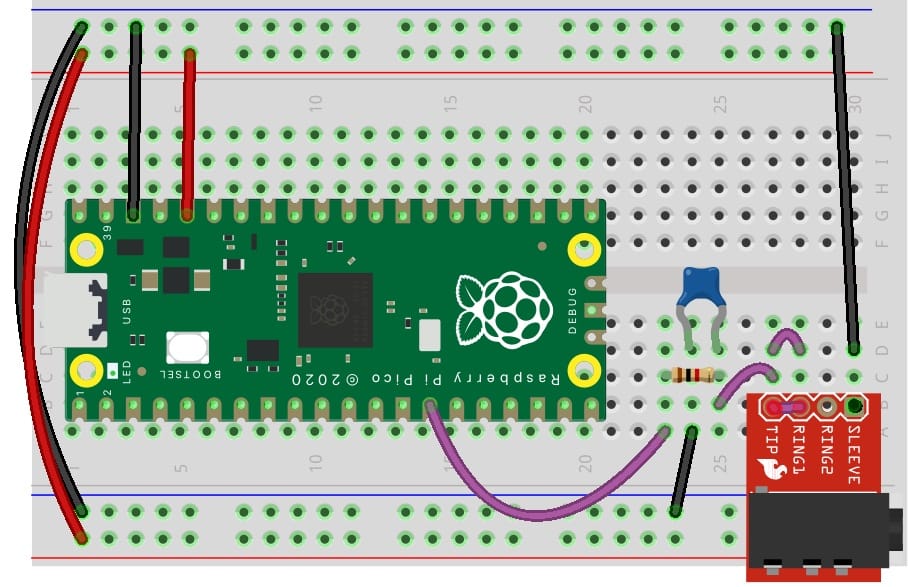
Note: this is a very minimal RC filter stage that doesn't do DC-blocking and proper line driving, but is strong enough to power many headphones. See here for a more complete RC filter circuit.
An example I2S DAC is the I2S PCM5102.
An I2S DAC board is capable of stereo CD-quality sound and they're very affordable. The line out is also strong enough to drive many headphones too, but I usually feed the output into a portable bluetooth speaker with line in.
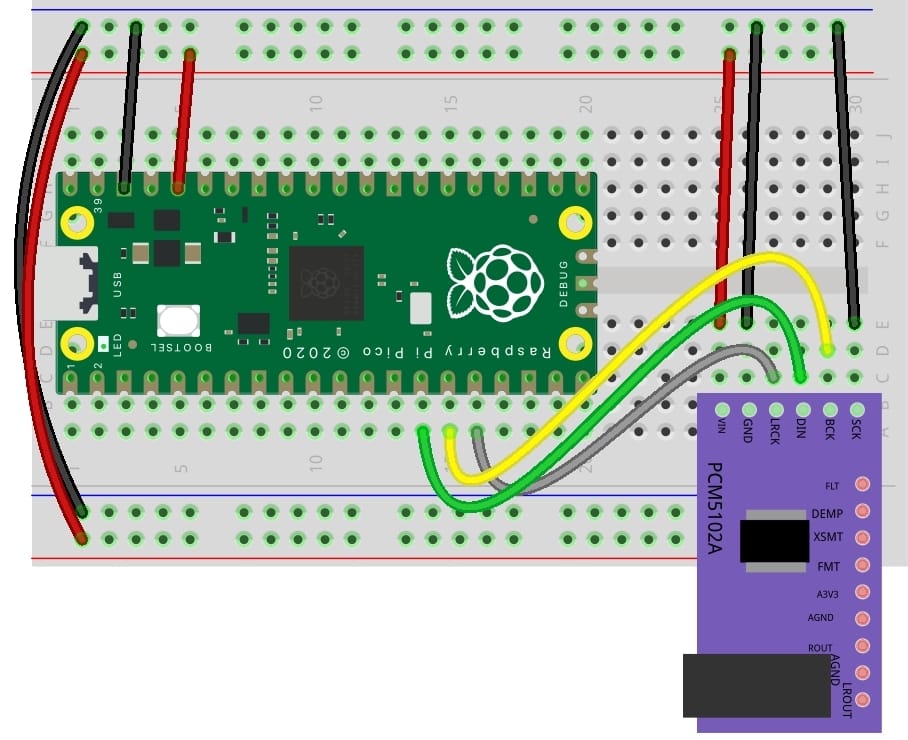
Note that in addition to the three I2S signals:
bit_clock,word_selectdatayou will need to wire:
in addition to wiring up Vin & Gnd. For more details, check out this post on PCM5102 modules.
Use one of the above circuits, we can now hear what synthio is doing.
todbot/circuitpython-synthio-tricks is a public repo on GitHub by todbot. tips, tricks, and examples of using CircuitPython synthio.
It declares the MIT license on GitHub.
Its maker has not tagged a system, so it is unknown here. Its README says what it needs.
Open "Take it" on its page: Take My Repo writes an install plan for your machine and hands it to your AI agent (Claude Code, Codex or Cursor), which asks you before each step. Take My Repo has not tested it on any machine.
Arduino library to play MOD, WAV, FLAC, MIDI, RTTTL, OGG/Opus, MP3, and AAC files on I2S DACs or with a software emulated delta-sigma DAC on the ESP8266 and ESP32 and Pico
The official firmware for Meshtastic, an open-source, off-grid mesh communication system.
A curated list of awesome CircuitPython guides, videos, libraries, frameworks, software and resources.
Its last change on GitHub was on 2026-04-27. Take My Repo does not judge from that whether it is maintained.
Nobody has reviewed it on Take My Repo yet, which says nothing about its quality.
Take My Repo cannot say: it does not audit code and has not run circuitpython-synthio-tricks. What is known comes from GitHub. It declares the MIT license on GitHub. Its last change was on 2026-04-27. It has 99 stars, which measure popularity, not safety. Nobody has reviewed it on Take My Repo yet, which says nothing about its quality. Read the source before you run it. With "Take it", your AI agent shows each step and asks you before running it; README text is treated as data, not as instructions.