React Native Training

The videos are here - Udemy
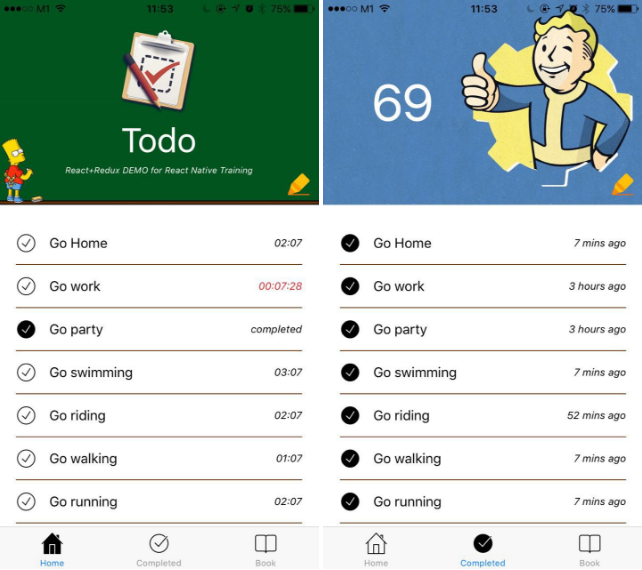
Please leave a message or twitter @unbug for further inquiries. Any help will be appreciated :)
Table of contents
1 First Look
Introducing React Native
What we really want is the user experience of the native mobile platforms, combined with the developer experience we have when building with React on the web.
With a bit of work, we can make it so the exact same React that's on GitHub can power truly native mobile applications. The only difference in the mobile environment is that instead of running React in the browser and rendering to divs and spans, we run it an embedded instance of JavaScriptCore inside our apps and render to higher-level platform-specific components.
It's worth noting that we're not chasing “write once, run anywhere.” Different platforms have different looks, feels, and capabilities, and as such, we should still be developing discrete apps for each platform, but the same set of engineers should be able to build applications for whatever platform they choose, without needing to learn a fundamentally different set of technologies for each. We call this approach “learn once, write anywhere.”
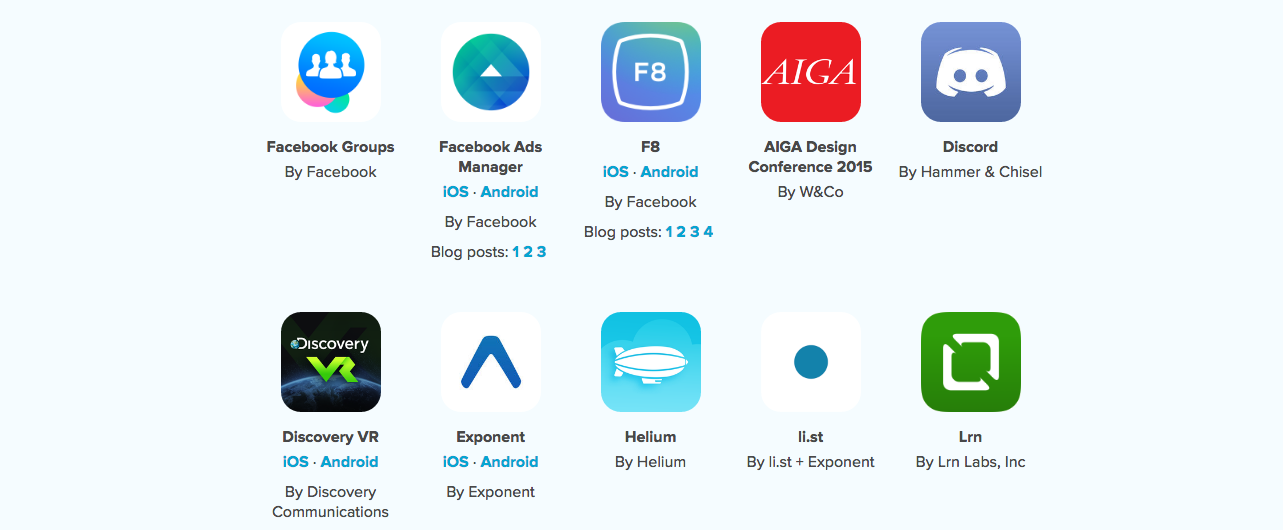
Showcase
1.1 Building an app in 5 minutes
-
Requirement follow Getting Started
-
Generate a new React Native project
-
Build & run project
or open testRn/ios/testRn.xcodeproj and build with XCode's play button
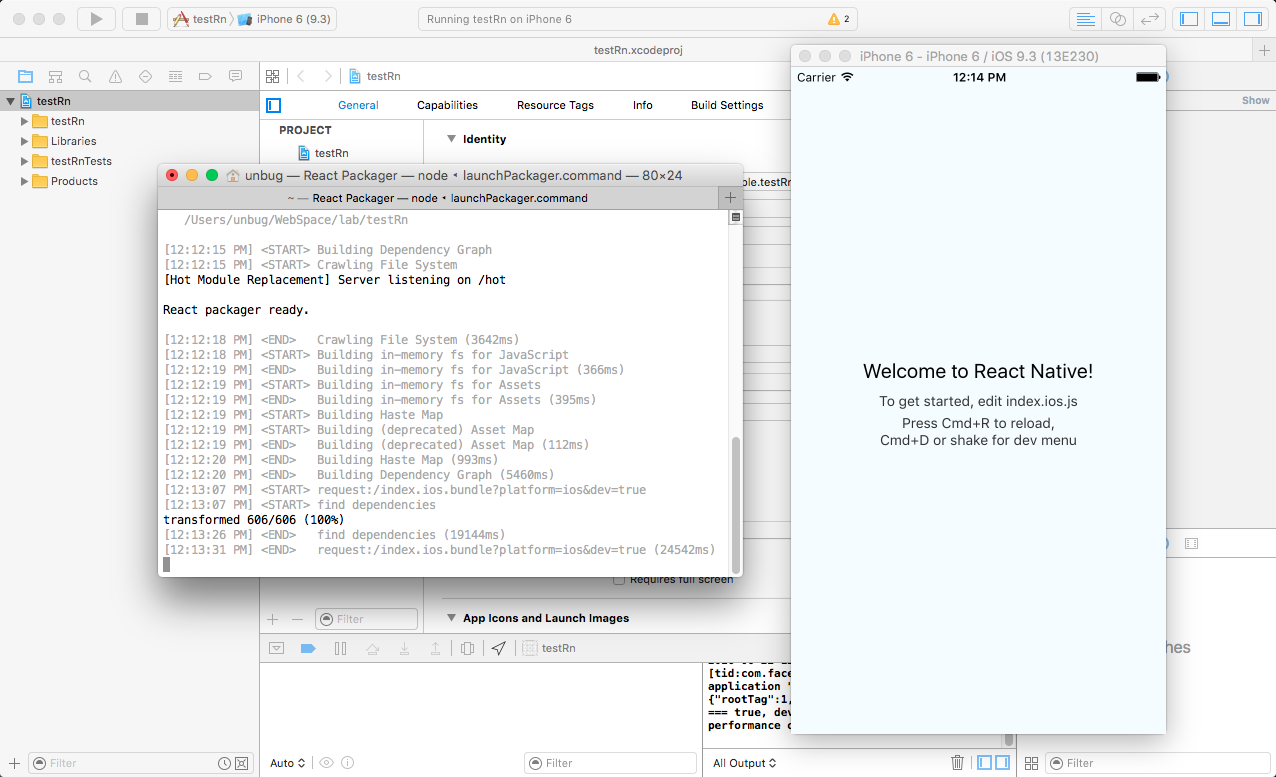
or if the app already builded, start the webserver
npm start
//or
react-native start
1.2 How it works
1.JavaScript bridge
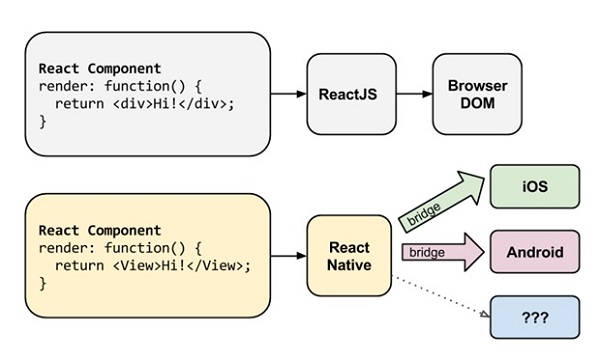
2.React Native Packager

1.3 Debug tools
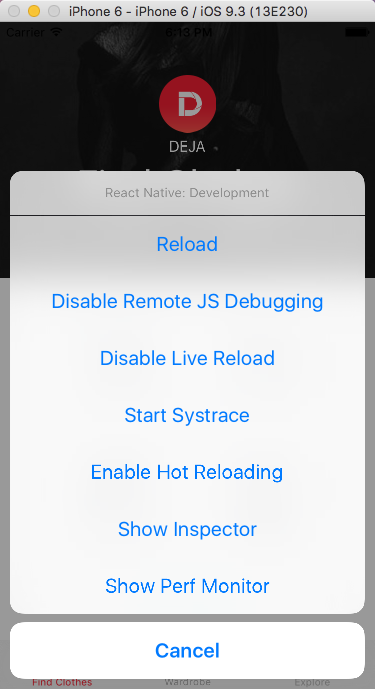
1.developer menu
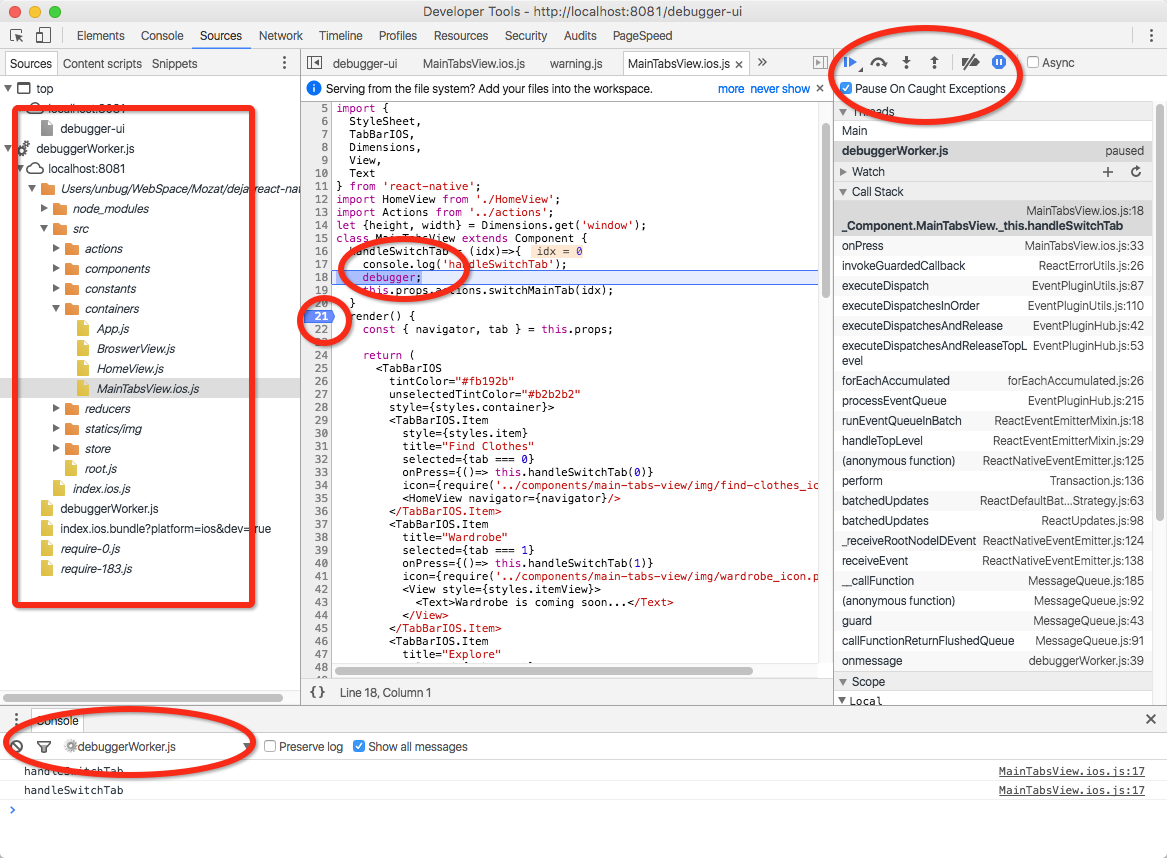
2.Chrome Devtools
3.log
console.log('some text');
console.dir({a:1, b:2, c:3});
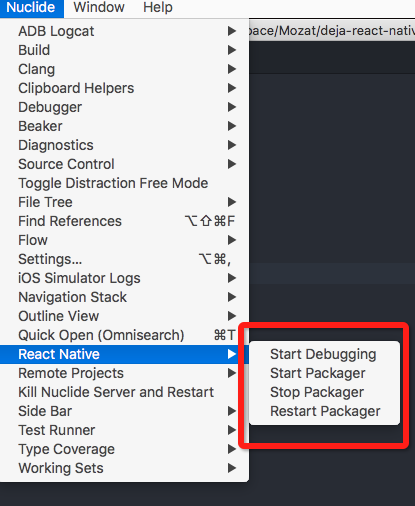
debugger;//breaking point4.Atom & nuclide
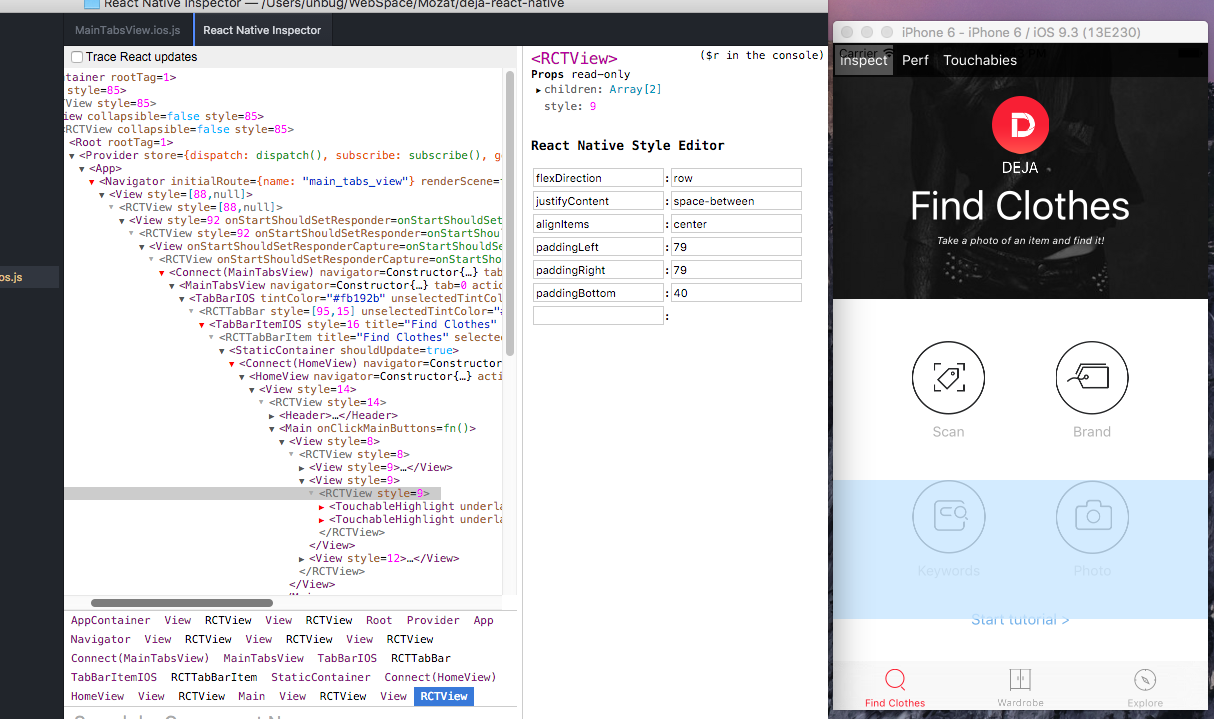
5.inspect
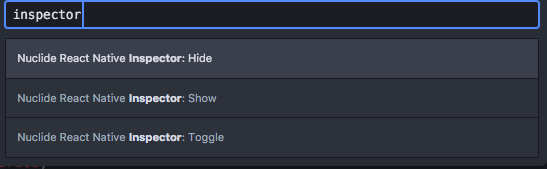
Open Atom Command Palette package with cmd-shift-p and search "inspector", then click "Nuclide React Native Inspector:Show"
6.Real device
6.1 Deploy to real device
project_name/ios/project_name/AppDelegate.m
  //jsCodeLocation = [NSURL URLWithString:@"http://localhost:8081/index.ios.bundle?platform=ios&dev=true"];

  /**
   * OPTION 2
   * Load from pre-bundled file on disk. The static bundle is automatically
   * generated by the "Bundle React Native code and images" build step when
   * running the project on an actual device or running the project on the
   * simulator in the "Release" build configuration.
   */

   jsCodeLocation = [[NSBundle mainBundle] URLForResource:@"main" withExtension:@"jsbundle"];
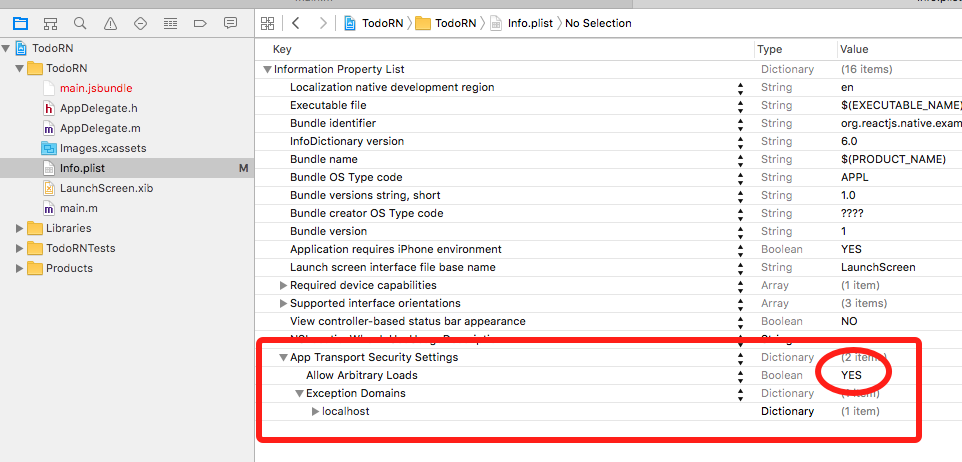
6.2 Debug in real device
1.project_name/ios/project_name/AppDelegate.m
jsCodeLocation = [NSURL URLWithString:@"http://172.28.0.230:8081/index.ios.bundle?platform=ios&dev=true"];
2.node_modules/react-native/Libraries/WebSocket/RCTWebSocketExecutor.m
  if (!_url) {
    NSUserDefaults *standardDefaults = [NSUserDefaults standardUserDefaults];
    NSInteger port = [standardDefaults integerForKey:@"websocket-executor-port"] ?: 8081;
    NSString *URLString = [NSString stringWithFormat:@"http://172.28.0.230:%zd/debugger-proxy?role=client", port];
    _url = [RCTConvert NSURL:URLString];
  }
1.4 DOCs & APIs
1.5 Resources
2 Components
1.MyComponent.js
//define component
class MyComponent extends React.Component {
  render() {
    return <Text>My component!</Text>;
  }
}
//export component
export default MyComponent;
2.Main.js
//import component
import MyComponent from './MyComponent';
class Main extends React.Component {
  render() {
    //use component
    return <MyComponent>;
  }
}
3.AppRegistry
AppRegistry.registerComponent('MyApp', () => Main);2.1 Render & JSX
..
...
render() {
  const txt = 'Hello';
  function say(name){
    return 'I am '+name;
  }
  return (
    <View>
      <Text>This is a title!</Text>
      <Text>{txt}</Text>
      <View>
        <Text>{say('React')}</Text>
      </View>
    </View>
  );
}
..
...
2.2 View, Text, Image, etc
- Core Components
..
...
import {
  StyleSheet,
  Text,
  View,
  Image
} from 'react-native';

class Main extends Component {
  render() {
    return (
      <View>
        <Image source={require('./img/bg.png')}>
          <Image source={require('./img/icon.png')}/>
          <Text>
            some text!
          </Text>
        </Image>
      </View>
    );
  }
}
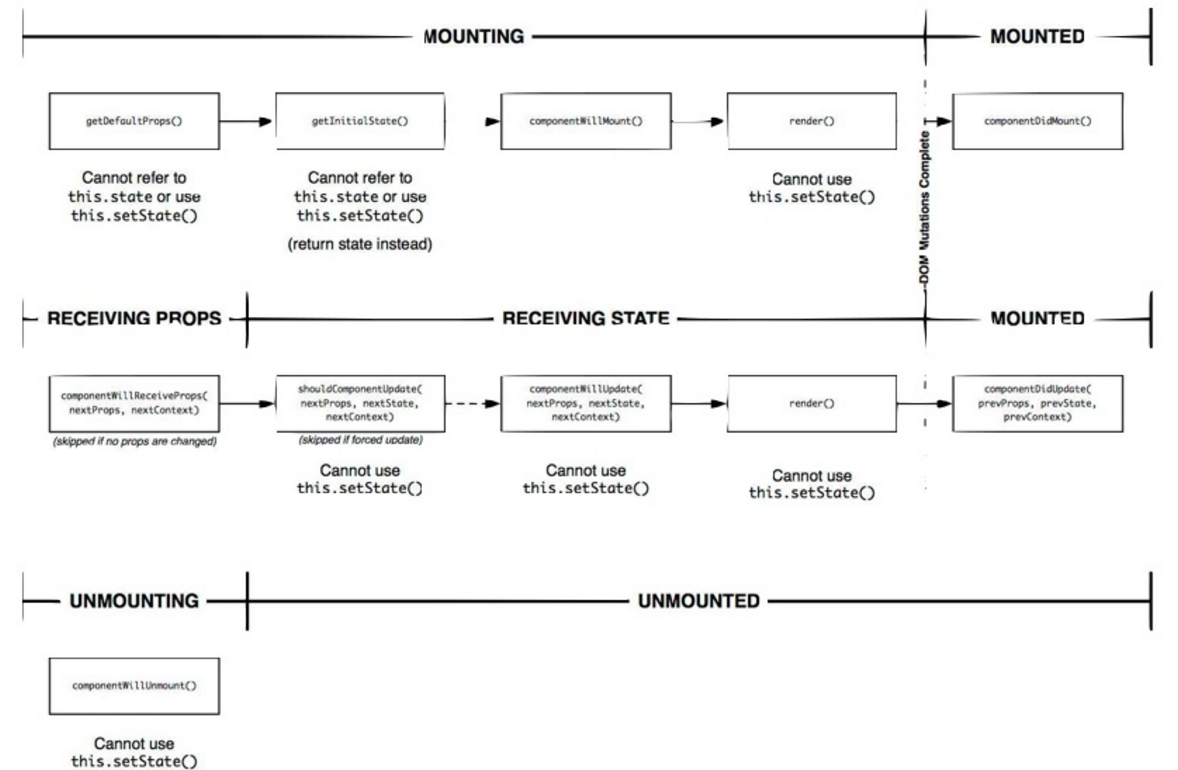
2.3 Lifecyle
-
Instantiation
1.1 The lifecycle methods that are called the first time an instance is created
- getDefaultProps
- getInitialState
- componentWillMount
- render
- componentDidMount
1.2 For all subsequent uses of that component class:
- getInitialState
- componentWillMount
- render
- componentDidMount”
-
Lifetime
- componentWillReceiveProps
- shouldComponentUpdate // return true|false
shouldComponentUpdate(nextProps, nextState) {
return nextProps.id !== this.props.id;
}
- componentWillUpdate //not called for the initial render
- render
- componentDidUpdate
-
Teardown & cleanup
2.4 Props & States
1.props: properties are passed to a component and can hold any data
class User extends Component {
  render(){
    const user = this.props.data;
    this.props.onReady('I am ready!');
    return(
      <View>
        <Text>
          score: {this.props.score}
          type: {this.props.type}
          Name: {user.name}
          Age: {user.age}
        </Text>
      </View>
    );
  }
}
//dufaultProps
User.propTypes = { score: React.PropTypes.number };
User.defaultProps = { score: 0 };

var user = {name: 'foo', age: 21};
class Main extends Component {
  handleReady(str){
    console.log(str);
  }
  render(){
    return(
      <View>
        <User type="Dev" data={user} onReady={this.handleReady}/>
      </View>
    );
  }
}
2.state: State differs from props in that it is internal to the component.
class Timer extends Component {
  constructor(props) {
    super(props);
    this.state = {count: 0};
  }

  componentDidMount() {
    let that = this;
    setInterval(function () {
      that.increase();
    }, 1000);
  }

  increase() {
    this.setState({count: this.state.count + 1});
  }

  render() {
    return (
      <View>
        <Text>count: {this.state.count}</Text>
      </View>
    );
  }
}

class Main extends Component {
  render(){
    return(
      <View>
        <Timer/>
      </View>
    );
  }
}3.props VS state
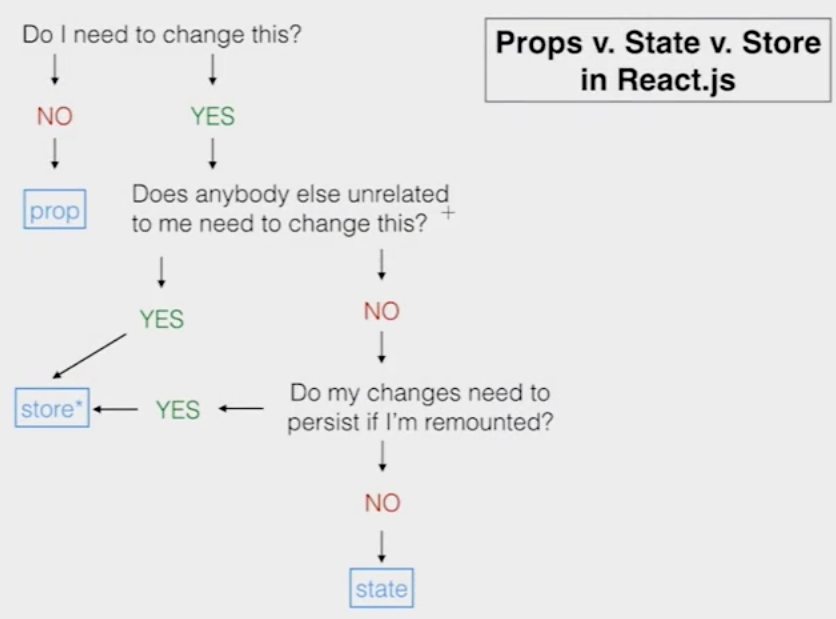
- Use props to pass data and settings through the component tree.
- Never modify this.props inside of a component; consider props immutable.
- Use props to for event handlers to communicate with child components.
- Use state for storing simple view state like wether or not drop-down options are visible.
- Never modify this.state directly, use this.setstate instead.
4.Stateless Component
const Heading = ({title}) => <Text>{title}</Text>;

..
...
<Heading title="test title"/>
...
..
2.5 Events
1.Basic events
1.1.<TouchableHighlight/>
class Touch extends Component {
  handlePress(){
    console.log('press');
  }
  handleLongPress(){
    console.log('longPress');
  }
  render() {
    return (
      <TouchableHighlight
        onPress={this.handlePress}
        onLongPress={this.handleLongPress}>
        <View>
          <Text>Press me!</Text>
        </View>
      </TouchableHighlight>
    );
  }
}
1.2. <TextInput/>
class Test extends Component {
  //...
  //handle events
  //...
  render() {
    return (
      <TextInput
        onBlur={...}
        onChange={...}
        onEndEditing={...}
        onSelectionChange={...}
        onSubmitEditing={...}
      </TextInput>
    );
  }
}1.3.DeviceEventEmitter
//keyboardWillShow, keyboardDidShow, keyboardWillHide, keyboardDidHide
//keyboardWillChangeFrame, keyboardDidChangeFrame
//add the listener
 var listener = DeviceEventEmitter.addListener('keyboardWillShow', (e) =>{
   console.log('Event is fired!');
 });
 //remove the listener
listener.remove();2.Gesture Responder System
2.1 Lifecycle
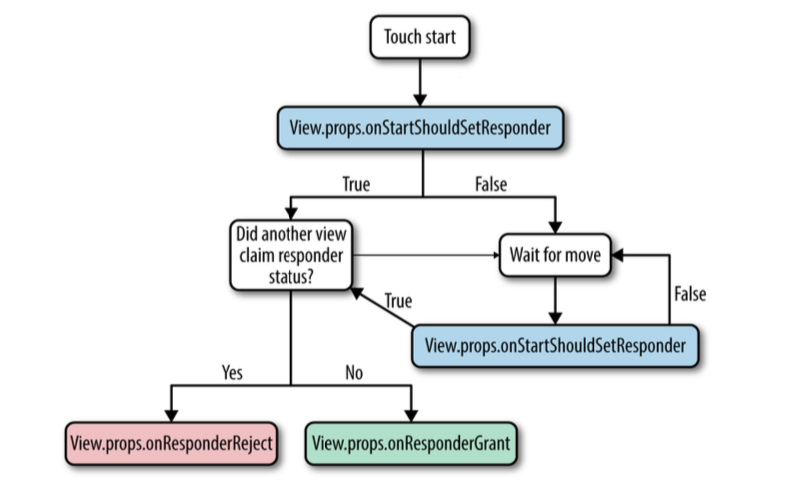
2.2 example
class Test extends Component {
  /* Capture handles */
  //the responder system bubbles up from the deepest component,
  //a parent View wants to prevent the child from becoming responder on a touch start
  handleStartShouldSetResponderCapture(evt){
    return true;
  }
  //the responder system bubbles up from the deepest component,
  //a parent View wants to prevent the child from becoming responder on a touch move
  handleMoveShouldSetResponderCapture(evt){
    return true;
  }

  /* Lifecycle handles */
  //Does this view want to become responder on the start of a touch?
  handleStartShouldSetResponder(evt){
    return true;
  }
  //Called for every touch move on the View when it is not the responder:
  //does this view want to "claim" touch responsiveness?
  handleMoveShouldSetResponder(evt){
    return true;
  }
  //The View is now responding for touch events.
  handleResponderGrant(evt){
    console.log('you are touching me');
  }
  //Something else is the responder right now and will not release it
  handleResponderReject(evt){
    console.log('please wait in line');
  }

  /* event handles */
  //touch move
  handleResponderMove(evt){
    console.log('touch move at:', 'X='+evt.pageX, 'Y='+evt.pageY);
  }
  //touch end/up
  handleResponderRelease(evt){
    console.log('touch end');
  }
  //Something else wants to become responder. Should this view release the responder?
  handleResponderTerminationRequest(evt){
    return true;
  }
  //touch cancel
  handleResponderTerminate(evt){
    console.log('touch canceled');
  }
  render() {
    return (
      <View
        onStartShouldSetResponderCapture={this.handleStartShouldSetResponderCapture}
        onMoveShouldSetResponderCapture={this.handleMoveShouldSetResponderCapture}
        onStartShouldSetResponder={this.handleStartShouldSetResponder}
        onMoveShouldSetResponder={this.handleMoveShouldSetResponder}
        onResponderGrant={this.handleResponderGrant}
        onResponderReject={this.handleResponderReject}
        onResponderMove={this.handleResponderMove}
        onResponderRelease={this.handleResponderRelease}
        onResponderTerminationRequest={this.handleResponderTerminationRequest}
        onResponderTerminate={this.handleResponderTerminate}>
          <Text>Press me!</Text>
      </View>
    );
  }
}
2.3 evt is a synthetic touch event with the following form nativeEvent:
- changedTouches - Array of all touch events that have changed since the last event
- identifier - The ID of the touch
- locationX - The X position of the touch, relative to the element
- locationY - The Y position of the touch, relative to the element
- pageX - The X position of the touch, relative to the root element
- pageY - The Y position of the touch, relative to the root element
- target - The node id of the element receiving the touch event
- timestamp - A time identifier for the touch, useful for velocity calculation
- touches - Array of all current touches on the screen
3.PanResponder
3.1
this._panResponder = PanResponder.create({
  // Ask to be the responder:
  onStartShouldSetPanResponder: (evt, gestureState) => true,
  onStartShouldSetPanResponderCapture: (evt, gestureState) => true,
  onMoveShouldSetPanResponder: (evt, gestureState) => true,
  onMoveShouldSetPanResponderCapture: (evt, gestureState) => true,
  //touch start
  onPanResponderGrant: (evt, gestureState) => {},
  //touch move
  onPanResponderMove: (evt, gestureState) => {},
  onPanResponderTerminationRequest: (evt, gestureState) => true,
  //touch end/up
  onPanResponderRelease: (evt, gestureState) => {},
  //touch cancel
  onPanResponderTerminate: (evt, gestureState) => {},
  onShouldBlockNativeResponder: (evt, gestureState) => true,
});
3.2 A gestureState object has the following:
- stateID - ID of the gestureState- persisted as long as there at least one touch on screen
- moveX - the latest screen coordinates of the recently-moved touch
- moveY - the latest screen coordinates of the recently-moved touch
- x0 - the screen coordinates of the responder grant
- y0 - the screen coordinates of the responder grant
- dx - accumulated distance of the gesture since the touch started
- dy - accumulated distance of the gesture since the touch started
- vx - current velocity of the gesture
- vy - current velocity of the gesture
- numberActiveTouches - Number of touches currently on screen
3.3 PanResponder example in UIExplorer
2.6 Resources
3 Styles
1.Declare Style
const styles = StyleSheet.create({
  container: {
    flex: 1,
    backgroundColor: 'blue',
  },
  text: {
    fontSize: 14,
    color: 'red'
  }
});
2.Using Styles
class Main extends Component {
  render() {
    return (
      <View style={styles.container}>
        <Text style={styles.text}>I am red.</Text>
      </View>
    );
  }
}
3.Properties
3.1 Flexbox
1.Flexbox layout
The main idea behind the flex layout is to give the container the ability to alter its items' width/height (and order) to best fill the available space (mostly to accommodate to all kind of display devices and screen sizes). A flex container expands items to fill available free space, or shrinks them to prevent overflow.

2.flex:1
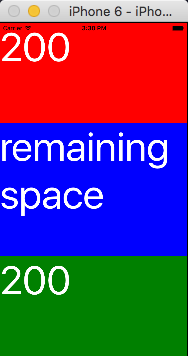
const styles = StyleSheet.create({
  container: {
    flex: 1
  },
  header: {
    height: 200,
    backgroundColor: 'red'
  },
  main: {
    flex: 1,
    backgroundColor: 'blue'
  },
  footer: {
    height: 200,
    backgroundColor: 'green'
  },
  text: {
    color: '#ffffff',
    fontSize: 80
  }
});
3.flexDirection:'row'|'column'
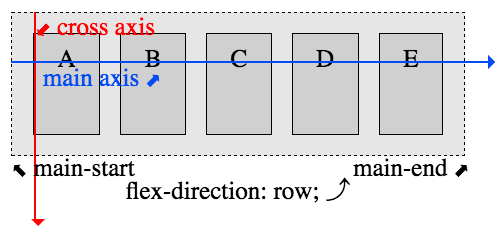
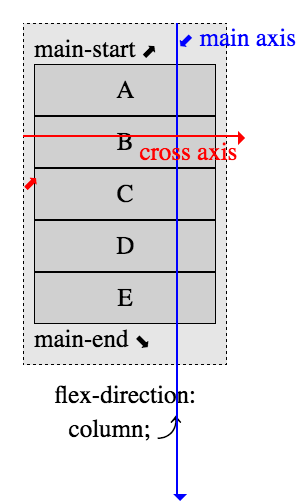
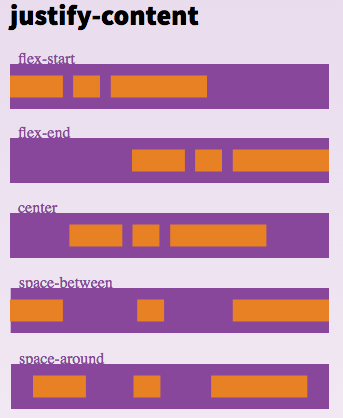
4.justifyContent:'flex-start'|'flex-end'|'center'|'space-between'|'space-around'
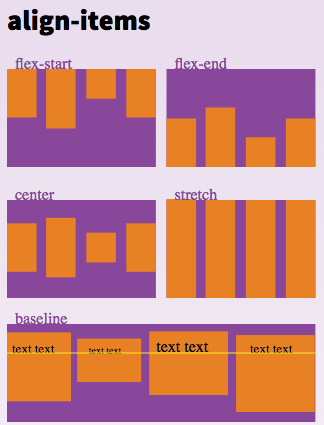
5.alignItems:'flex-start'|'flex-end'|'center'|'stretch'
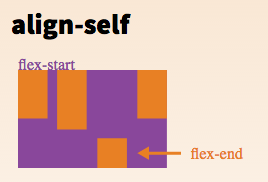
6.alignSelf:'auto'|'flex-start'|'flex-end'|'center'|'stretch'
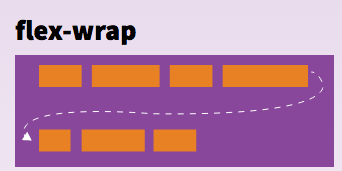
7.flexWrap:'wrap'|'nowrap'
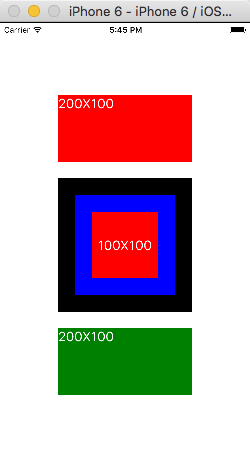
8.Box model
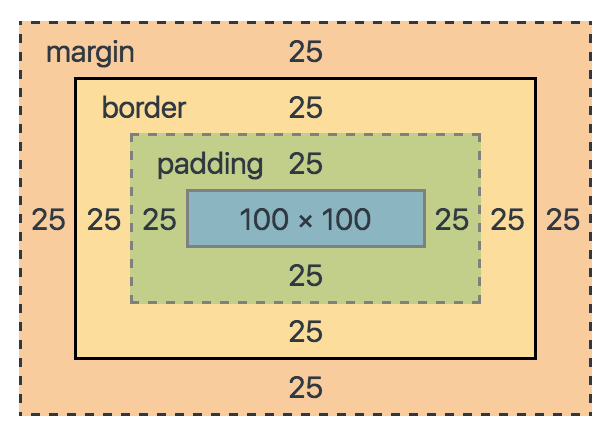
width = borderLeftWidth(25)+paddingLeft(25)+100+borderRightWidth(25)+paddingRight(25)=200
height = borderTopWidth(25)+paddingTop(25)+100+borderBottomWidth(25)+paddingBottom(25)=200
class Main extends Component {
  render() {
    return (
      <View style={styles.container}>
        <View style={styles.header}>
          <Text style={styles.text}>200X100</Text>
        </View>
        <View style={styles.main}>
          <View  style={styles.mainContent}>
            <Text style={styles.text}>100X100</Text>
          </View>
        </View>
        <View style={styles.footer}>
          <Text style={styles.text}>200X100</Text>
        </View>
      </View>
    );
  }
}

const styles = StyleSheet.create({
  container: {
    flex: 1,
    justifyContent: 'center',
    alignItems: 'center'
  },
  header: {
    height: 100,
    width: 200,
    backgroundColor: 'red'
  },
  main: {
    height: 200,
    width: 200,
    padding: 25,
    borderWidth: 25,
    borderColor: 'black',
    margin: 25,
    backgroundColor: 'blue'
  },
  mainContent: {
    flex: 1,
    justifyContent: 'center',
    alignItems: 'center',
    backgroundColor: 'red'
  },
  footer: {
    height: 100,
    width: 200,
    backgroundColor: 'green'
  },
  text: {
    color: '#ffffff',
    fontSize: 20
  }
});
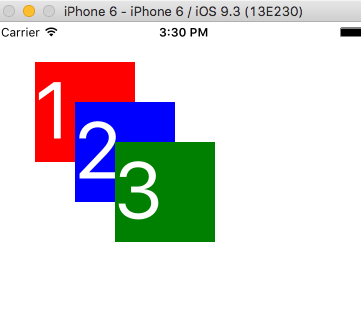
3.2 Absolute & Relative
1.absolute
class Position extends Component {
  render() {
    return (
      <View style={styles.container}>
        <View style={styles.box1}>
          <Text style={styles.text}>1</Text>
        </View>
        <View style={styles.box2}>
          <Text style={styles.text}>2</Text>
        </View>
        <View style={styles.box3}>
          <Text style={styles.text}>3</Text>
        </View>
      </View>
    );
  }
}
const styles = StyleSheet.create({
  container: {
    flex: 1
  },
  box1: {
    position: 'absolute',
    top: 40,
    left: 40,
    width: 100,
    height: 100,
    backgroundColor: 'red'
  },
  box2: {
    position: 'absolute',
    top: 80,
    left: 80,
    width: 100,
    height: 100,
    backgroundColor: 'blue'
  },
  box3: {
    position: 'absolute',
    top: 120,
    left: 120,
    width: 100,
    height: 100,
    backgroundColor: 'green'
  },
  text: {
    color: '#ffffff',
    fontSize: 80
  }
});
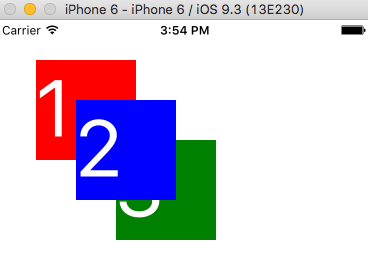
2.zIndex, v0.29 or transform
  box2: {
    position: 'absolute',
    top: 80,
    left: 80,
    width: 100,
    height: 100,
    backgroundColor: 'blue',
    transform: [{'translate': [0,0, 1]}]
  },
3.relative(default)
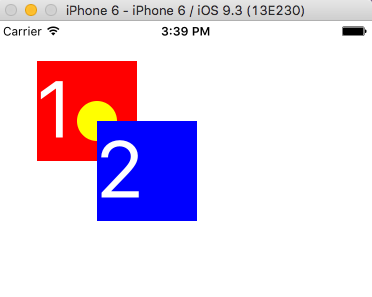
class Relative extends Component {
  render() {
    return (
      <View style={styles.container}>
        <View style={styles.box1}>
          <Text style={styles.text}>1</Text>
          <View style={styles.ball}/>
        </View>
        <View style={styles.box2}>
          <Text style={styles.text}>2</Text>
        </View>
      </View>
    );
  }
}
const styles = StyleSheet.create({
  container: {
    flex: 1
  },
  box1: {
    position: 'relative',
    top: 40,
    left: 40,
    width: 100,
    height: 100,
    backgroundColor: 'red'
  },
  box2: {
    position: 'absolute',
    top: 100,
    left: 100,
    width: 100,
    height: 100,
    backgroundColor: 'blue'
  },
  ball: {
    position: 'absolute',
    top: 40,
    left: 40,
    width: 40,
    height: 40,
    borderRadius: 20,
    backgroundColor: 'yellow'
  },
  text: {
    color: '#ffffff',
    fontSize: 80
  }
});
4.fixed
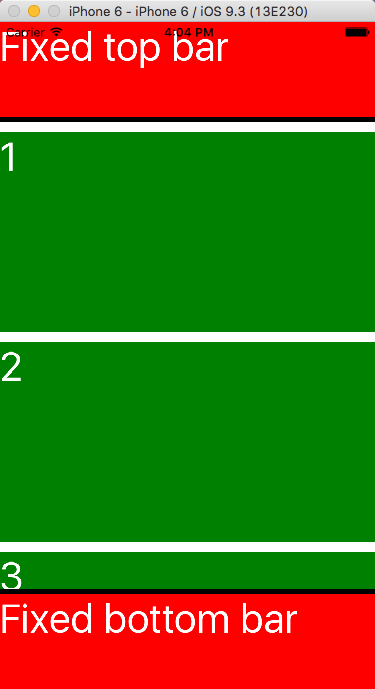
class Fixed extends Component {
  render() {
    return (
      <View style={styles.container}>
        <View style={styles.tbar}>
          <Text style={styles.text}>Fixed top bar</Text>
        </View>
        <ScrollView style={styles.main}>
          <View style={styles.item}><Text style={styles.text}>1</Text></View>
          <View style={styles.item}><Text style={styles.text}>2</Text></View>
          <View style={styles.item}><Text style={styles.text}>3</Text></View>
        </ScrollView>
        <View style={styles.bbar}>
          <Text style={styles.text}>Fixed bottom bar</Text>
        </View>
      </View>
    );
  }
}
const styles = StyleSheet.create({
  container: {
    flex: 1
  },
  tbar: {
    width: 375,
    height: 100,
    borderBottomWidth: 5,
    borderColor: 'black',
    backgroundColor: 'red'
  },
  main: {
    flex: 1
  },
  item: {
    height: 200,
    width: 375,
    marginTop: 10,
    backgroundColor: 'green'
  },
  bbar: {
    width: 375,
    height: 100,
    borderTopWidth: 5,
    borderColor: 'black',
    backgroundColor: 'red'
  },
  text: {
    color: '#ffffff',
    fontSize: 40
  }
});
3.3 Size & Dimensions & onLayout
1.window size
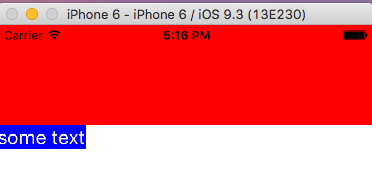
let winSize = Dimensions.get('window');
console.log(winSize);
class Size extends Component {
  render() {
    return (
      <View style={styles.container}>
        <View style={styles.block}/>
        <Text style={styles.text}>some text</Text>
      </View>
    );
  }
}
const styles = StyleSheet.create({
  container: {
    flex: 1,
    alignItems: 'flex-start'
  },
  block: {
    height: 100,
    width: winSize.width,
    backgroundColor: 'red'
  },
  text: {
    color: '#ffffff',
    fontSize: 40/winSize.scale,
    backgroundColor: 'blue'
  }
});2.onLayout
class Size extends Component {
  handleTextLayout(evt){
    console.log(evt.nativeEvent.layout);
  }
  render() {
    return (
      <View style={styles.container}>
        <View style={styles.block}/>
        <Text style={styles.text}
          onLayout={this.handleTextLayout}>some text</Text>
      </View>
    );
  }
}
3.4 Inheritance
1.pass styles as props
class InheritanceStyle extends Component {
  render() {
    return (
      <View style={this.props.parentColor}>
      </View>
    );
  }
}

class Main extends Component {
  handleReady(str){
    console.log(str);
  }
  render() {
    return (
      <View style={styles.container}>
        <InheritanceStyle parentColor={styles.blue}/>
      </View>
    );
  }
}
const styles = StyleSheet.create({
  container: {
    flex: 1
  },
  blue: {
    flex: 1,
    backgroundColor: 'blue'
  }
});
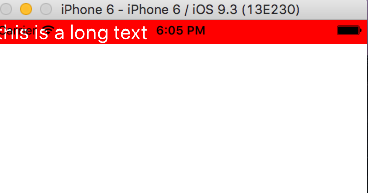
2.concatenation styles
BaseStyles.js
import { StyleSheet,Dimensions } from 'react-native';
let winSize = Dimensions.get('window');
const BaseStyles = StyleSheet.create({
  text: {
    fontSize: 40/winSize.scale
  }
});
export default BaseStyles;
import BaseStyles from './BaseStyles';
class InheritanceStyle extends Component {
render() {
return (
<View style={this.props.parentColor}>
<Text style={[BaseStyles.text, styles.text]}> this is a long text </Text>
</View>
);
}
}
const styles = StyleSheet.create({
text:{
color: '#ffffff'
}
});
3.5 Resources
4 Architecture
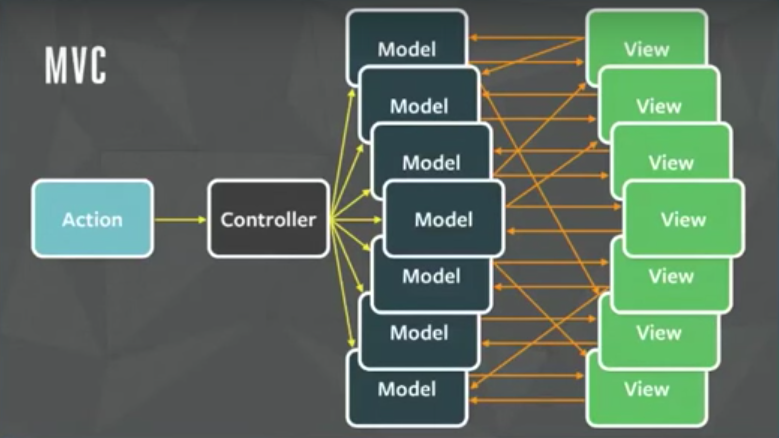
1.MVC problems
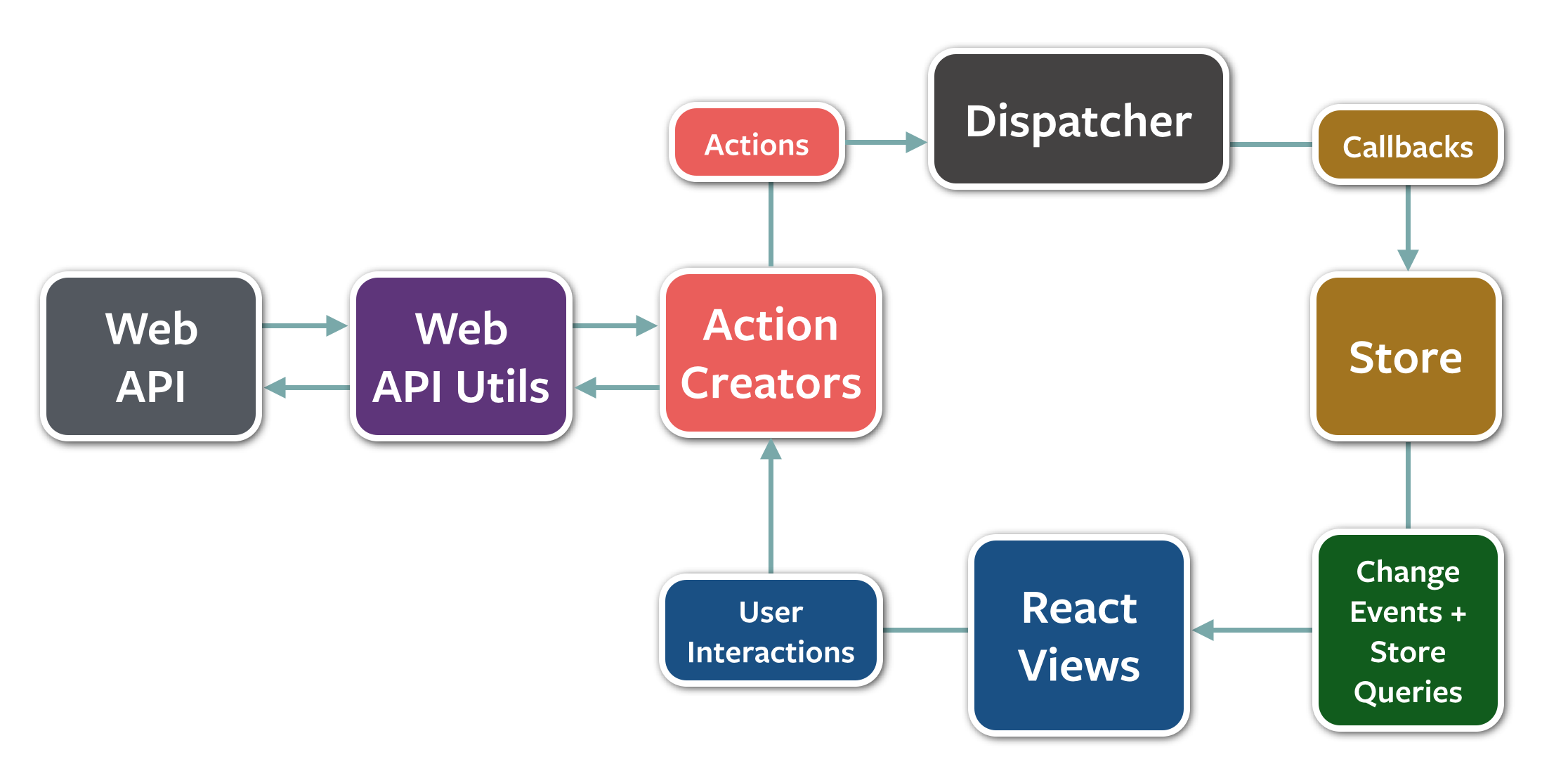
2.Flux
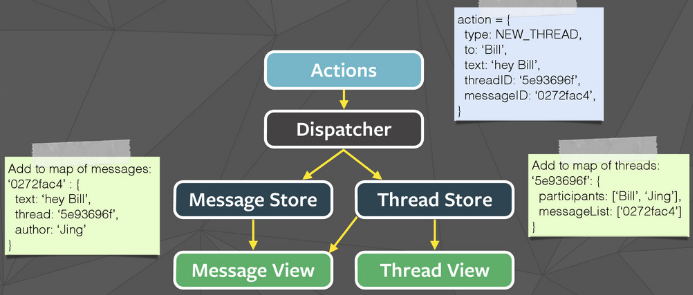
3.Data flow
Flux TodoMVC Example
4.1 Redux
1.Actions & Action Creators
//action type
const ADD_TODO = 'ADD_TODO';

//action creator, semantic methods that create actions
//collected together in a module to become an API
function addTodoAction(title, hour) {
  //action, an object with a type property and new data, like events
  return {type: ADD_TODO, title, hour}
}2.Reducers
//a function that accepts an accumulation and a value and returns a new accumulation.
function todoReducers(state = [], action) {
  switch (action.type) {
    case ADD_TODO:
      //always return a new state, never mutate old state
      return [
        {
          id: Utils.GUID(),
          title: action.title,
          endTime: getEndTime(action.hour),
          completed: false
        },
        ...state
      ]
    default:
      //return default state
      return state
  }
}
3.Store
import { createStore } from 'redux';
//1. define store
let store = createStore(todoReducers);

class App extends Component {
  constructor(props){
    super(props);
    this.state = {todos: []};
  }
  componentDidMount(){
    //2. subscribe store
    this.unsubscribeStore = store.subscribe(() =>{
      //3. getState
      this.setState({todos: store.getState()});
    });
  }
  componentWillUnmount(){
    //5. unsubscribe store
    this.unsubscribeStore();
  }
  renderTodoList = ()=>{
    //reder todo list
    return this.state.todos.map( (todo)=> {
      return <Text key={todo.id}>Todo: {todo.title}</Text>
    });
  }
  handleAddTodo = ()=>{
    //4. dispatching actions
    store.dispatch( addTodoAction('Create a new todo', 8) );
  }
  render() {
    return (
      <View>
        <TouchableHighlight onPress={this.handleAddTodo}>
          <Text>Add Todo</Text>
        </TouchableHighlight>
        <ScrollView>{this.renderTodoList()}</ScrollView>
      </View>
    );
  }
}
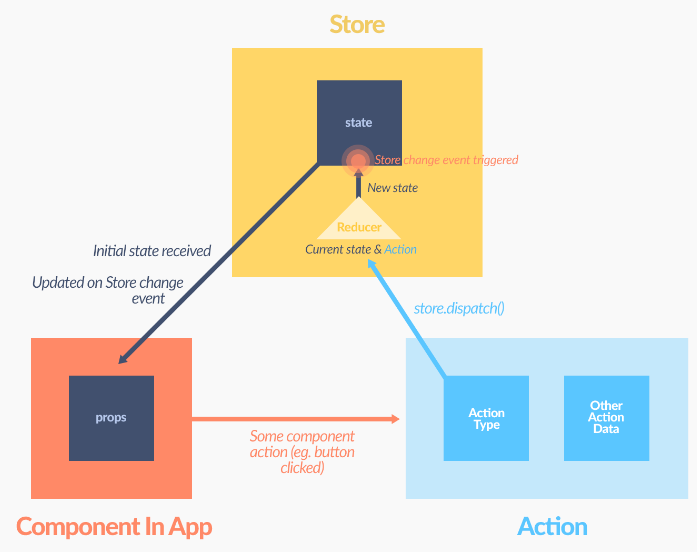
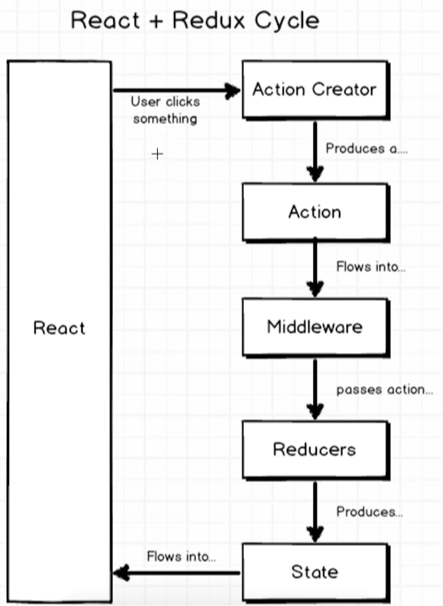
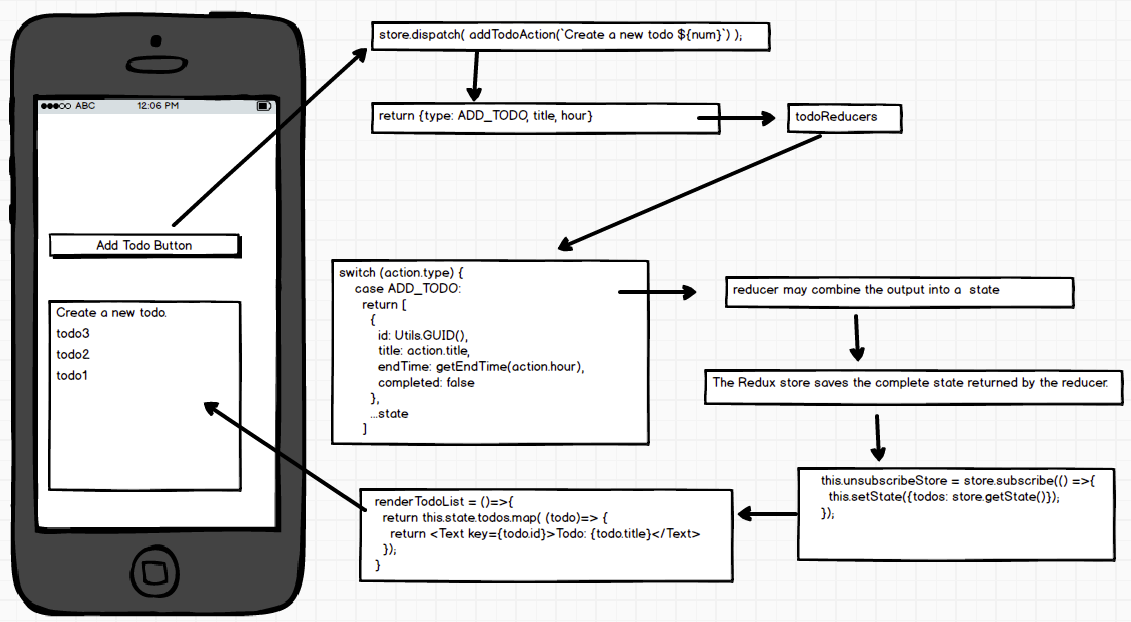
4.Data flow
1.Actions
import * as  navigationActions from './navigation';
import * as  todosActions from './todos';

export default {...navigationActions, ...todosActions};
2.combineReducers()
import { combineReducers } from 'redux';
import navigation from './navigation';
import todos from './todos';

const rootReducer = combineReducers({
  navigation, todos
});

export default rootReducer;
3.Application state by configureStore()
import { createStore } from 'redux';
import reducers from '../reducers';

export default function configureStore() {
  const store = createStore(reducers);
  return store;
}
4.mapStateToProps & mapDispatchToProps & bindActionCreators
import { bindActionCreators } from 'redux';
import { connect } from 'react-redux';

class App extends Component {
  renderTodoList = ()=>{
    //reder todo list
    return this.props.todos.map( (todo)=> {
      return <Text key={todo.id}>Todo: {todo.title}</Text>
    });
  }
  handleAddTodo = ()=>{
    this.props.actions.addTodoAction('Create a new todo', 8);
  }
  render() {
    return (
      <View>
        <TouchableHighlight onPress={this.handleAddTodo}>
          <Text>Add Todo</Text>
        </TouchableHighlight>
        <ScrollView>{this.renderTodoList()}</ScrollView>
      </View>
    );
  }
}

function mapStateToProps(state) {
  return {
    todos: state.todos
  };
}

function mapDispatchToProps(dispatch) {
  return {
    actions: bindActionCreators(Actions, dispatch)
  }
}

export default connect(
  mapStateToProps,
  mapDispatchToProps
)(App);
5.Passing the Store with <Provider/>
import React, { Component } from 'react';
import { Provider } from 'react-redux';

import App from './containers/App';
import configureStore from './store/configureStore';

class Root extends Component {
  render() {
    return (
      <Provider store={configureStore()}>
        <App />
      </Provider>
    );
  }
}

export default Root;
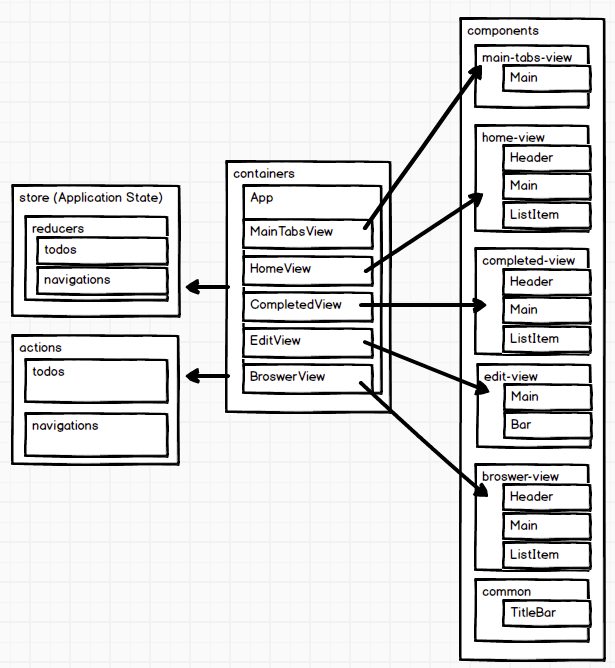
4.3 Containers & Components
1.Presentational and Container Components
|
Presentational Components |
Container Components |
| Purpose |
How things look (markup, styles) |
How things work (data fetching, state updates) |
| Aware of Redux |
No
| Yes
|
| To read data |
Read data from props |
Subscribe to Redux state |
| To change data |
Invoke callbacks from props |
Dispatch Redux actions |
| Are written |
By hand |
Usually generated by React Redux |
2.components/home-view & containers/HomeView
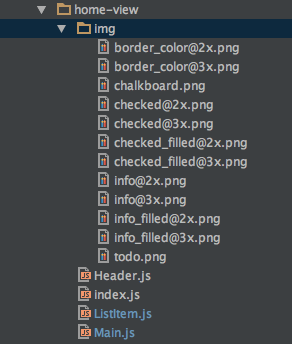
2.1 home-view components
2.2 HomeView container
import {
  Header,
  Main,
} from '../components/home-view';
import Actions from '../actions';

class HomeView extends Component {
  render() {
    return (
      <View>
        <Header {...this.props}/>
        <Main {...this.props} isVisible={this.state.isVisible}/>
      </View>
    );
  }
}

function mapStateToProps(state) {
  return {
    todos: state.todos
  };
}

function mapDispatchToProps(dispatch) {
  return {
    actions: bindActionCreators(Actions, dispatch)
  }
}

export default connect(
  mapStateToProps,
  mapDispatchToProps
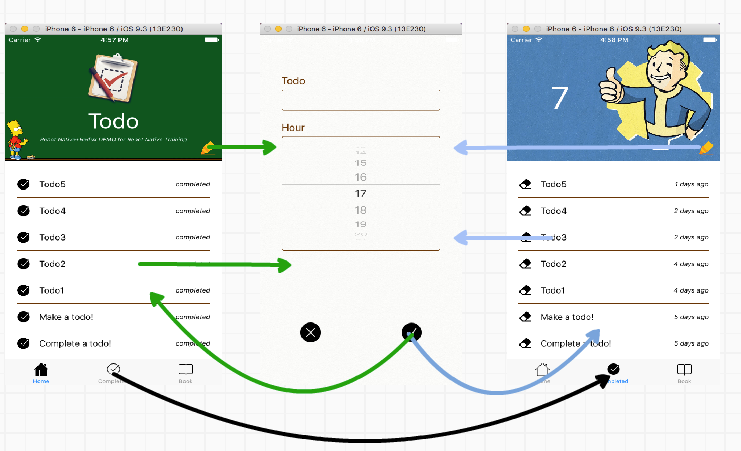
)(HomeView);1.Overview
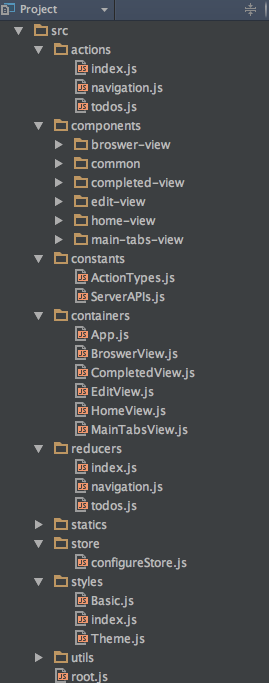
2.Structure
3.Containers & Components
4.5 Naming convention
1.Containers & Components
1.1. Container file:
src/containers/ModuleNameView.js
Component files:
src/components/module-name-view
 - index.js
 - Main.js
 - Header.js
 - ...
 - img
   - icon@2x.png
   - icon@3x.png
1.2. Event name:
handleEventName = ()=>{//todo}
...
<MyComponent onEventName={this.handleEventName}/>
1.3. Render methods:
  renderMethodName = () => {
   //todo
  }
  render() {
    return (
      <View>
        {this.renderMethodName()}
      </View>
    );
  }
1.4. mapStateToProps & mapDispatchToProps
function mapStateToProps(state) {
  return {
    todos: state.todos
  };
}

function mapDispatchToProps(dispatch) {
  return {
    actions: bindActionCreators(Actions, dispatch)
  }
}
2.actions src/actions
index.js
todos.js
navigation.js
2.1src/constants/ActionTypes.js
export const SWITCH_MAIN_TAB = 'SWITCH_MAIN_TAB';
2.2```src/actions/todos.js````
import * as types from '../constants/ActionTypes'

export function addTodo(title, hour) {
  return {type: types.ADD_TODO, title, hour}
}3.reducerssrc/reducers
index.js
todos.js
navigation.js
3.1.src/reducers/todos.js
import { ADD_TODO, DELETE_TODO, EDIT_TODO, COMPLETE_TODO } from '../constants/ActionTypes'
const initialState = []

export default function todos(state = initialState, action) {
  switch (action.type) {
    case ADD_TODO:
      //todo
    default:
      return state
  }
}4.stylessrc/styles
index.js
Basic.js
Theme.js
4.1src/styles/Basic.js
import { StyleSheet, Dimensions } from 'react-native';
let winSize = Dimensions.get('window');
const Basic = StyleSheet.create({
  text: {
    fontSize: 32/winSize.scale
  }
});
export default Basic;4.2src/styles/Theme.js
//colors
const color = {
  green: '#00551e',
  brown: '#693504',
  red: '#db2828'
}

//other
const active = {
  opacity: 0.6
}

export default {color, active}4.3import {Theme, BasicStyle} from '../../styles';
4.6 Resources
5 Data
1.Networking
- Fetch
- XMLHttpRequest API
- WebSocket
5.1 Fetch
1.apply redux-thunk middleware
import { applyMiddleware, createStore, compose } from 'redux';
import thunk from 'redux-thunk';
import createLogger from 'redux-logger';
import reducers from '../reducers';

var middlewares = compose(applyMiddleware(thunk), autoRehydrate());

export default function configureStore() {
  const store = createStore(reducers, undefined, middlewares);
  return store;
}
2.start & end action types
//todo action types
export const START_FETCH_ALL_TODOS = 'START_FETCH_ALL_TODOS';
export const FETCH_ALL_TODOS = 'FETCH_ALL_TODOS';
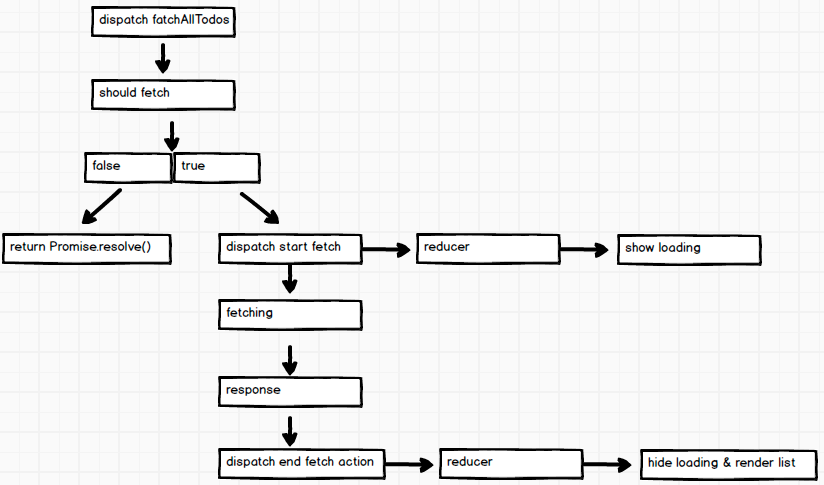
3.fetch flow
import * as types from '../constants/ActionTypes';
import * as APIs from '../constants/ServerAPIs';


function shouldFetchAllTodos(state) {
  const data = state.todos;
  if (data && data.isFetchingAllTodos) {
    return false
  }
  return true;
}

export function fetchAllTodos() {
  return async (dispatch, getState) =>{
    //verify
    if(!shouldFetchAllTodos(getState())){
      return Promise.resolve();
    }

    //dispatch fetch start action
    dispatch({type: types.START_FETCH_ALL_TODOS});

    //fetching
    const response = await fetch(APIs.allTodos);
    //response
    const data = await response.json();

    //dispatch fetch end action
    return dispatch({
      type: types.FETCH_ALL_TODOS,
      data
    });
  }
}
4.reducer
export default function todos(state = initialState, action) {
  switch (action.type) {
    case types.START_FETCH_ALL_TODOS:
      return Object.assign({}, state, {isFetchingAllTodos: true});

    case types.FETCH_ALL_TODOS:
      return Object.assign({}, state, {
        isFetchingAllTodos: false,
        data: action.data.data.reduce(function (pre, cur) {
          //remove duplicates
          !pre.find( key=> key.id===cur.id) && pre.push(cur);
          return pre;
        }, [...state.data])
      });
    ...
    ...
    default:
      return state
  }
}
5.dispatch & render
...
  componentDidMount(){
    //fetch data from server
    this.props.actions.fetchAllTodos();
  }
...
...
  renderLoading = () => {
    if (this.props.todos.isFetchingAllTodos) {
      return (
        <View style={styles.loading}>
          <Text style={styles.loadingText}>Loading...</Text>
        </View>
      )
    }
    return null;
  }
...
5.2 Persistent
1.AsyncStorage
2.apply redux-persist middlewear
import { AsyncStorage } from 'react-native';
import { applyMiddleware, createStore, compose } from 'redux';
import thunk from 'redux-thunk';
import {persistStore, autoRehydrate} from 'redux-persist';
import reducers from '../reducers';

var middlewares = compose(applyMiddleware(thunk), autoRehydrate());

export default function configureStore() {
  const store = createStore(reducers, undefined, middlewares);
  persistStore(store, {storage: AsyncStorage});
  return store;
}
5.3 Resources






