
tauri
Build smaller, faster, and more secure desktop and mobile applications with a web frontend.
- 113k
- Rust
- Apache-2.0
- 8 h ago
Helper for running user-supplied Windows installers on Linux through Wine, with a graphical app.
Repo undecuple/gitfurl, read from GitHub 9 min ago. undecuple has not joined Take My Repo.
undecuple/gitfurl is a public repo on GitHub by undecuple. Helper for running user-supplied Windows installers on Linux through Wine, with a graphical app. It declares the GPL-3.0 license on GitHub. It is written mainly in Python, has 0 stars and last changed on 2026-11-20. Nobody has reviewed it on Take My Repo yet, which says nothing about its quality. Read from GitHub on 2026-11-22.

Run a Windows installer you already have on Linux, in its own Wine environment, with a plan you approve first.
Getting started · User guide · Status and known issues · AI use · Community · Report a bug

gitfurl is a graphical app (with an optional command line) for running a Windows installer on Linux through Wine. You supply the installer. Gitfurl does not find, download or include any.
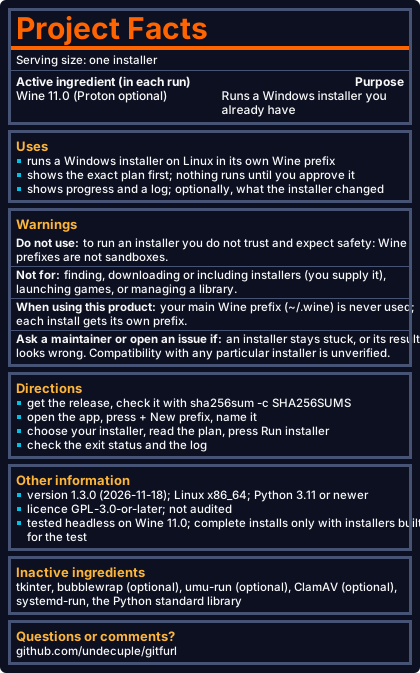
Version 1.3.0, released 2026-11-18. The app, the command line and the safety checks are complete for the scope in docs/scope.md. That does not mean any particular installer works: compatibility is unverified, a complete install has been tested only with an installer built for the test, and the code has not been audited. Details: docs/status.md.
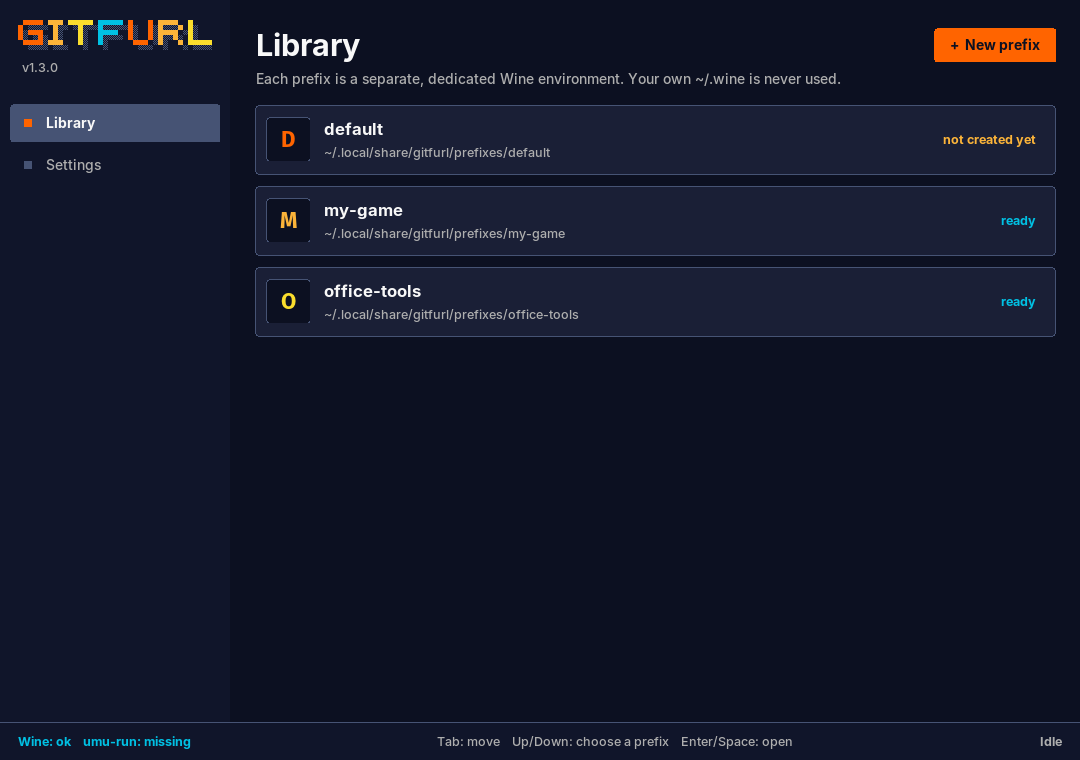
The Library page with demo prefixes (empty folders). No installer was run to make this picture. More pictures are in the user guide.

The latest release has a single-file Linux program and a SHA256SUMS file (check it with sha256sum -c SHA256SUMS). It is not proven on every desktop (see docs/status.md). Or run it from source. You need Linux and Wine; from source also Python 3.11 or newer and tkinter (python3-tk on Debian and Ubuntu).
git clone https://github.com/undecuple/gitfurl.git && cd gitfurlpython -m gitfurl cli doctor reports Wine, tkinter, bubblewrap and umu-run.python -m gitfurl, press + New prefix, name it, open it.Terminal instead: python -m gitfurl cli --help (same code, same approvals).

| Topic | Where |
|---|---|
| What it is for, every option, screenshots, the command line | docs/user-guide.md |
| What it does and does not do; who it is for | docs/scope.md |
| Tested setups, known issues | docs/status.md |
| How the core, app and progress reading fit together | docs/architecture.md |
| Building, tests, the sandbox wrapper, repository layout | docs/development.md, docs/testing.md |
| Docker image and compose file (experimental) | docs/docker.md |
What is read from /proc and what is not |
SECURITY.md |
| Plans for later | ROADMAP.md |
Nothing goes online from gitfurl itself: no network requests, no telemetry, no uploads. Two things you start yourself can use the network: umu-run downloading its runtime on first use, and anything the installer does. Prefixes live in ~/.local/share/gitfurl/prefixes/ and logs in ~/.local/state/gitfurl/logs/ (readable only by you; they can hold your user name and local paths, so remove those before sharing one). Nothing is written to ~/.wine.
Questions and discussion: the gitfurl forum on the undecuple Discord server. Bugs go to GitHub issues, security problems to private advisories. Remove your user name and local paths from logs before posting them. Contributing: CONTRIBUTING.md.
Wine (the compatibility layer gitfurl drives), umu-launcher with Proton and GE-Proton (the optional runtime; gitfurl ships none of them) and vim-tictoc (the colour scheme). Gitfurl is not affiliated with these projects or with any software publisher.
Copyright (C) 2026 undecuple. GPL-3.0-or-later; see LICENSE. The images in assets/ are generated by tools/make_assets.py and are under the same licence. The licence covers gitfurl only, not any installer or software you run with it.
Gitfurl is written with AI coding agents. Much of its code, tests and documentation was written by Claude (Anthropic's model, used through Claude Code) under the maintainer's direction. A second Claude session reviews each change before it goes public, and the maintainer approves every merge, tag and release. The code has not been audited by a security professional (see SECURITY.md). Read the plan before you approve a run, and report problems through the issue forms.
Gitfurl comes with no warranty, as in section 15 of the GPL. You are responsible for what you run and for being authorised to use it. Names of other products belong to their owners; gitfurl is not affiliated with them. Running an installer can harm your system; a Wine prefix is not a sandbox.
undecuple/gitfurl is a public repo on GitHub by undecuple. Helper for running user-supplied Windows installers on Linux through Wine, with a graphical app.
It declares the GPL-3.0 license on GitHub.
Its maker tagged it for Linux. That is declared by the maker; Take My Repo has not tested it.
Open "Take it" on its page: Take My Repo writes an install plan for your machine and hands it to your AI agent (Claude Code, Codex or Cursor), which asks you before each step. Take My Repo has not tested it on any machine.
Its last change on GitHub was on 2026-11-20. Take My Repo does not judge from that whether it is maintained.
Nobody has reviewed it on Take My Repo yet, which says nothing about its quality.
Build smaller, faster, and more secure desktop and mobile applications with a web frontend.
Set up your own IPsec VPN server in just a few minutes, with IPsec/L2TP, Cisco IPsec and IKEv2. Supports Ubuntu, Debian, CentOS/RHEL, Alpine Linux and Raspberry Pi OS. Includes client config and management scripts.
Reverse engineer anything with agents, from app behavior down to native binaries.
Dear ImGui: Bloat-free Graphical User interface for C++ with minimal dependencies
Killzone 3 // Unofficial PC Port (static recompilation). Work in progress, partly playable. Builds on your PC from your own game.
Killzone 2 // Unofficial PC Port (static recompilation). Work in progress, partly playable. Builds on your PC from your own game.
Qwark's Awakening: Ratchet & Clank (PS3) // Unofficial PC Port (static recompilation). Early work: in our tests Tools of Destruction plays its first levels; not playable yet.
A reimplementation of PSN (rooms, matchmaking, leaderboards) for statically recompiled PS3 games, with NAT traversal and an optional relay. Fork of sp00nznet/psnr; not the upstream project.
Mods for Insaniquarium! Deluxe on Steam: online co-op, extra modes, achievements, mutators and more.
Unofficial activity feed for PS3 recompilation projects on GitHub. Read-only collector and a static page. Not real time.




