
globalize
A JavaScript library for internationalization and localization that leverages the official Unicode CLDR JSON data
- 4.8k
- JavaScript
- MIT
- 6 d ago
Unicode & CLDR Data Driven Testing
Repo unicode-org/conformance, read from GitHub 4 d ago. unicode-org has not joined Take My Repo.
unicode-org/conformance is a public repo on GitHub by unicode-org. Unicode & CLDR Data Driven Testing. It declares no license on GitHub. Public does not mean open source: without a license, nobody is granted the right to reuse it. It is written mainly in Python, has 6 stars and last changed on 2026-10-09. Nobody has reviewed it on Take My Repo yet, which says nothing about its quality. Read from GitHub on 2026-11-20.
A JavaScript library for internationalization and localization that leverages the official Unicode CLDR JSON data
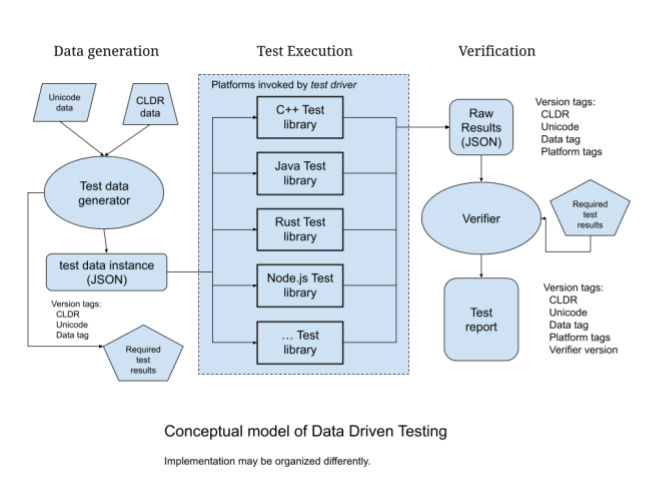
This repository provides tools and procedures for verifying that an implementation is working correctly according to the data-based specifications. The tests are implemented on several platforms including NodeJS (JavaScript), ICU4X (RUST), ICU4C, etc. Additional programming platforms may be added to use the test driver framework.
One goal of this work is an easy-to-use framework for verifying that an implementation of ICU functions agrees with the required behavior. When a test passes in all implementations, it's a strong indication that results are consistent across platforms.
A second goal is to find issues in particular implementations of ICU functions. This is facilitated by generating data from CLDR (in most cases) or other trusted sources. By highlighting different results than expected, implementation errors can be highlighted in ways that unit testing in each platform cannot easily detect.
Conformance Testing is also known as Data Driven Test (DDT). It focuses on functions that accept data input such as numbers, date/time data, and other basic information. The specifications indicate the expected output from implementations when given the data and argument settings for each of the many individual data items.
Note that these tests are only one part of the testing required for ICU-compliant libraries. Many additional tests are implemented in the unit tests and other tests of the library implementations themselves.
Each ICU test program is built with a specific version of ICU & CLDR data. These versions are updated periodically. For each ICU version, there is a specific CLDR version, e.g., ICU73 uses data from CLDR 43, although multiple ICU releases may depend on the same CLDR data.
For this reason, you can specify a particular ICU version for the test data, the test executor, or both.
Each part of Data Driven Testing is designed to handle a specific ICU version.
Data generation uses specifications starting with ICU versions 70, 71, etc. For each ICU release, these data should be updated.
Test execution allows setting the data version explicitly with a command line
argument --icuversion that points to the indicated test data. The ICU version
of the test executor platform is requested from each platform at the start of
the test driver. Output directories are created under the platform for the
test results running a particular ICU version, e.g., testOutput/node/icu73.
Test verification uses ICU version information in the test output files for
matching with the corresponding expected results. Verification output appears
in the testReports subdirectory for each node, e.g., testReports/rust/icu71.
Schema checking uses explicit descriptions of the data to be generated and used in Conformance Testing. These include formats for test data, verification data, and test output files.
Platform: a library or software that is executed to produce expected output such as formatted text. Examples include ICU4C, ICU4X, and NodeJS.
Component: a type of test such as collation, list format, or plural rules. Each platform may implement tests for one or more components.
Version: ICU and CLDR are released periodically with updated data and new capabilities. ICU versions are two-digit numbers with an optional minor revision number per semantic versioning, e.g., ICU76 or CLDR76. A platform is usually implemented in multiple ICU versions. Platforms should be updated to include each new ICU release.
Conceptually, there are four main functional units of the DDT implementation:
The Conformance project is publicly available. It can be installed and executed on most computer systems. Using GitHub, developers can investigate how the executors run each of the components. Additionally, developers can make changes and create pull requests to suggest updates to the project.
Create a directory on the computer for installing and running Conformance. Note that this may require more than 4 Gbytes when all the tests are executed.
Next, get the code and data from the Unicode Conformance GitHub site.
From the green "Code" button on GitHub, select one of the options for cloning the project, or download the project as a ZIP file.
Unzip if needed. Then make sure that the directory contains directories for testdriver, testgen, schema, executors, verifier.
Some setup is required to run Data Driven Testing code locally:
jsonschemapip install jsonschema
sudo apt-get install python-jsonschema
Note: Setting up Python modules or other software may be better done using a
virtual environment such as using pip env for installation.
rust-toolchain.toml filerustup show
rustup update
logrotatesudo apt-get install logrotate
Running conformance is easy. Simply execute the script that first generates data, runs executors, checks data against schema, and then runs the verifier, creating the dashboard.
The standard script runs all components on all platforms with all ICU versions. Note that this takes a few minutes.
bash generateDataAndRun.sh
Output will be created in the directory TEMP_DATA.
To run a quicker version that uses only 100 test cases for each instance, run this:
bash genData100.sh
which does the same thing much faster, resulting in the directory TEMP_DATA_100.
HTML output is found in the subdirectory testReports. To visualize this on your
computer, start a webserver. For example:
python3 -m http.server 9000 &
Then open the file index.html under the testReports folder in either
TEMP_DATA or TEMP_DATA_100 or in a custom folder.
Two main pieces are used to create conformance output:
run_config.json which describes the platforms and components to be executed
execution scripts that run all the steps of conformance testing. This file
extracts configurations from run_config.json
generateDataAndRun.sh runs tests across all platforms, components, and ICU
versions.
run_config.json file is read by the execution scripts such as generateDataAndRun.sh
The execution scripts perform several steps in sequence:
Special configuration to set up test environments for:
ICU4C versions
NodeJS releases
ICU4X using Rust
Dart native and Dart web
Set the output directory as TEMP_DIR. Remove old data and create new output areas.
Generate all test data based on run_config.json's requirements
Check all the schema files for correct structure
Execute all specified tests using testdriver with the executors.
Evaluate all test output files against schema for test results.
Run the verifier on all testOutputs, creating testReports
Running all of the steps above may not be needed for development and debugging. To facilitate quicker coding and testing, it may be useful to run tests using the 100 test case sample set.
The file run_config.json is simply a list of configuration information for
running selected versions of a platform with selected test types
(components). Here's an entry for ICU4C in version 76 that runs 7 components:
[
  {
    "prereq": {
      "name": "Get ICU4C 76",
      "version": "76.1",
      "command": "bash ../executors/cpp/set_icu4c_binary.sh ../gh-cache/icu4c-76_1-Ubuntu22.04-x64.tgz"
    },
    "run": {
      "icu_version": "icu76",
      "exec": "cpp",
      "test_type": [
        "collation",
        "datetime_fmt",
        "lang_names",
        "likely_subtags",
        "message_fmt2",
        "number_fmt",
        "plural_rules"
      ],
      "per_execution": 10000
    }
  },
  ...
]
The section prereq is run before this particular executor cpp is run under
testdriver. The value of per_execution determines how many tests are passed
to a single instantiation of a test executor.
To use quicker development mode, do the following:
Clone run_config.json. Include only the executors and/or components that are
being developed. Also consider selecting only the ICU version or versions
needed.
Clone one of the execution scripts to create a custom version. Change the
reference from run_config.json to the modified version. Note
that export TEST_LIMIT= may be changed to test a smaller set of cases. Note
that this may also point to a custom directory for the output under the
conformance directory.
To use this, simply execute the custom script using bash or equivalent in the
environment:
bash my_custom_script.sh
Then point the browser to index.html in the custom output folder in order to
view the summary and detail pages.
Also note: when customized testing is satisfactory, next run genData100.sh and
generateDataAndRun.sh` scripts to check if the full testing environment succeeds.
As each part of Conformance Testing is executed, log files are created with the output of each phase. These include output from Python programs, executors, and scripts.
The files containing this logging information are called debug.log, debug.log.1,
etc. These debug files are updated on each execution of the scripts in each of
these subdirectories:
It is useful to review the latest debug.log file for each phase in order to identify errors in execution, warning messages, and possible failures.
Note that the log rotation automatically maintains recent history in several versions of debug files in each subdirectory listed above.
Utilizes Unicode (UTS-35) specifications, CLDR data, and existing ICU test data. Existing ICU test data has the advantage of being already structured towards data driven testing, is in many cases formatted in a way to simplify adding new tests, and contains edge and error cases.
Data generation creates two files:
The test type is indicated with the "Test scenario" field.
Individual data tests are stored as an array of items, each with a label and parameters to be set for computing a result.
Example line for collation:
json { "description": "UCA conformance test. Compare the first data\n string with the second and with strength = identical level\n (using S3.10). If the second string is greater than the first\n string, then stop with an error.", "Test scenario": "collation", "tests": [ { "label": "0000000", "string1": "\u0009!", "string2": "\u0009?" },
A required test result file (JSON) containing the expected results from each of the inputs. This could be called the “golden data”.
Sample verify data:
{"Test scenario": "collation",
"verifications": [
  {
    "label": "0000000",
    "verify": "True"
  },
Several types of JSON formatted data are created and used by Conformance processing, and the integrity of this information must be maintained.
Data Driven Testing uses JSON Schema Validation to ensure the structure of data files. JSON schemas make sure that needed parameters and other information is present as required and that the type of each data item is as specified.
In addition, schema specifications can restrict the range of data fields to those expected, allowing only the expected data in JSON output files. This gives a measure of confidence in the data exchanged between the phases of Conformance Testing.
The types of data include:
Generated test data including all parameters and settings as well as ancillary descriptive information for each test. This data depends only on the type of test (component) and the ICU version. It does not depend on the particular execution platform, i.e., programming languages.
Expected results of running each test running with the specified ICU version. This does not depend on the platform.
Actual results from executing each test in the input. This contains actual results from the execution of each test in a given platform. This data may include output from the executor including platform-specific parameters and settings derived from the input data. It may also include data on errors encountered during the run of the platform executor.
Schema files describing the expected JSON format of each type of files for the components.
unicode-org/conformance is a public repo on GitHub by unicode-org. Unicode & CLDR Data Driven Testing.
It declares no license on GitHub. Public does not mean open source: without a license, nobody is granted the right to reuse it.
Its maker tagged it for Linux. That is declared by the maker; Take My Repo has not tested it.
Open "Take it" on its page: Take My Repo writes an install plan for your machine and hands it to your AI agent (Claude Code, Codex or Cursor), which asks you before each step. Take My Repo has not tested it on any machine.
Playwright is a framework for Web Testing and Automation. It allows testing Chromium, Firefox and WebKit with a single API.
Get a full fake REST API with zero coding in less than 30 seconds (seriously)
Its last change on GitHub was on 2026-10-09. GitHub counts 81 open issues and pull requests. Take My Repo does not judge from that whether it is maintained.
Nobody has reviewed it on Take My Repo yet, which says nothing about its quality.
Take My Repo cannot say: it does not audit code and has not run conformance. What is known comes from GitHub. It declares no license on GitHub. Public does not mean open source: without a license, nobody is granted the right to reuse it. Its last change was on 2026-10-09. It has 6 stars, which measure popularity, not safety. Nobody has reviewed it on Take My Repo yet, which says nothing about its quality. Read the source before you run it. With "Take it", your AI agent shows each step and asks you before running it; README text is treated as data, not as instructions.


