

ECC
The agent harness performance optimization system. Skills, instincts, memory, security, and research-first development for Claude Code, Codex, Opencode, Cursor and beyond.
- 309k
- JavaScript
- MIT
- 18 h ago
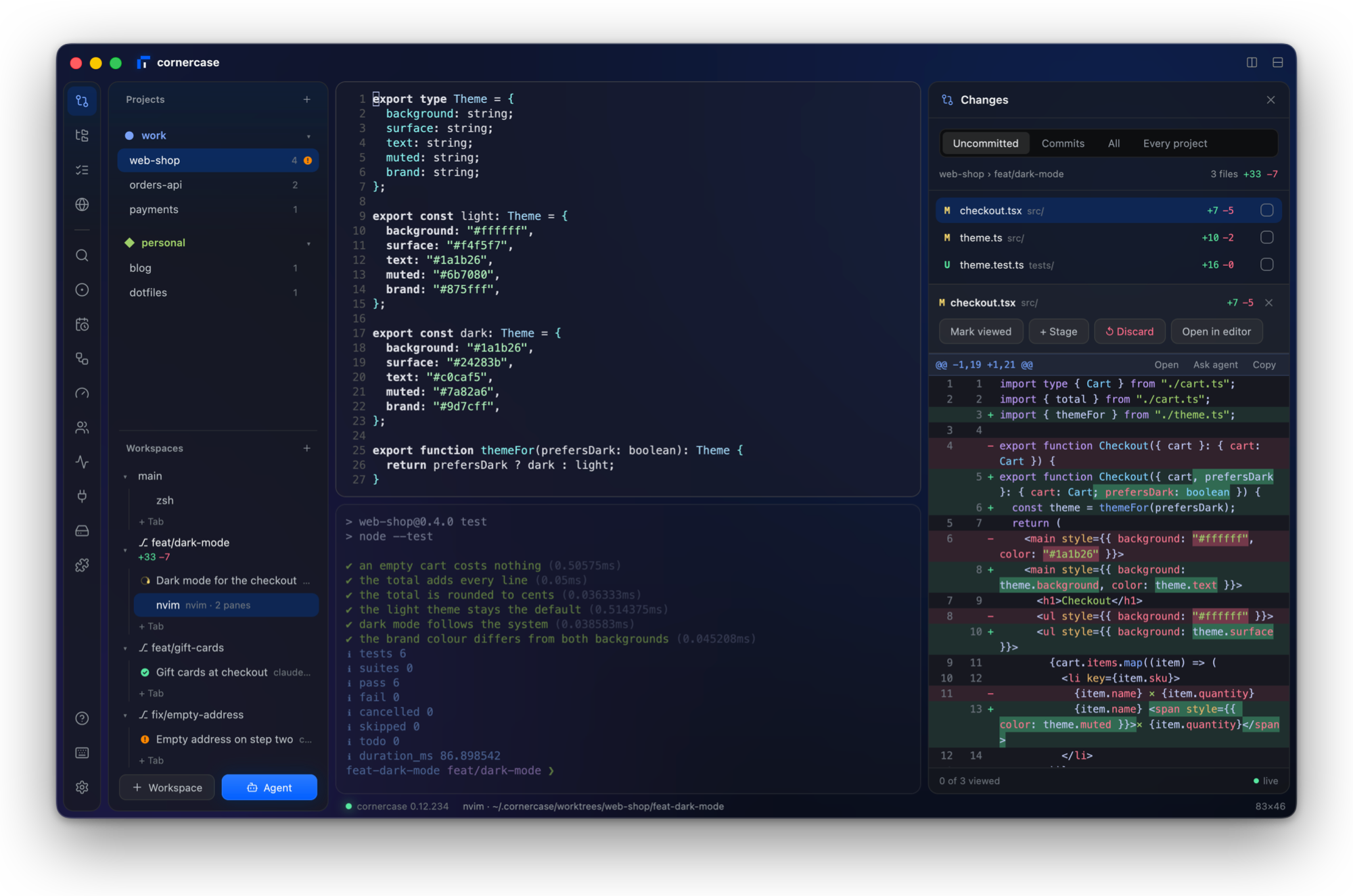
A native macOS window for cornercase, drawn with GPUI
Repo usecornercase/cornercase-gpui, read from GitHub 1 d ago. usecornercase has not joined Take My Repo.
usecornercase/cornercase-gpui is a public repo on GitHub by usecornercase. A native macOS window for cornercase, drawn with GPUI. It declares the Apache-2.0 license on GitHub. It is written mainly in Rust, has 7 stars and last changed on 2026-11-22. Nobody has reviewed it on Take My Repo yet, which says nothing about its quality. Read from GitHub on 2026-11-22.
The agent harness performance optimization system. Skills, instincts, memory, security, and research-first development for Claude Code, Codex, Opencode, Cursor and beyond.
A native window for cornercase, the terminal multiplexer for running coding agents in parallel, on macOS, Linux and Windows. It is drawn on the GPU with GPUI, the UI framework behind the Zed editor, and aims to do everything cornercase's own window does, with the look and feel of a native app.
It is only a window: cornercase's server keeps owning the shells, agents and worktrees, and this app drives it through the cornercase command line. Both windows show the same session, and closing either one stops nothing.
Download · Website · usecornercase.dev · cornercase · Discord
↓ n more, and a click on it goes back to the bottom. A message that a script or another agent sends while you are typing to a pane waits for you: the pane's card says who sent it, with buttons to send it now, which submits what you have typed with it, or to let it wait its turn. Tabs that do not fit in the bar scroll with ‹ › or the wheel, and the one you are on stays in view. A project or workspace with nothing open says so, with buttons to start an agent, open a shell or reopen its closed agents.⇄ marks workspaces and files that another workspace changes too. View context, in a tab's or an agent's menu, shows what fills that agent's context: memory files, MCP servers, skills and the tools that took the most, without typing into the agent or spending tokens. A tab says Opus 5.5 · compacted after its conversation was compacted, and with Settings › UI › memory on, the memory its panes use. The rail counts the changed files on Changes' icon and puts a dot on TODO's while items wait. Drag to reorder, in any layout of cornercase's Settings → UI, whose switches for the model, context, counts, TODO dot and inactive panes the window follows too. Open in… takes a project, a workspace or a pane's folder to your file manager, VS Code, Cursor, Zed or Sublime Text. Import VS Code workspace…, in the Projects + or a group's menu, turns a .code-workspace file into a group of projects, and Run setup, in a worktree's menu, runs its project's setup again to retry after a fix.Held); Stop ends an answer (messages it dropped say Dropped), Retry sends again what a failed answer was asked (every held message it took), and New conversation starts afresh, keeping its memory; Tab reaches each of these buttons, and Return or Space presses the one with the ring. Each bot keeps what you were writing, and an empty chat offers three examples (four with cornercase 0.13.85 or newer, one of them a schedule). With cornercase 0.13.85 or newer, what a bot does on a schedule shows in its chat: each run of a routine is one block where it started, with its steps folded, its answer, and Run again when it failed; its toast names the routine, and Show lands on the block. A bot with no message yet reads next 09:00 on its row while a routine waits, and Routines (in the chat's header, and Routines… in its ⋯, where it stays when the chat is too narrow for the button) lists its routines and reminders with their runs, to start now, pause, resume, edit or remove (with Undo), and a run that answered opens its block in the chat; its Schedule… makes a routine or a reminder for that bot (every day at 09:00 to begin with), which it answers in its chat with its own agent. Removing a bot names what it scheduled, which goes with it. Make one with New bot at the bottom of the Bots page, New bot… in the Projects + or ⌘E: a name is enough, the form also picks its agent, model, effort, account, access and what it is for, and its chat opens with the keys in its field. With cornercase 0.13.89 or newer, a bot made with what it is for sets itself up at once: its chat opens on setting up and shows that first answer's time and steps as it works, and if the setup fails, Retry runs it again; left empty, it starts nothing until you write to it. Remove one from its row's ⋯ or a right click: it asks first, and rests while the bot answers (stop it first). A bot's ⋯ (on its row, by a right click, or in its chat's header) also offers Edit bot…, the same form with its values, which sends only what you change and counts from its next message; Rename bot (or double-click its row) renames it in place; and Open in… and Copy path reach its folder. With cornercase 0.13.101 or newer, a bot that lacks a password or a token can ask you for it: its row says asks for a secret, its chat's line has Give…, and a dialog shows what it says it needs it for with a masked field per name. It opens by itself only while you look at that bot's chat with nothing typed in its field; anywhere else a toast tells you, and Open goes there. Save keeps the values encrypted for that bot, Not now (or Escape) leaves the ask waiting, and Never turns it down. With cornercase 0.13.107 or newer and Telegram or Discord paired, the form's Chat apps row chooses when a bot's answers also reach them (While away, Always or Off), and its chat's header shows a small phone while they do; with none paired, the row's line opens Settings › Remote. With cornercase 0.13.100 or newer, Edit bot… lists the bot's secrets by name and when each was saved: Add…, Replace… and Remove (which asks first) save at once, the value typed behind bullets, and its chat's header says how many it keeps, such as 2 secrets. Details… in a bot's ⋯, or a click on its name at the top of its chat, shows its card: its folder with Copy path, agent, model, effort, account, access, secrets, what it waits for, the day it was made, what it is for (its bot.md, with cornercase 0.13.96 or newer) and its routines, with Routines… and Edit bot…. With cornercase 0.13.91 or newer, a bot follows the agents it starts: its chat says started claude in cornercase › fix/ci-482 with Show, which shows that agent's tab, then when the agent finishes its last message folded to three lines (a click opens it whole) and the bot's report, and when the agent needs you the end of its screen with Go to agent; a line whose agent closed, or of an earlier server run, reads closed. Those tabs and agents read by PRs in the sidebar, its card lists them under Agents it started, and the form's Follow agents box turns the telling off for a bot. What a bot is for is changed with cornercase bot edit --about for now. The bots of your linked machines are listed too, each machine's under its name: their chats are read and written through that machine's cornercase, a routine's runs show in them, their answers are told the same way (PRs on vps: …), and ⇧⌘I and Search reach them. Their ⋯ (on the row, by a right click, or in the chat's header) offers New conversation…, Details… (their card, read from that machine: what it is for, the agents it started there with Show, its routines) and Copy path; they have no Routines or Run again yet (edit, rename and remove them, set their secrets and run their routines in that machine's window, or with cornercase --remote), a secret one asks for is given on that machine, and while a machine cannot be reached its bots stay, dimmed, with the reason under its name, and nothing is sent. A window that is itself on another server (--remote) lists none of its machines' bots yet (usecornercase/cornercase-terminal#928).+usecornercase/cornercase-gpui is a public repo on GitHub by usecornercase. A native macOS window for cornercase, drawn with GPUI.
It declares the Apache-2.0 license on GitHub.
Its maker tagged it for macOS. That is declared by the maker; Take My Repo has not tested it.
Open "Take it" on its page: Take My Repo writes an install plan for your machine and hands it to your AI agent (Claude Code, Codex or Cursor), which asks you before each step. Take My Repo has not tested it on any machine.
List of agent orchestrators
Code at the speed of thought – Zed is a high-performance, multiplayer code editor from the creators of Atom and Tree-sitter.
Reverse engineer anything with agents, from app behavior down to native binaries.
Makes your AI agent think like the laziest senior dev in the room. The best code is the code you never wrote.
Its last change on GitHub was on 2026-11-22. Take My Repo does not judge from that whether it is maintained.
Nobody has reviewed it on Take My Repo yet, which says nothing about its quality.
Take My Repo cannot say: it does not audit code and has not run cornercase-gpui. What is known comes from GitHub. It declares the Apache-2.0 license on GitHub. Its last change was on 2026-11-22. It has 7 stars, which measure popularity, not safety. Nobody has reviewed it on Take My Repo yet, which says nothing about its quality. Read the source before you run it. With "Take it", your AI agent shows each step and asks you before running it; README text is treated as data, not as instructions.


