
action-github-workflow-sync
Github Action To Sync Github Action's Workflow Files Across Repositories
- 73
- MIT
- 4 mo ago
Repo varunsridharan/action-github-workflow-sync, read from GitHub 4 h ago. varunsridharan has not joined Take My Repo.
In short
varunsridharan/action-github-workflow-sync is a public repo on GitHub by varunsridharan. Github Action To Sync Github Action's Workflow Files Across Repositories. It declares the MIT license on GitHub. It is written mainly in JavaScript, has 73 stars and last changed on 2026-08-06. Nobody has reviewed it on Take My Repo yet, which says nothing about its quality. Read from GitHub on 2026-11-24.
Similar repos
metrics
📊 An infographics generator with 30+ plugins and 300+ options to display stats about your GitHub account and render them as SVG, Markdown, PDF or JSON!


Github Workflow Sync - Github Action
Github Action To Sync Github Action's Workflow Files Across Repositories
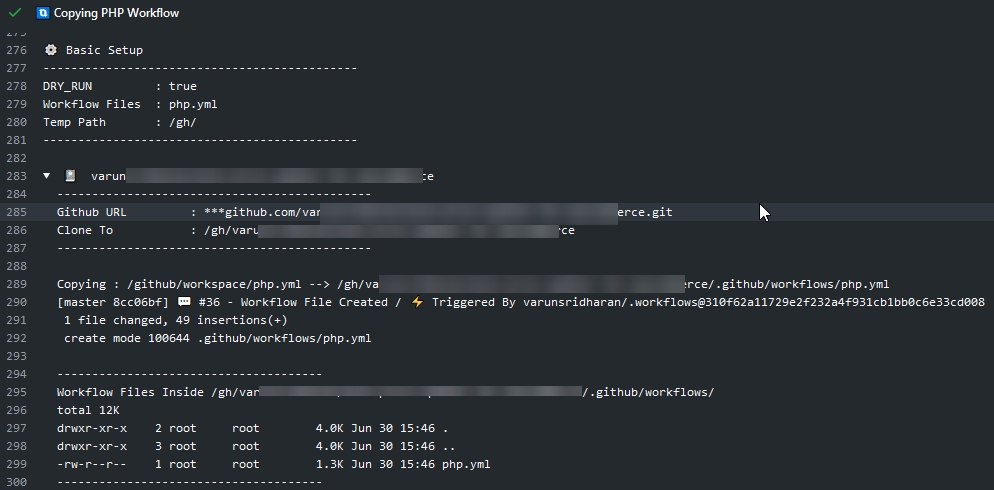
Use Case 🤔 ?
This Github Action can come in handy when you have lot of projects like i do. where in some case certain projects users action workflow which are common across projects. Example : Project 1 & Project 2 it can be pain to keep all the workflow updated with Github Action's Module's version.
This also isn't limited to Github Action yaml files - another use case could be keeping the .editorconfig, LICENSE, tsconfig.json, tslint.json, .gitignore, etc. in sync across all your repositories.
Here where this action comes in and reduces your stress 😉 it can update all your repository actions file based on the config provided
⚙️ Configuration
| Argument | Defaults | Description |
|---|---|---|
GITHUB_TOKEN |
- | Required Token to use to get repos and write secrets. ${{secrets.GITHUB_TOKEN}} will not work. instead Personal Access Token Required* |
GIT_URL |
github.com | URL for the instance of github, where repositories should be searched for. Change if using a GHES instance. |
GIT_USER |
Workflow Sync Bot | The name of the user to use for git commits. |
GIT_EMAIL |
githubactionbot+workflowsync@gmail.com | The email of the user to use for git commits. |
REPOSITORIES |
- | Required New line deliminated regex expressions to select repositories. Repositires are limited to those in whcich the token user is an owner or collaborator. |
WORKFLOW_FILES |
- | Required New line deliminated regex expressions. workflow files to be copied to provided repositores |
DRY_RUN |
false | Run everything except for nothing will be pushed. |
WORKFLOW_FILES_DIR |
workflows | Local Path Where Common Workflow Files Are Located Eg : workflows |
AUTO_CREATE_NEW_BRANCH |
false | Auto create new brach in a repository if the branch dose not exists |
COMMIT_EACH_FILE |
false | if you need to keep track of each file's commit history separate then set it to true |
PULL_REQUEST |
false | Set to true if you want the changes to be pushed via pull request. |
PULL_REQUEST_LABELS |
- | Labels to apply to the created pull request. Separate multiple values using a comma. |
SKIP_CI |
false | Set to true if you want skip all automations inside target repository. |
COMMIT_MESSAGE |
false | You can provide your custom commit message. |
COMMIT_MESSAGE_AS_PR_TITLE |
false | Use the commit message as the pull request title. |
RETRY_MODE |
true | Enable retry and throttling octokit plugins to avoid secondary rate limits on github content creation. |
Personal Access Token Scope
A personal access token is required to use this action. Create either a fine-grained or classic token with the following scopes:
Github Personal Token (fine-grained)
For public repositories, choose Public repositories for the repository access.
For private repositories, choose either All repositories or Only select repositories with the following permissions:
| Permission | Access | Notes |
|---|---|---|
| Content | Read and write | |
| Issues | Read and write | Only required when adding labels to the PR |
| Metadata | Read-only | |
| Pull requests | Read and write | Only required when creating a PR |
| Workflows | Read and write |
Github Personal Token (classic)
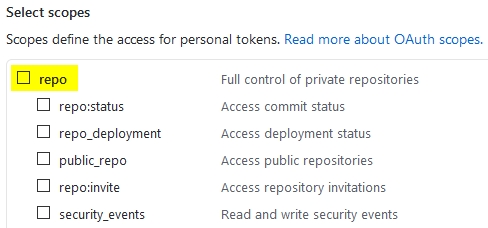
ℹ️ Full Repo is only required when you need to update private repository if your are updating only public repository then just select
public_repoinside repo scope
Click Here To Generate A Token
REPOSITORIES Configuration Examples
Repository With Default Brach
REPOSITORIES: |
    username/repo
    username/repo2
Repositry With Custom Branch
REPOSITORIES: |
    username/repo@dev
    username/repo1@dev2
You Can also have same repository multiple times if you provide different branch name
WORKFLOW_FILES Configuration Examples
- If you use
=as a file seperatorfile1.md=myfile.mdthenfile1from the current repository will be copied to remote repository with the name ofmyfile.md - If you use
!=as a file seperatorfile1.md!=myfile.mdthenfile1from the current repository will be copied to remote repository with the name ofmyfile.mdonly ifmyfile.mdalready not exists in the remote repository
Files - Source & Destination File Without Custom Name
WORKFLOW_FILES: |
    dependabot.yml
    .github/settings.yml
dependabot.yml will save in root folder in the repository
.github/settings.yml will save in
.githubin the repository
Files - Source File In Root & Destination File In Custom Location
WORKFLOW_FILES: |
    hello-bot.yml=.github/
    pr-bot.yml=.github/pull-request.yml
hello-bot.yml will save in
.githubin the repository with the same namepr-bot.yml will save in
.githubin the repository with the namepull-request.yml
Folders - Source & Destination Folders Without Custom Name
WORKFLOW_FILES: |
    folder1
    .github/folder2
folder1 will save in root folder in the repository
.github/folder2 will save in
.githubin the repository
Folders - Source & Destination Folders With Custom Name
WORKFLOW_FILES: |
    folder1=./save-to-folder
    .github/folder2=custom-folder/save-to-folder2
folder1 will save inside
REPOSITORY ROOTin the name ofsave-to-folder.github/folder2 will save inside
custom-folderin the name ofsave-to-folder2
How Files Sync Work ?
Before copying the WORKFLOW_FILES from the source to destination. this action will provide some flexibility.
this searchs for a file in various locations for example lets take settings.yml as the file that you want to sync for multiple repository
Below are the locations that this action search for the file/folder
./{OWNER}/{REPO_NAME}/workflows/{filename}./{OWNER}/workflows/{filename}./{WORKFLOW_FILES_DIR}/{filename}./.github/workflows/{filename}./{OWNER}/{REPO_NAME}/{filename}./{OWNER}/{filename}./{filename}
if the
settings.ymlis found insideworkflowsfolder then the destination is automaitcally forced to.github/workflowsin the destination repoif the
settings.ymlis outside ofworkflowsfolder then the destination then its copied to the destination
How this can be useful ?
Lets assume that you want to maintain all the common github files in a single repository and suddenly a repository needs a single file to be changed in that case instead of editing the action yml file. you can just create a folder like {REPO_OWNER}/{REPO_NAME}/{FILE} to copy the overriden file to the destination
🚀 Usage
Step 1
Create a New Repository or use our Repository Template
Step 2
if you have used our template repository then edit the file inside .github/workflows/workflow-sync.yml
OR
Create a new file in .github/workflows/ named workflow-sync.yml and copy & paste the below file content
workflow-sync.yml content
name: Workflow Sync

on:
  push:
    branches:
      - master
env:
  DRY_RUN: false
  REPOSITORIES: |

  WORKFLOW_FILES: |

jobs:
  Github_Workflow_Sync:
    runs-on: ubuntu-latest
    steps:
      - name: Fetching Local Repository
        uses: actions/checkout@master
      - name: Running Workflow Sync
        uses: varunsridharan/action-github-workflow-sync@main
        with:
          DRY_RUN: ${{ env.DRY_RUN }}
          REPOSITORIES: ${{ env.REPOSITORIES }}
          WORKFLOW_FILES: ${{ env.WORKFLOW_FILES }}
          GITHUB_TOKEN: ${{ secrets.PERSONAL_ACCESS_TOKEN }}
Troubleshooting
Spacing
Spacing around the equal sign is important. For example, this will not work:
WORKFLOW_FILES: |
  folder/file-sync.yml = folder/test.txt
It passes to the shell file 3 distinct objects
- folder/file-sync.ymll
- =
- folder/test.txt
instead of 1 object
- folder/file-sync.yml = folder/test.txt
and there is nothing I can do in code to make up for that
Slashes
You do not need (nor want) leading / for the file path on either side of the equal sign
The only time you need / trailing is for folder copies.
While a file copy will technically still work with a leading /, a folder copy will not
📝 Changelog
All notable changes to this project will be documented in this file.
The format is based on Keep a Changelog, and this project adheres to Semantic Versioning.
🤝 Contributing
If you would like to help, please take a look at the list of issues.
💰 Sponsor
I fell in love with open-source in 2013 and there has been no looking back since! You can read more about me here. If you, or your company, use any of my projects or like what I’m doing, kindly consider backing me. I'm in this for the long run.
- ☕ How about we get to know each other over coffee? Buy me a cup for just $9.99
- ☕️☕️ How about buying me just 2 cups of coffee each month? You can do that for as little as $9.99
- 🔰 We love bettering open-source projects. Support 1-hour of open-source maintenance for $24.99 one-time?
- 🚀 Love open-source tools? Me too! How about supporting one hour of open-source development for just $49.99 one-time ?
📝 License & Conduct
Questions
What is action-github-workflow-sync?
varunsridharan/action-github-workflow-sync is a public repo on GitHub by varunsridharan. Github Action To Sync Github Action's Workflow Files Across Repositories.
Is action-github-workflow-sync open source?
It declares the MIT license on GitHub.
Does action-github-workflow-sync run on macOS, Windows or Linux?
Its maker has not tagged a system, so it is unknown here. Its README says what it needs.


