
application-framework
Vector Application Framework
- 6
- 9 mo ago
Repo vectorgrp/application-framework, read from GitHub 17 min ago. vectorgrp has not joined Take My Repo.
In short
vectorgrp/application-framework is a public repo on GitHub by vectorgrp. Vector Application Framework. It declares no license on GitHub. Public does not mean open source: without a license, nobody is granted the right to reuse it. It has 6 stars and last changed on 2026-03-05. Nobody has reviewed it on Take My Repo yet, which says nothing about its quality. Read from GitHub on 2026-11-24.
Vector Application Framework - Community Edition
The Vector Application Framework - Community Edition offers a fast and straightforward solution for design, development, and test of distributed automotive applications. It includes a comprehensive API, a set of tools, and a complete workflow that enable you to rapidly build, integrate, and maintain your application. The Community Edition at hand targets the Linux platform and supports different communication use cases including intra-process as well as inter-process and network-based communication via SOME/IP protocol.
⚠️ Vector Application Framework - Community Edition SPECIFIC SPECIAL TERMS:
For Vector Application Framework - Community Edition, specific special terms apply and take precedence over Vector’s Terms of Use for Free Software (see below). The product-specific special terms can be viewed in the LICENSE file of this repository.
By downloading this repository, included artifacts, or packages of Vector Application Framework - Community Edition, you agree to these special terms.
Please note: Vector Application Framework - Community Edition is available for non-commercial use only, including research and development purposes, but not for use in production software. Using Vector Application Framework - Community Edition for production and commercial purposes is prohibited!
For production software options, please consider Vector's Embedded Software products or consult your Vector sales contact.
Prerequisites (w/ GitHub account)
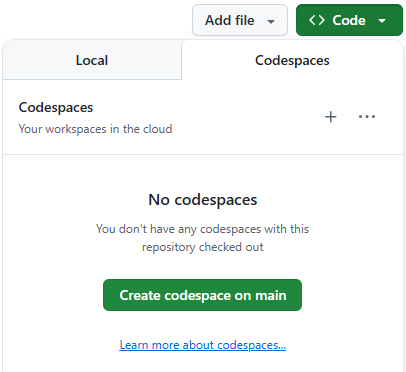
If you have a GitHub account, there are no specific requirements to get started with Vector Application Framework - Community Edition except for a web browser! Just click the Code icon in the top right corner of this page and select Create codespace on main as illustrated below.
This will open a Microsoft Visual Studio Code instance in a Container that is based on the Docker image as provided via Packages of this repository. All tools and dependencies of Vector Application Framework - Community Edition are pre-installed, just ready to use!
ℹ️ Note The initial creation of a Codespace takes a few moments, mainly due to the download of the Docker image. On subsequent access, previously created instances are still available and can be re-used. Even changes are persisted. That means, one can start a project and continue at any later point in time.
Prerequisites (w/o GitHub account)
If you don't have a GitHub account or prefer to work directly on your local machine, we recommend the following tool setup:
- Windows Subsystem for Linux (WSL 2) with Ubuntu 24.04 LTS (for Windows users only)
- Docker (recommended to install using the apt repository)
- Microsoft Visual Studio Code with Dev Containers extension
The following steps are needed to set up the environment locally:
- Clone the repository to your local machine:
git clone https://github.com/vectorgrp/application-framework.git - Open the just cloned folder in Visual Studio Code.
- Wait for the prompt of the Dev Containers extension to re-open the folder in the container.
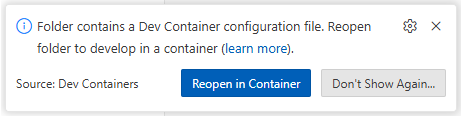
ℹ️ Note The initial startup takes a few moments, mainly due to the download of the Docker image.
- That is the setup complete. You are now ready to start with one of our provided examples in 📂 Tutorials.
Open source
The core of this solution is source-available as part of the Eclipse Automotive API Framework project. It is published under Apache-2.0 license and can be found in the following GitHub repository: application-framework.
Documentation
Learn more about motivation, concept, and building blocks of the Application Framework by reading the documentation, which is also published as part of the open source project. If you are interested in further material, for example an API specification, please do not hesitate to get in touch.
Repository content
This Git repository is the starting point for your journey with the Vector Application Framework. It represents the workspace for your projects and contains the following artifacts:
- 📂 .devcontainer
- This folder contains the devcontainer JSON file that lists Docker image and all settings for direct use of this workspace with Codespaces and Microsoft Visual Studio Code respectively.
- 📂 .vscode
- Contains scripts and configuration files for Visual Studio Code.
- 📂 Tutorials
- This directory contains step-by-step instructions for different examples that help you to get started with this bundle.
- 📄 .vafconfig.json
- Configuration file that labels this directory as workspace of the Vector Application Framework.
- 🔗 Demo
- Symlink to the folder that contains the sample files for all examples as listed in the Tutorials section. Target location of this link is only available in the container.
- 📄 LICENSE
- The LICENSE file contains the terms of use for the Vector Application Framework - Community Edition.
- 📄 README.md
- General introduction to the Vector Application Framework - Community Edition repository and overview of its contents.
- 📄 SECURITY.md
- Security policy of this project.
Questions
What is application-framework?
vectorgrp/application-framework is a public repo on GitHub by vectorgrp. Vector Application Framework.
Is application-framework open source?
It declares no license on GitHub. Public does not mean open source: without a license, nobody is granted the right to reuse it.
Does application-framework run on macOS, Windows or Linux?
Its maker has not tagged a system, so it is unknown here. Its README says what it needs.