
samexporter
Export and run SAM, MobileSAM, EfficientSAM, SAM 2/2.1, and SAM 3 as ONNX for portable image segmentation
- 436
- MIT
- 3 mo ago
Repo vietanhdev/samexporter, read from GitHub 1 min ago. vietanhdev has not joined Take My Repo.
In short
vietanhdev/samexporter is a public repo on GitHub by vietanhdev. Export and run SAM, MobileSAM, EfficientSAM, SAM 2/2.1, and SAM 3 as ONNX for portable image segmentation. It declares the MIT license on GitHub. It is written mainly in Python, has 436 stars and last changed on 2026-08-30. Nobody has reviewed it on Take My Repo yet, which says nothing about its quality. Read from GitHub on 2026-11-23.
Similar repos


AI models this project points to
SAMExporter — SAM / EfficientSAM / MobileSAM / SAM2 / SAM3 → ONNX
Export and run Segment Anything, MobileSAM, EfficientSAM, Segment Anything 2 / 2.1, and Segment Anything 3 in ONNX Runtime for portable deployment.
Supported models:
| Model | Prompt types | Notes |
|---|---|---|
| SAM ViT-B / ViT-L / ViT-H | Point, Rectangle | Original Meta SAM |
| SAM ViT-B / ViT-L / ViT-H (quantized) | Point, Rectangle | Smaller, faster variants |
| MobileSAM | Point, Rectangle | Lightweight; fast on CPU |
| EfficientSAM-Ti / S | Point, Rectangle | Apache-2.0; official split ONNX models |
| SAM2 Tiny / Small / Base+ / Large | Point, Rectangle | Meta SAM 2 |
| SAM2.1 Tiny / Small / Base+ / Large | Point, Rectangle | Improved SAM 2 |
| SAM3 ViT-H | Text, Point, Rectangle | Open-vocabulary text-driven segmentation |
Installation
Requires Python 3.11+.
pip install torch==2.10.0 torchvision==0.25.0 --index-url https://download.pytorch.org/whl/cpu
pip install "samexporter[runtime-cpu]"
Note — Windows users: The optional
onnxsimmodel simplifier (used during ONNX export) has no pre-built wheel for Windows. If you plan to export models and want simplification, install with:pip install "samexporter[runtime-cpu,export]"or enable Windows Long Path support before installing.
From source
pip install torch==2.10.0 torchvision==0.25.0 --index-url https://download.pytorch.org/whl/cpu
git clone --recurse-submodules https://github.com/vietanhdev/samexporter
cd samexporter
pip install -e ".[runtime-cpu]"
The source checkout pins the official model repositories as submodules so an
upstream main branch cannot silently change an export:
| Family | Pinned official revision |
|---|---|
| SAM 1 | dca509fe793f601edb92606367a655c15ac00fdf |
| SAM 2 / 2.1 | 2b90b9f5ceec907a1c18123530e92e794ad901a4 |
| SAM 3 | 660a5e9e1b8b4c02c0ad97229b88a09a6e4ff5b7 |
These were the latest upstream main revisions checked on 2026-08-30. Export
commands prefer these checkouts and retain installed-package fallbacks for the
published wheel.
SAM / MobileSAM — Convert to ONNX
1. Download checkpoints
Place checkpoints in original_models/:
original_models/
  sam_vit_b_01ec64.pth
  sam_vit_l_0b3195.pth
  sam_vit_h_4b8939.pth
  mobile_sam.pt
Download links:
2. Export encoder
# SAM ViT-H (most accurate)
python -m samexporter.export_encoder \
    --checkpoint original_models/sam_vit_h_4b8939.pth \
    --output output_models/sam_vit_h_4b8939.encoder.onnx \
    --model-type vit_h \
    --quantize-out output_models/sam_vit_h_4b8939.encoder.quant.onnx \
    --use-preprocess

# SAM ViT-B (fastest)
python -m samexporter.export_encoder \
    --checkpoint original_models/sam_vit_b_01ec64.pth \
    --output output_models/sam_vit_b_01ec64.encoder.onnx \
    --model-type vit_b \
    --quantize-out output_models/sam_vit_b_01ec64.encoder.quant.onnx \
    --use-preprocess
3. Export decoder
python -m samexporter.export_decoder \
    --checkpoint original_models/sam_vit_h_4b8939.pth \
    --output output_models/sam_vit_h_4b8939.decoder.onnx \
    --model-type vit_h \
    --quantize-out output_models/sam_vit_h_4b8939.decoder.quant.onnx \
    --return-single-mask
Remove --return-single-mask to return multiple mask proposals.
Batch convert all SAM models:
bash convert_all_meta_sam.sh
bash convert_mobile_sam.sh
MobileSAM uses the same checkpoint for both halves of the export:
python -m samexporter.export_decoder \
    --checkpoint original_models/mobile_sam.pt \
    --output output_models/mobile_sam/mobile_sam.decoder.onnx \
    --model-type mobile \
    --return-single-mask
4. Run inference
python -m samexporter.inference \
    --encoder_model output_models/sam_vit_h_4b8939.encoder.onnx \
    --decoder_model output_models/sam_vit_h_4b8939.decoder.onnx \
    --image images/truck.jpg \
    --prompt images/truck_prompt.json \
    --output output_images/truck.png \
    --show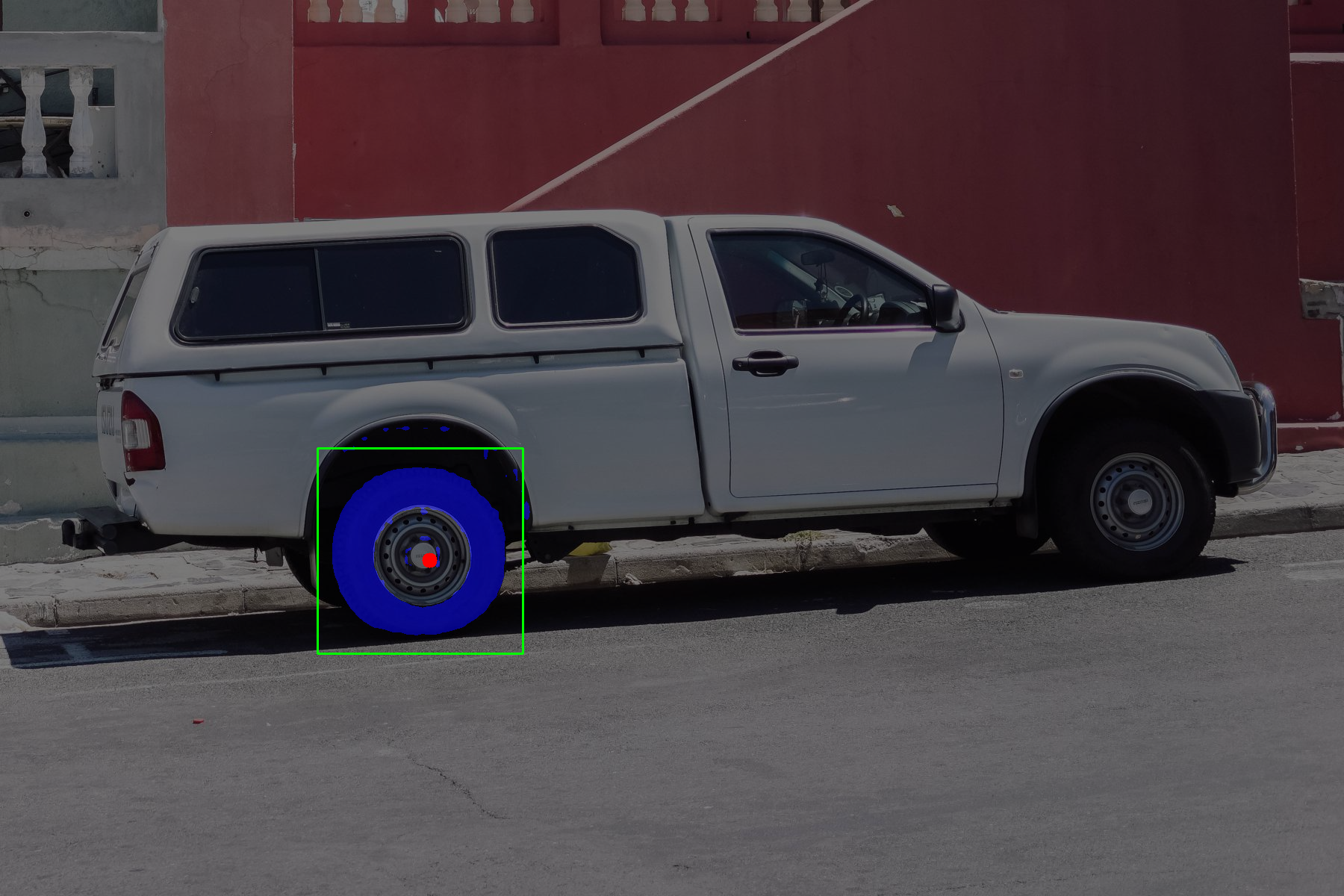
python -m samexporter.inference \
    --encoder_model output_models/sam_vit_h_4b8939.encoder.onnx \
    --decoder_model output_models/sam_vit_h_4b8939.decoder.onnx \
    --image images/plants.png \
    --prompt images/plants_prompt1.json \
    --output output_images/plants_01.png \
    --show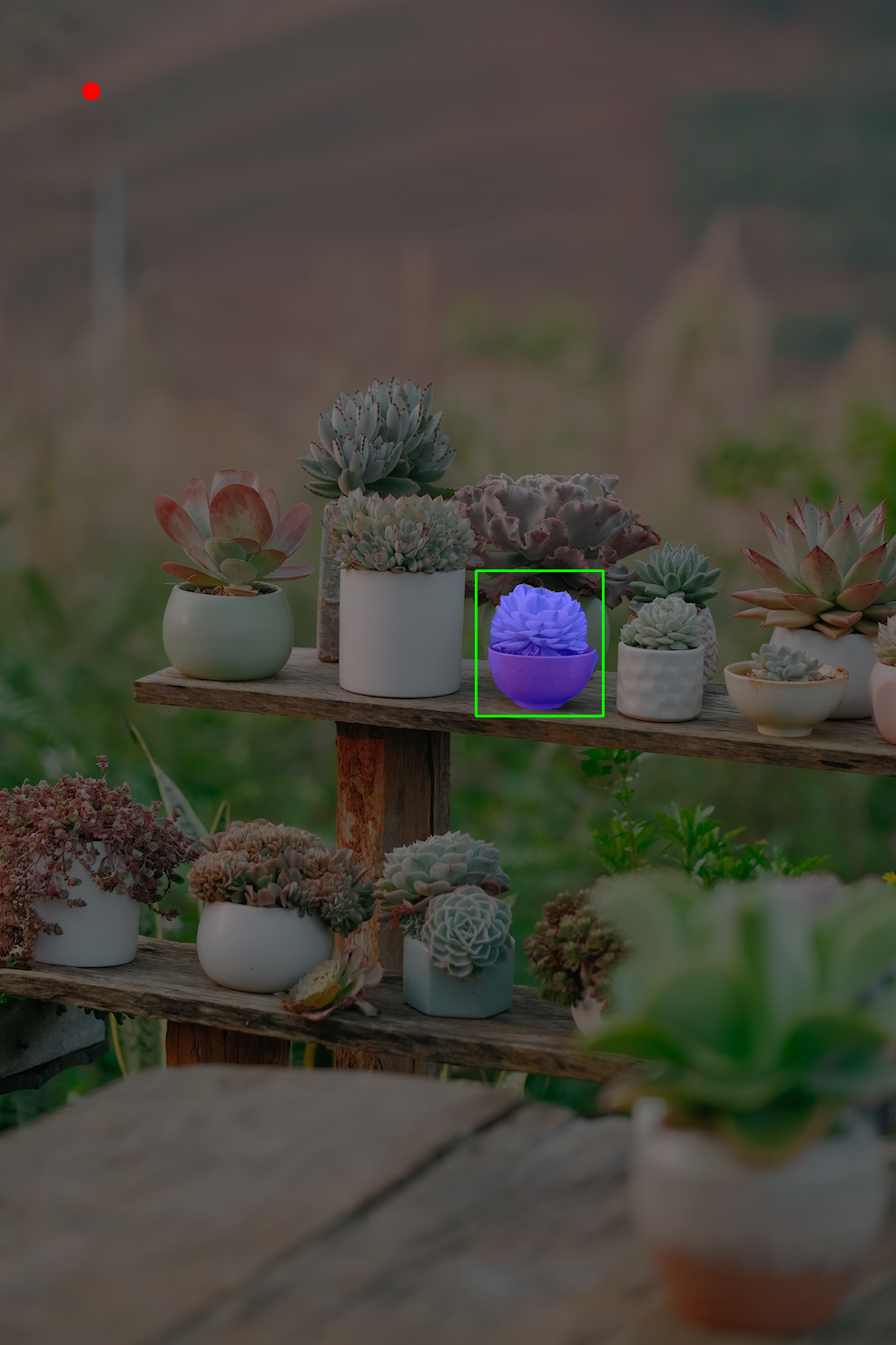
EfficientSAM — Run official ONNX models
EfficientSAM-Ti and EfficientSAM-S use a distinct lightweight architecture, so
select the efficient_sam runtime variant. The upstream project and models are
Apache-2.0 licensed.
Download the Ti encoder and decoder (about 40 MB combined):
mkdir -p output_models/efficient_sam
curl -L https://huggingface.co/yunyangx/EfficientSAM/resolve/main/efficientsam_ti_encoder.onnx \
    -o output_models/efficient_sam/efficientsam_ti_encoder.onnx
curl -L https://huggingface.co/yunyangx/EfficientSAM/resolve/main/efficientsam_ti_decoder.onnx \
    -o output_models/efficient_sam/efficientsam_ti_decoder.onnx
Run point or rectangle inference:
python -m samexporter.inference \
    --sam_variant efficient_sam \
    --encoder_model output_models/efficient_sam/efficientsam_ti_encoder.onnx \
    --decoder_model output_models/efficient_sam/efficientsam_ti_decoder.onnx \
    --image images/truck.jpg \
    --prompt images/truck_box.json \
    --output output_images/efficient_sam_truck.png
The same runtime accepts the EfficientSAM-S split ONNX pair by changing the two
model paths to efficientsam_s_encoder.onnx and efficientsam_s_decoder.onnx.
SAM2 / SAM2.1 — Convert to ONNX
1. Download checkpoints
cd original_models && bash download_sam2.sh
Or download manually:
original_models/
  sam2_hiera_tiny.pt
  sam2_hiera_small.pt
  sam2_hiera_base_plus.pt
  sam2_hiera_large.pt
  sam2.1_hiera_tiny.pt
  sam2.1_hiera_small.pt
  sam2.1_hiera_base_plus.pt
  sam2.1_hiera_large.pt
2. Install the pinned SAM2 PyTorch package
SAM2_BUILD_CUDA=0 pip install -e third_party/sam2
Omit SAM2_BUILD_CUDA=0 if you specifically need SAM2's optional CUDA
post-processing extension. It is not required for these image ONNX exports.
3. Export
# Single model example (SAM2 Tiny)
python -m samexporter.export_sam2 \
    --checkpoint original_models/sam2_hiera_tiny.pt \
    --output_encoder output_models/sam2_hiera_tiny.encoder.onnx \
    --output_decoder output_models/sam2_hiera_tiny.decoder.onnx \
    --model_type sam2_hiera_tiny

# SAM2.1 example
python -m samexporter.export_sam2 \
    --checkpoint original_models/sam2.1_hiera_tiny.pt \
    --output_encoder output_models/sam2.1_hiera_tiny.encoder.onnx \
    --output_decoder output_models/sam2.1_hiera_tiny.decoder.onnx \
    --model_type sam2.1_hiera_tiny
Batch convert all SAM2 / SAM2.1 models:
bash convert_all_meta_sam2.sh
4. Run inference
python -m samexporter.inference \
    --encoder_model output_models/sam2_hiera_tiny.encoder.onnx \
    --decoder_model output_models/sam2_hiera_tiny.decoder.onnx \
    --image images/truck.jpg \
    --prompt images/truck_prompt.json \
    --sam_variant sam2 \
    --output output_images/sam2_truck.png \
    --show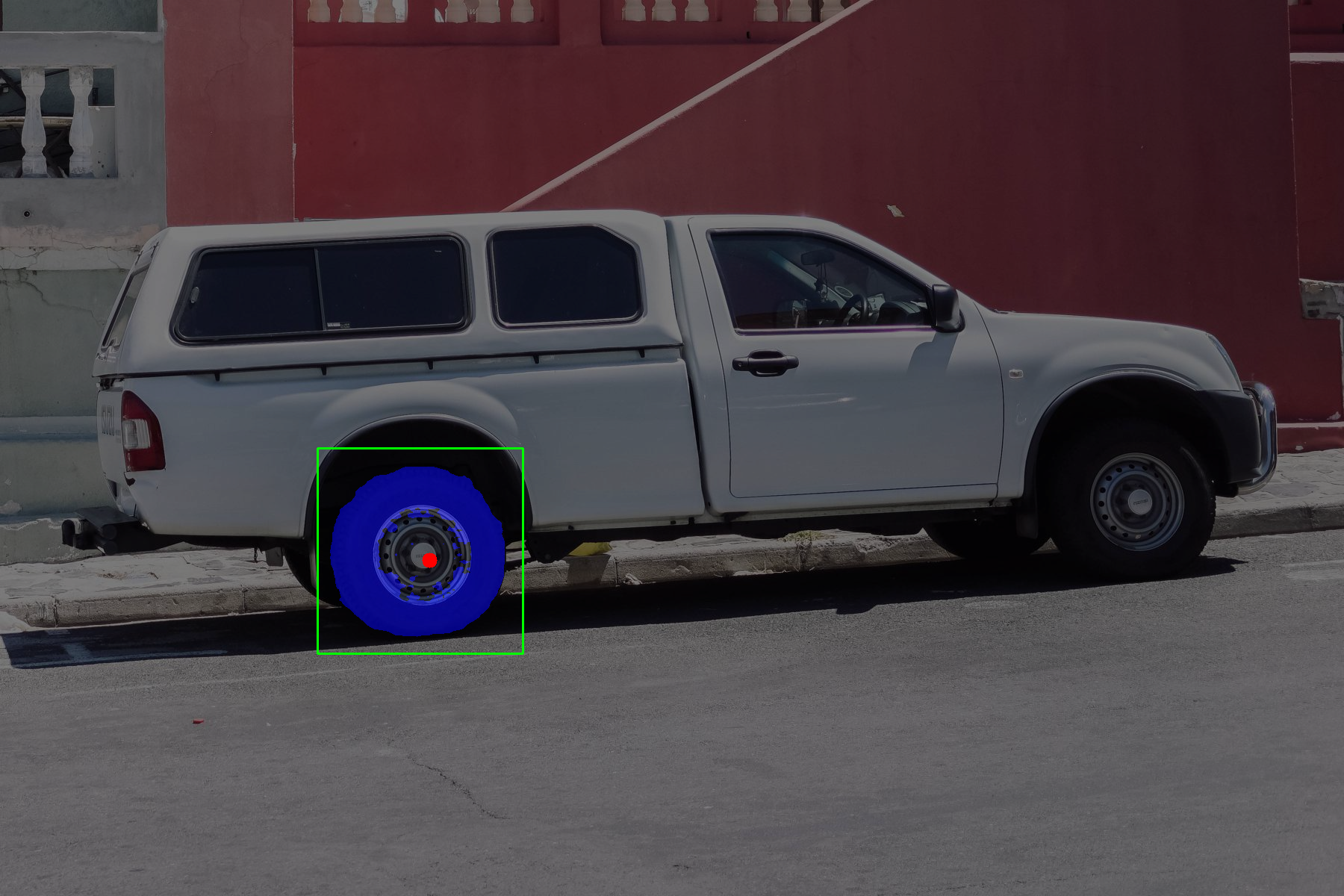
SAM3 — Convert to ONNX
SAM3 extends the SAM family with open-vocabulary, text-driven segmentation. In addition to point and rectangle prompts, it accepts text prompts (e.g., "truck", "person") to detect and segment objects without any prior training on those classes.
SAM3 exports into three separate ONNX models: an image encoder, a language (text) encoder, and a decoder.
Pre-exported ONNX models
NRL.ai publishes the real-model artifacts validated by this repository at
nrl-ai/samexporter-onnx-models.
The repository contains SAM ViT-B, MobileSAM, EfficientSAM-Ti, SAM 2.1 Tiny,
and SAM3, with checksums, source revisions, and a license in every family
directory.
hf download nrl-ai/samexporter-onnx-models \
    --include "sam3/*" \
    --local-dir output_models
Keep sam3_decoder.onnx.data beside sam3_decoder.onnx. The published bundle
was exported from facebook/sam3 revision
3c879f39826c281e95690f02c7821c4de09afae7 and source revision
660a5e9e1b8b4c02c0ad97229b88a09a6e4ff5b7.
Export from PyTorch (optional)
The pinned upstream SAM3 package supports Python 3.8 or newer and requires
NumPy <2 for source export. SAMExporter itself supports Python 3.11 through
3.13, so use any of those versions with NumPy >=1.26,<2 when exporting SAM3.
# Clone the SAM3 source (required for export only, not inference)
git submodule update --init sam3

# Install the pinned official SAM3 export dependencies
pip install -e sam3

# Export (add --simplify for ONNX simplification, requires [export] extra on Windows)
python -m samexporter.export_sam3 \
    --output_dir output_models/sam3 \
    --opset 18 \
    --device auto \
    --max-geometric-prompts 8
Pass --checkpoint /path/to/sam3.pt to use an already-downloaded official
checkpoint instead of consulting the Hugging Face cache.
Run inference
Text-only prompt (detects all instances matching the text):
python -m samexporter.inference \
    --sam_variant sam3 \
    --encoder_model output_models/sam3/sam3_image_encoder.onnx \
    --decoder_model output_models/sam3/sam3_decoder.onnx \
    --language_encoder_model output_models/sam3/sam3_language_encoder.onnx \
    --image images/truck.jpg \
    --prompt images/truck_sam3.json \
    --text_prompt "truck" \
    --output output_images/truck_sam3.png \
    --show
For broad concepts such as "plant", returning every visible matching object
is expected. Keep only the highest-confidence results when a compact preview is
more useful:
python -m samexporter.inference \
    --sam_variant sam3 \
    --encoder_model output_models/sam3/sam3_image_encoder.onnx \
    --decoder_model output_models/sam3/sam3_decoder.onnx \
    --language_encoder_model output_models/sam3/sam3_language_encoder.onnx \
    --image images/plants.png \
    --prompt images/plants_text.json \
    --text_prompt "plant" \
    --max_instances 5 \
    --output visual_results/runs/manual/sam3_plants_text_top5.png
Text + rectangle exemplar (text names the concept; the rectangle supplies a positive visual example):
python -m samexporter.inference \
    --sam_variant sam3 \
    --encoder_model output_models/sam3/sam3_image_encoder.onnx \
    --decoder_model output_models/sam3/sam3_decoder.onnx \
    --language_encoder_model output_models/sam3/sam3_language_encoder.onnx \
    --image images/truck.jpg \
    --prompt images/truck_sam3_box.json \
    --text_prompt "truck" \
    --output output_images/truck_sam3_box.png \
    --show
Text + point prompt:
python -m samexporter.inference \
    --sam_variant sam3 \
    --encoder_model output_models/sam3/sam3_image_encoder.onnx \
    --decoder_model output_models/sam3/sam3_decoder.onnx \
    --language_encoder_model output_models/sam3/sam3_language_encoder.onnx \
    --image images/truck.jpg \
    --prompt images/truck_sam3_point.json \
    --text_prompt "truck" \
    --output output_images/truck_sam3_point.png \
--showQuestions
What is samexporter?
vietanhdev/samexporter is a public repo on GitHub by vietanhdev. Export and run SAM, MobileSAM, EfficientSAM, SAM 2/2.1, and SAM 3 as ONNX for portable image segmentation.
Is samexporter open source?
It declares the MIT license on GitHub.
Does samexporter run on macOS, Windows or Linux?
Its maker tagged it for Windows. That is declared by the maker; Take My Repo has not tested it.
How do I install samexporter?
Open "Take it" on its page: Take My Repo writes an install plan for your machine and hands it to your AI agent (Claude Code, Codex or Cursor), which asks you before each step. Take My Repo has not tested it on any machine.


