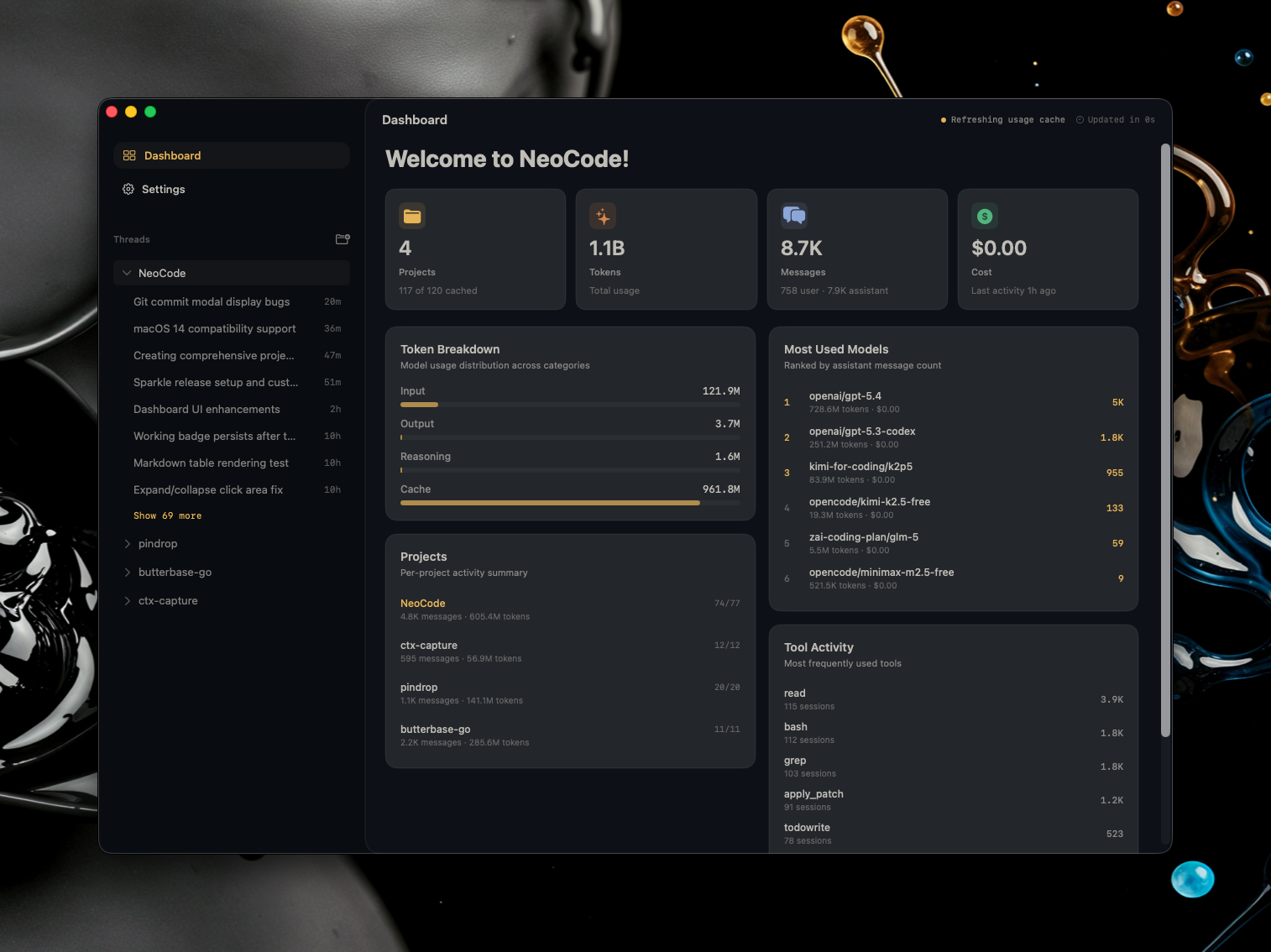

NeoCode
NeoCode is a Mac-native graphical frontend for OpenCode
- 85
- 8 mo ago
Repo watzon/NeoCode, read from GitHub 1 min ago. watzon has not joined Take My Repo.
In short
watzon/NeoCode is a public repo on GitHub by watzon. NeoCode is a Mac-native graphical frontend for OpenCode. It declares no license on GitHub. Public does not mean open source: without a license, nobody is granted the right to reuse it. It is written mainly in Swift, has 85 stars and last changed on 2026-03-21. It is archived: its maker no longer maintains it. Nobody has reviewed it on Take My Repo yet, which says nothing about its quality. Read from GitHub on 2026-11-25.
NeoCode
A native macOS SwiftUI client for OpenCode — the AI-powered coding assistant that runs locally in your projects.

NeoCode provides a beautiful, native macOS interface for OpenCode, launching per-project runtimes and connecting over HTTP/SSE to deliver AI-powered coding assistance with real-time streaming responses, tool execution, and seamless Git integration.
Table of Contents
Background
NeoCode was built to provide a first-class macOS experience for OpenCode users. While OpenCode excels as a terminal-based AI coding assistant, NeoCode brings that power into a modern, native SwiftUI application with:
- Native macOS Interface: Built with SwiftUI and designed for macOS 14+
- Real-time Streaming: Server-Sent Events (SSE) for live AI responses
- Per-Project Runtimes: Isolated OpenCode instances for each project
- Deep Git Integration: Branch management, commit workflows, and repository actions
- Markdown Rendering: Rich conversation display with syntax-highlighted code blocks
- Auto-updates: Built-in Sparkle integration for seamless updates
Install
Requirements
- macOS 14 or later
- OpenCode CLI installed (
opencodecommand available in PATH) - Xcode 16+ (for building from source)
Download
Download the latest release from the Releases page.
Install via Homebrew (Coming Soon)
brew install --cask neocode
Build from Source
git clone https://github.com/watzon/NeoCode.git
cd NeoCode
just build
Usage
- Launch NeoCode — The app will automatically detect OpenCode in your PATH
- Add a Project — Click "+" in the sidebar to add a project folder
- Start a Session — Select a project and create a new conversation
- Chat with AI — Use the composer to ask questions, request code changes, or execute commands
- Review Changes — NeoCode displays diffs, tool outputs, and file modifications in real-time
Keyboard Shortcuts
| Shortcut | Action |
|---|---|
⌘N |
New Session |
⌘⇧N |
New Project |
⌘W |
Close Current Session |
⌘, |
Open Settings |
⌘R |
Refresh Runtime Connection |
⌘⌫ |
Clear Conversation |
Features
Core
- 🚀 Per-Project Runtimes: Each project gets its own isolated OpenCode instance
- ⚡ Real-time Streaming: Live AI responses via Server-Sent Events
- 📝 Rich Markdown: Syntax-highlighted code blocks, tables, and formatting
- 🔧 Tool Execution: View and approve tool calls with detailed output
- ❓ Interactive Questions: Handle permission requests and multiple-choice prompts
Git Integration
- Branch Management: Create, switch, and delete branches from the UI
- Commit Workflow: Stage changes, write commits, and push directly
- Status Display: Visual indicators for modified, staged, and untracked files
Workspace Tools
- Editor Integration: Open files in VS Code, Xcode, or your preferred editor
- File Manager: Reveal files in Finder with a single click
- Project Discovery: Automatic detection of common project structures
Developer Experience
- Dark & Light Themes: Choose your preferred appearance
- Syntax Highlighting: Code blocks rendered with language detection
- Error Handling: User-friendly error messages with detailed logging
- Auto-updates: Sparkle-powered automatic updates
Architecture
NeoCode follows a clean, modular architecture with clear separation of concerns:
NeoCode/
├── AppShell/              # SwiftUI views for UI components
│   ├── ComposerViews.swift
│   ├── ConversationViews.swift
│   ├── SidebarViews.swift
│   ├── TranscriptViews.swift
│   └── MarkdownViews.swift
├── OpenCode/              # HTTP client and transport layer
│   ├── OpenCodeClient.swift
│   ├── OpenCodeEventDecoder.swift
│   ├── OpenCodeModels.swift
│   └── OpenCodeSSE.swift
├── Models/                # App-side domain models
├── Persistence/           # UserDefaults and caching
├── Git Services/          # Git integration
└── Theme/                 # Design system tokens
Key Components
| Component | Responsibility |
|---|---|
AppStore |
Main state container, session orchestration, persistence |
OpenCodeRuntime |
Process management, health checks, runtime lifecycle |
OpenCodeClient |
HTTP transport, request building, SSE handling |
GitBranchService |
Git branch operations and management |
WorkspaceToolService |
External editor and file manager discovery |
State Management
NeoCode uses SwiftUI's Observation framework with @Observable reference types:
AppStore— Application state, projects, sessionsOpenCodeRuntime— Runtime connection and health- Environment injection via
@Environment
All state containers are @MainActor isolated for thread safety.
Development
Prerequisites
- macOS 26.1 or later
- Xcode 16 or later
- Swift 5.0+
justcommand runner (brew install just)
Setup
# Clone the repository
git clone https://github.com/watzon/NeoCode.git
cd NeoCode

# Verify tools
just check-tools
Running Tests
# Run all tests
just test

# Run unit tests only
xcodebuild test -project "NeoCode.xcodeproj" -scheme "NeoCode" -destination 'platform=macOS' -only-testing:NeoCodeTests

# Run UI tests only
xcodebuild test -project "NeoCode.xcodeproj" -scheme "NeoCode" -destination 'platform=macOS' -only-testing:NeoCodeUITests
Project Structure
- Unit Tests:
NeoCodeTests/— Swift Testing framework - UI Tests:
NeoCodeUITests/— XCTest for smoke tests - Scripts:
scripts/— Build and release automation - Documentation:
BUILD.md,RELEASING.md
Building
Debug Build
just build
Release Build
just build-release
Create DMG
just dmg
Output: dist/NeoCode.dmg
Full Release
just release X.Y.Z
For a beta rollout with a numeric app version:
just release-beta X.Y.Z
Release artifacts are expected to be Developer ID signed and notarized before distribution.
See BUILD.md and RELEASING.md for detailed release instructions.
Build Commands
| Command | Description |
|---|---|
just build |
Debug build |
just build-release |
Release build |
just test |
Run test suite |
just archive |
Create signed archive |
just dmg |
Build signed DMG |
just notarize <dmg> |
Notarize DMG |
just release <version> |
Full release workflow |
Contributing
Contributions are welcome! Please read our Contributing Guide for details on:
- Code style and conventions
- Testing requirements
- Pull request process
- Reporting issues
Quick Start for Contributors
- Fork the repository
- Create a feature branch (
git checkout -b feature/amazing-feature) - Make your changes
- Run tests (
just test) - Commit your changes (
git commit -m 'Add amazing feature') - Push to the branch (
git push origin feature/amazing-feature) - Open a Pull Request
Code Conventions
- Swift Version: 5.0 with approachable concurrency enabled
- Architecture: MVVM with Observation framework
- Threading: MainActor-isolated observable state
- Naming: UpperCamelCase for types, lowerCamelCase for members
- Error Handling: Prefer early
guardexits, typedLocalizedErrorenums
License
MIT © Chris Watson
NeoCode is not affiliated with OpenCode. It is an independent macOS client built by the community, for the community.
Questions
What is NeoCode?
watzon/NeoCode is a public repo on GitHub by watzon. NeoCode is a Mac-native graphical frontend for OpenCode.
Is NeoCode open source?
It declares no license on GitHub. Public does not mean open source: without a license, nobody is granted the right to reuse it.
Does NeoCode run on macOS, Windows or Linux?
Its maker tagged it for macOS. That is declared by the maker; Take My Repo has not tested it.
How do I install NeoCode?
Open "Take it" on its page: Take My Repo writes an install plan for your machine and hands it to your AI agent (Claude Code, Codex or Cursor), which asks you before each step. Take My Repo has not tested it on any machine.