📊 Report Overview for Microsoft Dynamics 365 Business Central
A powerful and intuitive extension for managing, organizing, and executing custom reports in Microsoft Dynamics 365 Business Central. This extension provides a centralized dashboard for all your custom reports with advanced filtering, favorites management, and quick-access navigation.
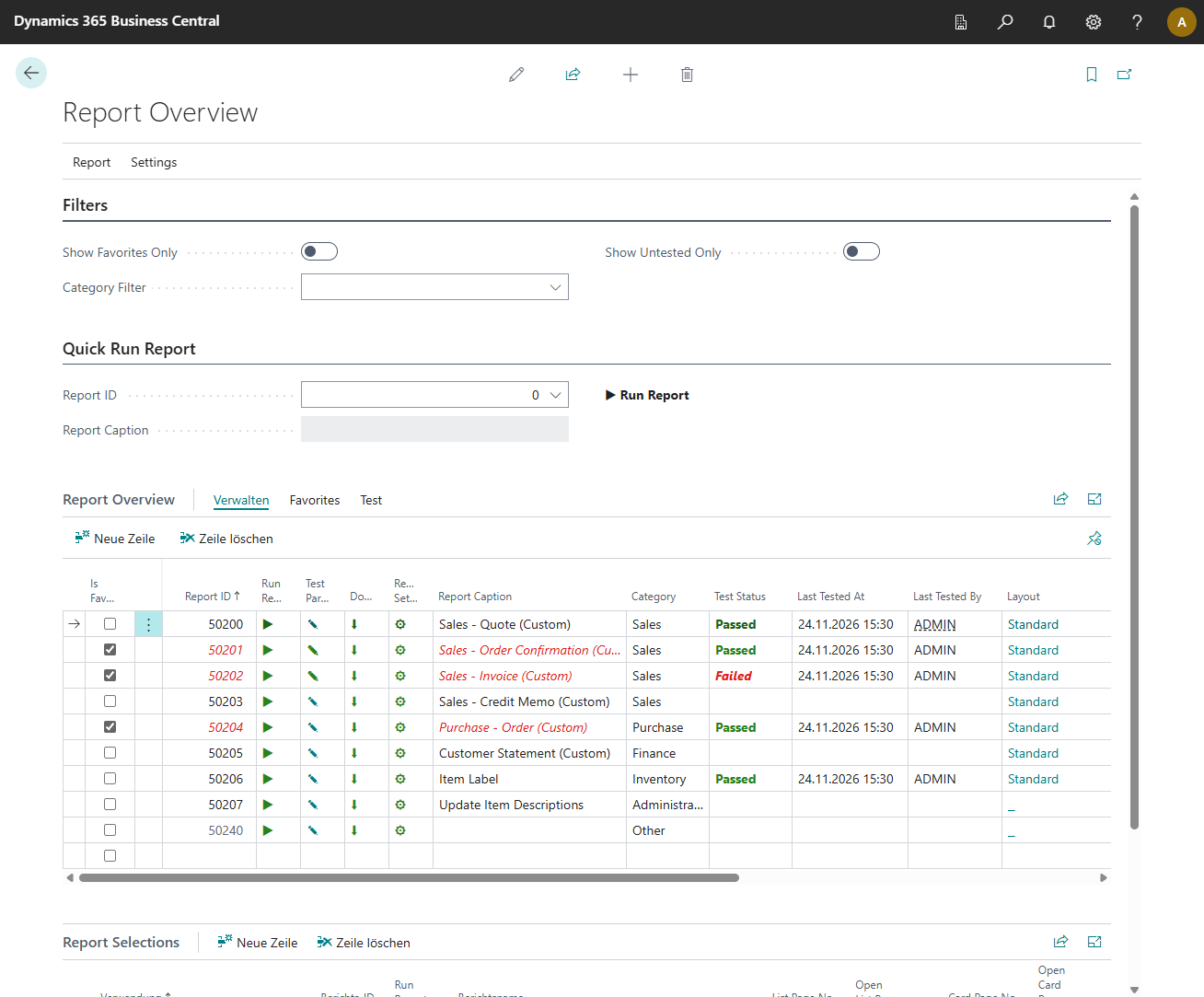 Main Dashboard with Quick Run Report, Filters, and integrated Subpages
🚀 Features
📋 Report Management Dashboard
- Centralized Overview: Single page to view all custom reports (ID range 50000-100000)
- Quick Run Report: Execute any report directly from the dashboard without navigation
- Inline Actions: Run reports and open related pages with one-click inline buttons (▶ and 🔗)
- Smart Filtering: Filter reports by favorites and categories
- Auto-Population: Automatically discovers and lists all custom reports in your environment
 Quick Run Report feature with inline execution button
⭐ Favorites System
- Mark frequently used reports as favorites with a single click
- Visual highlighting of favorite reports with attention styling
- Quick filter to show only favorite reports
- Add/Remove favorites directly from the list
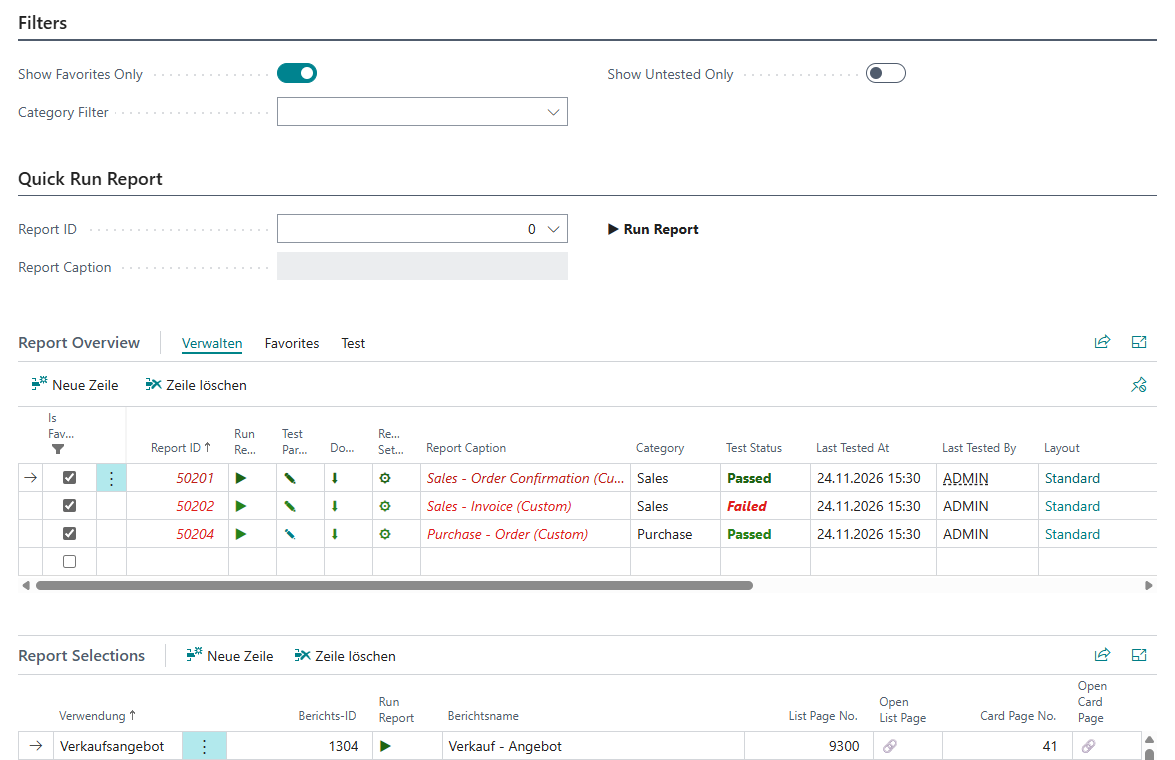 Favorite reports with visual highlighting and filter options
🏷️ Report Categorization
- Organize reports into logical categories:
- Sales - Sales-related reports
- Purchase - Purchasing and procurement reports
- Finance - Financial reports and statements
- Inventory - Stock and inventory reports
- Manufacturing - Production and manufacturing reports
- Service - Service management reports
- Human Resources - HR and employee reports
- Administration - Administrative reports
- Other - Miscellaneous reports
- Filter reports by category with dropdown selection
- Extensible enum for adding custom categories
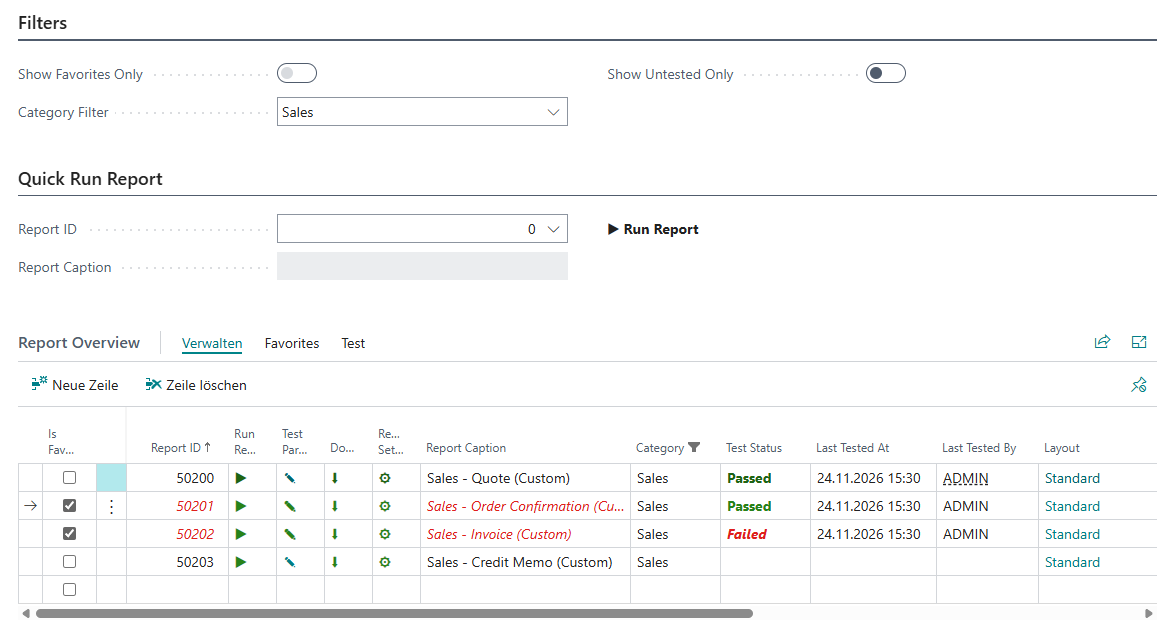 Category dropdown and filtering in action
✅ Test Tracking
- Set a Test Status (Passed or Failed) per report; the date and the user are stored with it
- Passed is shown in green, Failed in red
- Show Untested Only turns the list into a checklist, for example after an upgrade
- Keep notes per report in Test Information
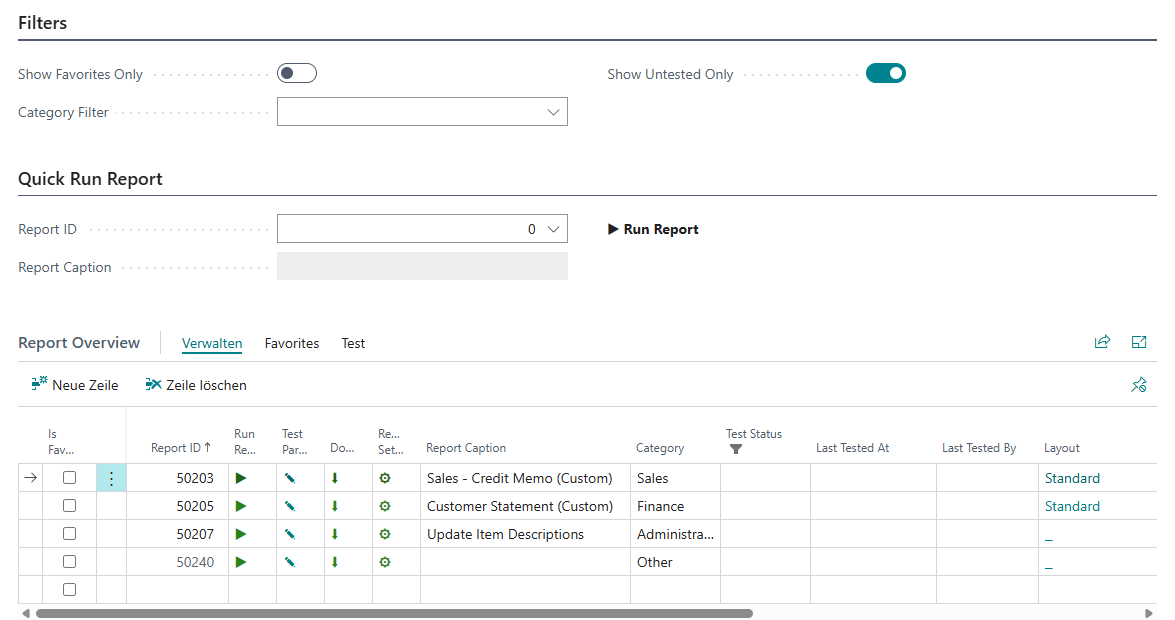 Show Untested Only lists the reports that still have to be tested
🧪 Test Parameters, Download and Layouts
- Test Parameters (✎): Store the request page values and filters of a report once, for example a document number. The run button then starts the report without request page
- Download (⬇): Download the output as PDF, Word or Excel file. With stored test parameters no request page is shown
- Report Settings (⚙): Open the request page settings that you saved for the report
- Layout: See the layout that is currently used and open the layouts of the report with one click
- Remove Missing Reports: Entries whose report no longer exists are greyed out and can be removed with one action
🏠 Favorites on the Role Center
- The part Favorite Reports shows your favorites on the Business Manager and the Administrator role center
- Run a favorite directly from the role center or open the Report Overview from there
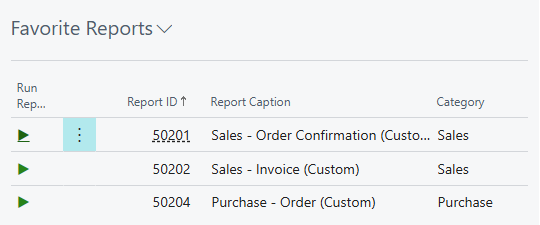 Favorite reports with run buttons on the role center
🎯 Quick Navigation
- Inline Run Buttons (▶): Execute reports directly from the list with visual feedback
- Inline Page Links (🔗): Open associated list or card pages instantly
- Report Selections Integration: View and manage standard BC report selections
- Direct Access: Navigate to Report Selection Sales/Purchase and Company Information
📊 Two Integrated Subpages
1. Report Overview Subpage
- Lists all custom reports with full details
- Editable fields for report metadata:
- Report ID and Caption
- List Page No. and Card Page No.
- Category assignment
- Test status with date and user of the last test
- Current layout
- Custom notes/information
- Favorite toggle with visual feedback
- Inline action buttons to run, download and configure a report
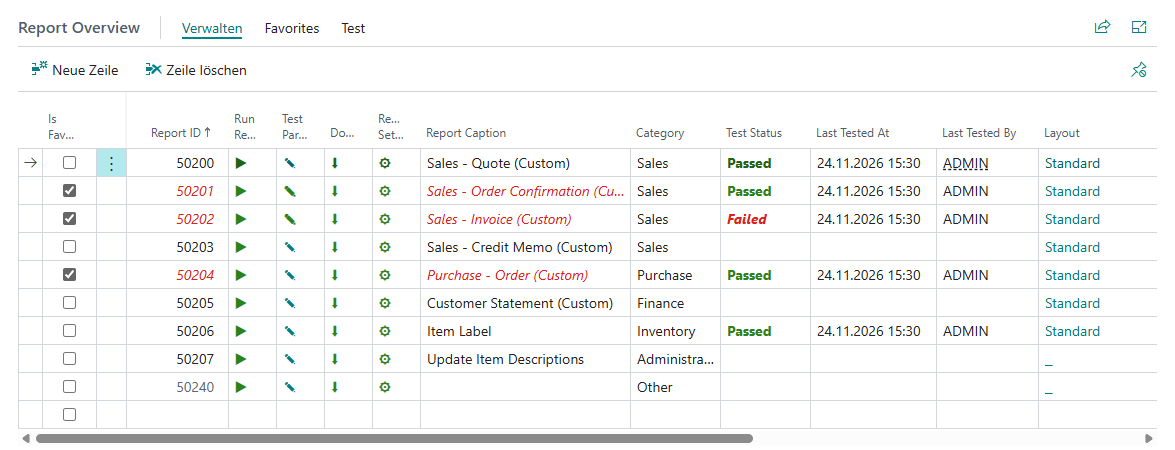 Custom reports list with inline ▶ Run and 🔗 Link buttons
2. Report Selections Subpage
- Pre-filtered standard BC report selections for documents
- Supported document types:
- Purchase: Quote, Order, Invoice, Credit Memo, Receipt, Return Shipment
- Sales: Quote, Order, Shipment, Invoice, Pro Forma Invoice, Credit Memo
- Service: Quote, Order, Invoice, Credit Memo, Shipment
- Reminder and Finance Charge Memo
- Automatic page number resolution for list and card pages
- Inline buttons for running reports and opening pages
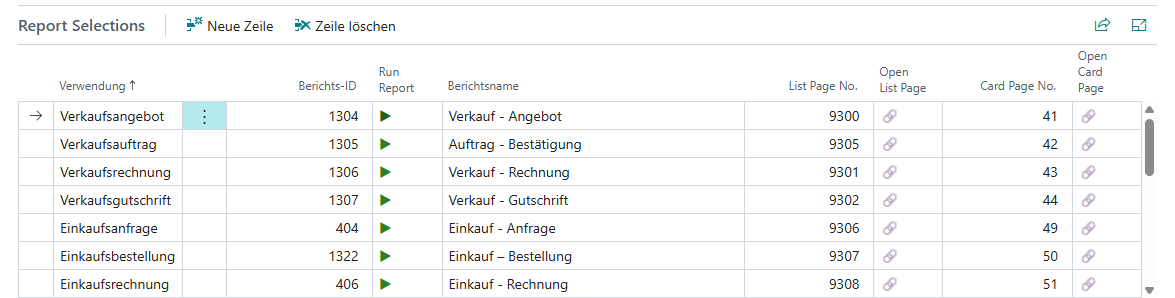 Standard BC Report Selections with inline execution and navigation
📦 Installation
Prerequisites
- Microsoft Dynamics 365 Business Central (Cloud)
- Platform version: 29.0.0.0 or higher
- Runtime: 18.0 or higher
- Object ID range: 50100-50149 available
Installation Steps
- Download the
.app file from the releases section
- Open Business Central Administration Shell
- Run:
Publish-NAVApp -ServerInstance BC -Path "path-to-app-file.app"
- Install via Extension Management in Business Central
- Assign the "Report Overview" permission set to users
🎯 Usage Guide
Opening the Report Overview
- Search for "Report Overview" in the Business Central search (Alt+Q)
- The page will automatically populate with all custom reports
Quick Run Report
- Enter a Report ID in the "Quick Run Report" section (only IDs of existing reports are accepted)
- The report caption will be displayed automatically
- Click the ▶ Run Report button to execute immediately
Managing Favorites
- Navigate to the Report Overview Subpage
- Check the "Is Favorite" checkbox for reports you use frequently
- Use the "Show Favorites Only" filter to see only marked reports
- Alternative: Use the Actions menu → Favorites → Add to Favorites
Categorizing Reports
- Select a report in the Report Overview Subpage
- Choose a category from the Category dropdown
- Use the "Category Filter" on the main page to filter by category
Using Inline Buttons
- ▶ Button: Click next to any Report ID to run the report instantly
- ✎ Button: Enter and store the test parameters of the report. The button is highlighted when test parameters are stored
- ⬇ Button: Download the output of the report as PDF, Word or Excel file
- ⚙ Button: Open the saved report settings of the report
- 🔗 Button: Click next to List/Card Page No. to open the associated page
- Visual feedback: Buttons are highlighted when the target is valid (non-zero)
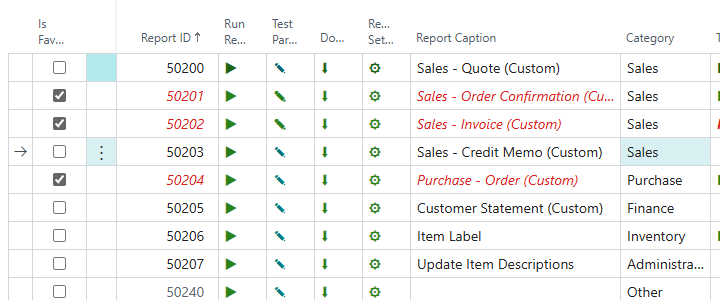 Inline action buttons with visual feedback for quick access
Filtering Reports
- Show Favorites Only: Toggle to display only favorite reports
- Category Filter: Select a category to filter reports
- Show Untested Only: Toggle to display only reports without a test status
- Show All Reports action: Clears all filters instantly
Tracking Tests
- Run the report and check its output
- Set Test Status to Passed or Failed. Last Tested At and Last Tested By are filled automatically
- Clear the test status to mark the report as untested again
Running a Report without Request Page
- Click the ✎ button of the report and enter the filters and options on the request page, for example the number of a test document
- Choose OK. The values are stored for the report
- From now on ▶ shows the preview directly, and ⬇ downloads the output without request page
- Use Test → Clear Test Parameters to remove the stored values
Checking Layouts
- The column Layout shows the layout that the report currently uses
- Click the layout name to open the report layouts of this report
Cleaning Up
- Entries whose report no longer exists are greyed out, for example after an extension was uninstalled
- Use Test → Remove Missing Reports to remove these entries
Accessing Standard Report Selections
- View pre-filtered selections in the Report Selections Subpage
- Run standard reports directly with inline ▶ buttons
- Open related document list/card pages with inline 🔗 buttons
- Navigate to full Report Selection pages via the Settings actions
🏗️ Technical Details
Object Structure
| Object Type |
Object ID |
Object Name |
Description |
| Table |
50100 |
Report Test |
Stores custom report metadata and user preferences |
| Enum |
50100 |
Report Category |
Categorization options for reports |
| Enum |
50101 |
Report Test Status |
Test result of a report (Passed, Failed) |
| Page |
50100 |
Report Overview |
Main dashboard (Card Page) |
| Page |
50102 |
Report Overview Subpage |
Custom reports list (ListPart) |
| Page |
50101 |
Report Selections Subpage |
Standard report selections (ListPart) |
| Page |
50103 |
Favorite Reports |
Favorites for the role center (ListPart) |
| PageExtension |
50100 |
Bus. Manager RC Fav. Reports |
Adds Favorite Reports to the Business Manager role center |
| PageExtension |
50101 |
Administrator RC Fav. Reports |
Adds Favorite Reports to the Administrator role center |
| Codeunit |
50100 |
Report Overview Mgt. |
Business logic and report management |
| PermissionSet |
50100 |
Report Overview |
Grants access to all extension objects |
Key Features Implementation
Report Auto-Discovery
- Scans
AllObjWithCaption for reports in range 50000-100000
- Auto-populates the
Report Test table on page open
- Uses FlowFields for dynamic report caption lookup
Filter Architecture
- Main page filter controls trigger
ApplyFilters() procedure


