storybook
Storybook is the industry standard workshop for building, documenting, and testing UI components in isolation
- 92k
- TypeScript
- MIT
- 2 h ago
Minimizer Plugin
Repo webpack/minimizer-webpack-plugin, read from GitHub 8 h ago. webpack has not joined Take My Repo.
webpack/minimizer-webpack-plugin is a public repo on GitHub by webpack. Minimizer Plugin. It declares the MIT license on GitHub. It is written mainly in JavaScript, has 1,970 stars and last changed on 2026-11-22. Nobody has reviewed it on Take My Repo yet, which says nothing about its quality. Read from GitHub on 2026-11-23.
Storybook is the industry standard workshop for building, documenting, and testing UI components in isolation
This plugin minifies your assets in a webpack build. It ships with several
built-in minimizers covering JavaScript, JSON, HTML, CSS, and images — pick one
with the minify option and target the right files with
test.
JavaScript minimizers:
terser — MinimizerPlugin.terserMinify (default). The same JavaScript-based minifier that webpack uses out of the box; produces small, well-tested output and supports the full set of extractComments modes.uglify-js — MinimizerPlugin.uglifyJsMinify. ES5-only minifier, useful when you specifically need UglifyJS-compatible output. Requires npm install --save-dev uglify-js.@swc/core — MinimizerPlugin.swcMinify. A very fast Rust-based JavaScript/TypeScript minifier. Requires npm install --save-dev @swc/core.esbuild — MinimizerPlugin.esbuildMinify. An extremely fast JS bundler/minifier; legal comments are always preserved (no extractComments support). Requires npm install --save-dev esbuild.JSON minimizer:
JSON.stringify — MinimizerPlugin.jsonMinify. Built in (no extra dependency); supports space and replacer options.HTML minimizers:
webpack.html.syntax.htmlMinify. Ships with webpack (>= 5.111.0), so it needs no extra dependency, and it is the one that minifies what a document nests: an inline <style>, every style="", a <script>, an <svg> subtree. See webpack's own minimizers.html-minifier-terser — MinimizerPlugin.htmlMinifierTerser. JavaScript-based, no native dependency. Requires npm install --save-dev html-minifier-terser.@swc/html — MinimizerPlugin.swcMinifyHtml (full HTML documents) and MinimizerPlugin.swcMinifyHtmlFragment (HTML fragments, e.g. <template> content). Very fast Rust-based platform for the Web. Requires npm install --save-dev @swc/html.@minify-html/node — MinimizerPlugin.minifyHtmlNode. A Rust HTML minifier optimised for speed and effectiveness. Requires npm install --save-dev @minify-html/node.CSS minimizers:
webpack.css.syntax.cssMinify. Ships with webpack (>= 5.111.0), so it needs no extra dependency, and it minifies the CSS a stylesheet or a document nests. See webpack's own minimizers.cssnano — MinimizerPlugin.cssnanoMinify. Built on top of PostCSS. Requires npm install --save-dev cssnano postcss.csso — MinimizerPlugin.cssoMinify. A CSS minifier with structural optimisations. Requires npm install --save-dev csso.clean-css — MinimizerPlugin.cleanCssMinify. A widely-used CSS optimiser. Requires npm install --save-dev clean-css.esbuild — MinimizerPlugin.esbuildMinifyCss. Very fast CSS minification using esbuild's CSS loader. Requires npm install --save-dev esbuild.lightningcss — MinimizerPlugin.lightningCssMinify. A Rust-based CSS parser, transformer, and minifier. Requires npm install --save-dev lightningcss.@swc/css — MinimizerPlugin.swcMinifyCss. A very fast Rust-based CSS minifier. Requires npm install --save-dev @swc/css.Image minimizers:
sharp — MinimizerPlugin.sharpMinify. Re-encodes an image as the format its name already claims (avif, gif, heif, jp2, jpeg, png, tiff, webp), and can resize, rotate, flip, grayscale, blur or sharpen on the way — from the options or from the asset's own name. Requires npm install --save-dev sharp.svgo — MinimizerPlugin.svgoMinify. Minifies SVG, including an asset/inline or asset/source SVG that no test can match. Requires npm install --save-dev svgo.imagemin — MinimizerPlugin.imageminMinify. Runs the imagemin plugins you name. Requires npm install --save-dev imagemin plus each plugin. Pair it with MinimizerPlugin.imageminGenerate under generate when a plugin converts the format, since only that can rename the asset.@napi-rs/image — MinimizerPlugin.napiRsImageMinify. Rust codecs with no system dependency; recompresses png losslessly with oxipng and jpeg with mozjpeg, and can resize, turn, mirror, grayscale, invert or blur on the way — from the options or from the asset's own name. Requires npm install --save-dev @napi-rs/image.These only minify — they never change an image's format or name; see Images.
Transport encodings:
zlib and anything shaped like it — MinimizerPlugin.compress. Compresses an
asset so a server can serve it under Content-Encoding. Takes algorithm — a
zlib function's name (gzip, brotliCompress, deflate, zstdCompress, …)
or one of your own — and compressionOptions for it, and needs no extra
dependency. Give it to minify to compress an asset in place,
or to generate as an asset generator to write the compressed
file beside the original; either way it puts itself after the minimizers,
through a getStage of its own.All of the non-default minimizers are declared as optional peer
dependencies — install only the ones you actually use. One plugin instance
covers several languages at once: give minify an array and each
minimizer is offered only the assets its own filter accepts, so JS, CSS,
HTML and JSON share a single worker pool (see Examples).
Webpack v5 comes with the latest minimizer-webpack-plugin out of the box.
If you are using Webpack v5 or above and wish to customize the options, you will still need to install minimizer-webpack-plugin.
Using Webpack v4, you have to install terser-webpack-plugin v4 (minimizer-webpack-plugin is only published for Webpack v5+).
To begin, you'll need to install minimizer-webpack-plugin:
npm install minimizer-webpack-plugin --save-devor
yarn add -D minimizer-webpack-pluginor
pnpm add -D minimizer-webpack-pluginThen add the plugin to your webpack configuration. For example:
webpack.config.js
const MinimizerPlugin = require("minimizer-webpack-plugin");

module.exports = {
  optimization: {
    minimize: true,
    minimizer: [new MinimizerPlugin()],
  },
};
Finally, run webpack using the method you normally use (e.g., via CLI or an npm script).
Works only with source-map, inline-source-map, hidden-source-map and nosources-source-map values for the devtool option.
Why?
eval wraps modules in eval("string") and the minimizer does not handle strings.cheap has no column information and the minimizer generates only a single line, which leaves only a single mapping.Using supported devtool values enable source map generation.
testincludeexcludeparallelminifyminimizerOptions (deprecated)generateextractCommentstestType:
type test = string | RegExp | (string | RegExp)[];
Default: /\.m?js(\?.*)?$/i
Test to match files against.
webpack.config.js
module.exports = {
  optimization: {
    minimize: true,
    minimizer: [
      new MinimizerPlugin({
        test: /\.js(\?.*)?$/i,
      }),
    ],
  },
};
includeType:
type include = string | RegExp | (string | RegExp)[];
Default: undefined
Files to include.
webpack.config.js
module.exports = {
  optimization: {
    minimize: true,
    minimizer: [
      new MinimizerPlugin({
        include: /\/includes/,
      }),
    ],
  },
};
excludeType:
type exclude = string | RegExp | (string | RegExp)[];
Default: undefined
Files to exclude.
webpack.config.js
module.exports = {
  optimization: {
    minimize: true,
    minimizer: [
      new MinimizerPlugin({
        exclude: /\/excludes/,
      }),
    ],
  },
};
parallelType:
type parallel = boolean | number;
Default: true
Use multi-process parallel running to improve the build speed.
Default number of concurrent runs: os.cpus().length - 1 or os.availableParallelism() - 1 (if this function is supported).
webpack/minimizer-webpack-plugin is a public repo on GitHub by webpack. Minimizer Plugin.
It declares the MIT license on GitHub.
Its maker has not tagged a system, so it is unknown here. Its README says what it needs.
Open "Take it" on its page: Take My Repo writes an install plan for your machine and hands it to your AI agent (Claude Code, Codex or Cursor), which asks you before each step. Take My Repo has not tested it on any machine.
💠 Speed up your Webpack with esbuild ⚡️
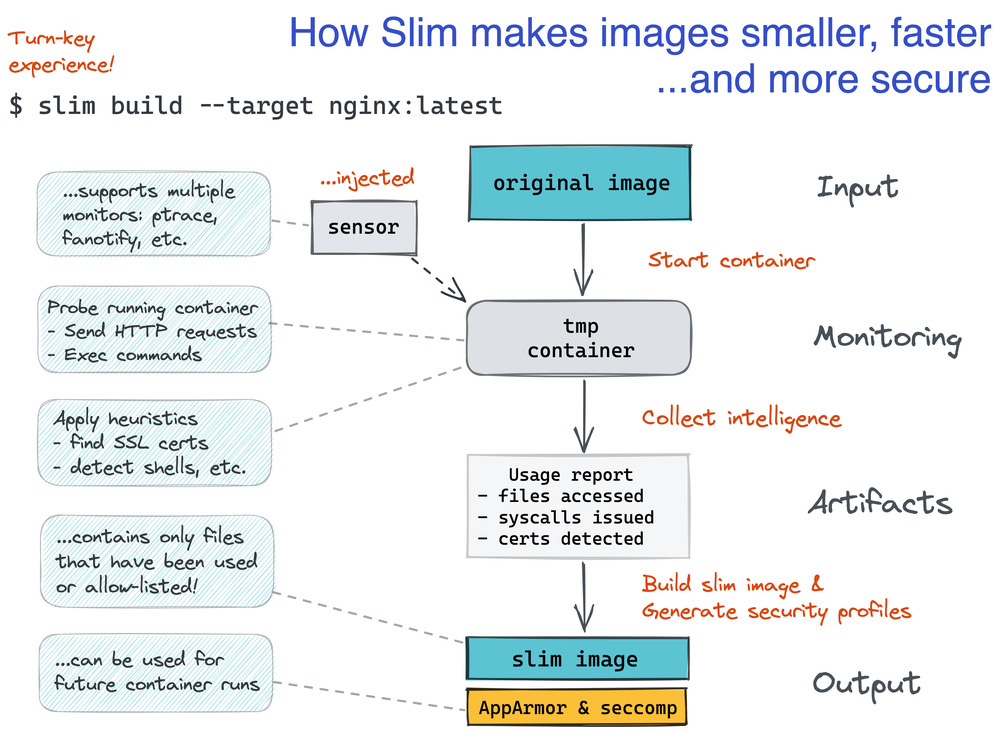
Slim(toolkit): Don't change anything in your container image and minify it by up to 30x (and for compiled languages even more) making it secure too! (free and open source)
A powerful obfuscator for JavaScript and Node.js
:tada: A magical vue admin https://panjiachen.github.io/vue-element-admin
Its last change on GitHub was on 2026-11-22. GitHub counts 6 open issues and pull requests. Take My Repo does not judge from that whether it is maintained.
Nobody has reviewed it on Take My Repo yet, which says nothing about its quality.
Take My Repo cannot say: it does not audit code and has not run minimizer-webpack-plugin. What is known comes from GitHub. It declares the MIT license on GitHub. Its last change was on 2026-11-22. It has 1,970 stars, which measure popularity, not safety. Nobody has reviewed it on Take My Repo yet, which says nothing about its quality. Read the source before you run it. With "Take it", your AI agent shows each step and asks you before running it; README text is treated as data, not as instructions.