
KernelResearchKit
Windows 11 kernel research framework demonstrating DSE bypass on Windows 11 25H2 through boot-time execution. Loads unsigned drivers by surgically patching SeCiCallbacks via native subsystem. Includes anti-loop protection and dual-path architecture. Windows 11 25H2 driver signature enforcement bypass
- 289
- 8 mo ago
Repo wesmar/KernelResearchKit, read from GitHub 1 h ago. wesmar has not joined Take My Repo.
In short
wesmar/KernelResearchKit is a public repo on GitHub by wesmar. Windows 11 kernel research framework demonstrating DSE bypass on Windows 11 25H2 through boot-time execution. Loads unsigned drivers by surgically patching SeCiCallbacks via native subsystem. Includes anti-loop protection and dual-path architecture. Windows 11 25H2 driver signature enforcement bypass. It declares no license on GitHub. Public does not mean open source: without a license, nobody is granted the right to reuse it. It is written mainly in C, has 289 stars and last changed on 2026-04-09. Nobody has reviewed it on Take My Repo yet, which says nothing about its quality. Read from GitHub on 2026-11-25.
KernelResearchKit - Windows DSE Bypass Framework
🚀 Update: 09.04.2026 — BootBypass becomes an independent project
bb.exehas been extracted into a standalone project with full documentation, clean deployment tooling, and a solid technical write-up.What changed
The boot-phase component previously embedded in this kit (
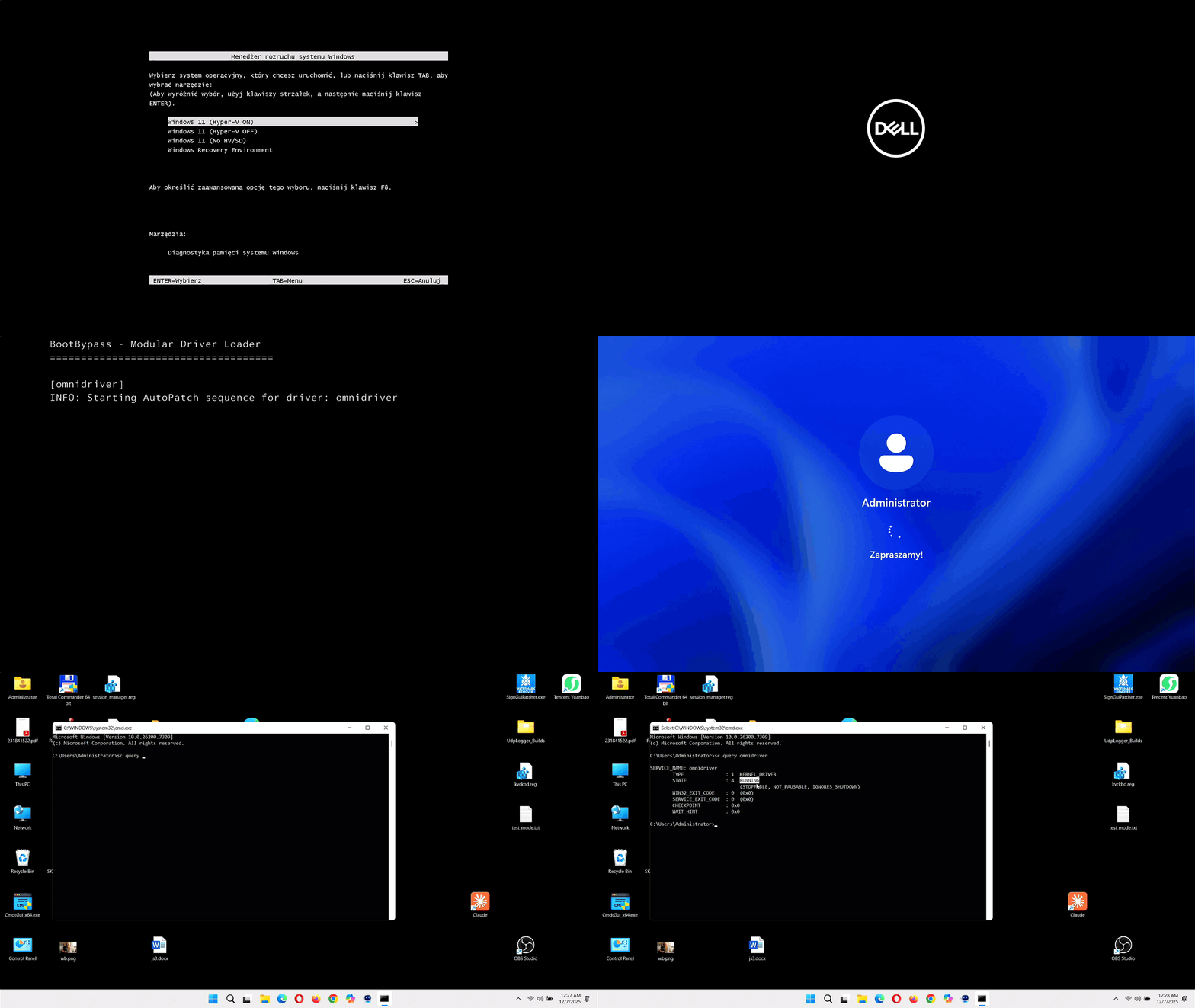
BootBypass.exe) has matured into a fully independent utility — BootBypass. It ships as a single 60 KB native binary (bb.exe) with zero external dependencies: no PDB files, no symbol server, no helper processes. The kernel offset scanner (OffsetFinder) readsntoskrnl.exedirectly from disk at boot time and resolvesSeCiCallbacksandZwFlushInstructionCacheautomatically — making the tool self-contained across Windows builds.Supported platforms: Windows 10 and Windows 11 (x64). The HVCI hive patcher handles the structural differences between both generations — Windows 11 stores NK and VK cells close together; Windows 10 scatters them across the hive file, requiring a chunked random-access scan to locate the
Enabledvalue regardless of its file offset.Download
Repository https://github.com/wesmar/BootBypass Release archive https://github.com/wesmar/BootBypass/releases/download/latest/BootBypass.7z Password github.comBoot-phase timing and driver dependencies
bb.exeexecutes at the SMSS phase — beforeservices.exe, beforewinlogon.exe, before any user-mode service initializes. This is ideal for drivers that are self-contained at the kernel level (hardware interfaces, filter drivers, research drivers with no service dependencies).However, drivers that depend on services initialized later in the boot sequence cannot be loaded at this phase without causing a BSOD. A concrete example is a keyboard filter driver that also opens a WSK (Windows Socket Kernel) network connection — as in kvckbd. At SMSS phase the network stack (
NDIS,tcpip.sys) may be present as boot-start drivers, but the WSK provider dispatch table and associated infrastructure are not yet fully registered. Attempting to initialize a WSK client at this point results in a kernel-mode crash. Such drivers must be loaded after the service initialization wave — at or after thewinlogon/themesphase, when the full service dependency chain has completed.For those scenarios,
drvloader.exe(this kit) remains the appropriate tool.bb.exetargets the early phase;drvloadertargets the runtime.Project status
Further development of KernelResearchKit is paused pending a larger architectural revision. Active research and all significant updates go into the flagship project — kvc — which is maintained on a regular basis.
🚀 Update: 22.12.2025 - Code Sanitization & PDB Version Resilience
Low-level code sanitization implemented in BootBypass(FastReboot).
Introduced code cleanup and hardening in the low-level BootBypass(FastReboot) component. Additionally, initiated testing to ensure drvloader remains functional across Windows updates and is resilient to changing PDB versions. This should work seamlessly; if issues occur, please delete the
C:\Windows\Symbolsfolder.
🚀 Update: 07.12.2025 - FastReboot Architecture ///BootBypass(FastReboot).exe///
New "FastReboot" mechanism introduced.
The new framework now utilizes direct raw-disk SYSTEM hive patching via a Chunked Rolling Scan algorithm. This allows for immediate HVCI disabling and system restart
NtShutdownSystem) purely within the Native (SMSS) phase.
- Zero Dependencies: Completely removed the
RebootGuardianservice andThemesdependency chain.- Stealth & Speed: Operations occur before Win32 subsystem initialization, leaving no service artifacts and significantly reducing reboot turnaround time.
📦 Download
KernelResearchKit.7z
🔐 Password: github.com
🎯 Overview
KernelResearchKit is a research framework for Windows kernel security analysis, demonstrating Driver Signature Enforcement (DSE) bypass through surgical manipulation of kernel code integrity callbacks. The framework provides two independent execution methods:
- BootBypass.exe - Native subsystem application executing during Windows boot sequence
- drvloader.exe - Win32 GUI application for interactive post-boot DSE manipulation
Both paths achieve identical results through different technical approaches, showcasing the versatility of the underlying vulnerability class.
Key Features
🔧 Boot-Time Execution (BootBypass)
- Executes in Native subsystem (pre-Win32, SMSS phase)
- Automatic HVCI detection with scheduled reboot mechanism
- Dual-layer anti-loop protection (cleanup + RebootGuardian service)
- Sequential driver operations: LOAD, UNLOAD, RENAME, DELETE, AutoPatch
- State persistence via
drivers.inifor DSE restoration - String obfuscation via assembly-based telemetry decoder
💻 Runtime Execution (drvloader)
- Interactive Win32 GUI with real-time DSE status checking
- Dynamic PDB symbol resolution from Microsoft Symbol Server
- Mini-PDB caching system (32-byte
.mpdbfiles) for offline operation - Automatic offset detection and
drivers.inisynchronization - No reboot required for DSE bypass operations
🛡️ Safety Mechanisms
- Dual-layer reboot loop protection (primary cleanup + RebootGuardian failsafe)
- Exception-wrapped kernel memory operations
- Registry backups before all modifications
- State validation and consistency checks
🔒 Anti-Analysis Features
- Assembly-based runtime string decoding (no hardcoded driver names)
- XOR-encoded resource embedding with multi-phase transformation
- Legitimate Windows API naming convention (
MmGetPoolDiagnosticString) - Static analysis evasion (strings.exe, IDA Pro string search resistant)
🗂️ Architecture
Component 1: BootBypass (Native Subsystem Application)
BootBypass is a native application compiled with /SUBSYSTEM:NATIVE, executing during the Session Manager Subsystem (SMSS) phase of Windows boot. This timing provides a pristine environment where security services (Windows Defender, EDR, etc.) have not yet initialized.
Execution Timeline:
sequenceDiagram
    participant UEFI
    participant ntoskrnl
    participant SMSS
    participant BootBypass
    participant Services

    UEFI->>ntoskrnl: Load Kernel
    ntoskrnl->>SMSS: Launch Session Manager
    Note over SMSS: Read BootExecute registry value
    SMSS->>BootBypass: Execute Native App (SYSTEM)
    Note over BootBypass: Security services: INACTIVE
    BootBypass->>BootBypass: Check HVCI → Extract embedded driver → Patch DSE → Load drivers
    SMSS->>Services: Start Windows Subsystem
    Note over Services: Windows Defender starts (too late)
Deployment via BootExecute Registry:
Registry Key: HKLM\SYSTEM\CurrentControlSet\Control\Session Manager
Value: BootExecute (REG_MULTI_SZ)
Content:
  autocheck autochk *
  BootBypass
Configuration File: drivers.ini
Sequential operations defined in UTF-16 LE format with sections:
[Config]- Global settings (Execute, RestoreHVCI, kernel offsets)[DriverN]- Load/unload operations with optional AutoPatch[RenameN]- File/directory renaming operations[DeleteN]- File/directory deletion (with RecursiveDelete option)[DSE_STATE]- Auto-generated state persistence for restoration
AutoPatch Feature:
Automatic DSE bypass cycle per driver. When AutoPatch=YES is set:
STEP 1: Extract vulnerable driver from embedded resources (XOR-decoded)
STEP 2: Load vulnerable driver with assembly-decoded name
STEP 3: Patch DSE callback → ZwFlushInstructionCache
STEP 4: Load target unsigned driver
STEP 5: Restore original DSE callback
STEP 6: Unload vulnerable driver
STEP 7: Delete temporary files and registry keys
This eliminates manual DSE management - each driver gets its own isolated bypass session with automatic cleanup.
Anti-Loop Protection (HVCI Handling):
When Memory Integrity (HVCI) is enabled, DSE bypass succeeds but unsigned driver loading causes BSOD. The framework implements dual-layer protection:
graph TD
    subgraph "Boot 1: Detection"
        A[BootBypass Start] --> B[Layer 1: Cleanup Attempt]
        B --> C[RemoveThemesDependency]
        C --> D[RemoveRebootGuardianService]
        D --> E{HVCI=1?}
        E -->|Yes| F[Set HVCI=0]
        F --> G[Create RebootGuardian Service]
        G --> H[Add Themes→RebootGuardian Dependency]
        H --> I[skipPatch=TRUE]
        I --> J[Exit Without DSE Patch]
    end

    subgraph "Boot 2: Guardian Trigger"
        K[Windows Services Start] --> L[Themes Dependency Check]
        L --> M[SCM Starts RebootGuardian]
        M --> N[Execute: sc delete RebootGuardian]
        N --> O[Execute: reg delete DependOnService]
        O --> P[Execute: shutdown /r /t 0 /f]
    end

    subgraph "Boot 3: Clean Operation"
        Q[BootBypass Start] --> R[Layer 1: Cleanup Success]
        R --> S{HVCI=1?}
        S -->|No| T[skipPatch=FALSE]
        T --> U[Extract & Load Vulnerable Driver]
        U --> V[Normal DSE Patching]
        V --> W[Load Unsigned Drivers]
        W --> X[Cleanup & RestoreHVCI Cosmetically]
    end

    J --> K
    P --> Q

    style F fill:#ff6b6b
    style G fill:#ff6b6b
    style V fill:#4ecdc4
Why Dual-Layer? Primary cleanup (Layer 1) executes on every boot before any operations. If system crashes/power fails before cleanup, secondary mechanism (Layer 2: RebootGuardian service) guarantees cleanup on next boot via Windows Service Control Manager.
Component 2: drvloader (Win32 Runtime Tool)
Interactive DSE bypass tool with dynamic symbol resolution and offset detection. No reboot required for operations.
Key Features:
- PDB Symbol Download: Automatic download from
https://msdl.microsoft.com/download/symbols - Mini-PDB Cache: Creates 32-byte
.mpdbfiles with extracted offsets for offline use - Offset Auto-Update: Option 2 updates
drivers.iniwith current kernel offsets - No Driver Needed for Offset Detection: PDB parsing requires no kernel driver installation
Workflow:
graph TD
    A[Launch drvloader.exe] --> B{HVCI Active?}
    B -->|Yes| C[Offer to Disable + Reboot]
    B -->|No| D[Display Menu]

    C -->|Accept| E[Disable HVCI → Reboot]
    C -->|Decline| F[Continue at Risk]

    D --> G{Select Option}
    F --> G

    G -->|1: Patch DSE| H[Extract Vulnerable Driver from Resources]
    G -->|2: Show Offsets| I[Check Mini-PDB Cache]
    G -->|3: Exit| J[Cleanup]

    H --> K[Load Driver with Assembly-Decoded Name]
    K --> L[Read Current Callback]
    L --> M[Write ZwFlushInstructionCache]
    M --> N[Verify Patch]
    N --> O[Unload Driver & Delete Files]

    I -->|Cache Hit| P[Display Cached Offsets]
    I -->|Cache Miss| Q[Download PDB from Microsoft]
    Q --> R[Extract Offsets via DbgHelp]
    R --> S[Create Mini-PDB]
    S --> T[Update drivers.ini]
    T --> P

    style K fill:#4ecdc4
    style Q fill:#ffeb3b
    style S fill:#45b7d1
Mini-PDB Format:
File: C:\Windows\symbols\ntkrnlmp.pdb\{GUID}\ntkrnlmp.mpdb
Size: 32 bytes
Structure:
  - Magic: "MINIPDB\0" (8 bytes)
  - Version: 1 (4 bytes)
  - Reserved: (4 bytes)
  - Offset_SeCiCallbacks: (8 bytes)
  - Offset_SafeFunction: (8 bytes)
Option 2 Functionality:
- Check for existing mini-PDB in cache (instant if found)
- If not cached: download full PDB from Microsoft Symbol Server
- Parse PDB using DbgHelp API to extract symbol offsets
- Create mini-PDB for future use (no download needed next time)
- Update
drivers.ini[Config] section with current offsets - Display offset information for external tools
Important: Offsets are constant for a specific Windows build. After Windows update (new build), run Option 2 to regenerate offsets. Same build = same offsets (deterministic).
Component 3: Assembly-Based String Obfuscation
Critical Innovation: The vulnerable driver name is never stored as a plaintext string in the binary. Instead, it's encoded in assembly data and decoded at runtime through a multi-phase algorithm.
MmPoolTelemetry.asm - Stealth Decoder:
Questions
What is KernelResearchKit?
wesmar/KernelResearchKit is a public repo on GitHub by wesmar. Windows 11 kernel research framework demonstrating DSE bypass on Windows 11 25H2 through boot-time execution. Loads unsigned drivers by surgically patching SeCiCallbacks via native subsystem. Includes anti-loop protection and dual-path architecture. Windows 11 25H2 driver signature enforcement bypass.