slate
A completely customizable framework for building rich text editors. (Currently in beta.)
- 32k
- TypeScript
- MIT
- 11 d ago
Angular view layer for Slate
Repo worktile/slate-angular, read from GitHub 17 min ago. worktile has not joined Take My Repo.
worktile/slate-angular is a public repo on GitHub by worktile. Angular view layer for Slate. It declares the MIT license on GitHub. It is written mainly in TypeScript, has 188 stars and last changed on 2026-11-13. Nobody has reviewed it on Take My Repo yet, which says nothing about its quality. Read from GitHub on 2026-11-22.
Angular view layer for Slate
Slate is a completely customizable framework for building rich text editors, including the model layer and view layer, but the slate only provides the view layer based on react, slate-angular is a supplement to the slate view layer, to help you use angular to build rich text editor.
slate-angular is inspired by slate-react, and try to keep the style of slate and angular, friendly to Chinese input, start your slate-angular journey.
Chrome、Edge、Safari、Firefox、QQ Browser
"dependencies": {
    "direction": "^2.0.1",
    "is-hotkey": "^0.2.0",
    "slate": "~0.101.5",
    "slate-history": "~0.100.0",
    "slate-angular": "~16.1.0-next.8"
}
import { FormsModule } from '@angular/forms';
import { SlateModule } from 'slate-angular';

@NgModule({
  imports: [
    // ...,
    FormsModule,
    SlateModule
  ],
  // ...
})
export class AppModule { }
src/styles.scss
@use 'slate-angular/styles/index.scss';

// basic richtext styles
.slate-editable-container {
    [slate-underlined][slate-strike] {
        text-decoration: underline line-through;
    }
    [slate-strike] {
        text-decoration: line-through;
    }
    [slate-underlined] {
        text-decoration: underline;
    }
    [slate-italic] {
        font-style: italic;
    }
    [slate-bold] {
        font-weight: bold;
    }
    [slate-code-line] {
        margin: 0 4px;
        padding: 2px 3px;
        border: 1px solid rgba($color: #000000, $alpha: 0.08);
        border-radius: 2px;
        background-color: rgba($color: #000000, $alpha: 0.06);
    }

    blockquote {
        margin: 0;
        margin-left: 0;
        margin-right: 0;
        color: #888;
        padding-left: 10px !important;
        border-left: 4px solid #eee;
    }

    h1,h2,h3 {
        margin: 0px;
    }

    &>[data-slate-node="element"],&>slate-block-card {
        margin-bottom: 12px;
    }
}

// basic richtext container styles
.demo-richtext-container {
    max-width: 42em;
    margin: 50px auto;
    background-color: #fff;
    box-shadow: 0px 0px 4px rgba(0, 0, 0, 0.2);
}
import { ChangeDetectorRef, Component, ElementRef, Renderer2 } from "@angular/core";
import { BaseTextComponent } from "slate-angular";

export enum MarkTypes {
    bold = 'bold',
    italic = 'italic',
    underline = 'underlined',
    strike = 'strike',
    code = 'code-line'
}

@Component({
    selector: 'span[textMark]',
    template: ``,
    host: {
        'data-slate-node': 'text'
    }
})
export class DemoTextMarkComponent extends BaseTextComponent {
    attributes: string[] = [];

    constructor(public renderer2: Renderer2) {
        super();
    }

    applyTextMark() {
        this.attributes.forEach(attr => {
            this.renderer2.removeAttribute(this.elementRef.nativeElement, attr);
        });
        this.attributes = [];
        for (const key in this.text) {
            if (Object.prototype.hasOwnProperty.call(this.text, key) && key !== 'text') {
                const attr = `slate-${key}`;
                this.renderer2.setAttribute(this.elementRef.nativeElement, attr, 'true');
                this.attributes.push(attr);
            }
        }
    }

    onContextChange() {
        super.onContextChange();
        this.applyTextMark();
    }
}
Template
<div class="demo-richtext-container">
    <slate-editable [editor]="editor" [(ngModel)]="value"
        (ngModelChange)="valueChange($event)"
        [renderElement]="renderElement"
        [renderText]="renderText">
        <ng-template #heading_1 let-context="context" let-viewContext="viewContext">
            <h1 slateElement [context]="context" [viewContext]="viewContext"></h1>
        </ng-template>
        <ng-template #heading_2 let-context="context" let-viewContext="viewContext">
            <h2 slateElement [context]="context" [viewContext]="viewContext"></h2>
        </ng-template>
        <ng-template #heading_3 let-context="context" let-viewContext="viewContext">
            <h3 slateElement [context]="context" [viewContext]="viewContext"></h3>
        </ng-template>
        <ng-template #blockquote let-context="context" let-viewContext="viewContext">
            <blockquote slateElement [context]="context" [viewContext]="viewContext"></blockquote>
        </ng-template>
        <ng-template #ul let-context="context" let-viewContext="viewContext">
            <ul slateElement [context]="context" [viewContext]="viewContext"></ul>
        </ng-template>
        <ng-template #ol let-context="context" let-viewContext="viewContext">
            <ol slateElement [context]="context" [viewContext]="viewContext"></ol>
        </ng-template>
        <ng-template #li let-context="context" let-viewContext="viewContext">
            <li slateElement [context]="context" [viewContext]="viewContext"></li>
        </ng-template>
    </slate-editable>
</div>
TS
import { Component, ViewChild, TemplateRef } from '@angular/core';
import { createEditor, Element } from 'slate';
import { withHistory } from 'slate-history';
import { withAngular } from 'slate-angular';
import { DemoTextMarkComponent, MarkTypes } from './text-mark.component';

@Component({
  selector: 'app-root',
  templateUrl: './app.component.html',
  styleUrls: ['./app.component.scss']
})
export class AppComponent {
  	title = 'slate-angular-basic';
    value = initialValue;

    @ViewChild('heading_1', { read: TemplateRef, static: true })
    headingOneTemplate!: TemplateRef<any>;

    @ViewChild('heading_2', { read: TemplateRef, static: true })
    headingTwoTemplate!: TemplateRef<any>;

    @ViewChild('heading_3', { read: TemplateRef, static: true })
    headingThreeTemplate!: TemplateRef<any>;

    @ViewChild('blockquote', { read: TemplateRef, static: true })
    blockquoteTemplate!: TemplateRef<any>;

    @ViewChild('ul', { read: TemplateRef, static: true })
    ulTemplate!: TemplateRef<any>;

    @ViewChild('ol', { read: TemplateRef, static: true })
    olTemplate!: TemplateRef<any>;

    @ViewChild('li', { read: TemplateRef, static: true })
    liTemplate!: TemplateRef<any>;

    editor = withHistory(withAngular(createEditor()));

    ngOnInit(): void {
    }

    valueChange(value: Element[]) {
    }

    renderElement = (element: any) => {
        if (element.type === 'heading-one') {
            return this.headingOneTemplate;
        }
        if (element.type === 'heading-two') {
            return this.headingTwoTemplate;
        }
        if (element.type === 'heading-three') {
            return this.headingThreeTemplate;
        }
        if (element.type === 'block-quote') {
            return this.blockquoteTemplate;
        }
        if (element.type === 'numbered-list') {
            return this.olTemplate;
        }
        if (element.type === 'bulleted-list') {
            return this.ulTemplate;
        }
        if (element.type === 'list-item') {
            return this.liTemplate;
        }
        return null;
    }

    renderText = (text: any) => {
        if (text[MarkTypes.bold] || text[MarkTypes.italic] || text[MarkTypes.code] || text[MarkTypes.underline]) {
            return DemoTextMarkComponent;
        }
      	return null;
    }
}

const initialValue = [
    {
        type: 'paragraph',
        children: [
            { text: 'This is editable ' },
            { text: 'rich', bold: true },
            { text: ' text, ' },
            { text: 'much', bold: true, italic: true },
            { text: ' better than a ' },
            { text: '<textarea>', 'code-line': true },
            { text: '!' }
        ]
    },
    {
        type: 'heading-one',
        children: [{ text: 'This is h1 ' }]
    },
    {
        type: 'heading-three',
        children: [{ text: 'This is h3 ' }]
    },
    {
        type: 'paragraph',
        children: [
            {
                text: `Since it's rich text, you can do things like turn a selection of text `
            },
            { text: 'bold', bold: true },
            {
                text: ', or add a semantically rendered block quote in the middle of the page, like this:'
            }
        ]
    },
    {
        type: 'block-quote',
        children: [{ text: 'A wise quote.' }]
    },
    {
        type: 'paragraph',
        children: [{ text: 'Try it out for yourself!' }]
    },
    {
        type: 'paragraph',
        children: [{ text: '' }]
    }
];
Before starting, you need to declare the DemoTextMarkComponent component in NgModule
You can checkout a stackblitz implementation of the readme usage
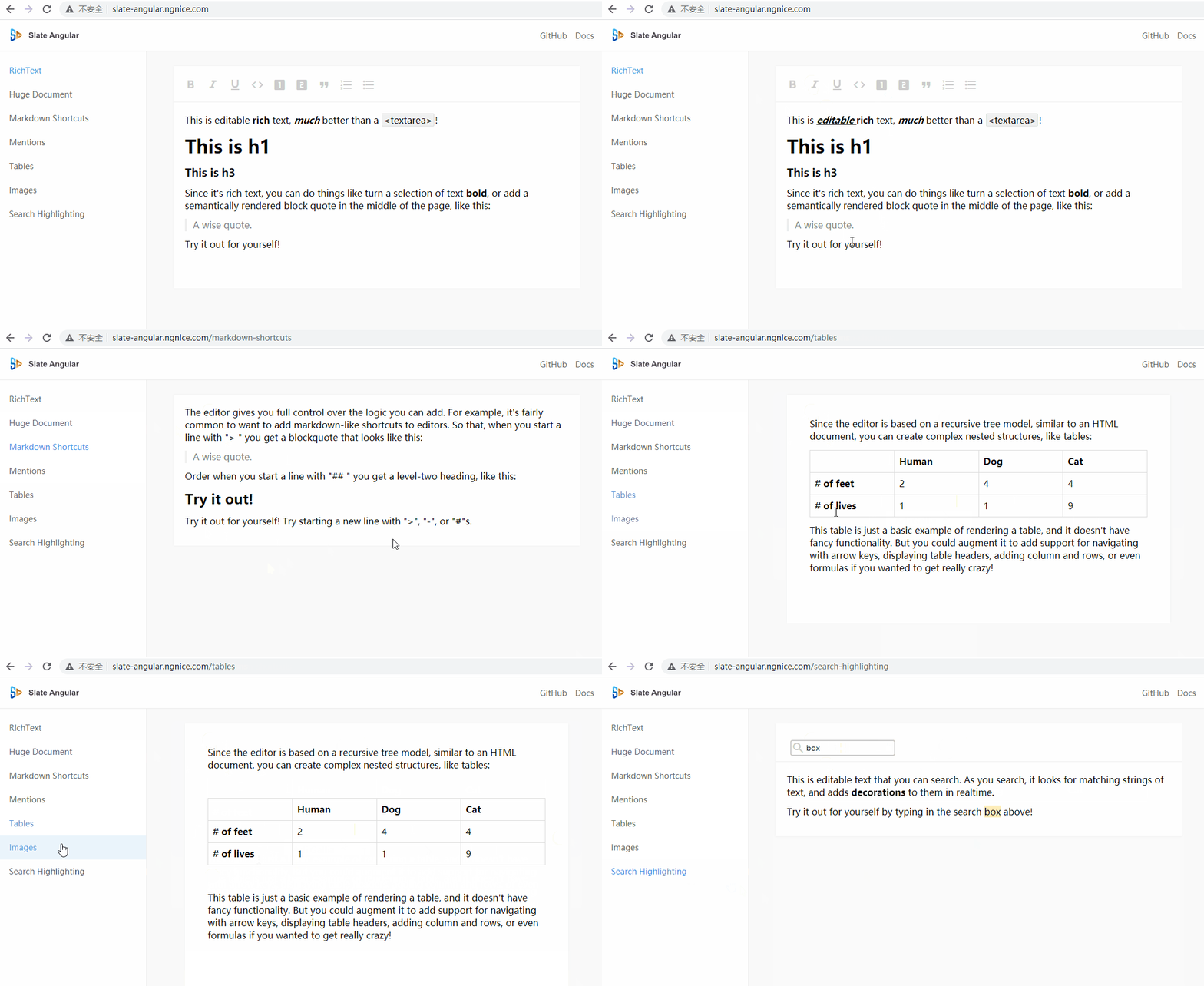
Start the demo and you will get the following interface
Currently, there is no toolbar. You need to add toolbars and processing functions according to your own icon library.
basic usage: https://github.com/pubuzhixing8/slate-angular-basic

PingCode Wiki |
npm install // Installs package dependencies
npm run start              // run demo
npm run build              // build new slate-angular

npm run test               // run unit tests
Angular >= 10.*
Slate >= 0.63.0
🌟 Stars and 📥 Pull requests to worktile/slate-angular are welcome!
worktile/slate-angular is a public repo on GitHub by worktile. Angular view layer for Slate.
It declares the MIT license on GitHub.
Its maker has not tagged a system, so it is unknown here. Its README says what it needs.
Open "Take it" on its page: Take My Repo writes an install plan for your machine and hands it to your AI agent (Claude Code, Codex or Cursor), which asks you before each step. Take My Repo has not tested it on any machine.
Its last change on GitHub was on 2026-11-13. Take My Repo does not judge from that whether it is maintained.
Nobody has reviewed it on Take My Repo yet, which says nothing about its quality.
A completely customizable framework for building rich text editors. (Currently in beta.)
:books: 免费的计算机编程类中文书籍,欢迎投稿
Quill is a modern WYSIWYG editor built for compatibility and extensibility
A completely customizable framework for building all-in-one drawing whiteboard
🚀🌍🚀A powerful, reliable, fully-featured and production ready Micro Frontend library for Angular.