
wp-graphql-filter-query
Adds taxonomy filtering and aggregation support to WP GraphQL
- 20
- GPL-2.0
- 9 mo ago
Repo wpengine/wp-graphql-filter-query, read from GitHub 2 d ago. wpengine has not joined Take My Repo.
In short
wpengine/wp-graphql-filter-query is a public repo on GitHub by wpengine. Adds taxonomy filtering and aggregation support to WP GraphQL. It declares the GPL-2.0 license on GitHub. It is written mainly in PHP, has 20 stars and last changed on 2026-03-04. It is archived: its maker no longer maintains it. Nobody has reviewed it on Take My Repo yet, which says nothing about its quality. Read from GitHub on 2026-11-21.
WPGraphQL Filter Query
[!CAUTION] This repository has been archived. WPGraphQL Filter Query is no longer actively maintained. No further updates, feature development, or support will be provided. Thank you for using WPGraphQL Filter Query.
Adds taxonomy filtering and aggregation support to WPGraphQL.
- WPGraphQL Filter Query
WPGraphQL limitation
The introduction of WPGraphQL helped make access to WordPress headless data even easier than via REST, but there are still some areas and use-cases that are outside that repository’s existing focus or scope. From interfacing with the WPGraphQL team it was noted that there was a community desire for a query filter argument implementation to extend the existing plugin, which could support scenarios such as the taxQuery candidate here.
Solution
In collaboration with the WPGraphQL team we built this plugin to:
- Add a
filterWPGraphQL input argument connection, for all Post types, which supports the passing of multiple Taxonomies for refinement. - Add an
aggregationfield connection, available in the body of all Post types, which can return a sum of the names of each Taxonomy that occurs, and a count of the number of occurrences of each, in each query response.
What are Filters (and Aggregates)
Filters allow the limiting of Post results by Taxonomy fields & values. Aggregates give a summary of such Taxonomies available to a given query - based on a sum of the resulting Posts associated Taxonomies. So, if one queried all Posts on food (this would need to be the name of a related Taxonomy here) from a Lifestyle blog, one might expect to receive all food-related Posts, plus the sum of all Taxonomies that occurred within the Posts' results - such as sweet or savory, but probably not home decor or yoga (unless a topic related to both food and yoga perhaps).
Broadly speaking, WordPress Taxonomies have two default types: Categories & Tags. Categories are more of a grouping mechanism, which supports hierarchy and siblings (animal-> feline-> tiger, lion, cat), whereas Tags are more for additional shared information (green, heavy, out-of-stock). This plugin supports both of these Taxomonies within both Filters and Aggregates.
Use Case Example
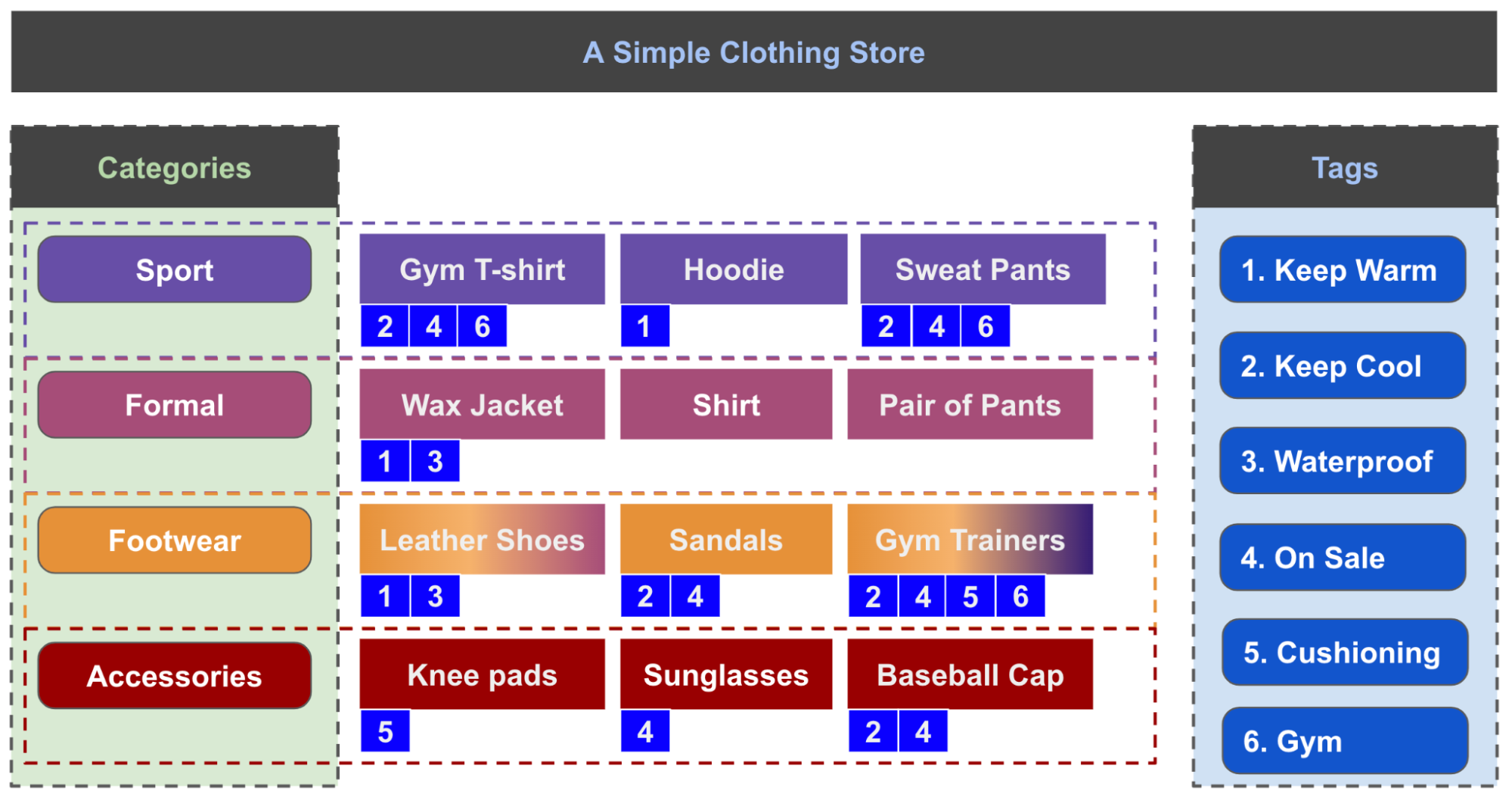
Using an example of a fictional Sample Clothing Store WordPress site we can further illustrate the use of filters. Here, the products are separated into 4, sometimes overlapping, Categories: Sport, Formal, Footwear and Accessories - there will be no inheritance Categories in this simple example, but some sibling Categories. There are 6 possible Tags also available, for further information on and grouping of the stock, and for shared traits: Keep Warm, Keep Cool, Waterproof, On Sale, Cushioning, and Gym. The 12 products are shown in the image below - 4 in each Category, but one can see Leather Shoes shares both Formal and Footwear Categories, while Gym Trainers shares both Sport and Footwear Categories. The blue numbers below each product show their associated Tags.
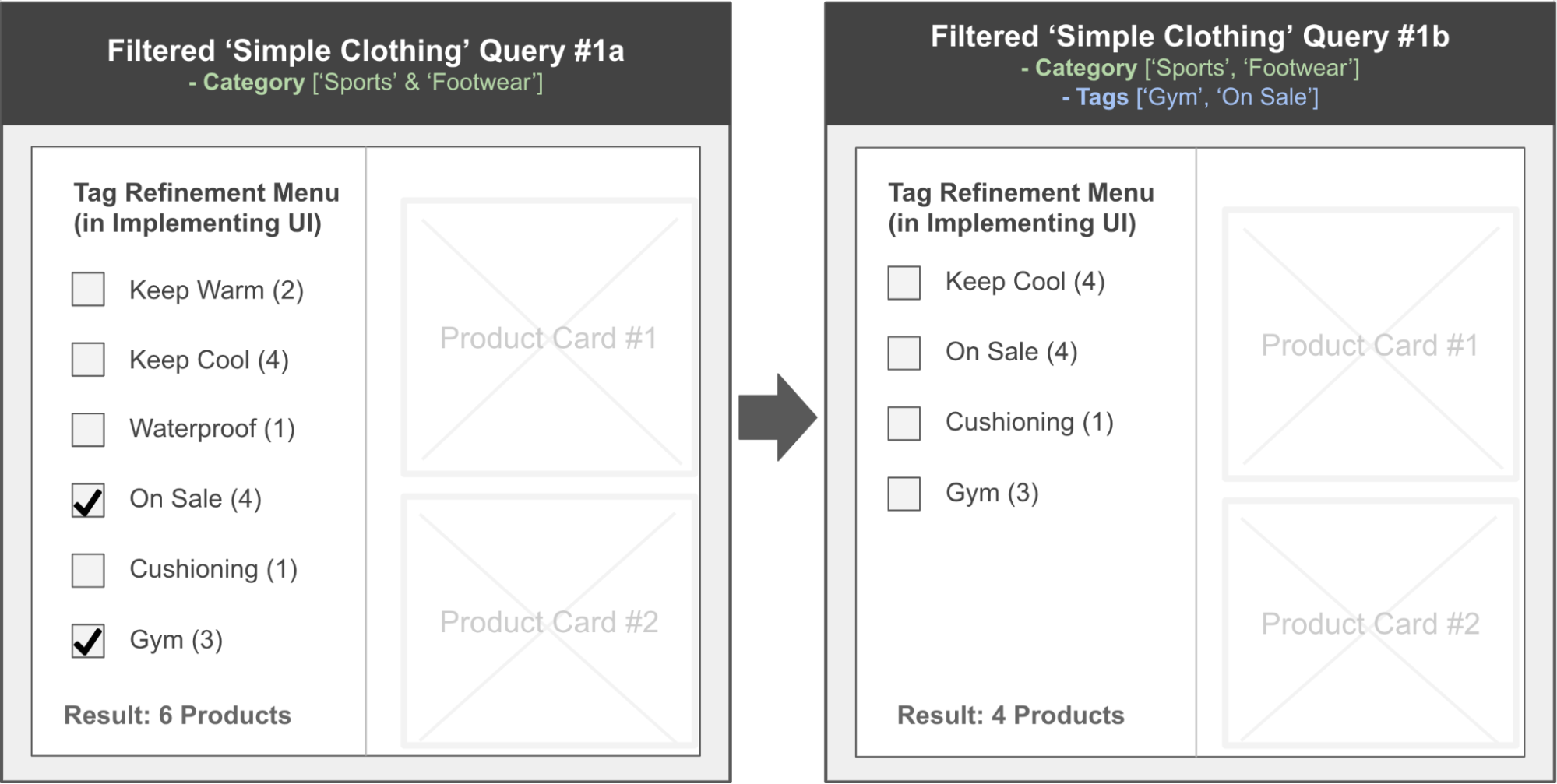
Now, if we pictured this sample store having its own website frontend (reading from our WordPress Headless WPGraphQL) which could display all of the products, and allow filtering by the Categories and Tags e.g. query #1 image.
In this query the customer has visited perhaps a Featured Sportswear & Footwear section, from one of the website’s homepage links, which automatically filter-queried the products by the given Categories of Sport & Footwear, while also returning the Aggregations of still-applicable Taxonomies (by name & occurrence count).
From this filter-by-category view the customer could then further refine what products they are interested in, by selecting only certain Tags from the Aggregated Tags returned (which was all 6 in this example). Next, in the query #1 image below, one can see some of the Tag boxes being checked so that, by query #2, we can see the products returned from the filter-by-category-and-tag query have gone from 6 (Gym T-shirt, Hoodie, Sweat Pants, Leather Shoes, Sandals, Gym Trainers) to 4 (Gym T-shirt, Sweat Pants, Sandals, Gym Trainers) in number.
We can see in both query results that:
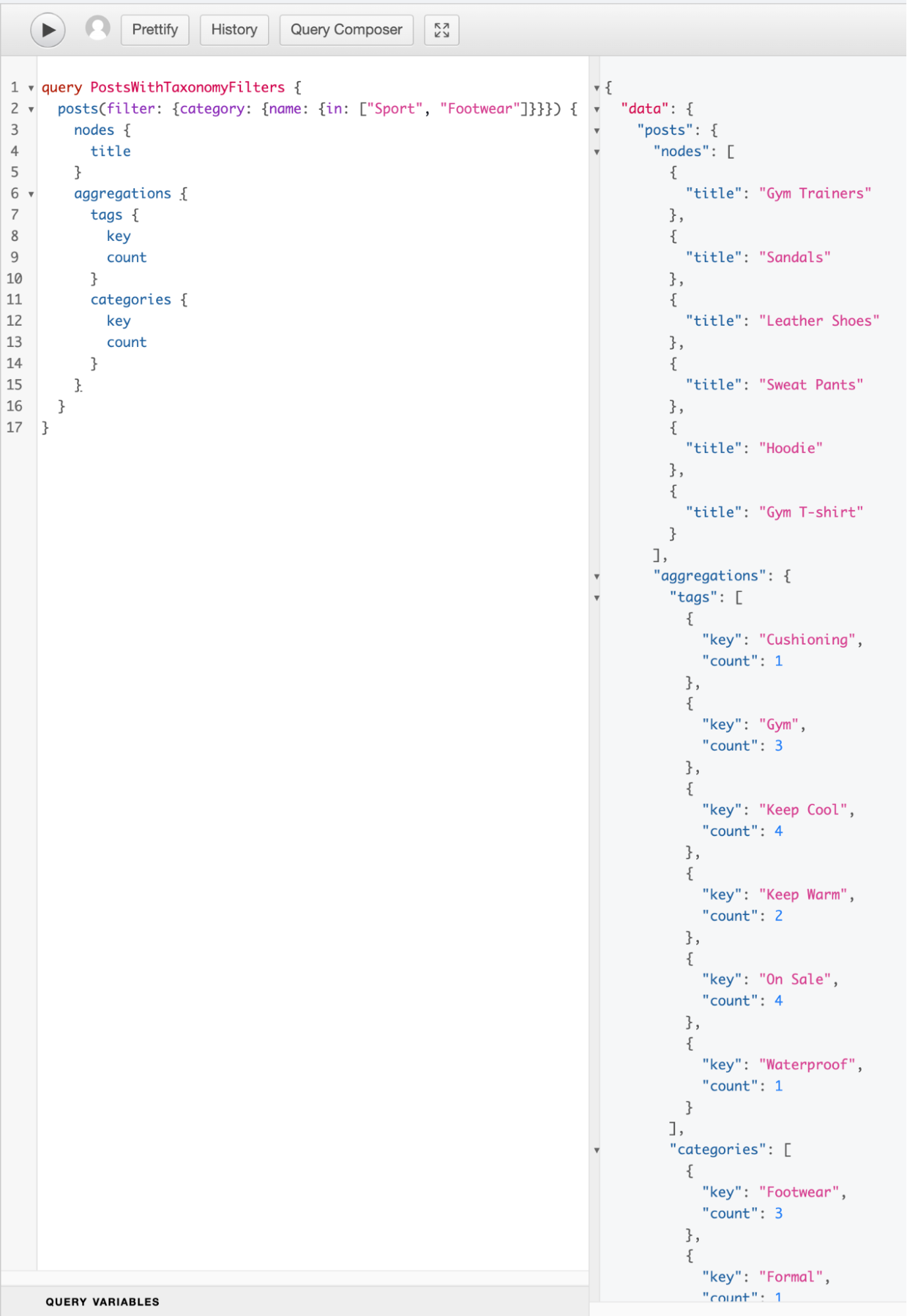
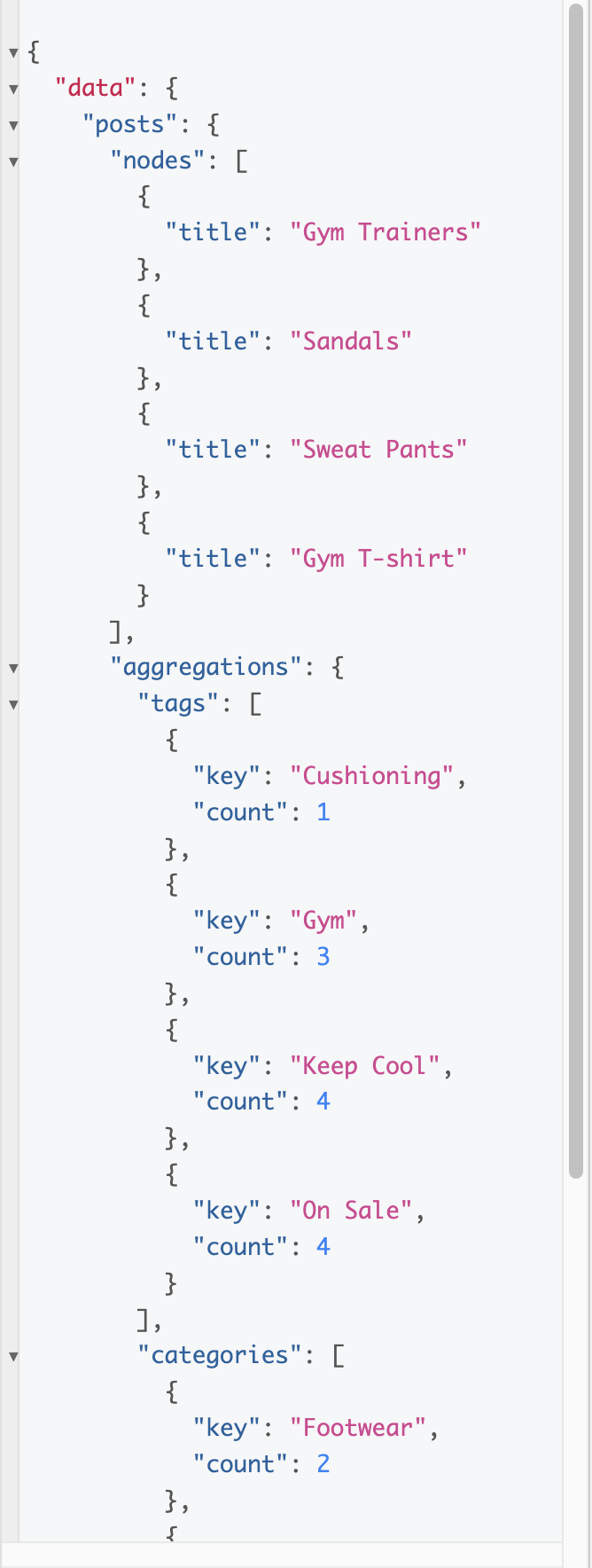
- Of the 6 Products returned in query #1, there were occurrences of all 6 Tags with a sum of 15 instances (again, the aggregate/ sum of Tags, by name & counts).
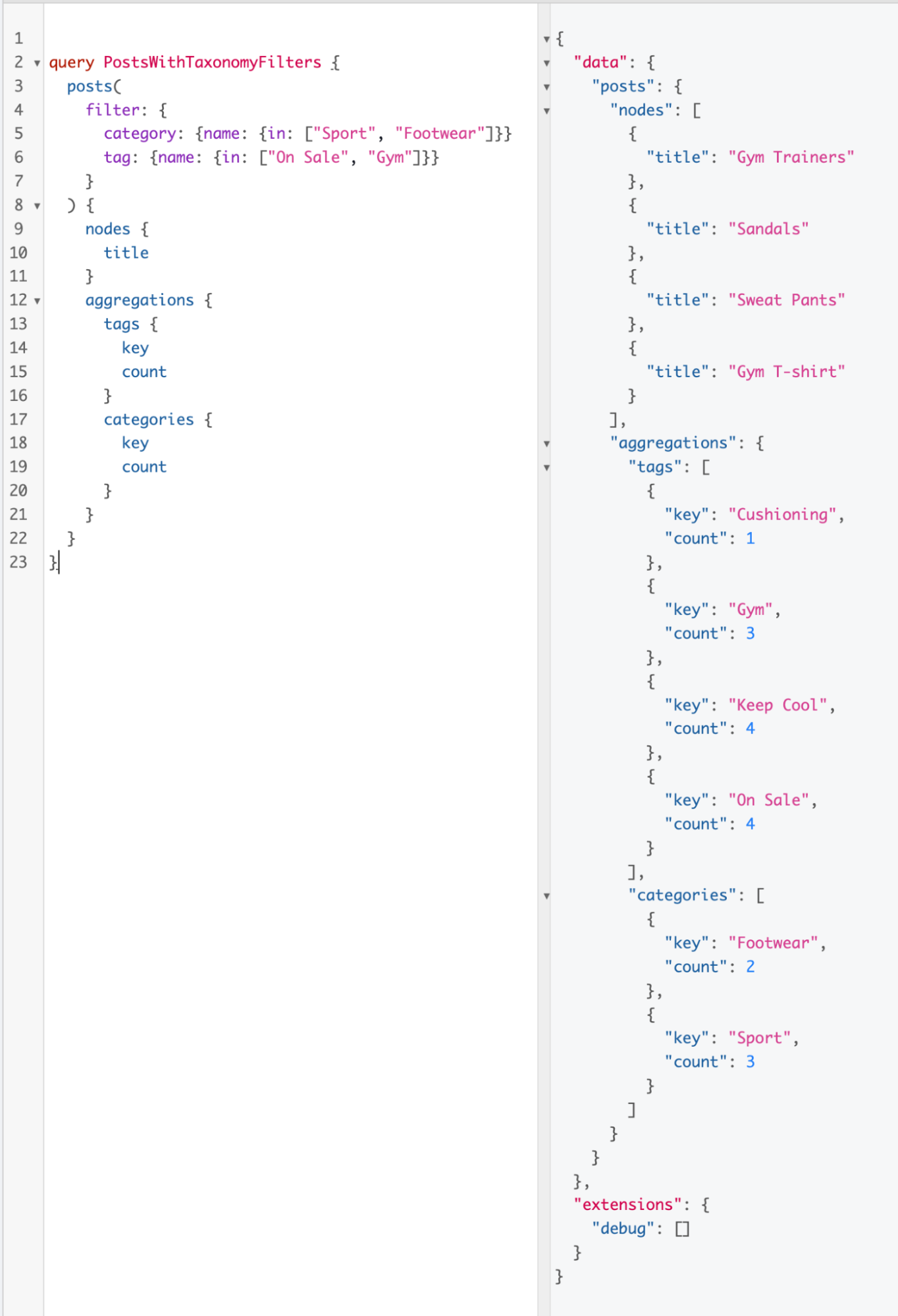
- By query #2, even though we specified 2 tags to filter by, the 4 Products returned contained a total of 4 associated Tags (each had both specified & unspecified Tags) and 12 instances.
This above example uses, by default, an and relationship between the specified Taxonomies, but this plugin supports both AND plus OR relationships within its filters - these are the relation operators. In this example a multiple-equality ‘in’ ‘comparison’ operator is used as the comparison for filtering, but this plugin supports all of the following comparison operators: eq, notEq, like, notLike, in, notIn.
Querying with Filters
Given the Simple Clothing Store website above, we can start seeing how one would go about benefiting from filter queries in query #1 and #2. To replicate the backend needed to supply such frontend functionality we must first create a WP instance with WPGraphQL & our WPGraphQL Filter Query plugins installed and activated. Then we need to clear any default data and add the 4 Categories, 6 Tags, and 12 Products (as Posts) from our earlier data, and establish the specified relationships between our Products, Tags and Categories. Once this is done one can begin querying the data via WPGraphQL’s inbuilt GraphiQL IDE (a familiarity with this is assumed).
The query #1 should look roughly like this, with Filter by Category:
query Query1 {
  posts(filter: { category: { name: { in: ["Sport", "Footwear"] } } }) {
    nodes {
      title
    }

    aggregations {
      tags {
        key
        count
      }

      categories {
        key
        count
      }
    }
  }
}
Query #2 builds on 1, with the addition of selected (UI-checked) Tags to Filter.
When we add Tags to the filter an implicit Relation Operator of and is applied between the Category and the Tag objects - if (Category-match && Tag-match) return Post(s).
query Query2 {
  posts(
    filter: {
      category: { name: { in: ["Sport", "Footwear"] } }
      tag: { name: { in: ["On Sale", "Gym"] } }
    }
  ) {
    nodes {
      title
    }

    aggregations {
      tags {
        key
        count
      }

      categories {
        key
        count
      }
    }
  }
}
Advanced Queries
Multiple Comparison Operators on one Taxonomy
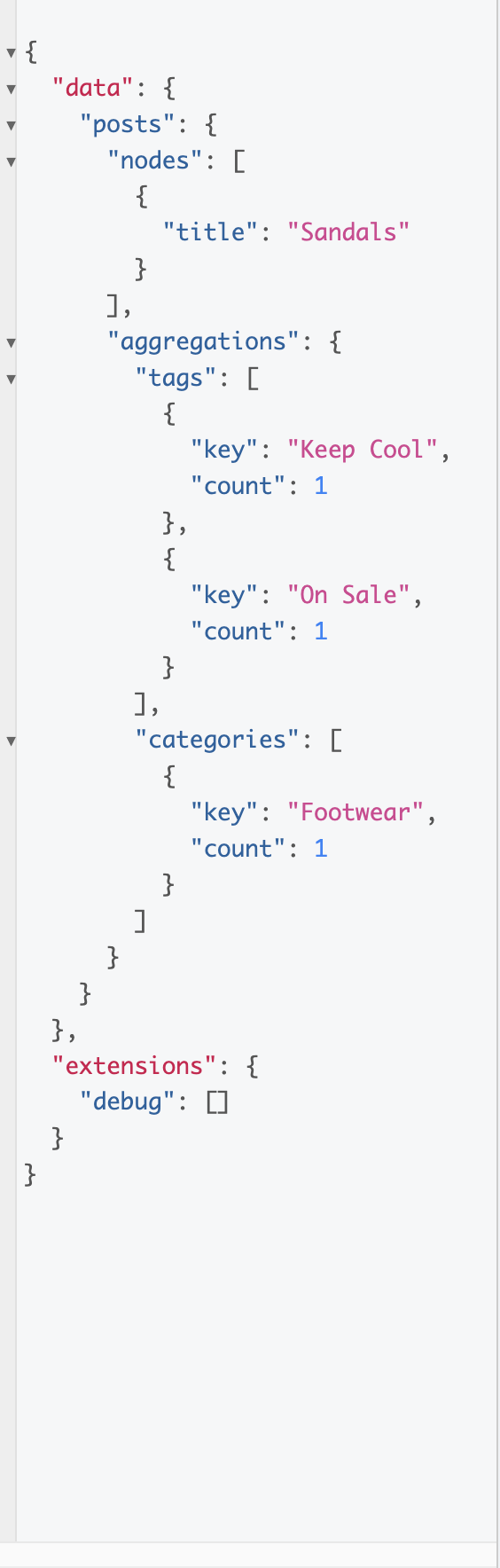
If the query #2 was taken a step further to perhaps exclude the Gym Tag, we could see only Sandals would make a return as On Sale. This is the lowest level of chaining operators, and the relation operator for these will always be and. We also see a new Comparison Operator, coupled with the previous one: notEq:
query ProductsByFilterNotEqGym {
  posts(
    filter: {
      category: { name: { in: ["Sport", "Footwear"] } }
      tag: { name: { in: ["On Sale", "Gym"], notEq: "Gym" } }
    }
  ) {
    nodes {
      title
    }

    aggregations {
      tags {
        key
        count
      }

      categories {
        key
        count
      }
    }
  }
}
Multiple Relation Operators on Multiple Taxonomies
This plugin supports 4 root filter query arguments presently:
- 2 Taxonomies: ‘Tag’ & ‘Category’ (Covered already)
- 2 Relation Operators:
or&and- These cannot appear as siblings, so use one or neither, per nested object
- These accept an array of root filter query objects (so, each object of array itself can have Taxonomies, or/and Relation Operators, recursively)
- Nested filter query objects can be nested up to 10 times presently
Given query #2 as a starting point, we could separate the two Tags to be searched into their own filter query object, inside an or Relation Operator and get the same result (Also switched the Comparison Operator here to eq, vs in as there was only one Tag comparison made in each object now):
query ProductsByFilterOROperator {
  posts(
    filter: {
      category: { name: { in: ["Sport", "Footwear"] } }
      or: [
        { tag: { name: { eq: "On Sale" } } }
        { tag: { name: { eq: "Gym" } } }
      ]
    }
  ) {
    nodes {
      title
    }

    aggregations {
      tags {
        key
        count
      }

      categories {
        key
        count
      }
    }
  }
}
Nesting Relation Operators on Multiple Taxonomies
If we simply swap the Relation Operator to and now on this previous query our results now must contain both Tag Comparison Operator matches, rather than either or. This eliminates Sandals, which only had the On Sale Tag, but not the Gym one.
query ProductsByFilterANDOperator {
  posts(
    filter: {
      category: { name: { in: ["Sport", "Footwear"] } }
      and: [
        { tag: { name: { eq: "On Sale" } } }
        { tag: { name: { eq: "Gym" } } }
      ]
    }
  ) {
    nodes {
      title
    }

    aggregations {
      tags {
        key
        count
      }

      categories {
        key
        count
      }
    }
  }
}
Readable Filter Queries
Using the relation operators are powerful, and were made to be siblings of Taxonomies, but, for greatest clarity do not reply on the implicit and relation of siblings at filter query level. As mentioned, nesting of queries is available via relation operators, up to a depth of 10, but this may be somewhat unreadable, like nested callbacks.
Dependencies
In order to use WPGraphQL Filter Query, you must have WPGraphQL installed and activated.
Install and Activate
WPGraphQL Filter Query is not currently available on the WordPress.org repository, so you must download it from Github.
Learn more about installing WordPress plugins from a Zip file.
Contributing
Requirements
- Docker
Getting Started
To get started with the dev environment run
make
Testing
make test
Linting
make lint
VSCode
Install the following plugins to gain formatting and lint errors showing up in the editor

Questions
What is wp-graphql-filter-query?
wpengine/wp-graphql-filter-query is a public repo on GitHub by wpengine. Adds taxonomy filtering and aggregation support to WP GraphQL.
Is wp-graphql-filter-query open source?
It declares the GPL-2.0 license on GitHub.
Does wp-graphql-filter-query run on macOS, Windows or Linux?
Its maker has not tagged a system, so it is unknown here. Its README says what it needs.
How do I install wp-graphql-filter-query?
Open "Take it" on its page: Take My Repo writes an install plan for your machine and hands it to your AI agent (Claude Code, Codex or Cursor), which asks you before each step. Take My Repo has not tested it on any machine.
Is wp-graphql-filter-query still maintained?
No. It is archived on GitHub: its maker no longer maintains it.
What do people who ran wp-graphql-filter-query say?
Nobody has reviewed it on Take My Repo yet, which says nothing about its quality.