
CQ-Unix-Toolkit
CQ Unix Toolkit
- 47
- 6 y ago
Repo wttech/CQ-Unix-Toolkit, read from GitHub 1 min ago. wttech has not joined Take My Repo.
In short
wttech/CQ-Unix-Toolkit is a public repo on GitHub by wttech. CQ Unix Toolkit. It declares no license on GitHub. Public does not mean open source: without a license, nobody is granted the right to reuse it. It is written mainly in Shell, has 47 stars and last changed on 2021-01-25. Nobody has reviewed it on Take My Repo yet, which says nothing about its quality. Read from GitHub on 2026-11-24.
CQ-Unix-Toolkit

Table of contents
- Introduction
- Which for what? (quick description for each tool)
- Supported shell environments
- Notes on Cygwin compatibility
- CQ Compatibilty
- Installation
- Building an RPM package
- Contributors
Introduction
CQ Unix Toolkit is a set of POSIX shell tools that calls curl and other 3rd party commands to perform some different tasks on Adobe CQ platform such as:
- Create, build, rewrite, upload, list, download, install and deletion of CRX zip packages
- Maintenance tasks: consistency checks, TarPM compaction and index merge, DataStore garbage collection
- Clear/invalidate dispatcher cache for subtree specified by
/statfilelevel - Active workflow instances list
- Display OSGI bundles list and start/stop specified bundles
Each action is wrapped in separate stand-alone script with additional usage output that allows to perform these tasks easily.
The toolkit aims at use only the basic built-in commands for typical UNIX/POSIX compliant system to avoid installing any 3rd party custom dependencies which is often not possible or prohibited whilst still providing nearly all functionalities for different operating systems and different shell flavours like csh/ksh/bash/dash etc.
Basically almost every tool requires authorized connection to CQ instance which is performed by toolkit using three basic options:
- -u (username)
- -p (password)
- -i (URL to instance) i.e. https://localhost:5510
Please note that there is a way to avoid the need to enter -u/-p/-i options each time by executing the following command in the current shell environment:
$ eval $(cqapi -L -u username -p password -i URL)
Please also note that the password is saved in plain text as environmental variable so every process can steal that information so such mode should be used only in development environment or in restricted shell process
The following example should be self descriptive:
$ eval $(cqapi -L -u admin -p admin -i http://localhost:4502)
After you execute this command in your current shell in all cqXXX commands you don't need to specify anything.
Which for what?
Below there is a list of separate tools and short purpose phrase for each one:
cqpkg-- Creates empty zip package on local filesystem using provided specification (name, group, version, paths, filters) which is valid and minimal CRX FileVault package. CQ connection not required.cqrepkg-- Read or rewrite package definition and/or content i.e. name, group etc and JCR filterscqbld-- Builds remotely uploaded CQ package using connection parameterscqcp-- Makes a copy of remote CQ package to your local environmentcqget-- Makes a copy of CQ resource to your local environmentcqrun-- Install uploaded CQ package on remote instancecqrev-- Revert previously installed CQ package on remote instance (if still exists)cqdel-- Remove completely remotely available CQ packagecqput-- Upload package from your local environmentcqls-- List packages uploaded/installed in remote CQcqchk-- Checks remote CQ instance repository if it's consistentcqgc-- Deletes effectively removed content from instance to reclaim free spacecqmrg-- Merge CQ TarPM indexescqtpm-- Deletes effectively removed content from TarPM CQ storagecqwfl-- Display active (or broken) workflow instancescqjcr-- Browse and modify JCR tree on nodes and properties levelcqosgi-- Display bundles list and manage them by starting/stopping on demandcqcfgls-- List configured or available (but non configured) OSGI configurationscqcfg-- Return details or modify specified OSGI configuration remotlycqcfgdel-- Delete specified OSGI configurationcqclr-- Simulates activation on dispatcher to clear its cache. Use dispatcher URL, (not CQ one) as instance URL (-i option).cqsnp-- Download and/or delete package installation backup/snapshot that is used for uninstalling packages.
Each script can be executed without parameters from your terminal i.e.:
    $ ./cqbld
    Usage: cqbld [OPTION...] package-name
    Build (rebuild) already uploaded package by group id and name in CQ Package
    Manager using instance URL.

    Examples:
      cqbld -u admin pack            # Build package named pack
      cqbld -u admin -g GRP pack     # Build package named pack in group GRP
      cqbld -i http://localhost:5510 # Build package for localhost instance on tcp
            -g com.group stuff       # port 5510 named stuff in group:com.group
            -p secret                # with password provided: secret

    Options:

      -u                    use specified usernamed for connection
      -p                    use provided password for authentication
      -i                    use specified instance URL to connect
      -g                    locate package by additional group ID
so you can find out how to operate and specify required arguments. We are working to be able to help users point correct syntax or provide suggestions in case of incorrect command line is passed.
Supported shell environments
Currently CQ Unix Toolkit supports only some subset of all shell environments,
however that list will be improved in the next releases.
For each command default shell indicated by /bin/sh symbolic link in your system
is used. In case of problems you can prefix command with shell name to use
non-default shell i.e. (bash ./cqbld instead of ./cqbld).
- bash (tested and fully supported)
- dash (tested and fully supported)
- bash on cygwin (see remarks for Cygwin in the next section below)
- bash on Mac OS X (with sed/echo BSD versions)
- csh (tested and fully supported on FreeBSD)
- mksh (MirBSD Korn Shell)
- ksh (should work like on mksh however it's not directly tested!)
Please note that zsh is currently not supported at all! You can get weird
errors when using this shell implementation.
Notes on Windows/Cygwin compatibility
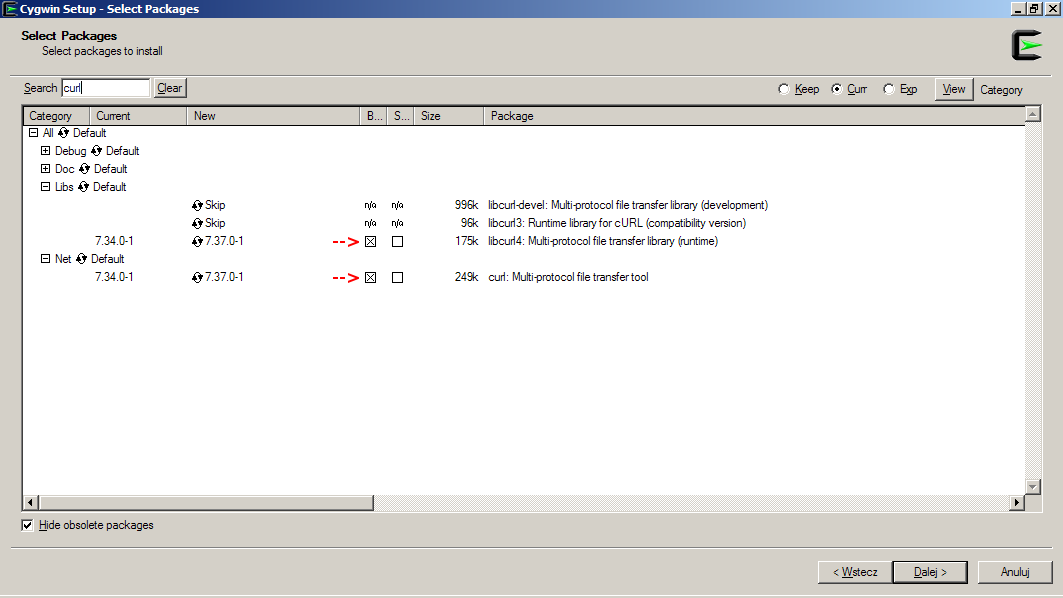
In order to use toolkit on cygwin make sure you have marked/installed the following cygwin packages:
util-linux(required for all tools)curl(required for almost all tools)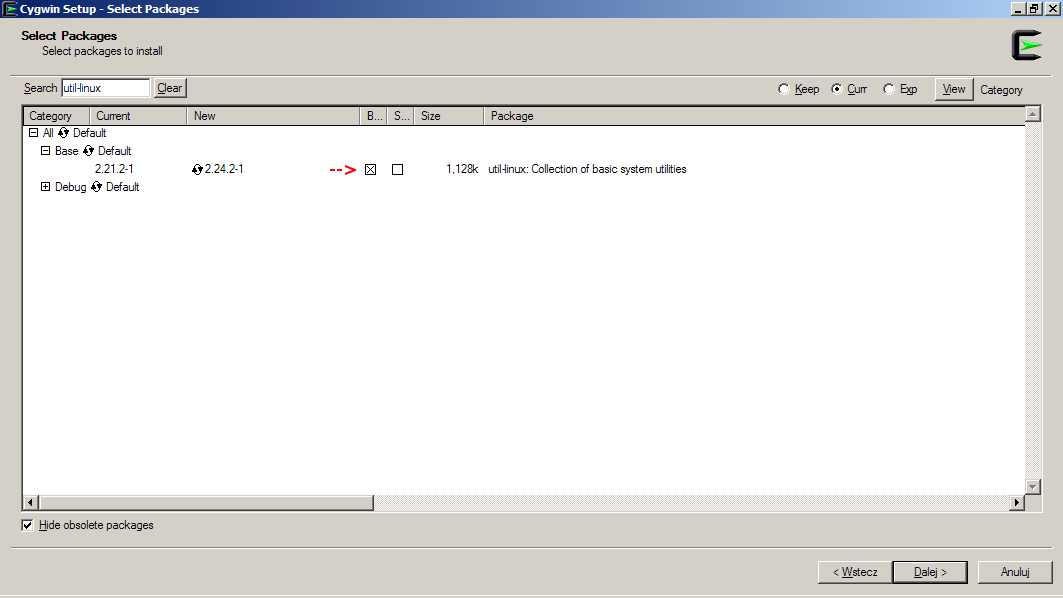
unzip,zip(required for cqrepkg, cqpkg tools)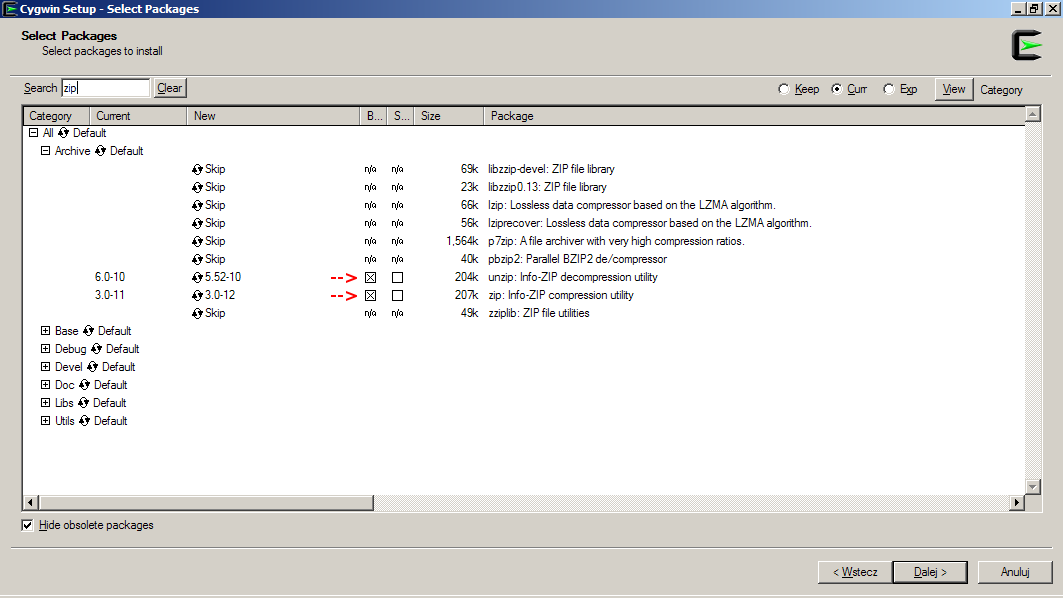


If you have any problems, please see cygwin installation screencast.
To test commands just type in command line the following expressions and compare results:
    $ zip -v | head -1
    Copyright (c) 1990-2008 Info-ZIP - Type 'zip "-L"' for software license.

    $ curl --version 2>&1 | head -1
    curl 7.34.0 (i686-pc-cygwin) libcurl/7.34.0 OpenSSL/1.0.1f zlib/1.2.8 libidn/1.26 libssh2/1.4.2

    $ column --version
    column from the package util-linux 2.21.2
Please rememeber that files should have \n endings only. Using git clone they
can be changed automatically to \r\n so please use one of the following
solutions:
-
Prior cloning repository change
git configoption tocore.autocrlf = false$ git config --global core.autocrlf input $ git clone https://github.com/wttech/CQ-Unix-Toolkit.git -
Prefix each call with
bash -o igncr(temporary solution)
An example of invalid file line endings:
    $ ./cqapi
    ./cqapi: line 16: syntax error `$'\r''
    '/cqapi: line 16: `_usage()
A quick method to fix invalid file line endings problem:
    $ bash -o igncr ./cqapi
    Usage: cqapi [OPTION...]
    ...
To fix this permanently in your code copy just enter in proper directory name:
$ dos2unix cq*
CQ Compatibilty
- Compatible with CRX 2.2 or higher (but not AEM 6.0 and higher yet)
- cqbld
- cqcp
- cqget
- cqrun
- cqdel
- cqput
- cqls
- cqpkg
- Compatible with CQ 5.5 or higher (but not AEM 6.0 and higher yet)
- cqchk
- cqgc
- cqmrg
- cqtpm
- Compatible with CQ 5.4 or higher (but not AEM 6.0 and higher yet)
- cqwfl
- cqosgi
- cqclr
Using CQ Unix Toolkit with AEM 6.0 is not recommended.
Installation
Above scripts don't require special installation. If you want these CQ Unix
Toolkit to be visible system-wide you can invoke install script provided in
repository that creates symbolic link in /usr/local/bin directory or you can
change INSTALL_DIR variable in script if you want to something else.
Building an RPM package
Before building place v1.1.0.tar.gz file in SOURCES rpmbuild directory.
The correct URL from which file can be obtained is defined in spec file in
Source: field.
Contributors
I want to thank every person involved in development of this tools. Personally I want to thank:
- Arkadiusz Kita (the original author of CQ Unix Toolkit)
- Krzysztof Kamil Konopko (Quality Assurance - exploratory tests, usability tests and improvements (against CQ5.5 & CQ5.6)
- Bartek Szafko (project management)
- Michał Leszczyński (infrastructure and development tools)
- Artur Kłopotek (cygwin hints)
- Robert Kapała (QA/improvements)
- Tomek Rękawek (fixes and tests for Mac OS X default shell)
Jakub Wadolowski [at] wundermanthompson.com
Questions
What is CQ-Unix-Toolkit?
wttech/CQ-Unix-Toolkit is a public repo on GitHub by wttech. CQ Unix Toolkit.
Is CQ-Unix-Toolkit open source?
It declares no license on GitHub. Public does not mean open source: without a license, nobody is granted the right to reuse it.
Does CQ-Unix-Toolkit run on macOS, Windows or Linux?
Its maker tagged it for macOS, Windows and Linux, or as Docker or cross-platform. That is declared by the maker; Take My Repo has not tested it.